A few hardware questionsPost Date: 2011-11-17 |
Post Reply 
|
| Author | |
LaneHayes 
Newbie 

Joined: 17 Oct 2011 Online Status: Offline Posts: 90 |
 Quote Reply Quote Reply
 Topic: A few hardware questions Topic: A few hardware questionsPosted: 17 Nov 2011 at 5:35pm |
|
I've ordered my brand new Intel 320 SSD, 120gb ($169 on amazon w/ free shipping, lowest I've seen so far). This seems the go-to place for simple issues and advice, so here it goes.
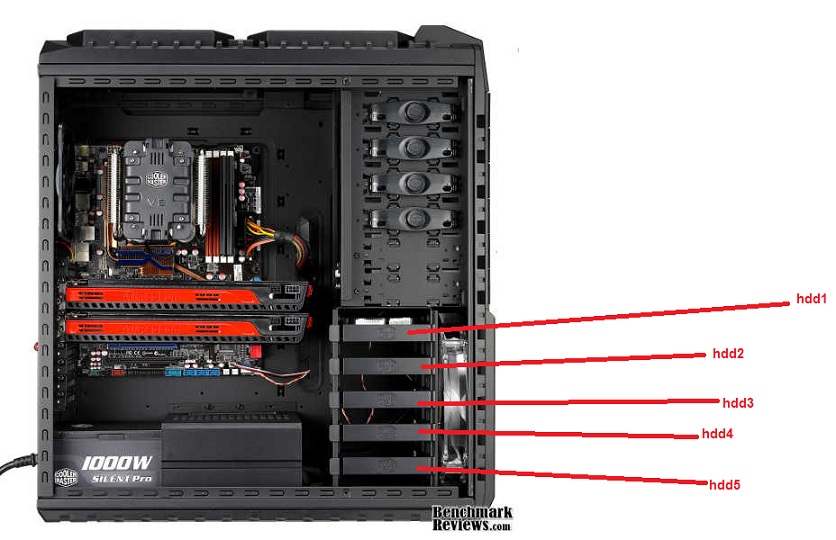
I have 3 hardware questions total, 2 about the install one about a sleep issue. Sleep Issue: 1. My monitor won't wake up from Windows 7 Professional (64 bit) sleep. The computer, fans/led lights and everything seem to, but it seems as though the video card doesn't wake up or something. I end up having to turn the computer off by holding the power button down and turning it back on (boo). So for now, I have it set to a no sleep setting. Has anyone experienced this problem? Currently 1x GTX 570. SSD Install: 2. I see my case (942 HAF) has 'hot swap bays' at the front. Seeing as how this will be where my OS is installed, is there another place I should install the physical drive? I'm not exactly sure where the 1TB harddrive is to be honest, I think behind the front intake fan at the bottom of the case. Is this where it should go? TL,DR: Where do I put the drive? 3. The process of cloning. I saw DST4ME had some videos and information on this on a different thread, could I get that? I can't seem to find it for a second time. |
|
 |
|
|
DST4ME
DS ELITE 
Joined: 14 Apr 2008 Online Status: Offline Posts: 36758 |
Quote Reply
Posted: 18 Nov 2011 at 1:04am |
|
1. I know windows has a sleep issue with the pc, not sure about the monitor but sleep has always been buggy.
2. 
3. you can follow my clone guide here |
|
|
|
|
sneaky George W
Groupie 
Joined: 13 Jun 2011 Online Status: Offline Posts: 196 |
Quote Reply
Posted: 18 Nov 2011 at 11:47am |
|
Hey LaneHayes,
1) my computer cant recover from a sleep/hibernate ether. my solution is just not to use the sleep/hibernate. with an SSD it takes almost no time at all to boot anyway so its no loss. 2) the hard drive can go in any of the bays DST highlighted. or in your hot swap bays. for performance you should put it in one of the bays dst showed, it doesnt matter which one. |
|
|
|
|
LaneHayes
Newbie
Joined: 17 Oct 2011 Online Status: Offline Posts: 90 |
Quote Reply
Posted: 18 Nov 2011 at 8:55pm |
|
Excellent replies. I was about to ask if it mattered which one I put it in. Good stuff, I will do the cloning as soon as it gets in!
That sucks about the sleep mode though, but I guess nothings perfect. Hopefully a patch will fix the issue eventually
|
|
|
|
|
jmaster299
Newbie
Joined: 27 Aug 2011 Online Status: Offline Posts: 0 |
Quote Reply
Posted: 18 Nov 2011 at 10:22pm |
|
If you want to keep the SSD out of the way of the intake airflow in the front you can install it in to one of those hotswap bays as I doubt u are using all 5 of them or optical drive or other front panel hardware. SSD do not get that hot so they do not need direct airflow like that. The lower hotswap bays have special mounting holes specifically for mounting SSDs.
It will help the air from the front intake hit the the GPUs with out obstruction giving you good air from the side and the front. |
|
|
|
|
LaneHayes
Newbie
Joined: 17 Oct 2011 Online Status: Offline Posts: 90 |
Quote Reply
Posted: 22 Nov 2011 at 12:04am |
|
Yea i was wondering about that, makes sense jmaster299.
I guess i'll just fork over the money for the cloning software. Everything in the cloning guide makes sense except for one thing. After its over, how do I boot the PC? Do I really have to unplug the first harddrive then reattach it after boot and format it or something, or can I choose where to boot from somehow and do it that way? Finally, WoW is a large game with low graphics requirements but large space eater. After this process, can I just stick it on the HDD and run it from there?
|
|
|
|
|
LaneHayes
Newbie
Joined: 17 Oct 2011 Online Status: Offline Posts: 90 |
Quote Reply
Posted: 22 Nov 2011 at 12:06am |
|
Also I can't just do Easy Migrate 7.0? It's 10 dollars cheaper but I don't know if its a true 'clone' instead of an 'image.'
|
|
|
|
|
DST4ME
DS ELITE
Joined: 14 Apr 2008 Online Status: Offline Posts: 36758 |
Quote Reply
Posted: 22 Nov 2011 at 12:24am |
|
The front fan and whether you have hdds in front of it or not will not really matter, the side fan is the one mainly blowing air over the gpus, with that fan there all other modifications to the hdd setup and etc might make a 1c difference in temps at best.
are you talking about my clone guide? if yes then: once clone is completely done, shutdown pc, and swap the ssd with the hdd inside the case, then boot to desktop to make sure the clone went correct and ssd is working all correct and etc. once you are on desktop and looked around and all seems to be good, turn off pc again, attach the hdd as hdd2 now, go to bios, make sure ssd is the first boot drive, then boot to windows and format the hdd, or you can boot back to acronis and use it to format the hdd. my method is a true clone, not an image, I don't use imaging or recommend it. games/os and apps need to be on the ssd cause they benefit from it. Edited by DST4ME - 22 Nov 2011 at 12:25am |
|
|
|
|
LaneHayes
Newbie
Joined: 17 Oct 2011 Online Status: Offline Posts: 90 |
Quote Reply
Posted: 22 Nov 2011 at 11:41am |
|
Cool, that makes perfect sense. I'll just pony up the money for the software then.
I understand they benefit from it, but theres no material wait time in anything with WoW even with just my normal HDD (literally max settings, no stuttering, super short load times) So if I'm happy with the performance now, will i lose performance from putting it on the HDD with no OS on it?
|
|
|
|
|
DST4ME
DS ELITE
Joined: 14 Apr 2008 Online Status: Offline Posts: 36758 |
Quote Reply
Posted: 23 Nov 2011 at 3:26am |
|
It should not make a difference which hdd its on.
|
|
|
|
|
jmaster299
Newbie
Joined: 27 Aug 2011 Online Status: Offline Posts: 0 |
Quote Reply
Posted: 23 Nov 2011 at 12:38pm |
|
Actually it does if they are HDD and not SSD. Windows almost constantly accesses the drive it is installed on, if you have other programs running like WoW they have to compete with Windows and everything for accessing information on the drive.If you have a SSD you don't need to worry about this as it's hella fast and can handle it but for a normal HDD having your games on a drive separate from your OS will help with your load times.
I know this from personal experience. When I put my second HDD in to my old rig I saw my load times for things like TF2 plummet and I am consistently the first or second person to load every single time, something that I never had when STEAM was on the same HDD as my OS. And yes the drives were the same make/model/speed, everything. |
|


|
|
|
|
|
DST4ME
DS ELITE
Joined: 14 Apr 2008 Online Status: Offline Posts: 36758 |
Quote Reply
Posted: 23 Nov 2011 at 5:54pm |
|
Not sure about a different rig thats not the same however on the same rig we have had users put the game on the os drive and non os drive and they saw no difference.
Tho I have seen this around many forums saying that windows constantly access a drive, but that is not true, windows does not constantly access a drive, if that was teh case things like GC for ssds would never have a chance to work. |
|
|
|
|
LaneHayes
Newbie
Joined: 17 Oct 2011 Online Status: Offline Posts: 90 |
Quote Reply
Posted: 24 Nov 2011 at 8:07pm |
|
Just FYI, the cloning/data migration stuff seems to be provided for free by intel. It's powered by Acronis too...
Found that 6 minutes after I spent the money haha
|
|
|
|
|
DST4ME
DS ELITE
Joined: 14 Apr 2008 Online Status: Offline Posts: 36758 |
Quote Reply
Posted: 24 Nov 2011 at 11:39pm |
|
That software only allows you to clone to ssd, when you need to make a back up in a few days, the intel one won't let you do it, you should clone at least once a week to have a full back in case anything goes wrong.
|
|
|
|
|
LaneHayes
Newbie
Joined: 17 Oct 2011 Online Status: Offline Posts: 90 |
Quote Reply
Posted: 25 Nov 2011 at 1:51am |
|
You're right. Looks like its a good purchase then!
Thanks for everything, its installed and works great!!!
|
|
|
|
|
DST4ME
DS ELITE
Joined: 14 Apr 2008 Online Status: Offline Posts: 36758 |
Quote Reply
Posted: 25 Nov 2011 at 2:03am |
|
LOL trust me, I'm here to save everybody money, software, hardware, if I know a way of doing it free/cheaper and have the same performance/results I would tell you guys to do it that way.
Glad you got it worked out 
now use it for backing up from now on, you never know when the drive is gonna crap out on you, if it does, no need to reinstall everything, just make sure pc is clean before you clone, an infected clone is not good. Edited by DST4ME - 25 Nov 2011 at 2:04am |
|
|
|
|
Post Reply
|
| Forum Jump | Forum Permissions You cannot post new topics in this forum You cannot reply to topics in this forum You cannot delete your posts in this forum You cannot edit your posts in this forum You cannot create polls in this forum You cannot vote in polls in this forum |

About Digital Storm
Contact Information
Facility Tour
Financing
Buy Now, Pay Later
Downloads
GSA Schedule
Terms & Conditions
Privacy Policy
Request Help
Call: 1-866-817-8676
(Hours 9AM-5PM PST)





 Topic Options