A rather daft question on USB portsPost Date: 2013-07-26 |
Post Reply 
|
| Author | |
oval99 
Newbie 

Joined: 26 Jul 2013 Online Status: Offline Posts: 2 |
 Quote Reply Quote Reply
 Topic: A rather daft question on USB ports Topic: A rather daft question on USB portsPosted: 26 Jul 2013 at 10:22pm |
|
So I'm about to pull the trigger on the configuration below after weeks of tweaking. But I forgot to ask one thing...how many USB ports does this setup come with? I honestly don't know what "mid board" means when speaking about the USB connections on the motherboard. I would assume it means that these connections are internal and are not "plug and play" friendly.
In a nutshell, I'd like to have 4-6 USB ports (with at least two USB 3.0 ports) that I can plug my USB peripherals into (keyboard, flash drive, external hard-drive, mouse, wi-fi adaptor). Will my current set-up allow for this? If it helps, my ticket is 854386. Thanks in advance!  -------------------- Chassis Model: Special Deal Hot Seller - Black OPS Enix Edition Exterior Finish: - Standard Factory Finish Trim Accents: - Standard Factory Finish Processor: Intel Core i5 3570K 3.40 GHz (Unlocked CPU) (Quad Core) Motherboard: ASUS P8Z77-M PRO (Intel Z77 Chipset) (Precise Digital Power Design) System Memory: 16GB DDR3 1866MHz Corsair Dominator Platinum DHX (Extreme-Performance) Power Supply: 750W Corsair CX Expansion Bay: - No Thanks Hard Drive Set 1: Operating System: 1x (480GB Solid State (By: Corsair) (Model: Neutron GTX Series) (SATA 6Gbps) Set 1 Raid Options: - No Thanks Hard Drive Set 2: Multimedia\Data: 1x (1TB Western Digital Caviar (7200 RPM) (Model: Black Edition) Hard Drive Set 3: Backup\Misc.: - No Thanks Optical Drive 1: DVD-R/RW/CD-R/RW (DVD Writer 8x / CD-Writer 8x) (Slim Slot Loading Edition) Optical Drive 2: - No Thanks Internet Access: High Speed Network Port (Supports High-Speed Cable / DSL / Network Connections) Video Card(s): 1x NVIDIA GeForce GTX 650 Ti BOOST 2GB (Includes PhysX) Add-on Card: - No Thanks Sound Card: Integrated Motherboard Audio Extreme Cooling: AIR: Stage 1: Cooler Master Hyper 212 EVO (High Performance Cooler) |
|
 |
|
|
fstcvc
DS Veteran 
Joined: 06 Jul 2013 Online Status: Offline Posts: 2551 |
Quote Reply
Posted: 26 Jul 2013 at 10:41pm |
|
Mid-board refers to connectors on the board to connect to additional USB's on the front panel of your system or sometimes to an additional plate that installs in the back. The motherboard you've selected has 4 USB3 & 2 USB2 on the back panel (already on the motherboard) with the capability of hooking up 2 USB3 & 6 USB2 to the front/rear panel.
Here's a modified pic I made from ASUS' website: 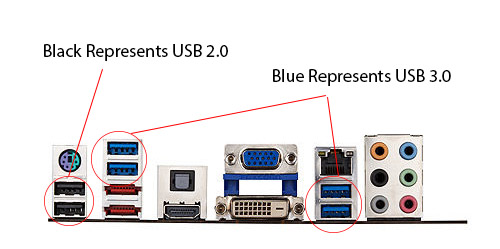
Hopes this helps! 
|
|
|
HailStorm II
i7 4770K @ 4.5GHz Asus Maximus VI Extreme 16GB Corsair Dominator Platinum 3xSLI EVGA SuperClocked GTX TITAN Samsung 840Pro SSD 256GB+512GB HydroLux+XSPC CPU/MoBo/GPU Liquid Cooling |
|
|
|
|
bprat22
DS ELITE 
DigitalStorm East -- (Unofficially!)
Joined: 08 Jun 2011 Online Status: Offline Posts: 20391 |
Quote Reply
Posted: 27 Jul 2013 at 6:35am |
|
Just to add, the Enix's FT03 case has 2x USB 3 on the front i/o panel and the USB's fstcvc pictured above, in stock form before adding if needed.
That's a nice build. Don't forget the free t-shirt. Good Luck.
Edited by bprat22 - 27 Jul 2013 at 6:38am |
|
|
|
|
oval99
Newbie
Joined: 26 Jul 2013 Online Status: Offline Posts: 2 |
Quote Reply
Posted: 27 Jul 2013 at 1:36pm |
|
Thanks everyone for the speedy and knowledgeable responses!
So if I have it straight: -The motherboard has 4 USB 3.0 ports and 2 USB 2.0 ports that are ready to be used. That is, I can plug in any of my USB peripherals into the motherboard's ports (on the top of the computer case) when I take the computer out of the box and be good to go. Also, the Enix case has 2 USB 3.0 ports on the front i/o panel, bringing the total available USB ports in my config to 8. **One other question: USB 3.0 is backwards compatible with USB 2.0 right? I ask because right now I don't have any USB 3.0 peripherals, but will most likely get some in the future as the format is more widely adopted. I need to be able to use some of those 3.0 ports for my USB 2.0 peripherals. Thanks again! |
|
|
|
|
bprat22
DS ELITE
DigitalStorm East -- (Unofficially!)
Joined: 08 Jun 2011 Online Status: Offline Posts: 20391 |
Quote Reply
Posted: 27 Jul 2013 at 1:39pm |
|
Yes... USB 3.0 is backward compatible so you should be good to go.
|
|
|
|
|
Post Reply
|
| Forum Jump | Forum Permissions You cannot post new topics in this forum You cannot reply to topics in this forum You cannot delete your posts in this forum You cannot edit your posts in this forum You cannot create polls in this forum You cannot vote in polls in this forum |

About Digital Storm
Contact Information
Facility Tour
Financing
Buy Now, Pay Later
Downloads
GSA Schedule
Terms & Conditions
Privacy Policy
Request Help
Call: 1-866-817-8676
(Hours 9AM-5PM PST)





 Topic Options