Advice?Post Date: 2012-03-06 |
Post Reply 
|
| Author | |
Frederico 
Newbie 
Joined: 06 Mar 2012 Online Status: Offline Posts: 4 |
 Quote Reply Quote Reply
 Topic: Advice? Topic: Advice?Posted: 06 Mar 2012 at 4:44am |
|
Budget:
[$8000] well I'm sorry if you do some confusion in written English and know little more google translator does not help ^ ^ well I'm moving to the United States going to live there for about 9 to 15 years going to college and I'd buy a computer in Brazil for more I will be very expensive to buy in the united states there that it is these settings: 1x CPU: Intel Sandy Bridge-E Core I7 3960X 3.30GHz Six-Core (Watercooled) 1x Placa Mãe: Asus (Sandy-Bridge-E) | Sabertooth X79 8x Memória Ram: Corsair 4GB DDR3 1600MHz Corsair Vengeance 1x Hard Disk: Seagate HDD 3TB SATA3 7200RPM. 1x SSD: Kingston SSD 64GB Sata3 V200 Series SSD Now 1x graphics card: Nvidia GeForce GTX 590 3GB GDDR5 768-bit 1x Drive Óptico: Pionner Blu-Ray burn. 1x Fonte De Alimentação: Corsair 1050W | HX1050 1x Gabinete: Thermaltake Gabinete TT Chaser MK-I Black 1x Acessório: LG Monitor LG IPS236V Monitor LED LCD 23" 1x Software: Microsoft Windows 7 Professional 64 Bit well I want a computer for heavy gaming as much battlefield 3 and other games and also to work in my area that is rendering 3D videos and photo editing effects including audio and can be up to $ 8,000 maximum $ 9,000 otimo want a computer with optimal cooling biggest possible ram memory and a processor q great to think it's the i7 and I hear he has caused more problems you help me I want a computer that will last a long time and it is possible to have an update when new boards come by and gtx 590 if the best with the maximum possible GB of memory and waiting that someone can help me to buy soon I'm going in April to the United States should get 25 days. and I said what I think I understood much more than computers do not understand anymore because I stopped now I shake the hand of you expecting something else helps me a chassis that I'm wanting is the mountain mods this one: 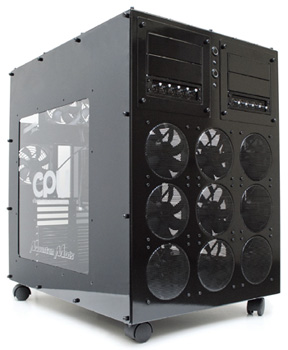
I'm wait thanks for help. |
|
 |
|
|
Alex
Admin Group 
Digital Storm Supervisor 
Joined: 04 Jun 2012 Online Status: Offline Posts: 16314 |
Quote Reply
Posted: 06 Mar 2012 at 10:16am |
|
@Frederico,
First off, thank you for your interest in Digital Storm, we can definitely help you build one awesome system. With such a large budget, I'm sure a lot of people will have some suggestions on how you can make an EPIC system. I personally would recommend waiting 3-4 weeks as there are few technology updates that are going to happen that will provide you with an even more faster system. We should also have our Aventum chassis ready to order as well soon, so you might want to wait for that as well.
|
|

|
|
|
|
|
FrankW
DS Veteran 
Joined: 22 Feb 2010 Online Status: Offline Posts: 2254 |
Quote Reply
Posted: 06 Mar 2012 at 10:49am |
|
Hi Frederico, welcome to America and to the DS Forum.
We can fix you up with a great system but first a couple of questions. Frank For what you want to do we can build a powerful system with full Liquid Cooling using the Hailstorm case. 1. Are you dead set on the Mountain Mods case? 2. Some of your other choices are not the best picks and I would suggest a slightly different configuration. Is that OK with you? 3. The monitor you have chosen has a resolution of 1920 x 1080. Do you think you will want to move up to a 27 or 30 inch monitor in the future. The larger monitor has a higher resolution and that requires different equipment. Edited by FrankW - 06 Mar 2012 at 10:50am |
|
|
|
|
Frederico
Newbie
Joined: 06 Mar 2012 Online Status: Offline Posts: 4 |
Quote Reply
Posted: 06 Mar 2012 at 11:28am |
|
@alex hello is required in April and I almost reached in May will have a lot ^ ^ right here in Brazil is not so lol That is why everyone buys something and then regret because something new comes out that only comes after one year in Brazil, I wait more ja want to see some recommendations for a super powerful machine ^ ^.
@FrankW Hello I do not want to put the monitor to a high resolution that there was already included in the package then came to the budget and I want a high resolution monitor for my future work in the area to be related to web design, audio and video and not be sure and also I move in 3dsmax and maya's office moutain mods thought it was good because of the amount of coolers that have nine coolers in your hand and let the other hand the opnion of each lot podereso a system the way you find better remember so the computer will be used for both desktop and for gaming and heavy. thanks. Edited by Frederico - 06 Mar 2012 at 11:28am |
|
|
|
|
FrankW
DS Veteran
Joined: 22 Feb 2010 Online Status: Offline Posts: 2254 |
Quote Reply
Posted: 06 Mar 2012 at 2:15pm |
|
Hi Frederico,
Here is a system I put together for you. 1. I moved you up to the Rampage Mobo. It has some features that you might want to use. If you think you want wireless you can drop back to the Deluxe Mobo. It has wireless included 2. I gave you 32Gb of ram because I thought that was what you wanted. The Digital Storm 1600Mhz memory is all you need. No need to pay for name brand or faster speed. 3. You have picked a very good power supply in the Corsair 1050w. It is all you need with this setup but I included the Corsair 1200w. Should you upgrade in the future to a bigger monitor you will need three GPUs. You can't do that with the 1050. If you are sure you won't get a big monitor then the Corsair 1050 is OK. 4. You had a very small SSD. I put in a 180Gb Intel 520. It is a new design and very fast. 64Gb is not big enough and you would have to be moving games in and out of the SSD as you needed them. 5. If you want a 3Tb hard drive you will have to special order it from DS. It is not listed so I couldn't add it in. I would rather have the 1Tb Western Digital and then a second HDD for backup and storage. With a 3Tb drive you loose a lot of data if it fails. I would rather have multiple drives rather than one big one. You will have to pick what you prefer. 6. I included a Blue Ray player/writer. You can save a little money by getting a Blue Ray player that writes to DVD. If you don't write to Blue Ray you can get the cheaper drive. 7. I changed the GPU to Sli 580 3Gb drives. The 590 drive is a very poor choice. We don't recommend it here on the forum. It generates too much heat and if one side fails you have to replace the card. Two 580 3Gb cards in SLI are more reliable and more powerful than the 590. 8. I have provided stage 6 Liquid Cooling for the CPU and the two GPU cards. With this type of cooling you will have to learn some basic maintenance procedures. That will include topping off the reservoir and draining/refilling it periodically. If you have a GPU failure you will have to open the loop, remove and replace the GPU and close the LC loop again. This is not hard but not something everyone wants to do. You can send the computer back to DS for this type of repair. 9. I put in stage 2 OC. This will give you around a 4.6 CPU freq. The stage 6 cooling is very capable of handling this level of OC. Just request DS not to exceed a Vcore voltage of 1.4v and you will have a long life on your CPU. 10. I didn't put in any colored or led lighted fans. You will have to figure out if you want any of that. There is also internal lighting that gives a glow to the inside of the computer. 11. I included Win-7. If you might have any need for other foreign language you should get the extreme version. 12. I would also suggest you get a longer warranty. The 3 year warranty only gives you 1 year of parts replacement. Configuration: 662990 Cost: $6366 Chassis Model: Special Deal Hot Seller - Black OPS Syndicate Exterior Finish: - Standard Factory Finish Trim Accents: - Standard Factory Finish Processor: Intel Core i7 Extreme Edition 3960X 3.3GHz (Six-Core) (Extreme Performance) Motherboard: ASUS Rampage IV Extreme X79 (Intel X79 Chipset) (Features USB 3.0 and SATA 6Gb/s) System Memory: 32GB DDR3 1600Mhz Digital Storm Certified Performance Series (Highly Recommended) (Hand Tested) Power Supply: 1200W Corsair Pro Gold Series (CMPSU-1200AX) (Dual/Triple/Quad SLI Compatible) Expansion Bay: - No Thanks Hard Drive Set 1: Operating System: 1x (180GB Solid State (By: Intel) (Model: 520 Series) Set 1 Raid Options: - No Thanks Hard Drive Set 2: Multimedia\Data: 1x (1TB Western Digital Caviar (7200 RPM) (Model: Black Edition) Hard Drive Set 3: Backup\Misc.: 1x (2TB Western Digital (7200 RPM) (Model: Black Edition) (SATA 6Gbps) Optical Drive 1: Blu-Ray & DVD Writer/Reader (Burn + Play Blu-Ray & DVDs) (12x BD-R) (Lite-On iHBS112) Optical Drive 2: - No Thanks Internet Access: High Speed Network Port (Supports High-Speed Cable / DSL / Network Connections) Video Card: 2x SLI Dual (NVIDIA GeForce GTX 580 3GB (PhysX) (EVGA 03G-P3-1584-BR) Add-on Card: - No Thanks Sound Card: Integrated Motherboard Audio Extreme Cooling: H20: Stage 6: Sub-Zero LCS Dual Loop: CPU & Dual SLI/CrossFire Video Cards H20 Tube Color:- Not Applicable, I do not have a FrostChill or Sub-Zero LCS Cooling System Selected Chassis Airflow: Standard Factory Chassis Fans Internal Lighting: - No Thanks Enhancements: - No Thanks Chassis Mods: - No Thanks Noise Reduction: - No Thanks LaserMark: - No Thanks Boost Processor: Stage 2: Overclock CPU 4.5GHz to 4.8GHz (Requires Pro or Deluxe Series Motherboard) Boost Video Card: - No Thanks, Please do not overclock my video card(s) Boost Memory: - No Thanks, Please do not overclock my memory Boost OS: - No Thanks, Please do not tweak the services on the operating system Windows OS: Microsoft Windows 7 Professional (64-Bit Edition) Recovery Tools: Windows Recovery Toolkit (Bundled with Windows 7 CD) Virus Protection: - No Thanks Office: - No Thanks Game: - No Thanks Display: - No Thanks Surge Shield: - No Thanks Speakers: - No Thanks Keyboard: - No Thanks Mouse: - No Thanks External Storage: - No Thanks Exclusive T-Shirt: FREE: Digital Storm T-Shirt - Black (Large) Priority Build: - No Thanks, Ship Within 5-15 Business Days After Order Is Successfully Processed Warranty: Life-time Expert Customer Care with 3 Year Limited Warranty Edited by FrankW - 06 Mar 2012 at 2:29pm |
|
|
|
|
kenage
Newbie
Joined: 03 Mar 2012 Online Status: Offline Posts: 59 |
Quote Reply
Posted: 07 Mar 2012 at 8:15pm |
|
Normal recommendations would be bumping the i7 3960X to the 3930K, as the price increase doesn't typically justify the meager performance gains, but given your large budget, that's much more personal preference.
With your desire to run video editing and 3D modelling, I would almost suggest going tri-SLI anyway. The X79 chipset will let you run three cards in x8 x8 x8, and that's plenty of bandwidth on PCI-E 3.0. As suggested, you will need the Corsair 1200 power supply, and the water cooling would need to be selected for three video cards, instead of two. As above, the NVidia GTX 590 is a poor card for gaming, and shares many flaws with the AMD Radeon 6990 HD (the other dual-GPU card on the market right now), but for video editing, the extra compute power of the 590, I have read, is more beneficial. However, if you go as recommended, and get 3x SLI 580s, you get near the same performance as 2x 590s (perhaps better, I haven't looked at tri-SLI performance of the 580s), without the flaws inherent in them. Otherwise, real solid advice, and your budget gives you a lot of room for personal preference. |
|
|
— Kenage
MCTS, MCP, Security+, Network+ Never put off until tomorrow what you can avoid doing entirely. |
|
|
|
|
Frederico
Newbie
Joined: 06 Mar 2012 Online Status: Offline Posts: 4 |
Quote Reply
Posted: 12 Mar 2012 at 3:05pm |
|
@kenage thanks.
Others Suggestions? |
|
|
|
|
kenage
Newbie
Joined: 03 Mar 2012 Online Status: Offline Posts: 59 |
Quote Reply
Posted: 13 Mar 2012 at 12:49pm |
|
To reiterate what Alex hinted at...
Looking at a couple of speculative articles about the Kepler cards coming from nVidia, you might want to see what the price points for the 680s are going to be. Two 680s in SLI should easily beat out the performance of three 580s, if the rumors floating around have any truth to them. Mileage may vary for video editing, since that has different needs than gaming, but benchmarks should give a good indication. If you can wait a couple weeks, you may want to consider waiting that out, since the GTX 6xx series is supposed to be released in that time frame. I also am reminded of a DS Unlocked article ( http://www.digitalstormonline.com/unlocked/article.asp?ID=17 ) where it is mentioned putting four GTX 590s into one case, giving an unprecedented 8 GPU cores. The machine mentioned was for doing folding@home, but for video editing, getting 3 or 4 of the 590s together will see a lot of benefit. For gaming, not so much, but there's always tradeoffs. For your budget, too, you could almost build two different systems, make one for gaming and one for video editing. I don't know how appealing this is to you, but the option is there. For gaming you could make an i7 2600K (or wait for Ivy Bridge and go with the 3770K), with a couple of either 7970s or 680s, and be set for gaming performance for a long time, then make a system with the 3930K or 3960X, with several 590s in it. Just something to think about. |
|
|
— Kenage
MCTS, MCP, Security+, Network+ Never put off until tomorrow what you can avoid doing entirely. |
|
|
|
|
FrankW
DS Veteran
Joined: 22 Feb 2010 Online Status: Offline Posts: 2254 |
Quote Reply
Posted: 13 Mar 2012 at 12:57pm |
|
Hi Frederico,
I just want to make sure you don't think that in any application that a 590 GPU has more computing power than 2 580 3Gh. That is just not true. The 590 has two detuned 580s inside a single can. They have to deturn them because of the heat. Full blow 580s are going to out perform detuned 580s. |
|
|
|
|
FrankW
DS Veteran
Joined: 22 Feb 2010 Online Status: Offline Posts: 2254 |
Quote Reply
Posted: 13 Mar 2012 at 1:08pm |
|
Hi Frederico,
I just want to make sure you don't think that in any application a 590 GPU has more computing power than 2 580 3Gb. That is just not true. The 590 has two detuned 580s inside a single can operating in SLI. They have to detune them because of the heat created inside of the can. Full blow 580s in SLI are going to out perform detuned 580s in SLI. Lets compare two computers. One with a 590 and one with 2 580s. Just to start off the 580s in SLI will out perform the 590 in programs that take advantage of SLI. Then lets assume that one 580 fails in each computer. In one system you buy a single 580 which is way cheaper than a 590. In the other system you have to replace the 590 that includes one bad unit and one good unit. That doesn't make economic sense. The 590 is a bad choice under any circumstances. Frank Edited by FrankW - 13 Mar 2012 at 1:09pm |
|
|
|
|
kenage
Newbie
Joined: 03 Mar 2012 Online Status: Offline Posts: 59 |
Quote Reply
Posted: 13 Mar 2012 at 1:17pm |
|
Let me elaborate a little...
I'm not suggesting that one 590 is better than two 580s; I'm suggesting that, for a purely video-editing-oriented machine, putting 3 590s into one box gives more raw processing power than 3 580s. That's all my recommendation was meant for. I still think waiting a couple weeks for the 680s will be the best option, but if Frederico wants/needs it now, then there's not much more to consider. |
|
|
— Kenage
MCTS, MCP, Security+, Network+ Never put off until tomorrow what you can avoid doing entirely. |
|
|
|
|
Frederico
Newbie
Joined: 06 Mar 2012 Online Status: Offline Posts: 4 |
Quote Reply
Posted: 27 Mar 2012 at 10:26pm |
|
replace gtx 580 to gtx 680? is good?
recommend? Please create new sugesttion with gtx 680 even if it is good |
|
|
|
|
Post Reply
|
| Forum Jump | Forum Permissions You cannot post new topics in this forum You cannot reply to topics in this forum You cannot delete your posts in this forum You cannot edit your posts in this forum You cannot create polls in this forum You can vote in polls in this forum |

About Digital Storm
Contact Information
Facility Tour
Financing
Buy Now, Pay Later
Downloads
GSA Schedule
Terms & Conditions
Privacy Policy
Request Help
Call: 1-866-817-8676
(Hours 9AM-5PM PST)





 Topic Options