Almost ready to pull the trigger.Post Date: 2013-12-23 |
Post Reply 
|
| Author | |
Nightfreeze 
Newbie 
Joined: 19 Dec 2013 Online Status: Offline Posts: 12 |
 Quote Reply Quote Reply
 Topic: Almost ready to pull the trigger. Topic: Almost ready to pull the trigger.Posted: 23 Dec 2013 at 7:08am |
|
I was going to purchase my rig yesterday but I still wasn't satisfied with my build. My wife and I finally agreed on a 6,000$ budget but we both want the best bang for our buck and no upgrades that would give little performance per dollar. I was going to go liquid cooled GPU's until I realized that I would never actually overclock my graphic cards anyway. I still want my processor liquid cooled though so I can overclock the heck out of it. I am grateful for the advice you guys have given me so far but I have a few more questions before I pull the trigger.
1. What motherboard should I get? 2. Would going 6 cores benefit me at some point in the near future for gaming? (a year or two) 3. Any bottlenecks with this build? How satisfied would I be with this build with a 4k monitor? I'm sure it would work great with a 2560x1600 monitor but what about 4k? 4. Ram speed would make little difference in gaming from what I heard? 5. Will this computer make me breakfast in the morning? (My wife works in the morning and her cooking sucks anyway.) ...Don't tell her I said that by the way!  Oh, and below are the specs for quick viewing. Chassis Model: Special Deal Hot Seller - Cooler Master 942 HAF X Exterior Finish: - Standard Factory Finish Trim Accents: - Standard Factory Finish Processor: Intel Core i7 4820K 3.7GHz (Unlocked CPU for Extreme Overclocking) (Quad Core) Motherboard: ASUS Sabertooth X79 (Intel X79 Chipset) (Features USB 3.0 and SATA 6Gb/s) System Memory: 16GB DDR3 1600MHz Digital Storm Certified Performance Series (Highly Recommended) (Hand Tested) Power Supply: 1050W Corsair Pro Silver 1050HX (Dual/Triple/Quad SLI Compatible) Expansion Bay: - No Thanks Optical Drive: DVD-R/RW/CD-R/RW (DVD Writer 24x / CD-Writer 48x) Storage Set 1: 1x (256GB Solid State (By: Samsung) (Model: 840 Pro Series) Storage Set 2: 1x (1TB Western Digital Caviar (7200 RPM) (Model: Black Edition) Storage Set 3: - No Thanks RAID Config: - No Thanks RAID Card: - No Thanks Internet Access: High Speed Network Port (Supports High-Speed Cable / DSL / Network Connections) Graphics Card(s): 3x SLI Triple (NVIDIA GeForce GTX 780 3GB (EVGA Superclocked ACX Cooler Edition) Sound Card: Creative Sound Blaster Z HPC Processor: - No Thanks Extreme Cooling: H20: Stage 2: Corsair H110 280mm Radiator Liquid CPU Cooler (Extreme-Performance Edition) H20 Tube Color: - Not Applicable, I do not have a FrostChill or Sub-Zero LCS Cooling System Selected Chassis Fans: Upgrade Chassis With LED Performance Fans (Red) (Up to 6 Fans) Internal Lighting: - No Thanks Airflow Control: - No Thanks Chassis Mods: - No Thanks Noise Reduction: - No Thanks LaserMark: - No Thanks CPU Boost: Stage 2: Overclock CPU 4.5GHz to 4.8GHz (Requires Pro/Deluxe/Sabertooth Motherboard) Graphics Boost: - No Thanks, Please do not overclock my video card(s) Memory Boost: - No Thanks, Please do not overclock my memory OS Boost: - No Thanks, Please do not tweak the services on the operating system Windows OS: Microsoft Windows 8.1 (64-Bit Edition) Recovery Tools: Windows Recovery Toolkit (Bundled with Windows CD) Virus Protection: - No Thanks Office: - No Thanks Game: - No Thanks Display: - No Thanks Surge Shield: - No Thanks Speakers: - No Thanks Keyboard: - No Thanks Mouse: - No Thanks Portable Gaming: - No Thanks Exclusive T-Shirt: - No Thanks Priority Build: - No Thanks, Ship Within 10-15 Business Days After Order Is Successfully Processed Warranty: Life-time Expert Care with 3 Year Limited Warranty (3 Year Labor & 1 Year Part Replacement) |
|
|
If you talk to God then you are religious. If God talks to you, then you are psychotic.
|
|
 |
|
|
Counsel
Groupie 

Joined: 29 Sep 2013 Online Status: Offline Posts: 125 |
Quote Reply
Posted: 23 Dec 2013 at 7:50am |
I'll let some of the older hands handle questions 1 and 2, but here are my thoughts on 3 through 5: 3. Tom's Hardware did a recent test on this very question, and double reference 780s were pushing Tomb Raider at 64fps on Ultra settings: http://www.tomshardware.com/reviews/pq321q-4k-gaming,3620-10.html Tri-SLI overclocked 780s should produce solid results at 4K, though, as always, ultra-demanding games and/or games that are poorly optimized for SLI will be the exception. 4. RAM speed isn't particularly important for gaming unless you're on integrated graphics. Ananadtech did a test on this in September and had a hard time recommending anything over 1866 Mhz: http://www.anandtech.com/show/7364/memory-scaling-on-haswell/10 5. Three 780s WILL put out a great deal of heat, but unfortunately the HAF-X case will be dispersing it from multiple points, complicating any attempts at toasting or frying. For improved breakfast-making capabilities, I recommend upgrading your computer with a solid USB toaster: 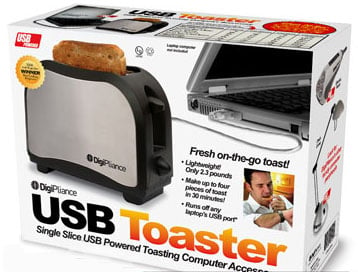
|
|
|
|
|
danjw1
Senior Member 
Joined: 07 Jul 2013 Online Status: Offline Posts: 667 |
Quote Reply
Posted: 23 Dec 2013 at 9:32am |
|
I would suggest taking a look at this review, it shows the current generation of graphics cards at a resolution that is close to what you are looking at, 2560x1440 you should expect about 90% of the frame rates shown: http://www.anandtech.com/show/7492/the-geforce-gtx-780-ti-review
Also, the Sabertooth X79 is only able to support two card SLI. The quad GPU SLI mentioned in the specs refers to dual GPU cards like the GTX 690. Right now, at least, pretty much every game is limited to using 4 Cores. Who knows if that will change in the near future or not. I think you would be better off with a Haswell based system (Z87) rather then Ivy Bridge-E that you have listed. The big thing about Ivy Bridge-E is the additional cores and 4 vs 2 memory channels. Most games won't be able to take advantage of that. This is what I would suggest in your budget: http://www.digitalstormonline.com/comploaddreadnought.asp?id=909006 or for liquid cooled: https://www.digitalstormonline.com/doneconfig.asp?id=909005 Edited by danjw1 - 23 Dec 2013 at 9:47am |
|
|
|
|
Nightfreeze
Newbie
Joined: 19 Dec 2013 Online Status: Offline Posts: 12 |
Quote Reply
Posted: 23 Dec 2013 at 10:35am |
16GB DDR3 1866MHz Corsair Dominator Platinum DHX (Extreme-Performance) ram? The DSO ram is much cheaper but has a higher MHz than the Platinum. Silly question but I am not knowledgeable about computer parts. Is it really worth throwing down an extra 100$ for the Platinum? Edited by Nightfreeze - 23 Dec 2013 at 10:37am |
|
|
If you talk to God then you are religious. If God talks to you, then you are psychotic.
|
|
|
|
|
bprat22
DS ELITE 
DigitalStorm East -- (Unofficially!)
Joined: 08 Jun 2011 Online Status: Offline Posts: 20391 |
Quote Reply
Posted: 23 Dec 2013 at 1:11pm |
|
The Platinum sticks are advertised as having better quality ic's, passing more strict testing, has light bar for ambience and better cooling. Not really needed by most but there for those that want the best and the lighting of course. If your into oc'ing the ram then they are more stable, with tighter specs. Plus, they do have a place to connect Corsair Link directly to the chip for monitoring.
|
|
|
|
|
Nightfreeze
Newbie
Joined: 19 Dec 2013 Online Status: Offline Posts: 12 |
Quote Reply
Posted: 23 Dec 2013 at 2:04pm |
P.S Thanks again for all your help so far, guys! You're awesome!  Edited by Nightfreeze - 23 Dec 2013 at 2:05pm |
|
|
If you talk to God then you are religious. If God talks to you, then you are psychotic.
|
|
|
|
|
bprat22
DS ELITE
DigitalStorm East -- (Unofficially!)
Joined: 08 Jun 2011 Online Status: Offline Posts: 20391 |
Quote Reply
Posted: 23 Dec 2013 at 2:17pm |
|
For your tri-sli needs and nothing extreme, my pick is the x79 Sabertooth. It meets your needs and does have a 5 year warranty as opposed to 3 years for most others. It just works with quality components and nothing you probably won't use.
|
|
|
|
|
fstcvc
DS Veteran 
Joined: 06 Jul 2013 Online Status: Offline Posts: 2551 |
Quote Reply
Posted: 23 Dec 2013 at 11:17pm |
|
The X79 cpu/chipset is designed for tasks requiring a bunch of CPU processing power - games rely mainly on GPU processing power and therefore the Z87 series the better buy. I doubt you'd even notice a difference while playing games if you had 2 identical builds (one use X79 and the other Z87). And as far as the OC'ing goes on the Haswell chips, 4.4 vs 4.5+ won't make much of a difference in games, either. They are super tough to clock over 4.4 no matter the cooling. Mine was originally clocked at 4.5 and worked fine for a few things but crashed like crazy doing a lot of other stuff. Changed it to 4.4 and have ZERO issues. Also, the 780ti GPU will eat the 780 for breakfast. If you're monitor will be 1600x2560, then dual SLI GPUs should suffice. If you plan on going 4k (plan on budgeting $3.5k for just the display!), then triple SLI would be highly recommend especially if you want to max out the graphics.
Config for 4k: 909241 $6007 Config for 2560: 909243 $4984 Edited by fstcvc - 23 Dec 2013 at 11:29pm |
|
|
HailStorm II
i7 4770K @ 4.5GHz Asus Maximus VI Extreme 16GB Corsair Dominator Platinum 3xSLI EVGA SuperClocked GTX TITAN Samsung 840Pro SSD 256GB+512GB HydroLux+XSPC CPU/MoBo/GPU Liquid Cooling |
|
|
|
|
Counsel
Groupie
Joined: 29 Sep 2013 Online Status: Offline Posts: 125 |
Quote Reply
Posted: 24 Dec 2013 at 7:42am |
Not for too much longer, hopefully. Dell has already announced new 24 and 28 inch UHD monitors for $1400 and "less than $1000" respectively. http://www.anandtech.com/show/7563/dell-24-uhd-up2414q-gets-a-price-28-uhd-4k-3840x2160-announced |
|
|
|
|
Post Reply
|
| Forum Jump | Forum Permissions You cannot post new topics in this forum You cannot reply to topics in this forum You cannot delete your posts in this forum You cannot edit your posts in this forum You cannot create polls in this forum You can vote in polls in this forum |

About Digital Storm
Contact Information
Facility Tour
Financing
Buy Now, Pay Later
Downloads
GSA Schedule
Terms & Conditions
Privacy Policy
Request Help
Call: 1-866-817-8676
(Hours 9AM-5PM PST)





 Topic Options