Another "Weekend Issue" topicPost Date: 2011-10-17 |
Post Reply 
|
| Author | |
darbebo 
Senior Member 

Joined: 18 Jun 2010 Online Status: Offline Posts: 515 |
 Quote Reply Quote Reply
 Topic: Another "Weekend Issue" topic Topic: Another "Weekend Issue" topicPosted: 17 Oct 2011 at 3:14am |
|
Hello,
So I've been using my DS rig a little bit over a yr. Roughly 1.5 months ago I installed a OCZ SSD in my DS rig and have experienced roughly 5 "hard freezes" where nothing moves and i have to press + hold the power button to force close. Not THAT bad but something to think about... Today I have starcraft running in the background, surfing alittle, then went down to cook. After I came back I was greeted with a black screen with some text saying something along the times of unable to book from CD, and asking me to insert boot disc and press enter. Pressing Enter obviously didn't help so after a little "tinkering" I press ESC to get into the boot menu and it "appears" that the first boot option is the CD drive and so I just selected the hard drive, then selected my SSD and it booted just fine. However if I don't press ESC and let it normal boot, the same black screen w/text happens. I don't know why it happened all of a sudden and I don't know how to change it back so I don't keep having to "manual" boot everytime. Anyone have any thoughts? Thanks! P.S. In order to get to that first black screen that MUST mean my computer restarted while i was cooking.....i wonder what could be the culprit in that... the rig I'm running: Case: Cooler Master CM Storm Sniper Processor: i7930 2.8 ghz (quad core) Motherboard: EVGA X58 LE Edition SLI (Intel X58 Chipset) (Supports SLI or CrossFire) 6 gb ram DDR 3 1600 MHZ Digigtal Storm certified 1000w Corsair Power supply (Dual/tri/quad SLI compatible) Vid card : 1x ATI Radeon HD 5870 1 GB (Back then I was going to get the 470, but i think everyone including DST4Me told me to get this card instead) Cooling: Stage 2: Noctua NH-D14 Extreme Performance Overclocked to between 3.3 to 3.90 500 gb western digital regular hard drive OCZ SSD Vertex 3 VTX3-25SAT3-120G 2.5" 120GB SATA III MLC blue ray + dvd player , nothing extraordinary. win 7 64 bit  Edited by darbebo - 17 Oct 2011 at 3:18am |
|
 |
|
|
DST4ME
DS ELITE 
Joined: 14 Apr 2008 Online Status: Offline Posts: 36758 |
Quote Reply
Posted: 17 Oct 2011 at 4:15am |
|
your first problem is the vertex, not a great choice of ssd.
esc takes you to temporary boot menu, aka you change options for that boot only, to change boot sequence for all boots you need to go to bios via del instead of esc, and then in teh boot menu of the bios, change the boot order, after that you are good to go. check your dump files to see if you have a dump file from when you were cooking, that can help us find what the culprit is. that 5870 gave you the same performance as the 470 but used lot less power and had lot less heat. Edited by DST4ME - 17 Oct 2011 at 4:18am |
|
|
|
|
darbebo
Senior Member
Joined: 18 Jun 2010 Online Status: Offline Posts: 515 |
Quote Reply
Posted: 17 Oct 2011 at 9:12am |
|
Hi! Thx for the reply.
When the computer first load, the 2 choices were ESC to boot menu and then DEL for something else (nothing about BIOS). But when i press DEL or something, it goes to the boot thing with the black screen, i can't get to the bios, it doesn't say "Press ______ to get to BIOS" what do you typically spam to get to bios? and how to check dump files. lol total noob |
|
|
|
|
DST4ME
DS ELITE
Joined: 14 Apr 2008 Online Status: Offline Posts: 36758 |
Quote Reply
Posted: 17 Oct 2011 at 7:36pm |
|
You should be able to get to the bios with delete.
check for dump files here: C:\Windows\Minidump if you have one from that time upload it here and lets have a look at it. |
|
|
|
|
darbebo
Senior Member
Joined: 18 Jun 2010 Online Status: Offline Posts: 515 |
Quote Reply
Posted: 17 Oct 2011 at 8:00pm |
|
I just searched in "windows" didn't find anything.
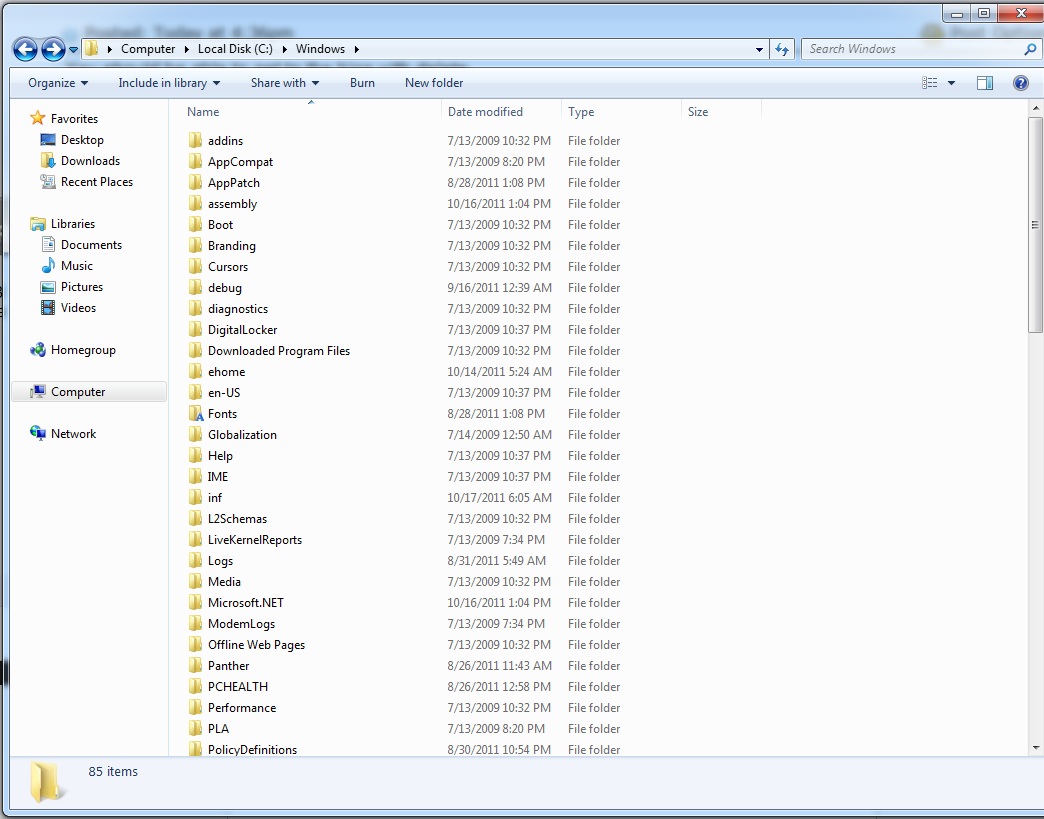
|
|
|
|
|
darbebo
Senior Member
Joined: 18 Jun 2010 Online Status: Offline Posts: 515 |
Quote Reply
Posted: 17 Oct 2011 at 8:06pm |
|
Are you supposed to do this first to get minidump?
what i found from randomly googling "Right click on My Computer and select Properties. Then select Advanced Tab on the left menu. Under the Startup and Recovery section, click on Settings. Make sure "Write an event to the system log" is checked and "Automatically Restart" is unchecked. In the drop down menu under "Write Debugging Information," select Small memory dump (256 KB)press ok and ok again. Then you must wait for anouther BSOD. After you reboot go to your new dump file located in C:/windows/minidump. and run the program I have located above. " |
|
|
|
|
DST4ME
DS ELITE
Joined: 14 Apr 2008 Online Status: Offline Posts: 36758 |
Quote Reply
Posted: 17 Oct 2011 at 8:16pm |

|
|
|
|
|
darbebo
Senior Member
Joined: 18 Jun 2010 Online Status: Offline Posts: 515 |
Quote Reply
Posted: 17 Oct 2011 at 8:20pm |
|
that's actually what i have.
So i followed the instruction i copied and pasted up there right and i saw exactly what you gave me as screenshot, but from what i understand the minidump folder will NOT appear unless the write debugging information is chosen as "small memory dump" and also someone says to NOT checkbox the "automatically restart". Can you comment on those DST4ME? thx! |
|
|
|
|
DST4ME
DS ELITE
Joined: 14 Apr 2008 Online Status: Offline Posts: 36758 |
Quote Reply
Posted: 18 Oct 2011 at 1:28am |
|
Well thats my setup and I have minidump.
auto restart is upto, I have my pc setup to have certain apps run and if its shuts down I need to restart and run those apps. check for a file called MEMORY.DMP in your windows folder also check C:\Windows\LiveKernelReports\WATCHDOG Edited by DST4ME - 18 Oct 2011 at 1:31am |
|
|
|
|
darbebo
Senior Member
Joined: 18 Jun 2010 Online Status: Offline Posts: 515 |
Quote Reply
Posted: 18 Oct 2011 at 2:18am |
|
no go for the DMP file, as for the other one, there is no watchdog folder within it.. o well...crosses fingers...
|
|
|
|
|
darbebo
Senior Member
Joined: 18 Jun 2010 Online Status: Offline Posts: 515 |
Quote Reply
Posted: 18 Oct 2011 at 2:20am |
|
but to be fair, the bios thing worked (at least for now) so we'll see
|
|
|
|
|
DST4ME
DS ELITE
Joined: 14 Apr 2008 Online Status: Offline Posts: 36758 |
Quote Reply
Posted: 18 Oct 2011 at 2:21am |
|
anything in LiveKernelReports folder?
if not then next time you have bsod you will have something. unless you disabled page file. |
|
|
|
|
Post Reply
|
| Forum Jump | Forum Permissions You cannot post new topics in this forum You cannot reply to topics in this forum You cannot delete your posts in this forum You cannot edit your posts in this forum You cannot create polls in this forum You can vote in polls in this forum |

About Digital Storm
Contact Information
Facility Tour
Financing
Buy Now, Pay Later
Downloads
GSA Schedule
Terms & Conditions
Privacy Policy
Request Help
Call: 1-866-817-8676
(Hours 9AM-5PM PST)





 Topic Options