Any comment regarding my order?Post Date: 2010-04-25 |
Post Reply 
|
Page 12> |
| Author | |||
geezerhood 
Newbie 
Joined: 12 Jul 2009 Online Status: Offline Posts: 53 |
 Quote Reply Quote Reply
 Topic: Any comment regarding my order? Topic: Any comment regarding my order?Posted: 25 Apr 2010 at 5:51am |
||
|
Hi, This is what I’m thinking of ordering. I will be using 3 monitors, 2 X EIZO S2411W (1920 by 1200) and 1 X EIZO S1932 (1280 by 1024). I will not be using SLI. I will be using the PC mostly for Dragon Naturally Speaking (very large documents), Adobe Photoshop CS5 (a lot of photo editing) and for fun some CAD drawing. Chassis Model: Digital Storm HailStorm (Black OPS Edition) Exterior Finish: Standard Factory Finish Trim Accent: Standard Factory Finish Processor: Intel Core i7 Edition 980X 3.33GHZ (Hexa-Core) Motherboard: ASUS Rampage III Extreme motherboard System Memory: CORSAIR CMG6GX3M3A2000C7 - DOMINATOR GT, 6GB (3x2GB), 2000MHz, 7-8-7-20, with Airflow fan and CMXTRFINKITRED - Dominator Extended Fins in Red (I already have them new myself) Power Supply: 1500W Silverstone Expansion Bay: Dual Solid State Drive Swap Bay (I think it comes with 800D) Hard Drive 1: 2 X 600GB Western Digital Velociraptor (One of them only for imaging/backup) Or 2 X Crucial RealSSD C300 CTFDDAC256MAG-1G1 2.5" 256GB SATA III MLC (One of them only for imaging/backup) Hard Drive 2: 2 X 300 GB Western Digital Velociraptor (I already have one new) Hard Drive 3: 1 X 2TB Western Digital (7200 RPM) (64MB Cache) (SATA) (Extreme Speed WD2001FASS 2TB) Optical Drive 1: Blue-Ray Writer/Reader Optical Drive 2: No Thanks Internet Access: High Speed Network Port Video Cards: 2 X EVGA GeForce GTX 480 Hydro Copper FTW (I will not run it in SLI). Add-on Card: BFG High-Performance Dedicated Ageia PhysX Card P1 (Don’t know if it will work with EVGA GeForce GTX 480) Sound Card: Creative PCI Express Sound Blaster X-Fi Titanium Fatal1ty Champion Series Sound Card Or ASUS Xonar Essence ST PCI Interface Audio Card Extreme Cooling: STAGE 6 (still thinking of the back radiator) H20: Tube Color: White Tubing Chassis Airflow: Upgrade Chassis with Zalman Performance Fans Internal Lighting: No Thanks Enhancement: No Thanks Chassis Mod’s: No Thanks Noise Reduction: Noise Suppression Package CPU Boost: Stage 3 Video Boost: No Thanks Memory Boost: Yes, Overclock memory frequency (I already have fan) OS Boost: No Thanks, Please do not tweak the service on the operating system Window OS: Microsoft Window 7 Ultimate (64-Bit Edition) Restore Kit: DVD Image Based Virus Protection: No Thanks Office Suite: No Thanks Benchmarking: No Thanks Game: No Thanks Accessories: No Thanks to all Warranty Plan: 5 year Platinum Care (As long as it’s valid oversea) Wooden Crate For hard drive, I don’t know how much boost I will get if I go Solid State since 600GB Western Digital Velociraptor is SATA 6 I think Solid State drives are way too temperamental for me. For STAGE 6 extreme cooling, I already have a post in Hardware discussion section. Please have a look and make any comment that you like. DST4ME I’m specially looking for your inputs and comments although I already know what you think about my noise reduction package choice. Thanks Geezerhood Edited by geezerhood - 25 Apr 2010 at 6:38am |
|||
 |
|||
|
Ambidex
Groupie 
Joined: 05 Nov 2009 Online Status: Offline Posts: 244 |
Quote Reply
Posted: 25 Apr 2010 at 2:07pm |
||
|
Hello
What do you mean about the back radiator? |
|||
|
EVGA X58 3x SLI Classified
Sapphire HD 5870 Corsair Dominator 1600MHz 6Gb Corsair HX 1000W Corsair Obsidian 800D LG LED w2486L 24" 2ms,1mill:1 Swiftech custom liquid cooling Corsair GT 120GB |
|||
|
|||
|
geezerhood
Newbie
Joined: 12 Jul 2009 Online Status: Offline Posts: 53 |
Quote Reply
Posted: 25 Apr 2010 at 2:09pm |
||
|
Hi,
It means to have the radiator outside attached to the back of 800D
|
|||
|
|||
|
Raif
Senior Member 
Joined: 07 Nov 2009 Online Status: Offline Posts: 712 |
Quote Reply
Posted: 25 Apr 2010 at 2:10pm |
||
|
the only reason why you would need 2x is since the 480 only has 2 ports. would you consider a 5870? you would only need one since it has 3 ports. i think a oc 920 or 930 will do just fine you don't need a 980 unless you want to thump your chest. in terms of "longevity" they are the same pretty much since they both use the same socket. only difference is the 980 has +2cores/ +4 threads. what i would do for hdd sets is this. 1. 160gb-256gb ssd 2. 1x 1 tb 3. 1tb thats only 3/5 hdd slots so if you want you can make the 1 tb 2x 1tb. you don't want largerr then that since anything more has a high failure rate. no need for the veloci with ssd... the ssd is so muich better but it costs money you don't need the physx card i believe. it should have it built in as well as cuda. ram boost is pointless and you should get the mushkin. it is garanteed for life and tested by the factory as well as DSO. it is the standard ram that ds offers. or if you want you can get the red line special ordered. |
|||
|
2.5 Ghz Core duo
Nvidia 9500 gt 3 gb 1033 Mhz ram if we can't answer a question shoot a e-mail here. [email protected] |
|||
|
|||
|
geezerhood
Newbie
Joined: 12 Jul 2009 Online Status: Offline Posts: 53 |
Quote Reply
Posted: 25 Apr 2010 at 2:24pm |
||
|
No I like NVIDIA Regarding 980 everything is relative 160 for C drive is small for me. DNS and Photoshop like to be on C drive I already have the CORSAIR DOMINATOR GT |
|||
|
|||
|
BHH.Husker
Newbie
Joined: 25 Dec 2009 Online Status: Offline Posts: 53 |
Quote Reply
Posted: 25 Apr 2010 at 2:37pm |
||
|
No expert on this, but upgrading the chassis fans with Zalman fans is going to be a waste. It won't make any difference in the airflow as far as I know. It will also make the system quite a bit louder. Get rid of the Noise Suppression Package as well I'd guess. It won't help very much as far as I know. If you're going with liquid cooling, the system should be very quiet anyway.
|
|||
|
|||
|
Ambidex
Groupie
Joined: 05 Nov 2009 Online Status: Offline Posts: 244 |
Quote Reply
Posted: 25 Apr 2010 at 2:41pm |
||
|
The radiator outside, are you thinking of a triple one?
|
|||
|
EVGA X58 3x SLI Classified
Sapphire HD 5870 Corsair Dominator 1600MHz 6Gb Corsair HX 1000W Corsair Obsidian 800D LG LED w2486L 24" 2ms,1mill:1 Swiftech custom liquid cooling Corsair GT 120GB |
|||
|
|||
|
VideCorSpoon
Newbie

Joined: 04 Apr 2010 Online Status: Offline Posts: 55 |
Quote Reply
Posted: 25 Apr 2010 at 4:18pm |
||
|
@ Ambidex

|
|||
|
|||
|
ablahblah
DS Veteran 
Joined: 12 Jun 2009 Online Status: Offline Posts: 2312 |
Quote Reply
Posted: 25 Apr 2010 at 7:33pm |
||
The Zalman fans are loud, don't get them. If you want, I'd say Cooler Master R4's would do the trick, low noise, high airflow, high pressure. Ageia's useless, Creative has a good rep for bad drivers, the Xonar Essence isn't what you think it is, it's not a 3.5mm jack sound card, rather, it's a phono jack sound card. Noise suppression's pointless, RAM Boost is pointless. Edited by ablahblah - 25 Apr 2010 at 7:36pm |
|||
|
R4D4RPR00F
Core i7 920 @ 3.9Ghz Asus Sabertooth X58 EVGA GTX 570 Mushkin 6GB 1414Mhz |
|||
|
|||
|
Raif
Senior Member
Joined: 07 Nov 2009 Online Status: Offline Posts: 712 |
Quote Reply
Posted: 26 Apr 2010 at 1:36am |
||
|
all your apps will be on the os set but all your data will be on the other sets so don't worry. the ssd will majorly increase the speed of your computer in load times, ect.
i agree ditch the zalman fan upgrade have 2x 480 will be loud already and with that upgraade it will be unbearable for a very minor temp drop. |
|||
|
2.5 Ghz Core duo
Nvidia 9500 gt 3 gb 1033 Mhz ram if we can't answer a question shoot a e-mail here. [email protected] |
|||
|
|||
|
DST4ME
DS ELITE 
Joined: 14 Apr 2008 Online Status: Offline Posts: 36758 |
Quote Reply
Posted: 26 Apr 2010 at 3:16am |
||
|
my rad is in the back, click on the image in my sig to see the bigger pic.
@geezerhood: 1. change mobo to classified. 2. go with 1250w enermax psu. 3. don't get the "Dual Solid State Drive Swap Bay", the 800d comes with 4 of them and they fit both 2.5" and 3.5". 4. with HDD1, when you say 2 x 600GB veloci (one for backup/imaging), there are a couple of problems there: a. imaging is not as reliable as cloning, you should be cloning. b. 2 x 600GB veloci, means the 2 drives are in raid, so you will not be able to use them separately, this goes for your HDD2 selection also. instead it should look like this: Here you go Ticket# 401917 --- Price: $7764 (To see this build click here) Price after current promotion $7264 Copy of Specifications: Chassis Model: Digital Storm HailStorm (Black OPS Edition) Exterior Finish: - Standard Factory Finish Trim Accents: - Standard Factory Finish Processor: Intel Core i7 Extreme Edition 980X 3.33GHz (Hexa-Core) (Extreme Performance) Motherboard: EVGA X58 Classified 3X SLI (Intel X58 Chipset) (Supports Triple SLI or CrossFire) System Memory: 6GB DDR3 2000MHz GTX-8 Digital Storm Certified Extreme Performance (Highly Recommended) (Hand Tested Power Supply: 1250W Enermax Galaxy EVO (Dual/Triple/Quad SLI Compatible) (Recommended) Expansion Bay: - No Thanks Hard Drive Set 1: Operating System: 1x (256GB Solid State (By: Corsair) (Model: CMFSSD-256GBG2D) Set 1 Raid Options: - No Thanks Hard Drive Set 2: Multimedia\Data: 1x (1TB Seagate/Hitachi/Western Digital (7200 RPM) (32MB Cache) (SATA) (Extreme Speed) Hard Drive Set 3: Backup\Misc.: 1x (1TB Seagate/Hitachi/Western Digital (7200 RPM) (32MB Cache) (SATA) (Extreme Speed) Optical Drive 1: Blu-Ray Writer/Reader (Burn Blu-Ray discs and play them) Optical Drive 2: - No Thanks Internet Access: High Speed Network Port (Supports High-Speed Cable / DSL / Network Connections) Video Card: 2x SLI Dual (NVIDIA EVGA GeForce GTX 480 1.5GB (Includes PhysX Technology) Add-on Card: - No Thanks Sound Card: Creative Labs X-Fi Titanium Fatal1ty Champion (Includes Front I/O) (PCI-Express Slot Based) Extreme Cooling: H20: Stage 6: Sub-Zero LCS Dual Loop: CPU & Dual SLI/CrossFire Video Cards H20 Tube Color:White Tubing with High-Performance Fluid (UV Lighting Reactive) Chassis Airflow: Standard Factory Chassis Fans Internal Lighting: Internal Chassis Lighting System (UV) (Creates Glowing Effect for H20 Tubes) Enhancements: - No Thanks Chassis Mods: - No Thanks Noise Reduction: - No Thanks Boost Processor: Stage 3: Overclock the processor between 4.2GHz to 4.4GHz (Requires i7 980X Processor) Boost Video Card: - No Thanks, Please do not overclock my video card(s) Boost Memory: Memory Fan Kit Only (Does not include memory overclocking service) Boost OS: - No Thanks, Please do not tweak the services on the operating system Windows OS: Microsoft Windows 7 Professional (64-Bit Edition) Restore Kit: Digital Storm Specialized Recovery System (DVD Image Based) Virus Protection: - No Thanks Office: - No Thanks Benchmarking: - No Thanks Install/Test Game: FREE: Please include a free copy of a hot-selling game Display: - No Thanks Surge Shield: - No Thanks Speakers: - No Thanks Keyboard: - No Thanks Mouse: - No Thanks External Storage: - No Thanks Exclusive T-Shirt: FREE: Digital Storm T-Shirt - Black (Medium) Priority Build: - No Thanks, Ship Within 5-15 Business Days After Order Is Successfully Processed Warranty: 3 Year Platinum Care Extended Parts & Labor Warranty use HDD3 for back of HDD1 and HDD2 |
|||
|
|||
|
geezerhood
Newbie
Joined: 12 Jul 2009 Online Status: Offline Posts: 53 |
Quote Reply
Posted: 26 Apr 2010 at 3:43am |
||
|
Thanks VideCorSpoon for the photo. Let's just say now I'm going to have the radiator on the back and change the Tube Color from white to red. Hi DST4ME 1. Yes I decided to have the rad on the back. 2. I prefer 1500W Silverstone for the 2 X EVGA GeForce GTX 480 Hydro Copper FTW 3. I want ASUS Rampage III Extreme motherboard because I like to have SATA6 and USB 3.0 4. The "Dual Solid State Drive Swap Bay" is to put my cloning back in safe box. I don't want to have an empty space in the front of 800D when I do that 5. My mistake I meant cloning. 6. I already have a brand new CORSAIR DOMINATOR GT, 6GB (3x2GB), 2000MHz, 7-8-7-20 I will ship it to Sara. I don't want to buy another memory kit. 7. I can't use SLI because I have 3 monitor 8. I already have a brand new 300 GB Western Digital Velociraptor 9. How reliable is 2TB Western Digital (7200 RPM) (64MB Cache) (SATA) (Extreme Speed WD2001FASS 2TB) ? 10. I prefer Crucial RealSSD C300 CTFDDAC256MAG-1G1 2.5" 256GB SATA III MLC It has SATA6 11. FREE: Digital Storm T-Shirt - Black (Medium) Too small I need (Large) :-) 12. For Priority Build (I didn't even see it) depends if I can get it in a normal way by first week of June 13. Will change the Warranty to 3 years Thanks |
|||
|
|||
|
geezerhood
Newbie
Joined: 12 Jul 2009 Online Status: Offline Posts: 53 |
Quote Reply
Posted: 26 Apr 2010 at 4:00am |
||
|
Hi, Ok with some changes. Chassis Model: Digital Storm HailStorm (Black OPS Edition) Exterior Finish: Standard Factory Finish Trim Accent: Standard Factory Finish Processor: Intel Core i7 Edition 980X 3.33GHZ (Hexa-Core) Motherboard: ASUS Rampage III Extreme motherboard System Memory: CORSAIR CMG6GX3M3A2000C7 - DOMINATOR GT, 6GB (3x2GB), 2000MHz, 7-8-7-20, with Airflow fan and CMXTRFINKITRED - Dominator Extended Fins in Red (I already have them new myself) Power Supply: 1500W Silverstone Expansion Bay: Dual Solid State Drive Swap Bay (For cloning / will put it in a safe place) Hard Drive 1: 2 X 600GB Western Digital Velociraptor (One of them only for imaging/backup) Or 2 X Crucial RealSSD C300 CTFDDAC256MAG-1G1 2.5" 256GB SATA III MLC (One of them only for imaging/backup) Hard Drive 2: 2 X 300 GB Western Digital Velociraptor (I already have one new) Hard Drive 3: 1 X 2TB Western Digital (7200 RPM) (64MB Cache) (SATA) (Extreme Speed WD2001FASS 2TB) ? Optical Drive 1: Blue-Ray Writer/Reader Optical Drive 2: No Thanks Internet Access: High Speed Network Port Video Cards: 2 X EVGA GeForce GTX 480 Hydro Copper FTW (I will not run it in SLI). Add-on Card: No Thanks Sound Card: Creative PCI Express Sound Blaster X-Fi Titanium Fatal1ty Champion Series Sound Card Extreme Cooling: STAGE 6 (With the radiator on the back) H20: Tube Color: Red Tubing Chassis Airflow: Standard Factory Chassis Fans Internal Lighting: Internal Chassis Lighting System (UV) (Creates Glowing Effect for H20 Tubes) Enhancement: No Thanks Chassis Mod’s: No Thanks Noise Reduction: Noise Suppression Package CPU Boost: Stage 3 Video Boost: No Thanks Memory Boost: Yes, Overclock memory frequency (I already have fan) OS Boost: No Thanks, Please do not tweak the service on the operating system Window OS: Microsoft Window 7 Ultimate (64-Bit Edition) Restore Kit: DVD Image Based Virus Protection: No Thanks Office Suite: No Thanks Benchmarking: No Thanks Game: No Thanks Benchmarking: - No Thanks Install/Test Game: FREE: Please include a free copy of a hot-selling game Display: - No Thanks Surge Shield: - No Thanks Speakers: - No Thanks Keyboard: - No Thanks Mouse: - No Thanks External Storage: - No Thanks Exclusive T-Shirt: FREE: Digital Storm T-Shirt - Black (Large) Priority Build: - Ship Within Four Business Days After Order Is Successfully Processed (If they can get it to me by first week of June then No Thanks) Warranty: 3 Year Platinum Care Extended Parts & Labor Warranty Accessories: No Thanks to all Wooden Crate Still cannot decide on SSD or 600GB Western Digital Velociraptor Thanks Geezerhood |
|||
|
|||
|
OutlawedPanther
Newbie
Joined: 04 Mar 2010 Online Status: Offline Posts: 38 |
Quote Reply
Posted: 26 Apr 2010 at 4:20am |
||
|
I vote for SSD

|
|||
|
|||
|
DST4ME
DS ELITE
Joined: 14 Apr 2008 Online Status: Offline Posts: 36758 |
Quote Reply
Posted: 26 Apr 2010 at 4:48am |
||
|
2. there is no point of having a 1500w for 2 x 480, 1000w can do it, 1250w will leave you head room, 1500w is pure waste.
also what is the point of getting hydro copper when you are getting stage 6 LC and it comes with WB for the GPUs, so you want to pay for 2 WB and just use one? also ftw editions tend to go bad sooner then the rest and the regular 480 will oc better then the ftw edition. 3. there is no mobo that has true sata 3.0 and usb 3.0 right now, to use the sata 3.0 on that board you will gimp the speed of the pci lanes. any mobo including the classified can do the same exact thing with a sata3.0/usb3.0 card, but its stupid since it gimps the pci lanes. 4. I don't think with the LC stage 6 and bluray drive and fron I/O you ware gonna have any open space for the swap bay. also if you clone, if the cloned drive has an os that was cloned then it can't be in the system when the source drive boots. 6. yes I got that but I just put that there to fill the space. 7. when did I say you should use sli? 8. ok 9. the fass seems to be a great drive, but its fairly new to the market so we don't have a long enough track record yet. 10. cotroller crucial uses is not the best/most reliable one, that is why we don't recommend it. also again refer to my comment about how the sata 3.0 will gimp the pci lanes, since there is no true sata 3.0. 11. my config was a base, you can change the size of shirt and that stuff by just clicking on the config I provided. 12. priority build is a bad idea, you can pay extra and still endup waiting if some of the parts are not in stock, all you have to do is order 3 weeks before june. 13. sorry I didn't see you pick the 5 year warranty that is a good idea, go with 5. hope that info helps. 14. again when you pick 2 x 600GB veloci, they are in raid, you can't use them separately, in other words you can't use one for backup, cause you can't separate them, since they will be in raid. Edited by DST4ME - 26 Apr 2010 at 4:57am |
|||
|
|||
|
geezerhood
Newbie
Joined: 12 Jul 2009 Online Status: Offline Posts: 53 |
Quote Reply
Posted: 26 Apr 2010 at 5:36am |
||
|
We can have the same argument regarding 980X. One can say it's pure waste. So let's move on. I think we have a misunderstanding regarding cloning. Perhaps I'm not explaining myself well. Let me try again. I'm going to hot-swap from the front. The C drive will be on the top try (one). I will use the second try for cloning. Once done I will remove it and put an empty try instead. So I'm not talking about raid. I still don't understand "there is no mobo that has true sata 3.0 and usb 3.0 right now, to use the sata 3.0 on that board you will gimp the speed of the pci lanes. any mobo including the classified can do the same exact thing with a sata3.0/usb3.0 card, but its stupid since it gimps the pci lanes." I'm going to keep this PC for minimum 4 years. You wrote "Video Card: 2x SLI Dual (NVIDIA EVGA GeForce GTX 480 1.5GB (Includes PhysX Technology)" I assumed wrongly that you mean SLI ! This is interesting "also ftw editions tend to go bad sooner then the rest and the regular 480 will oc better then the ftw edition" Didn't know that. Thanks The SSD crucial I'm talking about is getting very good reviews in newegg. Still can't decide between SSD and 600GB Western Digital Velociraptor. Basically it's between speed and reliability. geezerhood |
|||
|
|||
|
Dragoonseal
DS Veteran
Joined: 03 Apr 2009 Online Status: Offline Posts: 2247 |
Quote Reply
Posted: 26 Apr 2010 at 5:49am |
||
I find this amusing considering how much you're prepared to spend on this computer in other areas, especially since you want the 6Gbps SATA motherboard so badly. With a larger cashe size and and higher platter density than the first generation of Velociraptors, and being a 10k RPM drive, the 600GB WD Velociraptor is as far as I know the fastest HDD currently available. However, the sad fact is that they are barely quicker than a standard 1TB 7.2k RPM drive, while also being much louder, hotter, and consuming more wattage. They are, like every HDD, many magnitudes slower than SSDs. Average seek time: WD Caviar Black 1TB (7200 RPMs) - 4.2 ms WD Velociraptor 600GB (10k RPMs) - 3.6 ms Crucial RealSSD 256GB - .1 ms 4KB Random read speeds: WD Caviar Black 1TB - 0.4 MB/s WD Velociraptor 600GB - 0.68 MB/s Crucial RealSSD 256GB - 83.3 MB/s (on 6Gbps SATA) 4KB Random write speeds: WD Caviar Black 1TB - 1.3 MB/s WD Velociraptor 600GB - 1.9 MB/s Crucial RealSSD 256GB - 180.5 MB/s (on 6Gbps SATA) 2MB Sequential read speeds: WD Caviar Black 1TB - 132.4 MB/s WD Velociraptor 600GB - 145.3 MB/s Crucial RealSSD 256GB - 343.2 MB/s (on 6Gbps SATA) 2MB Sequential write speeds: WD Caviar Black 1TB - 132.3 MB/s WD Velociraptor 600GB - 143.9 MB/s Crucial RealSSD 256GB - 215 MB/s Reading and writing large 2MB or bigger files are the only things mechanical HDDs are even remotely respectable at. Unfortunately 90% of the time OS and applications are dealing with (hundreds/thousands of) tiny 4KB style files, and this is where SSDs access time and ability to read/write many things in parallel really shine. As a bonus, SSDs are also completely silent. 10k RPM drives on the other hand, are very loud. At a 1" distance idle/load noise levels for the Caviar Black 1TB are 47.7/49.7 dB(A), the Velociraptor's are 51.2/61 dB(A). Grab a nice SSD (or two or three) for OS/apps/games, grab some 1TB HDDs for storage, and don't bother worrying about anything inbetween. |
|||
|
Lilim
Intel Core i7 920 @4.2GHz HAF 932 - Dual SLI Nvidia GTX 480s 3x Intel X25-M G2 (80GB) SSD RAID0 |
|||
|
|||
|
Dragoonseal
DS Veteran
Joined: 03 Apr 2009 Online Status: Offline Posts: 2247 |
Quote Reply
Posted: 26 Apr 2010 at 5:56am |
||
Doing a quick search I see the ASUS Rampage III Extreme just came out and is, as far as I can tell, an actual 6Gbps SATA motherboard. Or at least, the closest we've seen any come to the real thing so far. But I did not do a ton of research on it. |
|||
|
Lilim
Intel Core i7 920 @4.2GHz HAF 932 - Dual SLI Nvidia GTX 480s 3x Intel X25-M G2 (80GB) SSD RAID0 |
|||
|
|||
|
geezerhood
Newbie
Joined: 12 Jul 2009 Online Status: Offline Posts: 53 |
Quote Reply
Posted: 26 Apr 2010 at 6:06am |
||
|
Hi Dragoonseal, Yes, apparently ASUS Rampage III Extreme is the real thing. I did as much as I had time researching it and it got good reviews. It's not so much the speed that I'm concerned about its the fact that SSD are a little bit temperamental for me. I have been using different Velociraptor for long time now and I find it very solid. Do you have any recommendation for a 256 SDD? |
|||
|
|||
|
Dragoonseal
DS Veteran
Joined: 03 Apr 2009 Online Status: Offline Posts: 2247 |
Quote Reply
Posted: 26 Apr 2010 at 7:09am |
||
What SSDs have you used in the past that you have had issues with? If it was an older first generation SSD then that does not surprise me, however if it was anything from Intel or OCZ to come out in the last year or so, I would be very surprised. OCZ is a bit too aggressive with their firmware upgrades, I would give them time to marinate and not use any immediately after they get released, but other than that they are very solid. Intel does not release many firmware updates, but they more throughly tested and all rock solid. As for a 256GB SSD? Honestly, I really don't know. I'm not a fan of larger SSDs. For one, unlike HDDs larger SSDs do not have a better price point of GB per dollar, a 100GB SSD might cost $300 whereas the 200GB version performs exactly the same and costs $600. Secondly, unlike HDDs, SSDs scale almost perfectly in RAID arrays. Basically, I've never seen a point in buying a 200GB SSD for $600 when I could buy two 100GB SSDs for the same price but have quite literately twice the performance in a 200GB RAID0 array. But that's just me, call me crazy. On paper the Crucial's RealSSD C300 (on a 6Gbps SATA board) looks pretty good and with a half decent price point, but the on paper numbers are as far as I can comment on them. They're brand new, I don't know how reliable they are, I don't know how their performance holds up in the long run, and I don't even know what kind of controller they use. The new SandForce controller SSDs coming out from a few companies (Vertex 2, Agility 2, Corsair Force) look promising too, but again fairly untested. The SandForce SSDs also have the drawback of a higher price point and needing a very high percentage of their overall space to be reserved for use by the controller, which is why they come in 100GB and 200GB varieties. Their 128GB SSD has roughly 100GB of usable space, their 256GB SSD has roughly 200GB of usable. Even with the newer SSDs coming out lately with bigger numbers I haven't been very impressed, I'd still go with current gen Intel SSDs personally. They have phenomenal performance for their prices, they are time proven extremely reliable, their performance does not decrease over time even without the availability of TRIM, and you don't have to worry about firmware updates. Their smaller sizes (40GB, 80GB, 160GB) put some people off, but I suggest RAID arrays as the perfect way to solve that.
I feel this got passed over and wanted to bring attention to it again. Geezerhood, is selecting a second GTX 480 only so you can use a third monitor? If so that is a colossal waste of money. A single ATI 5870 can run 3 monitors just fine, and a 2GB version of the 5870 can run up to 6. The ATI cards also have the benefit of running cooler and quieter. |
|||
|
Lilim
Intel Core i7 920 @4.2GHz HAF 932 - Dual SLI Nvidia GTX 480s 3x Intel X25-M G2 (80GB) SSD RAID0 |
|||
|
|||
|
geezerhood
Newbie
Joined: 12 Jul 2009 Online Status: Offline Posts: 53 |
Quote Reply
Posted: 26 Apr 2010 at 10:00am |
||
|
Hi Dragoonseal, Thanks for taking your time to explain the SSD. I appreciate that. I don't want RAID because I clone my C drive and then things will get complicated for me. Now you can call me crazy. For me price wise I think more than likely I will go with WD Velociraptor 600GB since I need two. One for C drive and for to clone my C drive. I know it doesn't make sense but that's how I feel comfortable. No the second GTX 480 is not only for my third monitor. When I do heavy duty Photoshop I run it in SLI on my two EIZO S2411W (1920 by 1200). Thanks again, geezerhood |
|||
|
|||
|
Dragoonseal
DS Veteran
Joined: 03 Apr 2009 Online Status: Offline Posts: 2247 |
Quote Reply
Posted: 26 Apr 2010 at 10:37am |
||
I should note that there are different types of RAID. RAID0 is just multiple drives working together as one big drive, splitting data up between them so they work in parallel, if one drive fails you lose all the data because the remaining drive(s) now only has fragmented incomplete data. RAID1 requires two drives and mirrors data between them. If you have two 100GB drives in RAID1 they just report themselves as a single 100GB drive. Since they both have to write the same data to both drives with every write there is no write performance increase, however now that two drives have the same information on them they can be read from in parallel for added read speed performance. If one drive fails in a RAID1 your data is still full and intact on the second drive. RAID1 is more or less real time constant drive cloning. Then there are fun setups like RAID0+1. RAID0+1 needs a minimum of four drives, two of which will be in a RAID0 array and all the data in that array is then mirrored to the second set of two disks. A RAID0+1 array of four 100GB drives would report itself as a 200GB volume. Read performance on a RAID0+1 array should be roughly four times that of a single 100GB (SSD) drive, while write performance would be roughly double a single drive.
Oh okay, no biggy. I didn't realize they were for heavy duty work as well. |
|||
|
Lilim
Intel Core i7 920 @4.2GHz HAF 932 - Dual SLI Nvidia GTX 480s 3x Intel X25-M G2 (80GB) SSD RAID0 |
|||
|
|||
|
DST4ME
DS ELITE
Joined: 14 Apr 2008 Online Status: Offline Posts: 36758 |
Quote Reply
Posted: 26 Apr 2010 at 4:26pm |
||
|
@geezerhood
1. 980x for cs5 is not at all waste, its a waste for gaming but for other tasks it makes a good difference. 2. ok I see what you are doing with hotswap, however choosing the option "HDD1: 2 x 600GB" or any "HDD1: 2 x any drive" means they are in raid. to correctly choose the drives so that they are not in raid, you have to choose like this: HDD1: 600GB veloci HDD2: 600GB veloci the above is not in raid but the below is HDD1: 2 x 600GB veloci. 3. as far as keeping the mobo for 4 years, what does it have to do with the fact that its not true sata 3.0? you paying for a mobo that you will gimp (slow down) what is the point of that? 4. in the config its listed as 2 x 480gtx sli, however during order you just let them know that you don't want it in sli, all sli is, is a bridge you remove from cards and then in nvidia cp you disable sli. 5. crucial ssd again has a bad controller, the problem with newegg reviews is that they are all new, how many reviews did you see that are 2 years old or so? cause many problems don't come till after 6month or so. I love crucial ram, I have nothing against crucial, its just that their controller is not the best and will drive you crazy, otherwise crucial would have been added to the list of other ssds I told you about. 6. the mobo, guys please don't contradict me unless you are sure, so lets have a look shall we: I'm gonna keep this very general for new members that don't get the technical stuff, true sata 3.0 needs a new sounthbrigde on the mobo, this south bridge is ICHr11, now go look at the asus mobo and if it has that south bridge then its true sata and usb 3.0, if not and it has the old/current ICH10R south bridge, then it does not matter when it comes out, its not ture sata 3.0 mobo, it will gimp the mobo if you use the sata 3.0. now for those of you that think this asus is real sata 3.0 mobo, I'm willing to be a million dollars that its not, you know why? cause the south bridge needed is not out yet and will not be out till some point 2011 we hope, so no mattter how many new mobos come out and when they come out, if they don't have the mentioned south bridge they are not real sata 3.0. on top of that asus customers svc sucks, they are not what they used to be, so stay away. so please don't contradict me unless you are sure, its a pain to repeat the same thing over and over again, greatly apprecitate it  
@geezerhood, if you can do with 256GB ssd then go with corsair, it has much better speeds then the veloci, ssds have much much better seektime and 4k files speeds that are the most important, not to mention better read and write speeds all the way around. most of your stuff with cs5 is done with cpu, the gpu is not as important from what I understand, so a 980x with one 480 should give you want you want I think as far as cs goes, but I'm sure about this one, so you can correct me if I'm wrong. at the end I like to point out that raid only helps large file speeds, and not seektime or 4k file size speeds, which are the most important speeds. also if the raid itself fails, you will lose all data. Edited by DST4ME - 26 Apr 2010 at 4:41pm |
|||
|
|||
|
Dragoonseal
DS Veteran
Joined: 03 Apr 2009 Online Status: Offline Posts: 2247 |
Quote Reply
Posted: 27 Apr 2010 at 4:30am |
||
I'll contradict you any time you present misinformation or offer bad advice. Moreover, I have no qualms about pointing out any time you're a jackass and need to learn when to shut your mouth instead of trying to talk down to people for no reason. You repeating yourself over and over is exactly the problem here because you were too lazy to do a 20 minute Google search and you end up giving old and now incorrect information to people. The earlier Gigabyte motherboards sapped PCIe 2.0 bandwidth from the GPU slots to offer 6Gbps speed SATA ports, but ASUS did not take that route. ASUS uses a PLX chip to combine multiple (4) PCIe 1.1 lanes to turn them into two PCIe 2.0 lanes for the Marvell 6Gbps controller. GPU lanes are unaffected on the ASUS board, nothing is gimped. The functionality is not the same yet, for some reason ASUS decided to use the older Marvell 9123 controller chip in the Rampage III Extreme which does not offer RAID support on the two 6Gbps lanes, but as there are no actual drawbacks my previous statement stands, this is basically the closest we've seen any come to a real 6Gbps SATA board so far. It's nice to see innovations like this come out instead of motherboard manufacturers sitting around waiting for Intel to do everything for them, especially since ICH11R is not slated to come out any time soon.
RAID does not help 4kb file read performance at a queue depth of 1. A queue depth of 1 is completely unrealistic as it is basically just reading single 4kb files one after enough sequentially. Think of it more like a measure of access speed or seek time. Any good SSDs make heavy use of NCQ (Native Command Queuing) to process things in parallel. The more and more you tell them to do, the more files you throw at them at once, and the more you multi task (queue depth) the faster they get because they stop waiting for things to do and start processing and queuing up information to send to your system. RAID does help 4kb file read performance more and more the higher the queue depth. RAID0 does help 4kb file write performance regardless of the queue depth. If a drive fails in a RAID array you only lose all the data in a RAID0 setup, not in a RAID1 array or RAID0+1 array. So again, we're back to you repeating old/incorrect/myth information. If you're that absolutely terrified of losing your boot/OS/apps drive and the horrible inconvenience of having to reinstall them keeps you up at night then by all means don't use RAID0, but there is no need to try and scare everyone else away from ever using it. If anything, you should be encouraging people to make use of RAID1 for data backup and read performance doubling. Examples of 4kb file read and write performance increases from RAID0 at higher queue depths, for anyone curious. These are on Intel SSDs, which make amazing use of NCQing: 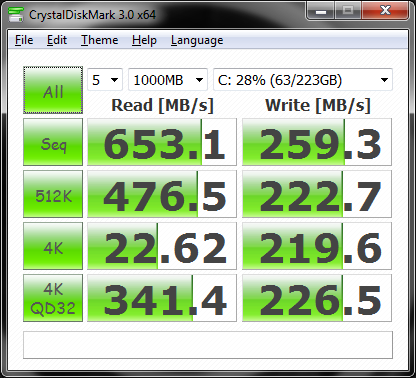 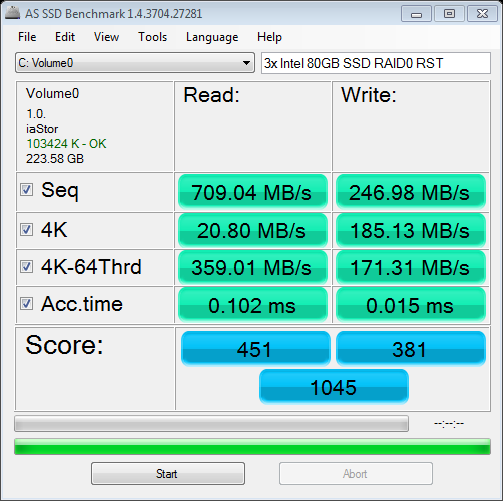 |
|||
|
Lilim
Intel Core i7 920 @4.2GHz HAF 932 - Dual SLI Nvidia GTX 480s 3x Intel X25-M G2 (80GB) SSD RAID0 |
|||
|
|||
|
DST4ME
DS ELITE
Joined: 14 Apr 2008 Online Status: Offline Posts: 36758 |
Quote Reply
Posted: 27 Apr 2010 at 5:16am |
||
|
Thanks for the personal attacks, but no matter what you say or asus does, real sata 3.0 can't be offered till you have ICHr11. I understand how plx has a work around but its still not ICHr11 which will give you all sata 3.0 and raid, also from what I understand marvel does not support trim either, real sata 3.0 support is more then just having 6GB/s, you have to have raid/trim options also, but if I'm wrong then point out where I'm wrong you don't need to be rude about it.
as for raid, were is the increase in your read in 4K? are you taking about the 1.82MB/s increase? cause that is not much at all, also I was taking about HDD not ssd, my comment was more in reguards to 600GB veloci vs a good ssd and how the ssd will have much better 4k read speeds then the 2 x 600GB veloci in raid. as far as I understand if the array fails in raid 1 you lose all data as for as OS goes (aka not bootable). explain to me how you would go about restoring a raid 1 that has os on it and the array broke. Edited by DST4ME - 27 Apr 2010 at 5:53am |
|||
|
|||
|
geezerhood
Newbie
Joined: 12 Jul 2009 Online Status: Offline Posts: 53 |
Quote Reply
Posted: 27 Apr 2010 at 6:19am |
||
|
Hi Guys, My post wasn't intended to create a problem between you two. You were both very helpful to me thanks. Since I'm not going to use raid I think I will go with ASUS Rampage III Extreme. I do not want to wait untill 2011 for Intel. For hard drive after reading your both posts I think I will take the "Crucial RealSSD C300 CTFDDAC256MAG-1G1 2.5" 256GB SATA III MLC Internal Solid State Drive (SSD)" I have sent an email to Sara. As my order moves forward I will post it here since I'm sure it will change several times before it's made. I have another question for my Photo storage. Is it better to have 2 X 1TB Western Digital Or 1 X 2TB Western Digital WD2001FASS 2TB Thanks, geezerhood |
|||
|
|||
|
Dragoonseal
DS Veteran
Joined: 03 Apr 2009 Online Status: Offline Posts: 2247 |
Quote Reply
Posted: 27 Apr 2010 at 8:36am |
||
I think it mostly falls down to price and how many SATA ports you are going to have available. Two 1TB drives together will be cheaper than a single 2TB drive, but they would also take up twice as many SATA ports. |
|||
|
Lilim
Intel Core i7 920 @4.2GHz HAF 932 - Dual SLI Nvidia GTX 480s 3x Intel X25-M G2 (80GB) SSD RAID0 |
|||
|
|||
|
justin.kerr
DS Veteran
Joined: 06 May 2008 Online Status: Offline Posts: 5084 |
Quote Reply
Posted: 27 Apr 2010 at 8:55am |
||
|
only thing I have to add is, stay a way from on board 6Gbs hard drive solutions, until the new southbridge comes out. If you want 6Gbs get a good 6Gbs raid card, I have had one for 9 months and it was great.. too bad now I have all my Pci e slots filled so I cant use it..

for fast, reliable HDD go with RAID 10, but a simple 2Tb good HDD for storage still works well, and is a lot cheaper, and simpler.... and for most users, the simpler the build, the happeier they will be in the long run.
|
|||

|
|||
|
|||
|
Dragoonseal
DS Veteran
Joined: 03 Apr 2009 Online Status: Offline Posts: 2247 |
Quote Reply
Posted: 27 Apr 2010 at 10:40am |
||
<Shrug> You make a rude comment and talk down to someone, especially when you end up being wrong about the subject, and you can usually expect the other to be rude right back. Assuming makes an ass out of you and me, as they say. Real SATA 3.0 or not, the ASUS board offers extra functionality over other boards without sacrificing performance elsewhere, and is a very solid motherboard in general, so if someone is willing to pay the premium for a top end style motherboard it remains a very valid option.
I probably should of included benchmarks of a single Intel 80GB SSD for reference. Here's what a single 80GB G2 looks like (same Intel RST driver): 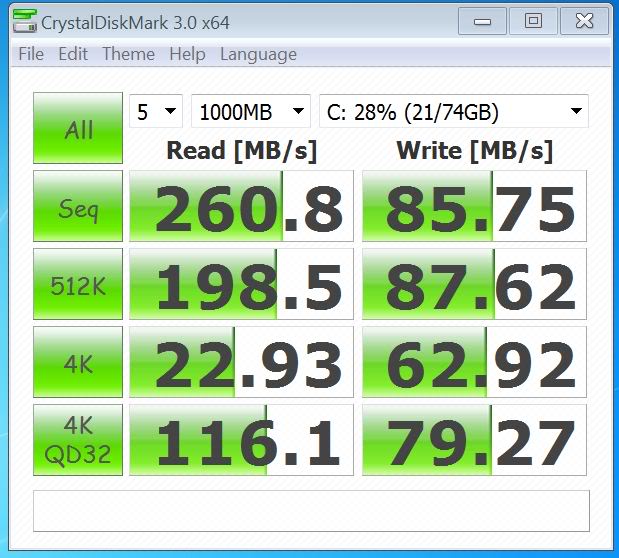 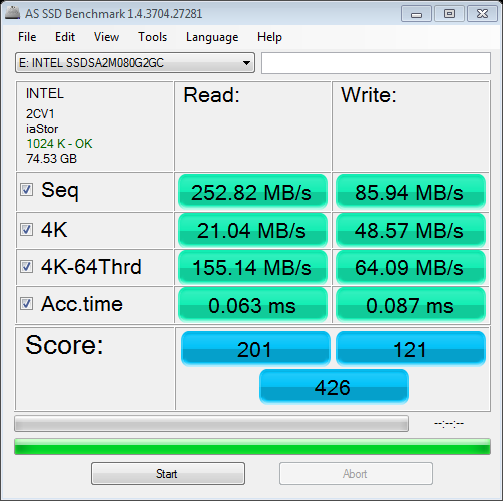 The 4k scores here of 22.93 MB/s and 21.04 MB/s are 4kb random reads at a queue depth of 1. You can not get a queue depth of 1 in actual desktop usage or with any program, it's almost impossible, about the only things possible of doing it are synthetic benchmarks like this that are designed to read a single 4kb file while doing nothing else, before moving on to another 4kb file, and then another and another, sequentially. The only thing this is representative of is a SSD's access or seek time. The 4k QD32 (queue depth of 32) score of 116.1 MB/s and 4k QD64 score of 155.14 MB/s listed above are where the benchmarks tell the SSD to access many 4kb files all at once and let the SSD go to town as quickly as it is able, more or less. Making use of NCQ and its own inherent ability to read and process much of its data in parallel the SSD is able to access all the data much faster than when it is told to access a single file one at a time sequentially. You'll note that the QD32 and QD64 4kb random read scores are much higher in my RAID0 array than a single Intel SSD can manage on its own. Not as perfectly scaled as the large file sequential reads are, but much faster none the less. You'll also note that the write speeds of all file sizes are much faster on my RAID0 array, regardless of the queue depth. So anyway, yes, RAID helps 4kb random read speeds, but the extent to which it helps depends on how much you are reading at once, and 4kb writes are always helped by RAID0.
With what kind of RAID solution? As far as I've ever read if one drive fails in a RAID1 array the computer just keeps on operating from the remaining drive(s) in the array and notifies you of the drive that has failed. In fact in a lot of server environments RAID1 is the desired setup for the OS, which the larger, faster, and more elaborate RAID5 and RAID0+1 (10) setups are used for the file systems. The better RAID1 solutions (I'm not acquainted on whether ICH10R has this functionality) let you replace the failed drive and it will rebuild the array, even continuing to run off of the good drive(s) while it does so. |
|||
|
Lilim
Intel Core i7 920 @4.2GHz HAF 932 - Dual SLI Nvidia GTX 480s 3x Intel X25-M G2 (80GB) SSD RAID0 |
|||
|
|||
|
geezerhood
Newbie
Joined: 12 Jul 2009 Online Status: Offline Posts: 53 |
Quote Reply
Posted: 27 Apr 2010 at 12:46pm |
||
|
Dragoonseal Ok I go for 1 X 2TB Western Digital WD2001FASS 2TB. I didn't think about the extra SATA port. Thanks for the heads up.
Why should I stay away from on board 6GBs hard drive solution. Will it give me problem or you just think it is not an elegant solution. |
|||
|
|||
|
DST4ME
DS ELITE
Joined: 14 Apr 2008 Online Status: Offline Posts: 36758 |
Quote Reply
Posted: 27 Apr 2010 at 1:29pm |
||
|
geezerhood if you go with the asus board you can't do raid and your ssd will not support trim and you gonna want trim, consider all of that before you get your mobo, a ssd that uses trim and does not get it, will lose performance.
justin is telling you the same thing I am, if you want a mobo with real sata support you need the new south bridge otherwise as mentioned there are gonna be functionalities missing. and again I warned you but asus has horrible support now Edited by DST4ME - 27 Apr 2010 at 1:31pm |
|||
|
|||
|
geezerhood
Newbie
Joined: 12 Jul 2009 Online Status: Offline Posts: 53 |
Quote Reply
Posted: 27 Apr 2010 at 1:44pm |
||
|
DST4ME
Thanks.
But can you tell me what trim is please. One of the reasons I was staying away from SSD is I have no idea about it. It already sounds complicated for me since I do not know much about it except that it's expensive and fast.
|
|||
|
|||
|
justin.kerr
DS Veteran
Joined: 06 May 2008 Online Status: Offline Posts: 5084 |
Quote Reply
Posted: 27 Apr 2010 at 1:45pm |
||
|
RAID cards are real RAID, on board is software RAID, or fake RAID.
On board use to be a joke, and for Nvidia chipsets, and AMD it still is, but the new Intel is pretty darn good, it has its limitations, you cant get anything too fast, but decent for sure.
RAID cards, add more complexity, and more issues to a system, that is why I would not recommend it for average use.
Raid cards that are going to have 6Gbs support and perform well, are not cheap.
A Intel G2 160 Gb SSD is on par overall with any 6Gbs drive out there, and for the most part you will never even max out SATA 3Gbs in normal usage, so 6Gbs doesn't make much sense, yet.
getting a band-aid 6Gbs now is not future proofing in my eyes. a good 3Gbs setup will last you well into the time when 6Gbs gets all the kinks worked out.
|
|||
|
|
|||
|
|||
|
Dragoonseal
DS Veteran
Joined: 03 Apr 2009 Online Status: Offline Posts: 2247 |
Quote Reply
Posted: 27 Apr 2010 at 1:52pm |
||
He can still RAID anything on the normal 3Gbps SATA 2.0 ports, just not the two 6Gbps SATA 3.0 ports, but he said he did not want to make use of any RAID configurations anyway (shame that). The lack of TRIM is a valid concern though. Some SSDs benefit little from TRIM these days, in particular any Intel G2 SSD and all the new SandForce SSDs (Vertex 2, Agility 2, Force) have such aggressive garbage collecting algorithms that they don't lose any performance over time. I haven't a clue how the Crucial RealSSD C300 holds up without TRIM, however. I don't think ASUS support matters much, if anything happens he would be going through DS for replacements. |
|||
|
Lilim
Intel Core i7 920 @4.2GHz HAF 932 - Dual SLI Nvidia GTX 480s 3x Intel X25-M G2 (80GB) SSD RAID0 |
|||
|
|||
|
geezerhood
Newbie
Joined: 12 Jul 2009 Online Status: Offline Posts: 53 |
Quote Reply
Posted: 27 Apr 2010 at 1:55pm |
||
|
justin.kerr
Ok thanks for your explanation.
The ASUS Rampage III Extreme has 7 x SATA 3.0 Gb/s ; 1 x eSATA 3.0 Gb/s; 2 x SATA 6.0 Gb/s ports
Can't I just use the SATA 3GB only.
I'm trying to understand as to why ASUS Rampage III Extreme is not good.
OK ASUS support sucks but I'm paying DS 5 years support and warranty. The motherboard is not included?
I'm just trying to make sure I'm making the right decisions as my PC will not be cheap.
|
|||
|
|||
|
Post Reply
|
Page 12> |
| Forum Jump | Forum Permissions You cannot post new topics in this forum You cannot reply to topics in this forum You cannot delete your posts in this forum You cannot edit your posts in this forum You cannot create polls in this forum You can vote in polls in this forum |

About Digital Storm
Contact Information
Facility Tour
Financing
Buy Now, Pay Later
Downloads
GSA Schedule
Terms & Conditions
Privacy Policy
Request Help
Call: 1-866-817-8676
(Hours 9AM-5PM PST)





 Topic Options
