Apollo has Landed !Post Date: 2015-12-07 |
Post Reply 
|
| Author | |
NorrinRad 
Newbie 

Joined: 03 Nov 2015 Online Status: Offline Posts: 36 |
 Quote Reply Quote Reply
 Topic: Apollo has Landed ! Topic: Apollo has Landed !Posted: 07 Dec 2015 at 6:41pm |
|
My Apollo Review 12/7/2015
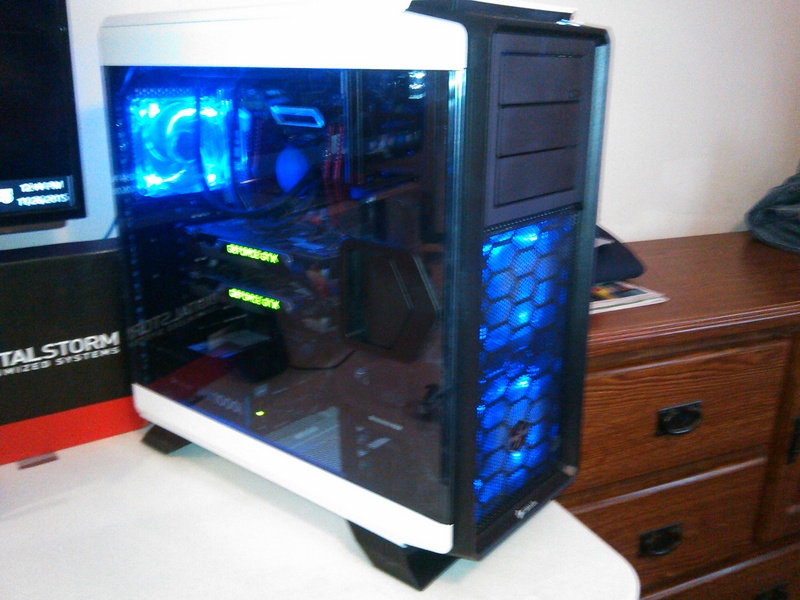
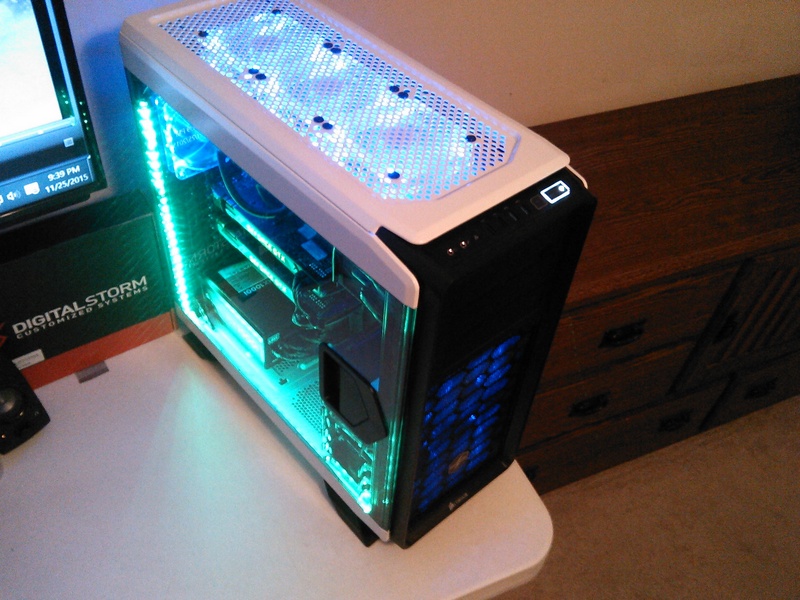
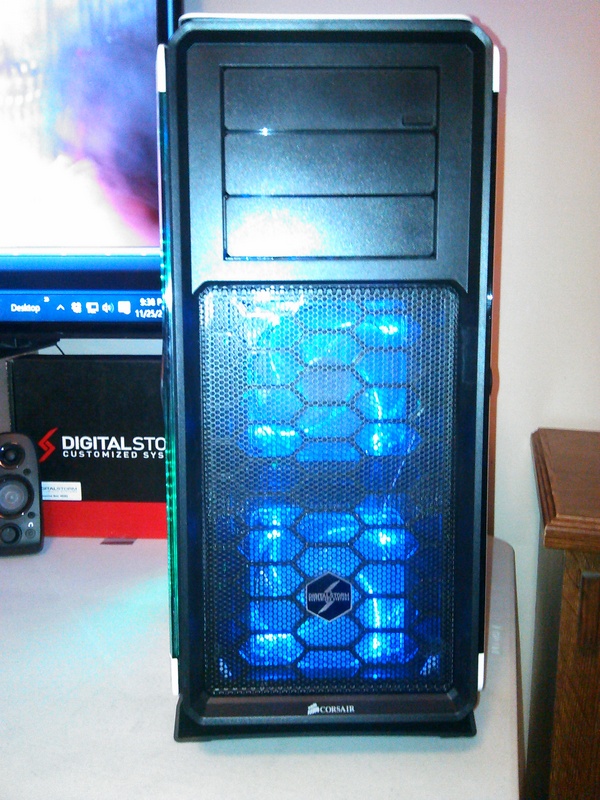
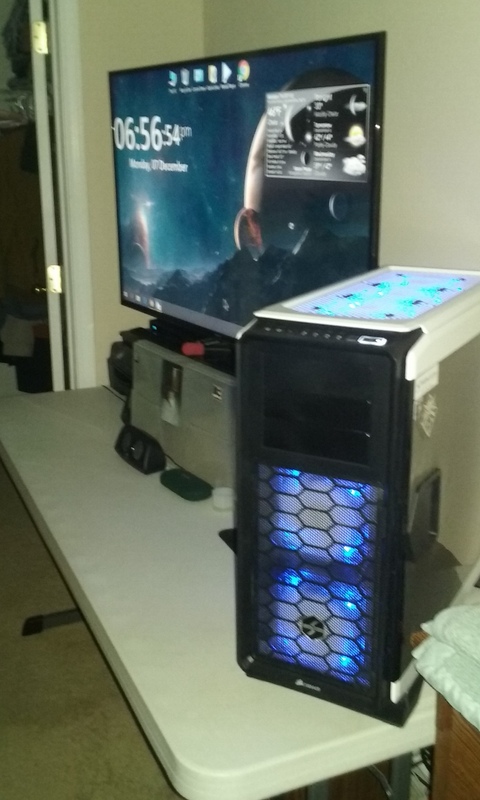
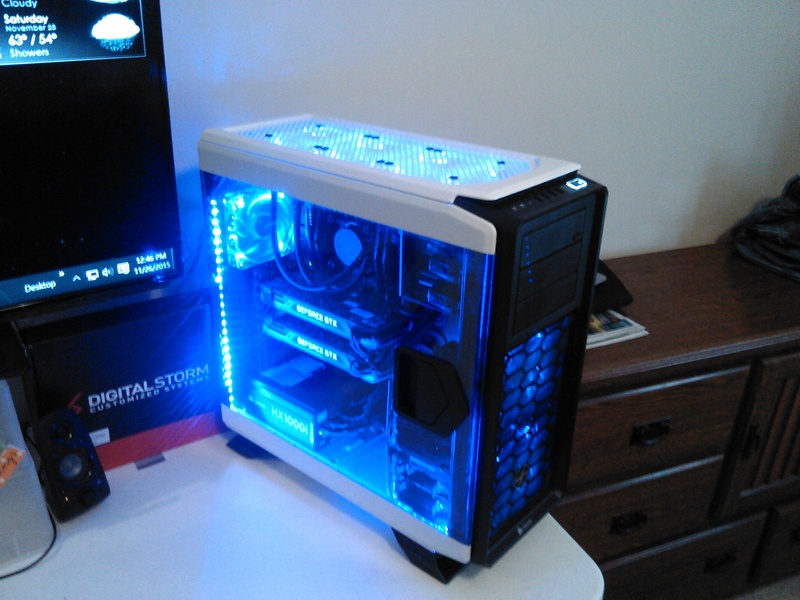
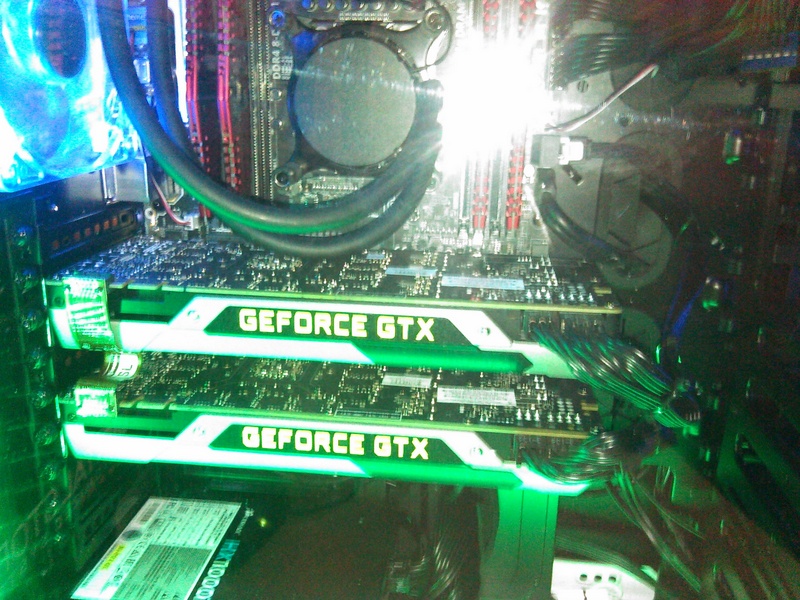
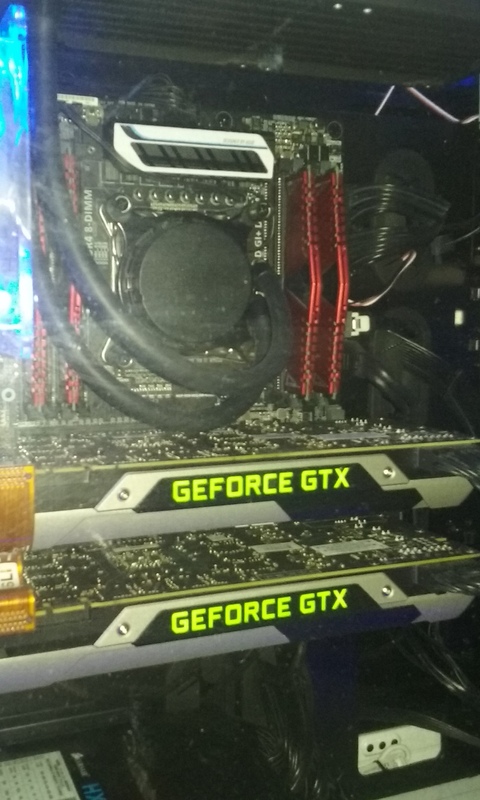
This will be as complete as possible, I'll try to type this as a "train of thought" (free form) so as to maximize my time, if not brevity's sake. Here's the rundown : I made my initial order for my Digital Storm Apollo on November 3, 2015 - the progress reports from the "stage" emails came as expected, on time, with no worries or delays in anything they did to get my machine to me. Stage 7 email came (glorious fanfare!) and was shipped within the time-frame specified (and expected). It arrived on November 23, 2015. I didn't make an unboxing video or anything like that. It should suffice it to tell the general reader that the box was undamaged by the cross-country travel (came here to Nashville, at my home). I took some pictures of the unboxing for purposes (if needed) to document any possible problems with rough handling (which didn't appear to be a problem, and wasn't). I always recommend people to fully document with videos or pictures the entire process once they receive their machine. At any rate, all looked great, I had the machine in it's new ready-made perch on my table, and soon had it plugged in, and it booted right up (again, I carefully inspected everything - wires all plugged in, making sure by visual inspection everything was where it should be and that all components were in their rightful place.) Everything looked great (had to note the good cable management), everything nicely tucked away and out of sight. Opening the back panel on the Apollo case was where I enjoyed seeing the careful detail of every wire and cable nicely placed - couldn't have done a better job myself. It booted right away to Windows 10 and after a brief system inspection of the software, appreciating the bloatware-free setup, I shut down after applying all current windows 10 patches and updates (all other drivers for the hardware was up-to-date and good to go, no other updating was needed ... in fact, I think there was only a quick win 10 update that was initially needed...) Then it was restarting it to make sure the Win 10 update went smoothly, and shut back down to install the 4GB external HDD I had as a additional legacy storage. Booted back up, and everything was fine, the equipment (hardware) runs extremely fast, and with the specs (as you shall see) - IT SHOULD BE A FAST COMPUTER. IT IS !!! Here is my Digital Storm Apollo : Chassis Model & Details : Digital Storm White Apollo Case Exterior Finish & Trim Accents : Standard Factory Finish Chassis Fans: Upgraded BlueLED Performance Fans Internal Lighting: Remote Controlled LED Lighting System (Multiple color options and lighting effects) Power Supply: 1000W Corsair HX1000i (Digitally Controlled Power) Processor: Intel Core i7 5930K 3.5GHz (Six-Core) (Unlocked CPU) Stage 1 Digital Storm Overclock : CPU set to 4.2GHz when I got it. Extreme CPU Cooling: H20 : Digital Storm Stage 2 Digital Storm Vortex 240mm Radiator Liquid CPU Cooler (Extreme-Performance Edition) Motherboard: ASUS X99-A USB 3.1 (Intel X99 Chipset) Graphics Cards : 2x SLI Dual (NVIDIA GeForce GTX 980 Ti 6GB (Includes PhysX) System Memory: 32GB DDR4 2666MHz Digital Storm Certified Performance Series Optical Drive: DVD-R/RW/CD-R/RW (DVD Writer 24x / CD-Writer 48x) - it was an ASUS drive. Internal HDD Storage Configuration : Storage Set 1: 1x SSD (500GB Samsung 850 EVO) - OS HDD Storage Set 2: 1x Storage (4TB Western Digital - Black Edition) Internet Access: High Speed Network Port (Supports High-Speed Cable / DSL / Network Connections) Sound Card: Integrated Motherboard Audio via Asus X99-A So.... long story short, it is now December 7, 2015. The system has ran very well, much to my expectations. There have been two "issues" I have encountered (but as a 30+ year experienced tech, I would hardly qualify them as true "troubled" issues, if you know what I mean) First of all, the SLI graphics cards were set to be disabled, (not really an issue). When I initially got everything up and all my games installed and updated, I ran several of them (basically stress testing) the machine by putting it through its' paces. After about 6 hours of continuous workout (with un-optimized games, and other factors (such as a hot room - my room tends to stay 5 degrees or so hotter than the rest of my central-AC / heated house) I got an error on restarting it (Overclocking had failed). No sweat, these things happen, I'm far too experienced of a technician to panic at such things (some newer computer users may expect everything to go without a hitch once a new machine arrives) .... Basically, I didn't wipe anything or change any settings (I had already made a backup image, clean and with everything installed to the point of my satisfaction, in case of needing to do a clean image reinstall. Always back up and make clean images for restoration, if needed. I simply allowed it some time to "cool off". I also re-checked my plug arrangement to my in-wall electrical outlets, sometimes overclocking can be picky about even the slightest voltage quivers ... and this house is getting old. I have a great surge protector (my old reliable) and swapped out only two other peripherals plugged into it. My UHD 50" Samsung JU6500 TV (which I use as my monitor, running at 4:4:4 chroma and true 4k @ 60hz for you technophile/videosnobs out there!) and the PC was the only things plugged into my protector. I booted right back up, no problems. It's been running fine since then, with no alerts or problems from the overclocking or concerns over the SLI cards (which, by the way - ROCK on a UHD setup like this!). Second issue, more of a Windows 10 issue. I had continuous problems with the Nov. update to 1511 (my windows file explorer continually kept crashing, also had a bear of a time getting the damned update to run stable otherwise, and even had a bunch of trouble installing it - I HATE Windows 10, but that's another story) After consulting with Keegan on the telephone with Digital Storm technical support (MY GOD, I actually called a tech support guy to help ME ?!?!?!?) We finally came up with an answer for the windows 10 issue. After 6 days of approaching this "issue" & doing the update and installing/testing/going back to the initial image.... ad nauseum ... I basically solved it by giving him an option once they called me back after the weekend. It was to simply STOP windows from auto-updating (which, can, in and of itself, be problematic) and after wisely deciding to give my tired cancer-ridden head a rest by knowing I should ask another qualified tech to approach my needs. He came upon the brilliant idea to simply stop the SERVICE from updating (windows updater on the service (local) screen). I also tweaked a few other things, and after Keegan brilliantly updated a knowledgebase article (in-case any other techs or customers want to do the same thing we did with Win 10 Home version, because - let's be honest - Win 10 has ISSUES, friends). We decided to call it a day, he was happy, I was happy, and I will do the downloading and updating MANUALLY (as I always have). Now I have a stable, kickass (as much as it can be) version of Windows 10 Home, and my machine SMOKES, it is so fast. (not to worry, that was just metaphor, for the literal-minded! *wink*) So, unlike other reviews where you get a nice video, or an unboxing guide, or a bunch of pictures without a return (updated) article on how things go when you get a brand spanking new Digital Storm (awesome) PC, you get my version as complete as possible. Bottom line : I couldn't be happier! It's only, like, the second PC I had bought without building one for myself (or friends, or families, or clients, etc.) since 1994. Previously, I cut my teeth on my Commodore 64 and a Sinclair laptop (which I built myself too, that was in, what was it? like, the late 80's ??? **I think?**) And that's only for those of you that remember early age home computing with Commodore 64's and Sinclair laptops - if you could call it a laptop, back then...) As I said, I'm a techie from way back, and an extreme-level of knowledge as a software and hardware (although I consider myself far more an old hardware oriented guy) useage expert. For the record, I worked all over Dell's corporate facilities here in Nashville (across the airport and the company HQ here, for over a decade in all depts' and all levels of service (tier 1 lowly entry level tech to tier 3 god level tech that liked to play in the game room and duck working as much as possible!!! hehe) But no, really, I genuinely did enjoying helping all customers with Dell, they're good people there, even if your experience is otherwise. (I prob'ly could say the same thing, but its' all good) I finally worked for Boeing out there when they picked up some high security-clearance gov't contracts. We had ultra secure access to the part of the Dell building when they converted it for security clearance techs like myself, to help out our govt. friends. So I finished up my career by supporting (literally) rocket scientists, it was all good. Then my brain tumor came out of remission (now inoperable) and I'm still hanging in there, on disability, but I say I'm retired!! And so, it's all part of who I am and why I bought from D.S. I'm getting older, although I have a great mind (still). I'd rather have my new Digital Storm friends, from the first guy I chatted with online thru chat (a fellow retired, ex-techie much like myself) to the UBER nice lady that took my order, hope she is having a great holiday! And to Keegan who took my call like a tech support pro (had to throw something out there to try & impress a fellow tech support guy !) but I give him kudos by writing him a brilliant compliment. I also filled out the survey and sent a letter to his manager telling them to get a raise to him ! (as I told them, I liked it when I got them, as did my managers - and I loved to read those kinds of emails for techs when I was a manager for tech-support personnel too). I hope it all helps you, the reader, to know all of this, in making your decision, to allay any possible fears or concerns you may have. You won't get treated better by anyone when you get a new PC, no matter the build, from Digital Storm. It's that simple. You will, like me, rest solid in a worry-free warranty, having them take care of all of it for you. Plus, lifetime tech support from guys like Mike and Keegan?!?!? OK, that (in and of itself HAS GOT TO BE, at least for the untrained and computer-novices out there) makes it worth the purchase price of any system you could possibly get from Digital Storm. I wouldn't lie to you. I've been at/in this business all of my life. I wouldn't trust my future need with Digital Storm building me this system - and trust them to do it for me - to anyone else. SURE, I could've saved a few hundred dollars doing it myself. I chose otherwise, it's my money, and it's my prerogative. So there you have it. Digital Storm, thank you for taking care of me. I can only hope I last as long as this computer will. It's solidly built, should last me a lifetime, no matter how many numbered days I have left on this planet. You've helped make my life a while lot more worry-free and have many more happy days! As a new customer, and a friend for life. Take care to one and all, and happy holidays ! Warren Jacobs 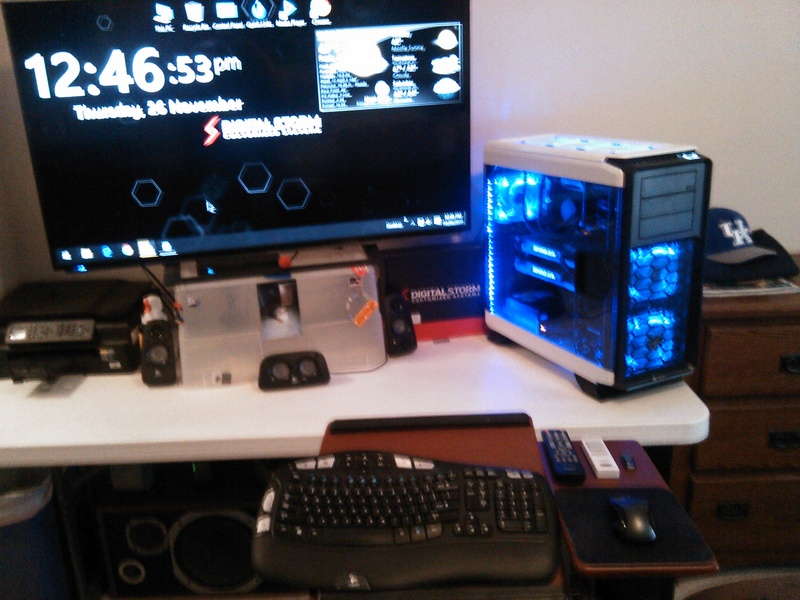
 Edited by NorrinRad - 08 Dec 2015 at 4:24am |
|
|
Apollo - 5930 stage 1 OC CPU, ASUS X99-A mobo, 32 GB RAM, 2 SLI 980ti 6GB cards, 1000 Watt PSU, blue led fans, remote controlled lighting, 500GB SSD, 4GB WD black mechanical HDD, Win10 home 64-bit.
|
|
 |
|
|
db188
DS Veteran 
Joined: 29 Jul 2014 Online Status: Offline Posts: 2115 |
Quote Reply
Posted: 07 Dec 2015 at 7:27pm |
|
thanks for the read! i appreciate substantive reviews/feedback...even long-winded ones
 jk jk congrats on your new rig. i just picked up my Aventum 3 today and it will be my first experience with DS and the new OS with its teething issues. on that subject, i've got 2 friends who couldn't be happier with it (upgraded from W7 Pro). they've both got the W10 Pro 64-bit and no issues. how were you able to disable the auto updates? i thought that only Home users couldn't selectively update??? |
|
|
Aventum 3
I7-6700K Gigabyte G1 Z170X Gaming GT 16GB Corsair Dominator 3000MHz Corsair Hx1000i 1000W Samsung M.2 980 Pro 2TB;Samsung 850 EVO 1TB MSI RTX 3080 Ventus OC 10G LHR Gigabyte M28U 4K |
|
|
|
|
NorrinRad
Newbie
Joined: 03 Nov 2015 Online Status: Offline Posts: 36 |
Quote Reply
Posted: 07 Dec 2015 at 8:39pm |
|
Hey ! Thanks for the reply DB! Always great to read your posts. Yeah, the Windows 10 home version .... I got it knowing there would be drawbacks, but my take is that it was Windows 10 .... I'd be living with it on my own terms, because I'm not a fanboy and I really do hate it, but hey, I'm a glutton for punishment. I don't use the word hate very much, there's way too much out there in the world already, know what I mean ?
Anyways .... If you goto the Windows administrative area in windows 10 services (local) You can pull up the service that actually has Windows update and disable it there. Doing this within the "settings" where windows update is doesn't do the trick, even if you make it run over a metered connection (if you straight hard-wire it into an ethernet cable, as I do, from my wireless AT&T gateway - btw - I get a nice 50mbps connection with the 45mbps dsl service here in Nashville .... they DO have gigabit ethernet in Chattanooga and Nashville, but only limited areas : commercial : here in Nashville starting this year) If you connect it via ethernet, Win 10 automatically sets itself to running on a metered connection. Add to this a layer of difficulty where earlier Win 10 versions had a winupdateshow/hide "app" you could download from Microsoft (it doesn't work with the latest builds/versions of windows 10 out there for public consumption anymore.... go figure) and my suggestion is not to try and get jiggy with anything in the Win 10 registry ... it's a dark, dangerous place they've made in there .... The only option I could come up with was downloading a hack and trying it ( I did it - or rather, I should say - attempted it - with Keegan on the phone, but my supposedly "clean" hack program contained a virus which ESET caught - WHEW ! - and therefore made the hack null and void, it wouldn't have worked anyways for other reasons, as I have since come to understand... ) Besides, even if I had infected my machine, I was working right after a clean system image restoration, so I was 5 days into frustration on this issue and already had the feeling of Indiana Jones hacking my way thru the rain forest with a machete-type feeling going on so ..... bravely moving forward....) They changed the dern administrative UAC access in Win 10 home versions and you can't enable it the old "hacked" way I used to do things. Of course, pro users don't work within this constraint. SO ... Keegan said why not try disabling windows update thru the services panel. Lo and behold, it gives you that option, but upon further inspection, it will re-enable it if something goes wrong and you try to use a restore point, or restore with any kind of windows recovery feature (apparently, that was my take after spelunking the windows update services tabs and reading up on how they've implemented that feature...) All of this is so arcane with the way they've done things, IMHO. I made the additional step of straight up telling it to NEVER enable the derned auto-update for anything. I'll see - and look up/research - the updates as they pawn them off on the public out there, and be my own judge, after thoroughly (and I do mean thoroughly) seeing how new updates break various things as they work in "perfecting" Win 10. You know, they've pretty much tried to completely take away our freedom in updating things where the OS is concerned with Win 10. Personally, for power users, we should know our own system and components well enough and know how they work, and learn (either on the fly or well before hand with GOOD testing) before new OS updates and drivers get updated so we KNOW what we need to update or NOT. We're power users, after all. We don't need hand holding to do that. But they're trying to make it so difficult even for power users by making these kinds of restrictions and also in making the OS the way they are, so non-technical computer windows users will eventually just say "do it for me, baby! Give it to me, Microsoft!!! And just take it the way they want in Redmond. I'm old school. I won't stand for it. In my case (and many other users, too) the 1511 "update" broke so many other things along with giving some minor tweaks here and there, and I won't even go into all the back-story about them putting it out there on Nov. 3, pulling it after a few days, then their legal team getting a statement back out JUST before they put it back out there for a staggered release. That was right after their legal team got ahold of looking at the situation and putting some cryptic legal-ese statement out there to protect them from the tons of people/businesses that lost money out there because of their incompetence (at best) or maliciousness ... at worst. My deal was that the 1511 update would not install properly until I disconnected EVERY SINGLE PERIPHERAL from my system. (say whaa?? yeah, you got that right) After I did it, I could use windows file explorer for a *little* while, until I determined that the explorer.exe file/process itself was either getting corrupt through normal (? NORMAL meaning usual use of file explorer to do work on the computer with files, but it also included seeing it exhibit bug-like behavior when using right click context menus and/or resizing the file explorer window with bug-like issues when running multiple windows - file explorer windows - open simultaneously and resizing them, moving them around the screen, with and without the snap-to features enabled ... and I could go on and on about other bugs it had with the file explorer itself) The curious thing is, I could use third party file explorer programs (like explorer++ or file commander - more beefier, feature rich explorer programs - third party, of course) and not experience any problems at all, even when performing actions that would cause the native win 10 file explorer to crash, with all of the issues and more that I just mentioned... And once it crashed, there was never - no - more again - using or opening windows 10 file explorer. It was gone, KAPUT. UNLESS you then resorted to using a third party file explorer program. I know I get long winded, but I'm kind of a thorough techie explaining things as best I can, and for completeness sake. The bottom line was : why should I have to use a third party file explorer as a replacement for the OS's own native file explorer? That is total bunk, and why I ultimately chose to disable Windows update totally on my windows 10 home edition OS on this particular setup/PC. Others usage (and opinions) will vary. But it works for me. Right now I'm "rock" stable with the occasional Win 10 glitch with build 10264 .... I think that's what I've got on here as my stable Win 10 image. That's with everything installed and all my external drives, peripherals going (there aren't many) and my home network running (all Win 10 home machines). In the end, it's all good. There's always more than one way to skin the .... chicken. If it were a cat, it'd be way too easy, for me? ... of course it would have to be! But disabling windows updates thru the services technique - it's goooood. So far, I've seen it exhibit no downloading/updating without my express permission. Nothing coming thru the backdoor in any way, shape or form the way I have everything configured. The way I WANT IT because I'm a POWER USER ! ... and all is well ! 
|
|
|
Apollo - 5930 stage 1 OC CPU, ASUS X99-A mobo, 32 GB RAM, 2 SLI 980ti 6GB cards, 1000 Watt PSU, blue led fans, remote controlled lighting, 500GB SSD, 4GB WD black mechanical HDD, Win10 home 64-bit.
|
|
|
|
|
hoserator
DS Veteran
We don't need no stinking "Avatars" !
Joined: 08 Oct 2014 Online Status: Offline Posts: 7966 |
Quote Reply
Posted: 08 Dec 2015 at 12:26am |
|
Congratulations NorrinRad on your ability to bypass MS's desire to completely control users.
 Some of us "old geezers" still like to drive the car. Hope you enjoy your system and the forums. Some of us "old geezers" still like to drive the car. Hope you enjoy your system and the forums. |
|
|
|
|
bprat22
DS ELITE 
DigitalStorm East -- (Unofficially!)
Joined: 08 Jun 2011 Online Status: Offline Posts: 20391 |
Quote Reply
Posted: 08 Dec 2015 at 3:38am |
|
Congrats on a dynamite rig and Welcome to the forums.
The pics are just what we like and thanks for sharing your thoughts. Enjoy.
|
|
|
|
|
NorrinRad
Newbie
Joined: 03 Nov 2015 Online Status: Offline Posts: 36 |
Quote Reply
Posted: 08 Dec 2015 at 3:57am |
|
Thanks, hoserator! It's nice to still be able to get excited about having a shiny, fast, and new computer to play with. It's very productive and a great gamin/multimedia rig, which is the main uses in my man-cave.
For those interested in how she handles .... I play all my old MMO games (ESO, Age of Conan, Lord of the Rings online, Neverwinter, Rift) full on with ultra settings, everything looks as visually beautiful as they possibly can in those games, and the framerates are very high, running butter smooth. I play Age of Conan with SLI disabled (bummer) because of certain visual blitchews that AOC still isn't optimized for such a modern SLI setup. Lotro I also play without SLI enabled, it only runs on a SINGLE CORE after all these years! But since I'm a dedicated player, I'll share this.... Most MMO's I get bored with over time and end up running either in a "dual-client" setup (running one - or more - game clients controlling two characters or more one one monitor, with only my single computer). I have such a nice system now, with dual 980 ti cards with 6GB graphics memory, a single card (even on my UHD 50" Samsung TV as a monitor, keep in mind, it's running full 4k @ 60hz at 4:4:4 chroma) can run older games flawlessly. The older MMO's that I dual or multi client with, running one card, I get framerates in the upper sixties (on two clients in lotro, all settings maxed) to well over 120 FPS in AOC running two clients. 120+ FPS in Neverwinter and Rift as well. ESO, I haven't had enough time to do much with, but I thought I saw Fraps display over 100+ FPS running a single client. I also play Witcher 3. It's the one ultra modern game that pushes this setup I have. I still get 45-50 fps consistently running in UHD big screen glory, with everything to ultra and hairworks on. My sister came by and said "Is that a computer game?" To which I said "Yeeeeeeah.... :)" She stood there for a few minutes whuile I showed her some cutscenes and gameplay, and she (who knows absolutely nothing about computers or PC gaming) simply said "That's incredible!" Testament enough to how nice my Digital Storm PC runs games. As for other things : The PC boots in about 8 seconds, VERY FAST. The SSD is snappy, and writes/reads very fast - as expected. (I'm seriously wondering about getting one of those new Intel 750 series NVME x4 SSD's - like one of those 1.2 TB models they got out there now and see how that puppy would handle! I'm sure it would rock!) I copied about 2.3 TB of files to the WD black edition 4TB HDD on my machine, and happy I got that for data storage. It's wonderful. With the DSL line (AT&T) giving me a steady 50mbps hardwired, my internet connection is very fast, edge/chrome loads virtually instantly, browsing is fast and responsive, so are downloads, but the machine handles all the apps and installed software I have on it like a champ. It's like driving a high performance car, makes one feel good as you go through the day behind the wheel I can only end by saying Digital Storm backs up what it says by actions. Any potential buyer (I hope) reads my testimonial here and realizes they cannot go wrong in choosing to get a Digital Stprm Computer. If you pay a little more, it's worth it. If you get a base system, it will not be pre-loaded with a bunch of bloatware many other computer manufacturers put out there. There shouldn't be any worries, and that is the truth. Any experienced PC user like us can appreciate what they do, and we rock on !!! Life is good ! |
|
|
Apollo - 5930 stage 1 OC CPU, ASUS X99-A mobo, 32 GB RAM, 2 SLI 980ti 6GB cards, 1000 Watt PSU, blue led fans, remote controlled lighting, 500GB SSD, 4GB WD black mechanical HDD, Win10 home 64-bit.
|
|
|
|
|
hoserator
DS Veteran
We don't need no stinking "Avatars" !
Joined: 08 Oct 2014 Online Status: Offline Posts: 7966 |
Quote Reply
Posted: 08 Dec 2015 at 9:31am |
 |
|
|
|
|
oldlady RPGer
DS Veteran
One of the cool kids
Joined: 09 Sep 2011 Online Status: Offline Posts: 1080 |
Quote Reply
Posted: 08 Dec 2015 at 4:17pm |
|
Love your set up!!!
I really enjoyed your review. Having W7 Ultimate I got W10 Pro for free. And had nothing but problems on both my systems. I disabled the automatic updates and a few other things and still was crap. So I'm back to W7 Ultimate and a very happy camper. Will wait until W10 has been around for awhile. Your Pics are also very cool!
Congratulations! |
|
|
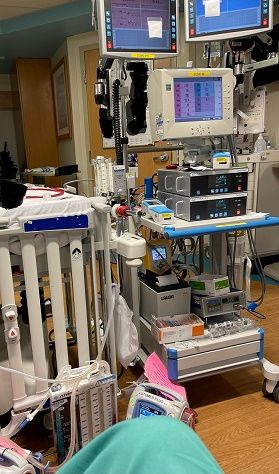
Me sitting my ECMO in PICU. Now you know why I like LC. ;)
|
|
|
|
|
db188
DS Veteran
Joined: 29 Jul 2014 Online Status: Offline Posts: 2115 |
Quote Reply
Posted: 09 Dec 2015 at 12:18am |
|
thanks for the explanation. I, too, prefer to handle my own updates. i'm jumping on W10 with my new rig from W7 on my old and I've been vary leery of it. my longtime pals have had no issues with it and like it. so, I decided to take the plunge. I've been playing D3 all day on it. also, dl some programs/apps and updated some drivers. it's been all good so far...(fingers crossed)
|
|
|
Aventum 3
I7-6700K Gigabyte G1 Z170X Gaming GT 16GB Corsair Dominator 3000MHz Corsair Hx1000i 1000W Samsung M.2 980 Pro 2TB;Samsung 850 EVO 1TB MSI RTX 3080 Ventus OC 10G LHR Gigabyte M28U 4K |
|
|
|
|
NorrinRad
Newbie
Joined: 03 Nov 2015 Online Status: Offline Posts: 36 |
Quote Reply
Posted: 09 Dec 2015 at 6:20am |
|
Thanks to everyone that has responded to my review ! I tried to get the best pictures of my new Digital Storm computer in its' native habitat. It loves its' new home!
Everyone seems to like the look of the blue led lit fans. I use the remote controlled lighting to change the lighted combo-look every day, depends on my mood. Funny how sometimes the *simplest* of things is the thing that catches everyone's attention. The women in my family absolutely love the lights. (Their favorite is when I have the remote controlled lighting set to green with the blue led fan lights .... it does look particularly sharp, I must say) Somehow I knew that single addition would be the show stopper when people came into my man cave. (Now, if I can just educate them all on why this computer is so fast and ultra-modern with all the techno-babble I throw their way .... I'll keep working on them ! *wink*) Also, @oldladyrpger - those pics in the dark are sharp, with all the visual bling, I love your setup too! Again, thanks for the compliments and best of wishes to you all all of yours this holiday season ! |
|
|
Apollo - 5930 stage 1 OC CPU, ASUS X99-A mobo, 32 GB RAM, 2 SLI 980ti 6GB cards, 1000 Watt PSU, blue led fans, remote controlled lighting, 500GB SSD, 4GB WD black mechanical HDD, Win10 home 64-bit.
|
|
|
|
|
Post Reply
|
| Forum Jump | Forum Permissions You cannot post new topics in this forum You cannot reply to topics in this forum You cannot delete your posts in this forum You cannot edit your posts in this forum You cannot create polls in this forum You can vote in polls in this forum |

About Digital Storm
Contact Information
Facility Tour
Financing
Buy Now, Pay Later
Downloads
GSA Schedule
Terms & Conditions
Privacy Policy
Request Help
Call: 1-866-817-8676
(Hours 9AM-5PM PST)





 Topic Options