Arrived Today!! What i need to DL?Post Date: 2010-08-05 |
Post Reply 
|
| Author | |
bartmanb 
Newbie 
Joined: 20 Jul 2010 Online Status: Offline Posts: 18 |
 Quote Reply Quote Reply
 Topic: Arrived Today!! What i need to DL? Topic: Arrived Today!! What i need to DL?Posted: 05 Aug 2010 at 2:33pm |
|
Hey Everyone!
Just received my new DS rig about 30 minutes ago. It fired up perfect and is absolutely awesome so far. Quick question. What are some good CPU and GPU performance and Temp monitors that i can download to make sure everything is staying nice and cool? Also, do i need to check for updates to the gtx 470 driver, or does DS install latest driver before it ships? Thanks, and i'll post pics and review when i get everything set up! |
|
 |
|
|
Dragoonseal
DS Veteran 

Joined: 03 Apr 2009 Online Status: Offline Posts: 2247 |
Quote Reply
Posted: 05 Aug 2010 at 2:40pm |
|
Use RealTemp to monitor temperatures. Use Prime95 (blend test) to check CPU load temperatures.
CPU-Z to see CPU settings, GPU-Z to see GPU settings. You might want MSI Afterburner to set custom GPU fan profiles and/or overclocks. And the MSI Kombustor that goes along with Afterburner is good for testing max GPU load temperatures. |
|
|
Lilim
Intel Core i7 920 @4.2GHz HAF 932 - Dual SLI Nvidia GTX 480s 3x Intel X25-M G2 (80GB) SSD RAID0 |
|
|
|
|
!ender_
DS Veteran
Joined: 24 Oct 2007 Online Status: Offline Posts: 4219 |
Quote Reply
Posted: 05 Aug 2010 at 2:46pm |
|
and just check the nvidia website to make sure you have the newest driver, though it is likely already there.
also, realtemps will keep track of your max temp per core, so test it with prime95 and after about 10 minutes write down or screen shot the max temps, then reset it and open up a game, play that for a while with realtemps up and write down/screen shot that
|
|
|
|
|
bartmanb
Newbie
Joined: 20 Jul 2010 Online Status: Offline Posts: 18 |
Quote Reply
Posted: 05 Aug 2010 at 3:53pm |
|
Awesome, thanks guys. Got all of that running.
Under full load, the gpu levels off around 84 C and sits about 43 C at rest. CPU never got above 58 C at max. 84 sounds a little hot, but i guess thats the nature of the gtx 470. Especially since i'm not liquid cooled. Time to try out some games =) |
|
|
|
|
!ender_
DS Veteran
Joined: 24 Oct 2007 Online Status: Offline Posts: 4219 |
Quote Reply
Posted: 05 Aug 2010 at 3:56pm |
|
84 is definitely not high, the card is supposed to handle 100c according to nvidia, ive even seen as high as 107. so your gpu temps are fine for sure
what processor and cooler are you using? that seems like an oddly low number for cpu load
|
|
|
|
|
bartmanb
Newbie
Joined: 20 Jul 2010 Online Status: Offline Posts: 18 |
Quote Reply
Posted: 05 Aug 2010 at 5:26pm |
|
Yeah, i was doing everything all wrong.. haha
I think i got it now. On Kombuster the GPU actually gets to 90 C max, still not too bad I guess. on Prime 95 the CPU gets to 69 C max CPU is an i5-750 overclocked to 3.8, with the v6 air cooler on it. Those numbers probably sound more accurate though, huh. Anyway everything looks great so far, anything else i should test or try? |
|
|
|
|
!ender_
DS Veteran
Joined: 24 Oct 2007 Online Status: Offline Posts: 4219 |
Quote Reply
Posted: 05 Aug 2010 at 6:07pm |
|
sounds great, makes more sense now too

|
|
|
|
|
Liq
Groupie 
Joined: 19 Jun 2010 Online Status: Offline Posts: 112 |
Quote Reply
Posted: 05 Aug 2010 at 6:28pm |
|
I'm not sure if the 470 fan speed curve is like the 480s, but you might want to adjust it some to get the temps lower if you like. I don't go past 80 degrees in games ever with a GTX 480, but it typically sits at 75 degrees with a custom fan profile set up.
|
|
|
|
|
Dragoonseal
DS Veteran
Joined: 03 Apr 2009 Online Status: Offline Posts: 2247 |
Quote Reply
Posted: 05 Aug 2010 at 6:37pm |
|
Yeah, MSI Afterburner is great for doing that. Mine looks like this:
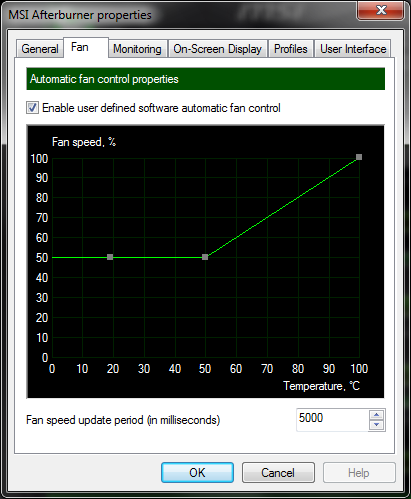 With that Lilim's 480 idles at 32°C at 50% fan speed, and if the temp goes over 50°C the fan speed starts slowly increasing in response until it finds a happy medium that it settles into. The highest I've seen it go is 79°C at 79% fan speed while playing S.T.A.L.K.E.R.: Clear Sky, but with a lot of my other games it will top out at only 69-70°C and 70% fan speed. |
|
|
Lilim
Intel Core i7 920 @4.2GHz HAF 932 - Dual SLI Nvidia GTX 480s 3x Intel X25-M G2 (80GB) SSD RAID0 |
|
|
|
|
JJJJ_Shabadoo
Groupie
Joined: 22 May 2010 Online Status: Offline Posts: 320 |
Quote Reply
Posted: 05 Aug 2010 at 6:48pm |
|
Yeah, I'd probably use a custom fan profile set up in MSI Afterburner. My 480 was regularly getting above 90. Setting the fan speeds higher it doesn't get much above 80. Of course the trade off is much more fan noise.
|
|
|
|
|
jelsin
Newbie
Joined: 30 Oct 2010 Online Status: Offline Posts: 21 |
Quote Reply
Posted: 06 Nov 2010 at 7:32pm |
|
Hi everyone,
It seems like MSI afterburner is a great program for the GPU fan profile. Do you guys have any suggestions for controlling the computer's case fans? Thanks! |
|
|
|
|
!ender_
DS Veteran
Joined: 24 Oct 2007 Online Status: Offline Posts: 4219 |
Quote Reply
Posted: 06 Nov 2010 at 7:41pm |
|
depends on where they are connected, if they are hooked to the motherboard, you can control them in the bios
the best way to control your case fans is with a fan controller if noise is bothering you
i use this one, is pretty, functional, reasonably priced: http://www.frozencpu.com/products/8745/bus-183/Lamptron_High_Wattage_4_Channel_Rheobus_-_Black_FC-3.html
|
|
|
|
|
jelsin
Newbie
Joined: 30 Oct 2010 Online Status: Offline Posts: 21 |
Quote Reply
Posted: 06 Nov 2010 at 8:04pm |
|
Ah thanks for the info !ender, I'm more interested in using the fan controller for boosting cooling rather than noise
 Are they fairly easy to install/include directions on where to plug into on the mobo? Are they fairly easy to install/include directions on where to plug into on the mobo?
|
|
|
|
|
!ender_
DS Veteran
Joined: 24 Oct 2007 Online Status: Offline Posts: 4219 |
Quote Reply
Posted: 06 Nov 2010 at 8:10pm |
|
if you want to boost then plug your fans in to the power suppy directly using 4 to 3 pin connectors:
fan hooked in to the power supply directly = runs at 100% all the time
|
|
|
|
|
jelsin
Newbie
Joined: 30 Oct 2010 Online Status: Offline Posts: 21 |
Quote Reply
Posted: 06 Nov 2010 at 8:17pm |
|
Haha ok maybe not THAT boosted :) I'm mostly interested in keeping the case cool as I game. Would you say the standard cooling profile the mobo fan controller sets is adequate for cooling needs? I'd like to keep the case cool in prolong the life of the components. I was thinking with a fan controller, I could have them run at higher speeds than normal as the case got hotter.
|
|
|
|
|
!ender_
DS Veteran
Joined: 24 Oct 2007 Online Status: Offline Posts: 4219 |
Quote Reply
Posted: 06 Nov 2010 at 8:48pm |
|
every situation is different, depends on tons of things what matters is your CPU and GPU temps, if those look good, i woudnt mess with it
depending on your motherboard, you should be able to change the speeds of your fan from the bios
|
|
|
|
|
maxyme
DS Veteran
Joined: 14 Aug 2010 Online Status: Offline Posts: 1514 |
Quote Reply
Posted: 06 Nov 2010 at 8:54pm |
|
if you really want to you can control the fans via tempreture or just manually by connecting them to the mobo and then installing speedfan.
|
|
|
Steam:pcmaster160
|
|
|
|
|
Alex
Admin Group 
Digital Storm Supervisor 
Joined: 04 Jun 2012 Online Status: Offline Posts: 16314 |
Quote Reply
Posted: 07 Nov 2010 at 11:02pm |
|
I wanted to add that, I agree low temps are great. However, I tend to get carried away too with trying to lower my system temps... but in the end, the hardware is designed to run at those temps and it's not like they are going to make a noticeable difference when I'm gaming or using the system. In conclusion, enjoy that awesome system! Put it through it's paces.
 |
|

|
|
|
|
|
Post Reply
|
| Forum Jump | Forum Permissions You cannot post new topics in this forum You cannot reply to topics in this forum You cannot delete your posts in this forum You cannot edit your posts in this forum You cannot create polls in this forum You can vote in polls in this forum |

About Digital Storm
Contact Information
Facility Tour
Financing
Buy Now, Pay Later
Downloads
GSA Schedule
Terms & Conditions
Privacy Policy
Request Help
Call: 1-866-817-8676
(Hours 9AM-5PM PST)





 Topic Options