Aspect RatioPost Date: 2013-12-23 |
Post Reply 
|
| Author | |
Clay 
Senior Member 

Joined: 11 Apr 2009 Online Status: Offline Posts: 526 |
 Quote Reply Quote Reply
 Topic: Aspect Ratio Topic: Aspect RatioPosted: 23 Dec 2013 at 5:18pm |
|
Budget:
System specs below Expectations: gain Usage: gamin Special Needs: none Specifications: Hey guys...What is a good aspect ratio for gaming? I have the ASUS 27". I play COD: Ghost mainly. Ive been reading around and it sounds like 16:9 is the best? Another dumb question is ....how can i find what my aspect ratio is? 
Thanks for the input!! |
|
|
I7 13700KF 5.4hz
ASUS Prime z790 MoBo ASUS Dual 4070 32g ram@5200 850 Gold PSU 1TB SSD 2TB SSD 27" ASUS Monitor 144hz Razer Ornata Chroma Keyboard Razer Basilisk V2 Mouse Nari Ultimate Headset |
|
 |
|
|
bprat22
DS ELITE 
DigitalStorm East -- (Unofficially!)
Joined: 08 Jun 2011 Online Status: Offline Posts: 20391 |
Quote Reply
Posted: 23 Dec 2013 at 5:50pm |
|
Not sure if 16:9 is the best but it is the most popular. Aspect ratio is the ratio of the width vs height resolution. 1920x 1080 is 16:9 because if you divide the width of 1920 by height of 1080 you get a ratio of 1.78 :1. Multiply both by 9 and that's the 16:9.
Hope this helps. 
|
|
|
|
|
Clay
Senior Member
Joined: 11 Apr 2009 Online Status: Offline Posts: 526 |
Quote Reply
Posted: 23 Dec 2013 at 8:55pm |
|
Thanks... just looking for the best/fastest gaming experience! I just tried the 16:8 / 4:3
the 4:3 looked better to me? The other just looked and felt weird |
|
|
I7 13700KF 5.4hz
ASUS Prime z790 MoBo ASUS Dual 4070 32g ram@5200 850 Gold PSU 1TB SSD 2TB SSD 27" ASUS Monitor 144hz Razer Ornata Chroma Keyboard Razer Basilisk V2 Mouse Nari Ultimate Headset |
|
|
|
|
fstcvc
DS Veteran 
Joined: 06 Jul 2013 Online Status: Offline Posts: 2551 |
Quote Reply
Posted: 23 Dec 2013 at 11:35pm |
|
16:9 is a standard TV now days whereas 4:3 is the old school "square" TV of olden days...

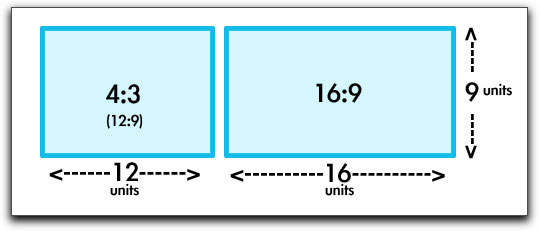
|
|
|
HailStorm II
i7 4770K @ 4.5GHz Asus Maximus VI Extreme 16GB Corsair Dominator Platinum 3xSLI EVGA SuperClocked GTX TITAN Samsung 840Pro SSD 256GB+512GB HydroLux+XSPC CPU/MoBo/GPU Liquid Cooling |
|
|
|
|
bprat22
DS ELITE
DigitalStorm East -- (Unofficially!)
Joined: 08 Jun 2011 Online Status: Offline Posts: 20391 |
Quote Reply
Posted: 24 Dec 2013 at 2:56am |
|
When I went from the old Dell 4:3 monitor to a 16:9 I at first wasnt sure I liked it. But it didn't take long to change my mind. Would never want to go back.
|
|
|
|
|
Clay
Senior Member
Joined: 11 Apr 2009 Online Status: Offline Posts: 526 |
Quote Reply
Posted: 24 Dec 2013 at 3:47am |
|
Gotcha.... Thanks for the visual ~no pun intended~

Ok, 16:9 it is! also... before my new rig, I was coming from a 22" monitor AND windows Vista!  Anything as high speed as what I am doing now and using is just amazing! Anything as high speed as what I am doing now and using is just amazing!
Thanks for the input guys! Oh, one more thing... how do I get to my aspect ratio within Win 8? ~~nvm... found it.. its within my monitor..?~~ Edited by Clay - 24 Dec 2013 at 3:51am |
|
|
I7 13700KF 5.4hz
ASUS Prime z790 MoBo ASUS Dual 4070 32g ram@5200 850 Gold PSU 1TB SSD 2TB SSD 27" ASUS Monitor 144hz Razer Ornata Chroma Keyboard Razer Basilisk V2 Mouse Nari Ultimate Headset |
|
|
|
|
Clay
Senior Member
Joined: 11 Apr 2009 Online Status: Offline Posts: 526 |
Quote Reply
Posted: 24 Dec 2013 at 3:34pm |
|
actually... I miss spoke... How do I get to my monitor aspect ratio? Cant find it!

|
|
|
I7 13700KF 5.4hz
ASUS Prime z790 MoBo ASUS Dual 4070 32g ram@5200 850 Gold PSU 1TB SSD 2TB SSD 27" ASUS Monitor 144hz Razer Ornata Chroma Keyboard Razer Basilisk V2 Mouse Nari Ultimate Headset |
|
|
|
|
fstcvc
DS Veteran
Joined: 06 Jul 2013 Online Status: Offline Posts: 2551 |
Quote Reply
Posted: 25 Dec 2013 at 6:48am |
|
Most monitors have a default pixel size/resolution (normally referred to "native resolution") and the change is set by the software/hardware sending information to it (your computer and Windows). Some displays might have an internal setting allowing you to change this but I would guess not many. Under display options in Windows, there is a resolution setting. Typically it will adjust to fill all the pixels on the display but sometimes you might get black bars if the setting is odd for the display. To get the best picture quality on your display, you want to use it's native resolution normally listed on the box (i.e. 1080x1920, 2540x1440, etc).
Hope this helps... 
|
|
|
HailStorm II
i7 4770K @ 4.5GHz Asus Maximus VI Extreme 16GB Corsair Dominator Platinum 3xSLI EVGA SuperClocked GTX TITAN Samsung 840Pro SSD 256GB+512GB HydroLux+XSPC CPU/MoBo/GPU Liquid Cooling |
|
|
|
|
Post Reply
|
| Forum Jump | Forum Permissions You cannot post new topics in this forum You cannot reply to topics in this forum You cannot delete your posts in this forum You cannot edit your posts in this forum You cannot create polls in this forum You can vote in polls in this forum |

About Digital Storm
Contact Information
Facility Tour
Financing
Buy Now, Pay Later
Downloads
GSA Schedule
Terms & Conditions
Privacy Policy
Request Help
Call: 1-866-817-8676
(Hours 9AM-5PM PST)





 Topic Options