Can running the computer 24/7 cause problems?Post Date: 2010-03-08 |
Post Reply 
|
| Author | |
sbq 
Newbie 

Joined: 10 Nov 2008 Online Status: Offline Posts: 60 |
 Quote Reply Quote Reply
 Topic: Can running the computer 24/7 cause problems? Topic: Can running the computer 24/7 cause problems?Posted: 08 Mar 2010 at 3:55pm |
|
I've got the below DS system I ordered back in Nov 2008, and for the most part it's been a great system. Lately though I've been having issues with games like WoW or Civ 4 crashing to desktop, blue screening, or worse things like the display going crazy and the system completely freezing up. I normally run this system 24/7 since I'm logged into IRC all the time, so it's been running almost non-stop since Dec 2008. I'm about to do a system wipe and put Windows 7 on it and I'm hoping that the crashing/BSOD problems will go away, but I'm worried the video card is the problem and I'll need to replace it (when I do get a BSOD I usually get it on an ATI driver file).
Oh, I don't know what the expected temp from an air cooled 4870 X2 is supposed to be, but during game play it's between 91-96 C according to GPUz. Is that bad? System Configuration: Chassis Model: Digital Storm 950Si Processor: Intel Core i7 Extreme Edition 965 3.2GHz (Quad Core) (Extreme Performance) Motherboard: ASUS P6T Deluxe (Intel X58 Chipset) (Supports Dual SLI or CrossFire) System Memory: 6GB DDR3 1600MHz OCZ (High-Performance) Power Supply: 1000W Corsair HX (Dual/Triple/Quad SLI Compatible) Hard Drive Set 1: Operating System: 300GB Western Digital VelociRaptor (10K RPM) (16MB Cache) (Extreme Speed) Set 1 Raid Options: - No Thanks Hard Drive Set 2: Multimedia\Data: 300GB Western Digital VelociRaptor (10K RPM) (16MB Cache) (Extreme Speed) Optical Drive 1: DVD±R/RW/CD-R/RW (DVD Writer 20x / CD-Writer 48x) (LightScribe Edition) Internet Access: High Speed Network Port (Supports High-Speed Cable / DSL / Network Connections) Video Card(s): 1x ATI Radeon HD 4870X2 2GB Add-on Card: - No Thanks Sound Card: Integrated Motherboard Audio Extreme Cooling: H20: Stage 3: High-Performance Liquid Chilled FrostBite System For CPU Liquid Color: UV Blue: Glowing Non-conductive High-Performance Fluid (Requires H20: Stage 3 & UV Lighting) Chassis Airflow: Upgrade Chassis With Zalman Performance Fans Enhancements: LCD Temperature Display & Fan Controller (Requires Chassis Airflow Upgrade) CPU Boost: Yes, Overclock the processor as much as possible with complete stability Graphics Boost: - No Thanks, Please do not overclock my video card(s) Memory Boost: Yes, Overclock memory frequency (Includes Memory Fan Kit Installed) Windows Boost: - No Thanks, Please do not tweak the services on the operating system Windows OS: Microsoft Windows Vista Ultimate (64-Bit Edition) (For Enthusiasts) Warranty: 4 Year Platinum Care Extended Parts & Labor Warranty (Highly Recommended) Edited by sbq - 08 Mar 2010 at 3:58pm |
|
 |
|
|
<8) slunK parade
Senior Member 
Joined: 20 Jan 2009 Online Status: Offline Posts: 798 |
Quote Reply
Posted: 08 Mar 2010 at 4:28pm |
|
should be fine 24/7 just make sure everything is running at a good temperature
4870x2s do run hot, but your temperature is getting up to the seriously hot area. if you can bump up the fan speed whats the idle temp for it? Edited by <8) slunK parade - 08 Mar 2010 at 4:30pm |
|
|
|
|
Muz
Groupie 
Joined: 05 Aug 2009 Online Status: Offline Posts: 246 |
Quote Reply
Posted: 08 Mar 2010 at 4:29pm |
|
Under load, the mid 90s for your gpu is on the overheating side but not to the point where it will meltdown. Have you been cleaning your hardware at all? IE: using compressed air to get the dust away and such? You want to shoot for a mid 70c for air cooling system. I know back in the day and several members on here leave theri pc's on 24/7 and dont have a problem, but with your temps might be straining the life outta it.
I would see what others have to say about this.
|
|
|
|
|
sbq
Newbie
Joined: 10 Nov 2008 Online Status: Offline Posts: 60 |
Quote Reply
Posted: 08 Mar 2010 at 4:36pm |
|
at idle I'm getting low to mid 80's for GPU temp. I have cleaned it twice since I got the system. I'll play with the fan speed on it to see if that helps. I've got that nifty front panel thing that can control 4 different fans and monitor their speeds, just need to figure out which one is the GPU.
I had also been thinking of just getting a couple of nvidia cards for SLI and re-doing the liquid cooling to extend it to them, hoping to have DS do it for me (I live in the SF bayarea and can drive the system to their Milpitas HQ). EDIT: actually, now that I think about it, those 4 fan controls on the front panel may not include the GPU, but the internal chasis fans. If that's the case, how do I change the fan speed on the GPU? Edited by sbq - 08 Mar 2010 at 4:48pm |
|
|
|
|
rholyrag
Senior Member
Joined: 17 Oct 2009 Online Status: Offline Posts: 841 |
Quote Reply
Posted: 08 Mar 2010 at 8:15pm |
|
Catalyst or do you have MSI afterburner? |
|
|
|
|
Pilgrim
Groupie
Joined: 17 Dec 2009 Online Status: Offline Posts: 163 |
Quote Reply
Posted: 08 Mar 2010 at 9:08pm |
|
I have a number of Dell Pentium P4's that run very hot....run 24/7 for 5 years with no cleaning in a dusty garage,,,,been waiting for them to die but they just
won't...so yours should be fine
cheers
|
|
|
|
|
<8) slunK parade
Senior Member
Joined: 20 Jan 2009 Online Status: Offline Posts: 798 |
Quote Reply
Posted: 08 Mar 2010 at 9:33pm |
|
80 degree idle temp is way to high
something is wrong with it |
|
|
|
|
sbq
Newbie
Joined: 10 Nov 2008 Online Status: Offline Posts: 60 |
Quote Reply
Posted: 09 Mar 2010 at 12:43am |
Catalyst. I figured it out, Unlock ATI Overdrive in the CCC and set the fan speed there. I played some Civ 4 with the fan on auto and the temp started going up, got to 85 C. Then I set the fan at about 35% and it kept it at ~75 C, though I did see spikes up to 82 C. p.s. Ok, playing around with it and it seems setting the fan at 37% keeps the temp down to 72-76 C with WoW at highest settings. Funny thing is with the fan set to manual it was only getting up to 86, but I had shut the computer down for a couple of days and just turned it on today. I'm guessing that when it's been running for awhile the GPU temp can get much higher. I set up a game profile with the fan manually set at 37% and a normal profile where the fan is automatically controlled. I'm guessing letting it run at 2350 RPM full time will shorten it's lifespan. Edited by sbq - 09 Mar 2010 at 2:07am |
|
|
|
|
justin.kerr
DS Veteran 
Joined: 06 May 2008 Online Status: Offline Posts: 5084 |
Quote Reply
Posted: 09 Mar 2010 at 5:08pm |
|
set fan speeds is just crazy, I have no idea why that idea ever came about.
you can either modify the GPU BIOS, or use MSI afterburner to have the fan speed increase as the temps go up.
|
|

|
|
|
|
|
sbq
Newbie
Joined: 10 Nov 2008 Online Status: Offline Posts: 60 |
Quote Reply
Posted: 09 Mar 2010 at 5:20pm |
|
well, turns out my crashing problems in WoW are still here. I had the GPU fan set at 45% and it was at 61-65 C when the crashes happened, so that isn't it. I'm also running Core Temp and the core that wow.exe was running on spiked at 92 C, though it looks like it was averaging ~82 - 86 C.
The crash that I keep getting is cryptic: The instruction at "0x009672D9" referenced memory at "0x00000014". The memory could not be "read". The addresses change with each crash, but it's almost always that type of error. |
|
|
|
|
Grandpa
Newbie
Joined: 18 Feb 2010 Online Status: Offline Posts: 68 |
Quote Reply
Posted: 09 Mar 2010 at 9:02pm |
|
Would this help?
http://pcsupport.about.com/od/fixtheproblem/ht/stoperrors.htm |
|
|
|
|
justin.kerr
DS Veteran
Joined: 06 May 2008 Online Status: Offline Posts: 5084 |
Quote Reply
Posted: 09 Mar 2010 at 9:07pm |
|
that is hot enough to cause instability on your CPU also..
I would run some stability tests to rule that out, then go for software issues
|
|
|
|
|
|
|
|
sbq
Newbie
Joined: 10 Nov 2008 Online Status: Offline Posts: 60 |
Quote Reply
Posted: 09 Mar 2010 at 10:48pm |
|
I got PCMark05 Advanced and ran that, the peak temp on the CPU's was 81 and 82, but the average was much lower.
I need something that can really stress the CPU's. |
|
|
|
|
justin.kerr
DS Veteran
Joined: 06 May 2008 Online Status: Offline Posts: 5084 |
Quote Reply
Posted: 09 Mar 2010 at 10:58pm |
|
to check max temps use this. http://damage.vigilantesoftware.com/downloads/coredmg08h.exe
what are you using to read your temps?
Realtemp is the best
|
|
|
|
|
|
|
|
sbq
Newbie
Joined: 10 Nov 2008 Online Status: Offline Posts: 60 |
Quote Reply
Posted: 10 Mar 2010 at 12:53am |
I've been using Core Temp, I had also been turning on logging. Something weird was happening, my temps on all 4 cores was having large spikes, hitting high 80's low 90's, even though wow.exe was only using one of the cores and there was no activity on the other 3. It's like the water cooling turned off suddenly. I took the system apart and cleaned the dust out, didn't see too much but the big block that the water pipes run into at the top (where a big fan is) was caked in dust, so I'm wondering if that was causing a problem. I went over every nook and cranny to clean out the dust and now the temps are much better, only spiking up to low 70's, and only the core(s) that are being used. I also set the wow client to use 2 cores instead of just 1, that seems to help a bit too. I also got MSI Afterburner and set it up to handle the GPU fan, 30% until it hits 60C then climbs to 50% at 80C, then 70% at 90 C. I ran the Kombustor thing that came with MSI at those settings and it would only get up to 73C; with default fan settigns it would quickly get to 85C. One thing I noticed that was weird. I installed Kombustor before MSI and ran that and it used both GPU's in it's test, but after I installed MSI and have it running Kombustor will only use 1 GPU, not both. |
|
|
|
|
Sikboy1029
Groupie
Joined: 25 Aug 2007 Online Status: Offline Posts: 172 |
Quote Reply
Posted: 10 Mar 2010 at 2:14pm |
|
My Q6600 idles at about 68 celsius, has since it was new, never had problems when I played through Crysis Warhead. I think it runs that hot because it's right by my mini fridge though.
|
|
|
|
|
<8) slunK parade
Senior Member
Joined: 20 Jan 2009 Online Status: Offline Posts: 798 |
Quote Reply
Posted: 10 Mar 2010 at 10:29pm |
|
theres now way its THAT hot just because its by a fridge, if its in a case with fans blowing on it, and a decent heatsink it should be about half that hot on idle
|
|
|
|
|
EdH63
DS Veteran
Joined: 01 Sep 2007 Online Status: Offline Posts: 1826 |
Quote Reply
Posted: 10 Mar 2010 at 10:43pm |
|
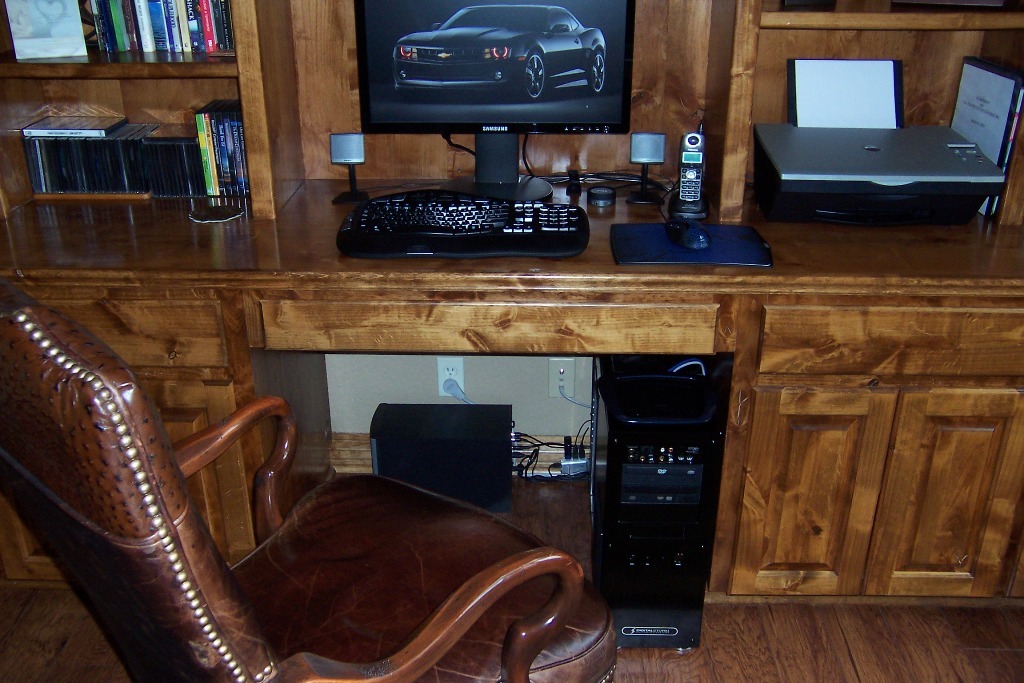
I have mine tucked in this location and it idles at around 35C to 37C. I
have the plastic window side panel removed, 2/120mm top fans drawing
air up and my office stays around 75F all the time. What's your ambient temp in your room?
 |
|
|
|
|
sbq
Newbie
Joined: 10 Nov 2008 Online Status: Offline Posts: 60 |
Quote Reply
Posted: 11 Mar 2010 at 2:00am |
|
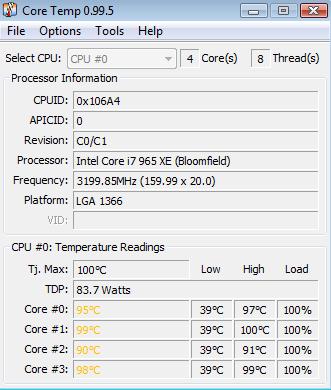
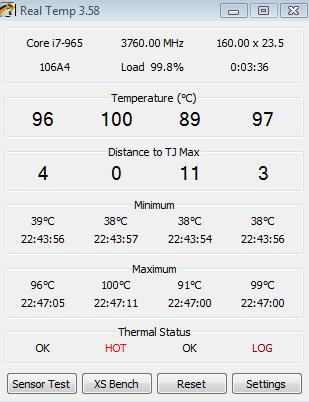
ok, I got Prime95 and ran it with Core Temp monitoring, then Real Temp. Both of those showed me hitting 100+ C with Prime95 using all 4 cores:
  I checked the LC and it appears to be fine. The water pump is pumping, I can see the liquid flowing in the tubes and on the WB on the CPU, and the reservoir is at 3/4 full. I idle at 35 - 40C, so I seem to do fine most of the time, but it seems that if I stress the CPU it causes extreme heat. DS overclocked this i7 965 Extreme to 3.85GHz from it's standard 3.2GHz, and I've heard of others getting a 965 to 4GHz and beyond. Here's what CPUz is showing: 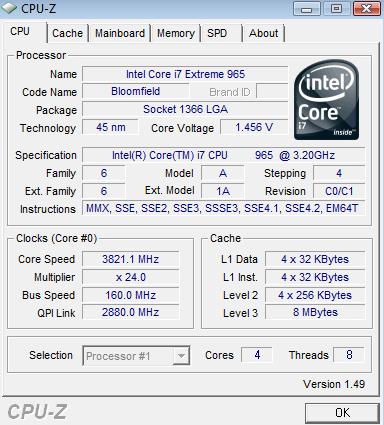 I notice that my core speed is fluctuating, is that normal? |
|
|
|
|
justin.kerr
DS Veteran
Joined: 06 May 2008 Online Status: Offline Posts: 5084 |
Quote Reply
Posted: 11 Mar 2010 at 8:52am |
|
and prime95 does not even put that much stress on the CPU. lol
yeah, that is way too hot
|
|
|
|
|
|
|
|
sbq
Newbie
Joined: 10 Nov 2008 Online Status: Offline Posts: 60 |
Quote Reply
Posted: 11 Mar 2010 at 2:15pm |
|
all 4 cores were doing 100%, so it was stressing them as much as it could. I ran the 64 bit version, and told it to use them all.
|
|
|
|
|
justin.kerr
DS Veteran
Joined: 06 May 2008 Online Status: Offline Posts: 5084 |
Quote Reply
Posted: 11 Mar 2010 at 4:17pm |
|
the one I posted will stress it harder, that is why I posted it, but either way your temps are just stupid high
|
|
|
|
|
|
|
|
sbq
Newbie
Joined: 10 Nov 2008 Online Status: Offline Posts: 60 |
Quote Reply
Posted: 14 Mar 2010 at 11:38am |
|
anyone have any ideas why it would be overheating like this if the liquid cooling seems to be working fine?
|
|
|
|
|
Raif
Senior Member
Joined: 07 Nov 2009 Online Status: Offline Posts: 712 |
Quote Reply
Posted: 14 Mar 2010 at 4:34pm |
|
i don't know if this helps... but i read somewhere a year back that some of the i7 extreme editions were defective with heat issues... send it to ds maybe they can figure it out
|
|
|
2.5 Ghz Core duo
Nvidia 9500 gt 3 gb 1033 Mhz ram if we can't answer a question shoot a e-mail here. [email protected] |
|
|
|
|
justin.kerr
DS Veteran
Joined: 06 May 2008 Online Status: Offline Posts: 5084 |
Quote Reply
Posted: 14 Mar 2010 at 5:05pm |
|
I am guessing if the system cooled well before, and the pump is flowing the fluid, then the water blocked is gummed up/pluged from using colored fluid, the dyes ruin the water blocks afetr a while. |
|
|
|
|
|
|
|
Post Reply
|
| Forum Jump | Forum Permissions You cannot post new topics in this forum You cannot reply to topics in this forum You cannot delete your posts in this forum You cannot edit your posts in this forum You cannot create polls in this forum You cannot vote in polls in this forum |

About Digital Storm
Contact Information
Facility Tour
Financing
Buy Now, Pay Later
Downloads
GSA Schedule
Terms & Conditions
Privacy Policy
Request Help
Call: 1-866-817-8676
(Hours 9AM-5PM PST)





 Topic Options