Case fan recomendationPost Date: 2013-02-22 |
Post Reply 
|
| Author | |
ziggy 
Groupie 
Joined: 07 Jun 2008 Online Status: Offline Posts: 161 |
 Quote Reply Quote Reply
 Topic: Case fan recomendation Topic: Case fan recomendationPosted: 22 Feb 2013 at 6:07pm |
|
My rig is 4 years old and still runs great. I have what they called stage 3 cooling back then. My front fan(2speed Zalman) started to squeal a little and I applied some lube to it and it appears ok. What is a good 2speed or 3speed front case fan.What do you folks here
recommend ? There are quite a few out here.  Edited by ziggy - 22 Feb 2013 at 6:11pm |
|
 |
|
|
DST4ME
DS ELITE 

Joined: 14 Apr 2008 Online Status: Offline Posts: 36758 |
Quote Reply
Posted: 22 Feb 2013 at 6:41pm |
|
We like quiet fans, a good 140mm should give you good flow and little noise, can fit a 140mm?
I don't lower my fans, so I always use one speed, high, but my fans at high are fairly quiet. |
|
|
|
|
DomTheBomb
Groupie
Joined: 19 May 2012 Online Status: Offline Posts: 314 |
Quote Reply
Posted: 22 Feb 2013 at 6:48pm |
|
I used the Corsair Air series fans when I built my desktop. There are quiet and performance versions of their case fans, and they have special high static pressure radiators fans as well. They are fairly quiet and move a lot of air for 120/140mm fans. I'd definitely recommend checking them out.
There aren't different speed settings but each one comes with a resistor pack that you can use to lower the speed. |
|
|
DS x17, 1 Year 5 Months
i7 3720QM (2.6GHz/3.6GHz) 16GB 1600MHz DDR3 Nvidia GTX 680M 4GB 240GB Intel 520 SSD Windows 8.1 Pro |
|
|
|
|
ziggy
Groupie
Joined: 07 Jun 2008 Online Status: Offline Posts: 161 |
Quote Reply
Posted: 22 Feb 2013 at 6:50pm |
|
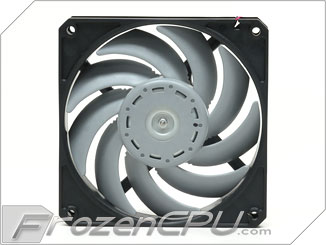
My fans are 120 mm that are in my rig. Scythe Gentle Typhoon 120mm x 25mm Fan - 1850 RPM (D1225C12B5AP-15120mm. Would this single speed fan be ok for the front intake?
 Edited by ziggy - 22 Feb 2013 at 7:00pm |
|
|
|
|
DomTheBomb
Groupie
Joined: 19 May 2012 Online Status: Offline Posts: 314 |
Quote Reply
Posted: 22 Feb 2013 at 7:13pm |
|
I've heard really good things about those fans. Unless your front intake supports a 140mm fan, then yes that fan will be good for the front intake.
|
|
|
DS x17, 1 Year 5 Months
i7 3720QM (2.6GHz/3.6GHz) 16GB 1600MHz DDR3 Nvidia GTX 680M 4GB 240GB Intel 520 SSD Windows 8.1 Pro |
|
|
|
|
ziggy
Groupie
Joined: 07 Jun 2008 Online Status: Offline Posts: 161 |
Quote Reply
Posted: 22 Feb 2013 at 7:27pm |
|
It's a 120mm fan.Thats what is currently in my rig
|
|
|
|
|
DST4ME
DS ELITE
Joined: 14 Apr 2008 Online Status: Offline Posts: 36758 |
Quote Reply
Posted: 22 Feb 2013 at 10:04pm |
|
Scythe Gentle Typhoon are great fans but IMHO they are best used for rads.
Try Nexus 120mm Real Silent case fan I have not used the corsair fans yet but if DTB is sure the 120mm are quiet maybe you can try them, the nexus is a quiet fan and has been around for a long time. |
|
|
|
|
HockeyBuck
DS Veteran 
Joined: 27 Jul 2012 Online Status: Offline Posts: 1608 |
Quote Reply
Posted: 23 Feb 2013 at 12:45am |
|
Bitfenix Spectre Pro....Good fluid dynamic bearings...good CFM and pressure in a quiet well designed fan.
Come in several flavors...Love them... 
You can find them at frozencpu, performancepcs, microcenter, or newegg. Spectre Pro PWM.....http://www.bitfenix.com/global/en/products/accessories/spectre-pro-pwm Spectre Pro..............http://www.bitfenix.com/global/en/products/accessories/spectre-pro Spectre Pro LED......http://www.bitfenix.com/global/en/products/accessories/spectre-pro-led |
|
|
|
|
DST4ME
DS ELITE
Joined: 14 Apr 2008 Online Status: Offline Posts: 36758 |
Quote Reply
Posted: 23 Feb 2013 at 1:08am |
|
spectre are good fans, they push good air, but IMHO they are not as quiet as some other fans, Noiseblocker for example.
|
|
|
|
|
HockeyBuck
DS Veteran
Joined: 27 Jul 2012 Online Status: Offline Posts: 1608 |
Quote Reply
Posted: 23 Feb 2013 at 1:24am |
|
No doubt you are right about even quieter fans to be had...but I value performance over quiet myself.
I have upgraded two DS builds with them in 3 different sizes, and I find Spectre Pro's much quieter than the Zalmans that DS likes to use...and quieter than stock Corsairs too.... We may like our fans windy AND quiet, but our pal ziggy here hasn't expressed a requirement for that yet...lol... 
|
|
|
|
|
DST4ME
DS ELITE
Joined: 14 Apr 2008 Online Status: Offline Posts: 36758 |
Quote Reply
Posted: 23 Feb 2013 at 1:36am |
|
I agree, I take performance over noise myself, and the spectre is a more quiet fan than the ones used here.
|
|
|
|
|
ziggy
Groupie
Joined: 07 Jun 2008 Online Status: Offline Posts: 161 |
Quote Reply
Posted: 23 Feb 2013 at 9:31am |
|
Thanks for the wealth of information!
 I'll probably choose between the Nexus or Spectre. I have to agree that I would take preformance over quiet. I'll probably choose between the Nexus or Spectre. I have to agree that I would take preformance over quiet. 
|
|
|
|
|
DST4ME
DS ELITE
Joined: 14 Apr 2008 Online Status: Offline Posts: 36758 |
Quote Reply
Posted: 23 Feb 2013 at 9:37am |
|
If you want performance over quiet (not saying loud as hell fans) but then look at spectre, corsair, and xigmatek.
as I have mentioned I have not use corsair but the other 2 move good air and are fairly quiet, DTB says he used the corsair and found them quiet, so they must be good also. Edited by DST4ME - 23 Feb 2013 at 9:39am |
|
|
|
|
ziggy
Groupie
Joined: 07 Jun 2008 Online Status: Offline Posts: 161 |
Quote Reply
Posted: 23 Feb 2013 at 4:40pm |
|
Ok now that I have an idea on what brand of fan I want, here's what my Bios said:
CPU fan speed 953 rpm AUX Fan speed 5769 rpm nForce SPP Fan speed 3414 rpm chassis fan speed 1854 rpm so that means that I should get a fan thats running at 1800 rpm(front fan)?
|
|
|
|
|
DST4ME
DS ELITE
Joined: 14 Apr 2008 Online Status: Offline Posts: 36758 |
Quote Reply
Posted: 23 Feb 2013 at 4:59pm |
|
No, you don't need to connect your fan to mobo, those are current settings for what you have.
|
|
|
|
|
ziggy
Groupie
Joined: 07 Jun 2008 Online Status: Offline Posts: 161 |
Quote Reply
Posted: 23 Feb 2013 at 5:29pm |
|
Sorry for my lack of knowledge
Them are just settings on my 680iLT mobo? If I use speed fan would that tell me my fan speeds?
|
|
|
|
|
DST4ME
DS ELITE
Joined: 14 Apr 2008 Online Status: Offline Posts: 36758 |
Quote Reply
Posted: 23 Feb 2013 at 6:14pm |
|
not sure why you want to mess with those fans, cpu fan is your cpu cooler you don't want to mess with that unless you know what you are doing.
I'm not sure why you want to know what speed different fans on your system are running, they have nothing to do with what kinds of fan you can get/add. no need to apologize, we are here to help, we expect you guys to know nothing. Edited by DST4ME - 23 Feb 2013 at 6:14pm |
|
|
|
|
ziggy
Groupie
Joined: 07 Jun 2008 Online Status: Offline Posts: 161 |
Quote Reply
Posted: 23 Feb 2013 at 6:58pm |
|
So DST4ME,no matter what fan I get,In my case it is located on the bottom front of my case and blows air from front to back,It will run at the same speed as my current fan when I connect it?
|
|
|
|
|
DST4ME
DS ELITE
Joined: 14 Apr 2008 Online Status: Offline Posts: 36758 |
Quote Reply
Posted: 23 Feb 2013 at 8:10pm |
|
Well lets say your fan is a 120mm and the screws holes in the case are for a 120mm fan, so you can only put a 120mm fan there.
Now if you have a 120mm fan there but the case has holes for both 120mm and 140mm then you can put one of the two size fan there, a good 140mm would be choice in this scenario. the fan you get will run at it max speed whatever that is, the point here is to get a fan that is more quiet but brings same/more airflow. |
|
|
|
|
ziggy
Groupie
Joined: 07 Jun 2008 Online Status: Offline Posts: 161 |
Quote Reply
Posted: 24 Feb 2013 at 6:53am |
|
I understand what your saying now. Never paid attention if I do have holes for a 140mm fan. If I do then that's the way I will go. Thank you and the rest of the fine folks here for their imput.

|
|
|
|
|
DST4ME
DS ELITE
Joined: 14 Apr 2008 Online Status: Offline Posts: 36758 |
Quote Reply
Posted: 24 Feb 2013 at 10:13am |
|
If you have any question or not sure we are here boss good luck

|
|
|
|
|
Post Reply
|
| Forum Jump | Forum Permissions You cannot post new topics in this forum You cannot reply to topics in this forum You cannot delete your posts in this forum You cannot edit your posts in this forum You cannot create polls in this forum You cannot vote in polls in this forum |

About Digital Storm
Contact Information
Facility Tour
Financing
Buy Now, Pay Later
Downloads
GSA Schedule
Terms & Conditions
Privacy Policy
Request Help
Call: 1-866-817-8676
(Hours 9AM-5PM PST)





 Topic Options