Choosing a MonitorPost Date: 2009-06-17 |
Post Reply 
|
| Author | |
medone 
Newbie 
Joined: 17 Jun 2009 Online Status: Offline Posts: 10 |
 Quote Reply Quote Reply
 Topic: Choosing a Monitor Topic: Choosing a MonitorPosted: 17 Jun 2009 at 12:55pm |
|
I'm a medic currently deployed in Iraq, however I am going to be home within the next month and a half. I've been thinking about putting together a dream system with a budget of about $3,500 (limit of $4,000).
I've posted in the general discussion a brief history on what I'm looking for and a bit about myself but I was advised this was the place to go once I've decided on a few things in reference to my gaming machine. I am not very enlightened to the finer details of a monitor and I don't know which one is best for me. I was hoping someone would give me a few tips on choosing a monitor so that I can continue further in the search for my dream gaming machine. |
|
 |
|
|
DST4ME
DS ELITE 

Joined: 14 Apr 2008 Online Status: Offline Posts: 36758 |
Quote Reply
Posted: 17 Jun 2009 at 1:01pm |
|
thats tough to do, how much do you want to spend on a monitor?
for around $2800 I can put you in a pc that will run a monitor with resolution and 1900 x 1200 and whatever else you throw at it. thats basically a 24" monitor. Edited by DST4ME - 17 Jun 2009 at 1:02pm |
|
|
|
|
medone
Newbie
Joined: 17 Jun 2009 Online Status: Offline Posts: 10 |
Quote Reply
Posted: 17 Jun 2009 at 1:13pm |
I'm willing to spend up to around $500 on a monitor (as long as the total of the computer doesn't surpass 3,500 - 4,000) |
|
|
|
|
DST4ME
DS ELITE
Joined: 14 Apr 2008 Online Status: Offline Posts: 36758 |
Quote Reply
Posted: 17 Jun 2009 at 1:20pm |
|
Air cooled:
Here you go Ticket# 295548 --- Price: $3129 (To see this build click here) Price after current promotion $2829 Copy of Specifications: Chassis Model: Cooler Master HAF 932 Exterior Finish: - Standard Factory Finish Interior Finish: - Standard Factory Finish Trim Accents: - Standard Factory Finish Processor: Intel Core i7 920 2.66GHz (Quad Core) Motherboard: EVGA X58 3X SLI (Intel X58 Chipset) (Supports Triple SLI or CrossFire) System Memory: 6GB DDR3 1333MHz Digital Storm Certified by mushkin enhanced (Highly Recommended) (Hand Tested) Power Supply: 1000W Corsair HX (Dual/Triple/Quad SLI Compatible) (Silent Edition) Card Reader: - No Thanks Hard Drive Set 1: Operating System: 1x (120GB Solid State (By: OCZ) Vertex Series (Model: OCZSSD2-1VTX120G) Set 1 Raid Options: - No Thanks Hard Drive Set 2: Multimedia\Data: 1x (500GB Western Digital (16MB Cache) (7200 RPM) (SATA) Hard Drive Set 3: Backup\Misc.: - No Thanks Optical Drive 1: DVD±R/RW/CD-R/RW (DVD Writer 20x / CD-Writer 48x) Optical Drive 2: - No Thanks Internet Access: High Speed Network Port (Supports High-Speed Cable / DSL / Network Connections) Video Card: 2x SLI Dual (NVIDIA GeForce GTX 275 896MB (Includes PhysX Technology) Add-on Card: - No Thanks Sound Card: Integrated Motherboard Audio Extreme Cooling: AIR: Stage 2: Noctua NH-U12P High Performance Cooler (Compatible With ONLY i7 Processors) Liquid Color:- Not Applicable, I do not have a H20: Stage 3 Cooling System Selected Chassis Airflow: Standard Factory Chassis Fans Internal Lighting: Internal Chassis Lighting System (Red) Enhancements: - No Thanks Chassis Mods: - No Thanks Boost Processor: Stage 1: Overclock the processor between 3.3GHz to 3.9GHz (Requires Air Cooling Upgrade) Boost Video Card: - No Thanks, Please do not overclock my video card(s) Boost Memory: Memory Fan Kit Only (Does not include memory overclocking service) Tweak Windows: - No Thanks, Please do not tweak the services on the operating system Windows OS: Microsoft Windows Vista Home Premium (64-Bit Edition) Restore Kit: Digital Storm Specialized Recovery System (DVD Image Based) Virus Protection: - No Thanks Office: - No Thanks Benchmarking: - No Thanks Install/Test Game: - No Thanks LCD Display: - No Thanks Surge Shield: - No Thanks Speakers: - No Thanks Keyboard: - No Thanks Mouse: - No Thanks External Storage: - No Thanks Exclusive T-Shirt: - No Thanks Priority Build: - No Thanks, Ship Within 5-10 Business Days After Order Is Successfully Processed Warranty: 3 Year Platinum Care Extended Parts & Labor Warranty --------------------------------------------------------- Liquid cooled: Here you go Ticket# 295549 --- Price: $3295 (To see this build click here) Price after current promotion $2995 Copy of Specifications: Chassis Model: Cooler Master HAF 932 Exterior Finish: - Standard Factory Finish Interior Finish: - Standard Factory Finish Trim Accents: - Standard Factory Finish Processor: Intel Core i7 920 2.66GHz (Quad Core) Motherboard: EVGA X58 3X SLI (Intel X58 Chipset) (Supports Triple SLI or CrossFire) System Memory: 6GB DDR3 1333MHz Digital Storm Certified by mushkin enhanced (Highly Recommended) (Hand Tested) Power Supply: 1000W Corsair HX (Dual/Triple/Quad SLI Compatible) (Silent Edition) Card Reader: - No Thanks Hard Drive Set 1: Operating System: 1x (120GB Solid State (By: OCZ) Vertex Series (Model: OCZSSD2-1VTX120G) Set 1 Raid Options: - No Thanks Hard Drive Set 2: Multimedia\Data: 1x (500GB Western Digital (16MB Cache) (7200 RPM) (SATA) Hard Drive Set 3: Backup\Misc.: - No Thanks Optical Drive 1: DVD±R/RW/CD-R/RW (DVD Writer 20x / CD-Writer 48x) Optical Drive 2: - No Thanks Internet Access: High Speed Network Port (Supports High-Speed Cable / DSL / Network Connections) Video Card: 2x SLI Dual (NVIDIA GeForce GTX 275 896MB (Includes PhysX Technology) Add-on Card: - No Thanks Sound Card: Integrated Motherboard Audio Extreme Cooling: H20: Stage 3: High-Performance Liquid Chilled FrostBite System For CPU Liquid Color:UV Redish Pink: Medium Glowing Non-conductive Fluid (Requires H20: Stage 3 & UV Lighting) Chassis Airflow: Standard Factory Chassis Fans Internal Lighting: Internal Chassis Lighting System (UV) (Creates Glowing Effect For H20: Stage 3 UV Fluid) Enhancements: - No Thanks Chassis Mods: - No Thanks Boost Processor: Stage 1: Overclock the processor between 3.3GHz to 3.9GHz (Requires Air Cooling Upgrade) Boost Video Card: - No Thanks, Please do not overclock my video card(s) Boost Memory: Memory Fan Kit Only (Does not include memory overclocking service) Tweak Windows: - No Thanks, Please do not tweak the services on the operating system Windows OS: Microsoft Windows Vista Home Premium (64-Bit Edition) Restore Kit: Digital Storm Specialized Recovery System (DVD Image Based) Virus Protection: - No Thanks Office: - No Thanks Benchmarking: - No Thanks Install/Test Game: - No Thanks LCD Display: - No Thanks Surge Shield: - No Thanks Speakers: - No Thanks Keyboard: - No Thanks Mouse: - No Thanks External Storage: - No Thanks Exclusive T-Shirt: - No Thanks Priority Build: - No Thanks, Ship Within 5-10 Business Days After Order Is Successfully Processed Warranty: 3 Year Platinum Care Extended Parts & Labor Warranty --------------------------------------------------------- the above system are meant for 1900 x 1200 resolutions, if your resolution is going to be lower, you need to drop one of the two 275 GTX cards Edited by DST4ME - 17 Jun 2009 at 1:22pm |
|
|
|
|
medone
Newbie
Joined: 17 Jun 2009 Online Status: Offline Posts: 10 |
Quote Reply
Posted: 17 Jun 2009 at 1:29pm |
|
Thank you very much. I'm totally stoked about this! It makes me look forward to coming home from Iraq that much more.
:) I have a question though...is there a difference between air and liquid cooled? Is one more efficient than the other? |
|
|
|
|
GeneralShrooms
Groupie 
Joined: 19 May 2009 Online Status: Offline Posts: 197 |
Quote Reply
Posted: 17 Jun 2009 at 1:32pm |
|
Liquid cooling yields better temps that can allow a better OC or a better lifespan, there is little maintenance required.
I think DSO is a hero magnet. Edited by GeneralShrooms - 17 Jun 2009 at 1:34pm |
|
|
|
|
DST4ME
DS ELITE
Joined: 14 Apr 2008 Online Status: Offline Posts: 36758 |
Quote Reply
Posted: 17 Jun 2009 at 1:36pm |
|
Ya LC in this case will give you better temps, but if you like to the LC build you can add stage 2 OC, guaranteeing you an OC of 4.0GHz or higher.
the better temps can lead to better OC also as mentioned |
|
|
|
|
Sarah
Newbie
Hardcore Gamer Joined: 07 Jun 2008 Online Status: Offline Posts: 879 |
Quote Reply
Posted: 17 Jun 2009 at 1:48pm |
|
Hey medone, when you are ready to place that order, give me a call, I will get you all taken care of.
|
|
|
|
|
medone
Newbie
Joined: 17 Jun 2009 Online Status: Offline Posts: 10 |
Quote Reply
Posted: 17 Jun 2009 at 1:54pm |
|
Thanks to all of you so much. I've had a really tough time this passed year with this deployment and personal issues throughout the time I've been here in Iraq. I've actually found myself looking forward to coming home for more than just picking up the pieces of my broken marriage.
I can't wait to get everything together and I'm totally going with the liquid cooling. My father has control over my bank account and power of attorney while I've been gone so I will have to go through him to get all the financial stuff squared away. I don't get a lot of spare time or decent internet out here, so I don't get a lot of connection back home. But the PX sells PC gaming magazines that I've pretty much been addicted to. In one of the magazines, they had an entire page advertising this website and I have to say I am happy with the information and feedback I've received from you guys so far! I've got your number down, Sarah and I will call you as soon as I get everything taken care of. Thanks again guys! |
|
|
|
|
DST4ME
DS ELITE
Joined: 14 Apr 2008 Online Status: Offline Posts: 36758 |
Quote Reply
Posted: 17 Jun 2009 at 1:57pm |
|
Our pleasure and Good luck on everything, sorry about the wife but if you ask me, you deserve better.
 
we are here for you if you ever just want to talk Edited by DST4ME - 17 Jun 2009 at 1:57pm |
|
|
|
|
medone
Newbie
Joined: 17 Jun 2009 Online Status: Offline Posts: 10 |
Quote Reply
Posted: 17 Jun 2009 at 1:57pm |
|
Oh, I have one more question about the LC system. Since the build has 2 video cards, is it okay that the cooling system is only for the CPU? Do I need to worry about upgrading the LC to CPU and 2 video cards?
|
|
|
|
|
medone
Newbie
Joined: 17 Jun 2009 Online Status: Offline Posts: 10 |
Quote Reply
Posted: 17 Jun 2009 at 1:59pm |
Thank you so much man! As soon as I get home, I will take pictures with my new system and put them up here. I don't think I'm going to get any sleep tonight just thinking about it. 45 days and a wake up till I go home! |
|
|
|
|
BillDempsey
Senior Member 
Joined: 31 Jan 2009 Online Status: Offline Posts: 399 |
Quote Reply
Posted: 17 Jun 2009 at 2:00pm |
|
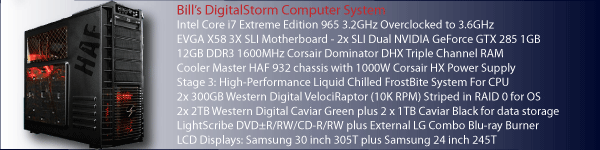
Here's my own experience with my DS system(s). LC affects the load temps much more than the idle temps on the CPU. In my case, the CPU idle temps were identical (air was 1c lower) between a really good air cooler (Noctua NH-U12P) and the basic Frostbite LC. However when the computer is working really hard (heavy load), the LC system pulled into the lead far enough to keep my own system from overheating. Since the load temps are the ones you really need to worry about, LC definitely helps there, especially with overclocked CPUs.
Is LC worth the extra hassle vs just accepting a slightly lower overclock with air cooling? That's a question only you can answer. LC definitely cools better under load and looks better, but it's your time and money. |
|
|
|
|
|
|
DST4ME
DS ELITE
Joined: 14 Apr 2008 Online Status: Offline Posts: 36758 |
Quote Reply
Posted: 17 Jun 2009 at 2:03pm |
|
for GPUs you don't really need to LC the LC for CPU is a good idea as bill said, it makes a difference in load temps
\
get home safe Edited by DST4ME - 17 Jun 2009 at 2:03pm |
|
|
|
|
Kraven
Newbie
Joined: 17 Jun 2009 Online Status: Offline Posts: 10 |
Quote Reply
Posted: 17 Jun 2009 at 5:31pm |
|
Hi everyone :) quick question? what monitors (brands,size etc..) would you recommend? i will be going to buy a new LCD monitor to go with my new DS system when it arrives and am looking for advice? Thank you for your time, Kraven
|
|
|
|
|
DST4ME
DS ELITE
Joined: 14 Apr 2008 Online Status: Offline Posts: 36758 |
Quote Reply
Posted: 17 Jun 2009 at 5:32pm |
|
you should have figured the monitor first, cause that decides what GPUs to get.
so what GPU/s did you get? Edited by DST4ME - 17 Jun 2009 at 5:32pm |
|
|
|
|
Kraven
Newbie
Joined: 17 Jun 2009 Online Status: Offline Posts: 10 |
Quote Reply
Posted: 17 Jun 2009 at 5:40pm |
|
Nvidia GTX 285 with 2 GB ram
|
|
|
|
|
DST4ME
DS ELITE
Joined: 14 Apr 2008 Online Status: Offline Posts: 36758 |
Quote Reply
Posted: 17 Jun 2009 at 5:43pm |
|
as I mentioned in the other thread, I would change that to a 275 and save the money since the difference is like 4 fps.
anyways with either card you best go with a 22" monitor that has no more then 1600 x 1200 resolution. with your 750w PSU, you can at least sli 2 x 275, you won't want to sli 2 x 285 with that PSU. |
|
|
|
|
Kraven
Newbie
Joined: 17 Jun 2009 Online Status: Offline Posts: 10 |
Quote Reply
Posted: 17 Jun 2009 at 5:46pm |
|
Thanks for the info DST4ME, it's appreciated :)
|
|
|
|
|
DST4ME
DS ELITE
Joined: 14 Apr 2008 Online Status: Offline Posts: 36758 |
Quote Reply
Posted: 17 Jun 2009 at 5:49pm |
|
My pleasure boss
|
|
|
|
|
Post Reply
|
| Forum Jump | Forum Permissions You cannot post new topics in this forum You cannot reply to topics in this forum You cannot delete your posts in this forum You cannot edit your posts in this forum You cannot create polls in this forum You can vote in polls in this forum |

About Digital Storm
Contact Information
Facility Tour
Financing
Buy Now, Pay Later
Downloads
GSA Schedule
Terms & Conditions
Privacy Policy
Request Help
Call: 1-866-817-8676
(Hours 9AM-5PM PST)





 Topic Options