CPU FAN ERRORPost Date: 2013-03-11 |
Post Reply 
|
Page 12> |
| Author | |
SpaceManCraig 
Newbie 
Joined: 28 Feb 2013 Online Status: Offline Posts: 48 |
 Quote Reply Quote Reply
 Topic: CPU FAN ERROR Topic: CPU FAN ERRORPosted: 11 Mar 2013 at 9:31pm |
|
I just bought a computer first day on it.. and my screen just shut off then a screen called like agent setup comes on then a page with all my stuff in my computer and at the bottom it says CPU FAN ERROR?
|
|
 |
|
|
DST4ME
DS ELITE 

Joined: 14 Apr 2008 Online Status: Offline Posts: 36758 |
Quote Reply
Posted: 11 Mar 2013 at 11:09pm |
|
Did your bios reset to default?
are all your fans running? |
|
|
|
|
Brandon
Groupie 
Joined: 02 Feb 2013 Online Status: Offline Posts: 275 |
Quote Reply
Posted: 11 Mar 2013 at 11:12pm |
|
I am sure DST4ME will chime in here, but from what I have read and troubleshooted, I have gotten that error as well. Now we all need to know what Motherboard you are using to move forward and help you. But in the meantime I will assist you with what little knowledge I know from having that error. I have the Asus Rampage Extreme IV, and I am not sure and I dont see why not but the user interface when entering the Motherboard bios setup would be the same layout, dont quote me on that. But when I got that error the first time, DS had walked me through and under your cpu fan monitor's theres an option to "ignore" and you have to select that and save it, but that of course is because I have liquid cooling so the fan doesn't exist. Now that was for the cooling side of things. Later on I got that same error again, computer shuts down and you think your computer is just kuput, I removed all the RAM cards out and tested 1 by one to see if the "cpu fan error" went away, which of course it did with 1 stick triggering the "cpu fan error". Fixed that and then things go smooth and then again that fan error again. Noticed on the board that 2 of the PCIE slots were not lit up and getting no power, so yeah the motherboard was bad and just crapping out slowly one thing after another. So theres my 2 cents hope this helps. BTW I sent the computer back, changing a new MOBO with liquid cooled GPU,CPU and chipset is no easy task.
|
|
|
|
|
Brandon
Groupie
Joined: 02 Feb 2013 Online Status: Offline Posts: 275 |
Quote Reply
Posted: 11 Mar 2013 at 11:13pm |
|
@DST4ME, I think he might run into what you and I trouble shot because the description of what happened to him sounds spot on with the cpu fan error and everything shutting off
|
|
|
|
|
DST4ME
DS ELITE
Joined: 14 Apr 2008 Online Status: Offline Posts: 36758 |
Quote Reply
Posted: 11 Mar 2013 at 11:16pm |
|
Well it could be, but you have very different builds, his could just be a fan, but before we ignore it we want to make sure all fans are running, all temps are where they are suppose to be.
Having said that, since his pc shutdown, it could be many things from heat to oc settings. @SpaceManCraig if you can post your specs also that would be great. Edited by DST4ME - 11 Mar 2013 at 11:17pm |
|
|
|
|
SpaceManCraig
Newbie
Joined: 28 Feb 2013 Online Status: Offline Posts: 48 |
Quote Reply
Posted: 11 Mar 2013 at 11:17pm |
|
I'm using SaberTooth Z77 every time i start computer i get that thing with all my specs and at bottom it says CPU FAN ERROR? i'm running good temp tho.
|
|
|
|
|
DST4ME
DS ELITE
Joined: 14 Apr 2008 Online Status: Offline Posts: 36758 |
Quote Reply
Posted: 11 Mar 2013 at 11:18pm |
|
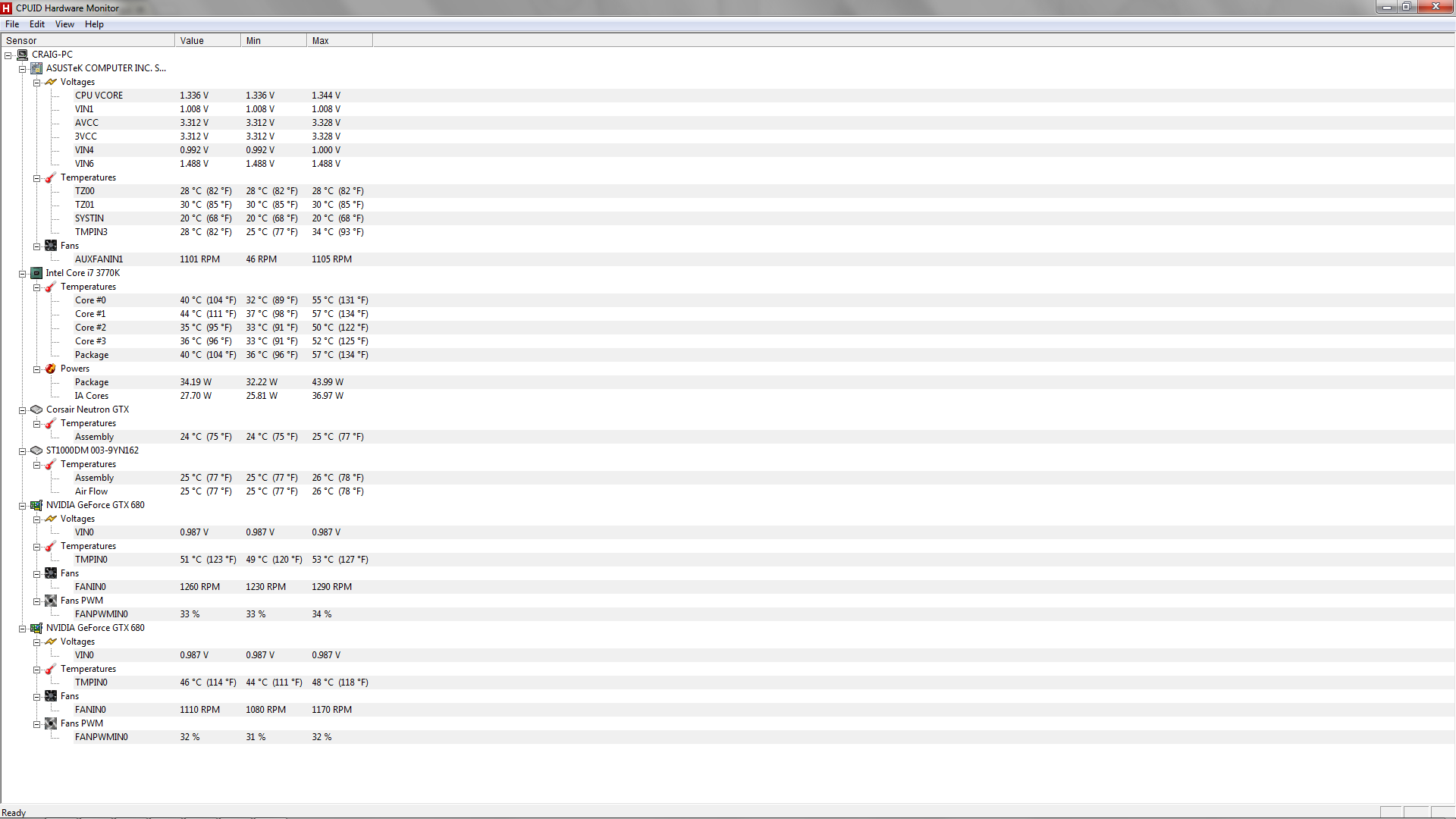
Screenshot of HWMonitor and your specs please.
Did you get the pc oced? Edited by DST4ME - 11 Mar 2013 at 11:18pm |
|
|
|
|
SpaceManCraig
Newbie
Joined: 28 Feb 2013 Online Status: Offline Posts: 48 |
Quote Reply
Posted: 11 Mar 2013 at 11:28pm |
|
Yeah i did. How to do i get to HWMonitor
|
|
|
|
|
SpaceManCraig
Newbie
Joined: 28 Feb 2013 Online Status: Offline Posts: 48 |
Quote Reply
Posted: 11 Mar 2013 at 11:28pm |
|
All my fans are running btw.
|
|
|
|
|
SpaceManCraig
Newbie
Joined: 28 Feb 2013 Online Status: Offline Posts: 48 |
Quote Reply
Posted: 11 Mar 2013 at 11:39pm |
|
My Temptures on my cores are like 40 and i'm playing battle field 3 ultra settings.
|
|
|
|
|
DST4ME
DS ELITE
Joined: 14 Apr 2008 Online Status: Offline Posts: 36758 |
Quote Reply
Posted: 11 Mar 2013 at 11:40pm |
|
Click on the link in my previous post and download and install it and then run it, what are you using for temps?
Also is your pc oced right now? if yes what are you checking it with? |
|
|
|
|
SpaceManCraig
Newbie
Joined: 28 Feb 2013 Online Status: Offline Posts: 48 |
Quote Reply
Posted: 11 Mar 2013 at 11:47pm |
|
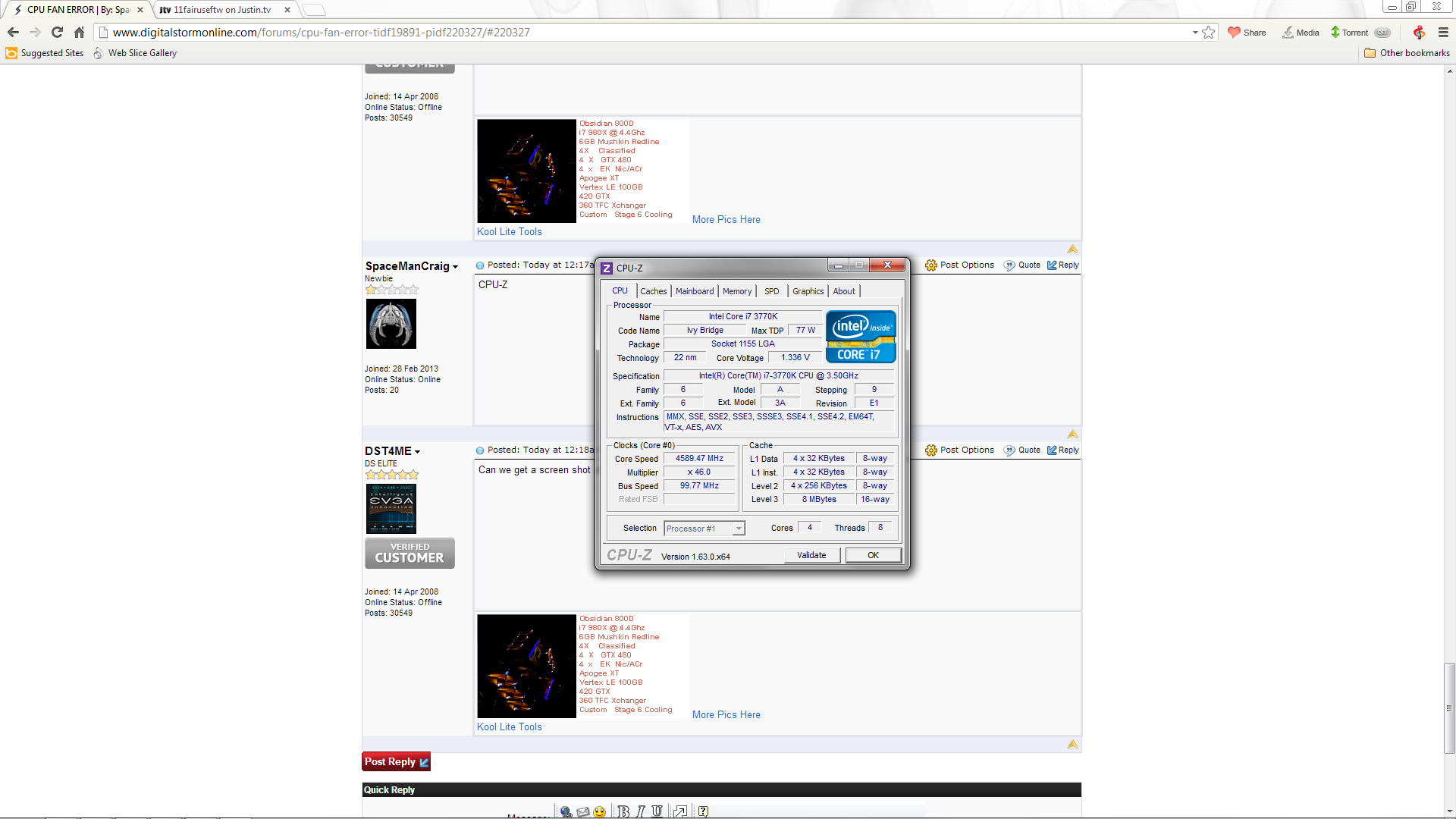
I'm using HWMonitor to check my temps and I'm over clocked. from 3.5 to 4.7 or so.
|
|
|
|
|
DST4ME
DS ELITE
Joined: 14 Apr 2008 Online Status: Offline Posts: 36758 |
Quote Reply
Posted: 11 Mar 2013 at 11:50pm |
|
What are you checking your oc with right now?
can you give us a screen shot of your hw with all the temps showing? |
|
|
|
|
SpaceManCraig
Newbie
Joined: 28 Feb 2013 Online Status: Offline Posts: 48 |
Quote Reply
Posted: 11 Mar 2013 at 11:56pm |
|
|
|
|
|
SpaceManCraig
Newbie
Joined: 28 Feb 2013 Online Status: Offline Posts: 48 |
Quote Reply
Posted: 12 Mar 2013 at 12:05am |
|
There
|
|
|
|
|
DST4ME
DS ELITE
Joined: 14 Apr 2008 Online Status: Offline Posts: 36758 |
Quote Reply
Posted: 12 Mar 2013 at 12:14am |
|
Great keep that open.
Now what are you using to see your oc right now? |
|
|
|
|
SpaceManCraig
Newbie
Joined: 28 Feb 2013 Online Status: Offline Posts: 48 |
Quote Reply
Posted: 12 Mar 2013 at 12:17am |
|
CPU-Z
|
|
|
|
|
DST4ME
DS ELITE
Joined: 14 Apr 2008 Online Status: Offline Posts: 36758 |
Quote Reply
Posted: 12 Mar 2013 at 12:18am |
|
Can we get a screen shot of that please?
|
|
|
|
|
SpaceManCraig
Newbie
Joined: 28 Feb 2013 Online Status: Offline Posts: 48 |
Quote Reply
Posted: 12 Mar 2013 at 12:30am |
|
|
|
|
|
DST4ME
DS ELITE
Joined: 14 Apr 2008 Online Status: Offline Posts: 36758 |
Quote Reply
Posted: 12 Mar 2013 at 12:43am |
|
ALT + Prnt Screen will copy just the window your cursor is on.
ok oc looks right, temps look good. so what you can do is go to your bios and disable the fan. but we want to make sure nothing is wrong. to test temps you can download and run fah, once it runs an smp and gpu clients check your temps, if any temps go above 85c you got a problem there. below is a diagram that shows you which connector the error is for: 
you can wait till tomorrow and have DS show you where to disable it. Edited by DST4ME - 12 Mar 2013 at 12:44am |
|
|
|
|
SpaceManCraig
Newbie
Joined: 28 Feb 2013 Online Status: Offline Posts: 48 |
Quote Reply
Posted: 12 Mar 2013 at 12:52am |
|
I'll run it tonight and see what happens
|
|
|
|
|
SpaceManCraig
Newbie
Joined: 28 Feb 2013 Online Status: Offline Posts: 48 |
Quote Reply
Posted: 12 Mar 2013 at 12:55am |
|
Looks to go to about 71 when i do that like 65-71
|
|
|
|
|
DST4ME
DS ELITE
Joined: 14 Apr 2008 Online Status: Offline Posts: 36758 |
Quote Reply
Posted: 12 Mar 2013 at 12:56am |
|
Just run it for an hour, it stress cpu/gpu like nothing else, keep a close eye on temps, hdd/ssd temps are not affected or important for this test.
also tell me what if anything is connected to the cpu fan connector. |
|
|
|
|
SpaceManCraig
Newbie
Joined: 28 Feb 2013 Online Status: Offline Posts: 48 |
Quote Reply
Posted: 12 Mar 2013 at 12:58am |
|
Could it just be a bug or something cause everything has been fine bro i was playing Battle field ultra settings all day.
|
|
|
|
|
SpaceManCraig
Newbie
Joined: 28 Feb 2013 Online Status: Offline Posts: 48 |
Quote Reply
Posted: 12 Mar 2013 at 1:02am |
|
Watcha think?
|
|
|
|
|
DST4ME
DS ELITE
Joined: 14 Apr 2008 Online Status: Offline Posts: 36758 |
Quote Reply
Posted: 12 Mar 2013 at 1:06am |
|
I need to know if anything is connected to your cpu fan connnector in the diagram and also I need to see a screen shot of hw after its been open for an hour and during that hour I need fah to be folding on smp and both gpus.
If nothing is connected to the cpu fan connector and your temps are all below 85c after fah was running for an hour, then I would say its nothing, and to just disable that fan connector in the bios. Edited by DST4ME - 12 Mar 2013 at 1:07am |
|
|
|
|
SpaceManCraig
Newbie
Joined: 28 Feb 2013 Online Status: Offline Posts: 48 |
Quote Reply
Posted: 12 Mar 2013 at 1:07am |
|
ah? I'm confused lol.. Do you have Skype or something?
|
|
|
|
|
DST4ME
DS ELITE
Joined: 14 Apr 2008 Online Status: Offline Posts: 36758 |
Quote Reply
Posted: 12 Mar 2013 at 1:08am |
|
No sorry I don't use anything like that. this is about as good as it gets.
What are you confused about? |
|
|
|
|
SpaceManCraig
Newbie
Joined: 28 Feb 2013 Online Status: Offline Posts: 48 |
Quote Reply
Posted: 12 Mar 2013 at 1:12am |
|
There is a little fan on my mother board it's about a 40m fan or something . I mean all the fans are running fine.
|
|
|
|
|
SpaceManCraig
Newbie
Joined: 28 Feb 2013 Online Status: Offline Posts: 48 |
Quote Reply
Posted: 12 Mar 2013 at 1:26am |
|
So?
|
|
|
|
|
DST4ME
DS ELITE
Joined: 14 Apr 2008 Online Status: Offline Posts: 36758 |
Quote Reply
Posted: 12 Mar 2013 at 1:36am |
|
Ok so I'm clear, you are saying there is a 40mm fan connected to the cpu fan connector in the diagram?
|
|
|
|
|
SpaceManCraig
Newbie
Joined: 28 Feb 2013 Online Status: Offline Posts: 48 |
Quote Reply
Posted: 12 Mar 2013 at 1:38am |
|
i believe so
|
|
|
|
|
DST4ME
DS ELITE
Joined: 14 Apr 2008 Online Status: Offline Posts: 36758 |
Quote Reply
Posted: 12 Mar 2013 at 1:40am |
|
LOL you don't sound so sure.
if that is the fan thats connected to it and its not running, then that fan needs to be changed and you need to talk to DS about it. |
|
|
|
|
SpaceManCraig
Newbie
Joined: 28 Feb 2013 Online Status: Offline Posts: 48 |
Quote Reply
Posted: 12 Mar 2013 at 1:43am |
|
it's running looking right at it bro
|
|
|
|
|
SpaceManCraig
Newbie
Joined: 28 Feb 2013 Online Status: Offline Posts: 48 |
Quote Reply
Posted: 12 Mar 2013 at 1:45am |
|
it right under my cpu
|
|
|
|
|
Post Reply
|
Page 12> |
| Forum Jump | Forum Permissions You cannot post new topics in this forum You cannot reply to topics in this forum You cannot delete your posts in this forum You cannot edit your posts in this forum You cannot create polls in this forum You cannot vote in polls in this forum |

About Digital Storm
Contact Information
Facility Tour
Financing
Buy Now, Pay Later
Downloads
GSA Schedule
Terms & Conditions
Privacy Policy
Request Help
Call: 1-866-817-8676
(Hours 9AM-5PM PST)





 Topic Options
