Electrical buzzing sound while playing gamesPost Date: 2012-10-01 |
Post Reply 
|
| Author | |
Trumpeteer23 
Newbie 

Joined: 11 May 2012 Online Status: Offline Posts: 40 |
 Quote Reply Quote Reply
 Topic: Electrical buzzing sound while playing games Topic: Electrical buzzing sound while playing gamesPosted: 01 Oct 2012 at 6:13pm |
|
Hi,
So far, my x15E has been outstanding. Plays any game I install, and runs them all on max settings with a fair amount of ease. Just a quick question--I only started noticing that when I play games, I get a soft electrical sounding buzz coming from the left side of my laptop, near the CPU and above where the battery is (already tried removing the battery, and nothing changed). When I put my ear up to the bottom, the source seems to be right on my CPU. This only happens when playing a game. While idling or surfing the internet or listening to music, it's completely quiet, but only when the PC starts using it's GPU (675M) does it begin to buzz. I tried an experiment and got it to stop for like a millisecond. I plugged my mouse into the USB 3 on the left side of the laptop, and right when I clicked it in, it stopped for a second (I guess because it had process for a second that something was being plugged in), giving me the theory that's it's electrical and not something else. Is this normal... should I be worried... is there anything I can do? ALSO (one more stupid question), I dled a beta for Hawken, which then had me reboot my comp. Upon rebooting, it turned to an AMD Processor Driver screen, asking me if I would accept the terms and conditions. I said "no" because I don't need an AMD driver for an Intel i7, haha. Have no idea why the heck it even downloaded this in the first place, but... This couldn't screw anything up, could it? Thanks! T. |
|
 |
|
|
bprat22
DS ELITE 
DigitalStorm East -- (Unofficially!)
Joined: 08 Jun 2011 Online Status: Offline Posts: 20391 |
Quote Reply
Posted: 02 Oct 2012 at 2:20am |
|
Off hand it sounds like the cpu or gpu cooling fan is getting noisy. I would call DS tech support and have them walk you through checking it.
Good luck. |
|
|
|
|
Trumpeteer23
Newbie
Joined: 11 May 2012 Online Status: Offline Posts: 40 |
Quote Reply
Posted: 02 Oct 2012 at 7:30am |
|
If it helps any, it kinda sounds like a (very soft) fluorescent light bulb sound. I don't know... maybe there is just some dust or cat hair in the fan area, but wouldn't it make the sound all the time, not just when I game? Maybe it's because it's using a lot more power and then the fans speed up and it's creating that sound. Hopefully DS will know what I should do, haha :)
|
|
|
|
|
Bobby
Groupie 
Joined: 16 May 2012 Online Status: Offline Posts: 322 |
Quote Reply
Posted: 02 Oct 2012 at 8:51am |
|
The only electrical hum I can think of for your laptop would be the power brick or a 60cycle hum coming through your speakers. Plugging in headphones would isolate the speakers.
I also think bprat22 is correct about the fans. I'd flip the thing over and remove the cover and blow out the fans and heat sink radiators with canned air. Using a #0 philips screw driver, just verify all the heat sink screws are secure. I've heard of a couple working loose from the factory which may cause noise and also making them run hotter. If that doesn't help....I'd ring up DS. With regard to the beta testing. I don't think you screwed anything up. If you are out of the beta and not playing the game, I'd just make sure it didn't leave something running on startup and leave some process running in the background. You can look under running proceeses or msconfig to see if it left anything on your machine
|
|
|
|
|
Trumpeteer23
Newbie
Joined: 11 May 2012 Online Status: Offline Posts: 40 |
Quote Reply
Posted: 02 Oct 2012 at 10:21pm |
|
Problem solved. I opened up my laptop and thoroughly cleaned the fans and vents, tightened up a few semi-not tight screws. Had no effect on the buzz. I then tried to run a game with just the battery, and the buzz was gone. I plugged my comp in mid-game and the buzz reappeared. I guess this is just how it is. There is an unavoidable electronic sound when running games while plugged in. Now, this electronic noise might not even be noticed by most... I just randomly noticed it when my room was really quiet, and the game volume was pretty much nonexistent. This really isn't an issue, I just wanted to make sure nothing was amiss with my comp.
Game on! T. |
|
|
|
|
Bobby
Groupie
Joined: 16 May 2012 Online Status: Offline Posts: 322 |
Quote Reply
Posted: 03 Oct 2012 at 7:46am |
|
You probably have a line circuit in your house that is "dirty"......"dirty" meaning electrical noise in the line. Could be you're plugged into the same circuit as big appliances or a high resistance line.
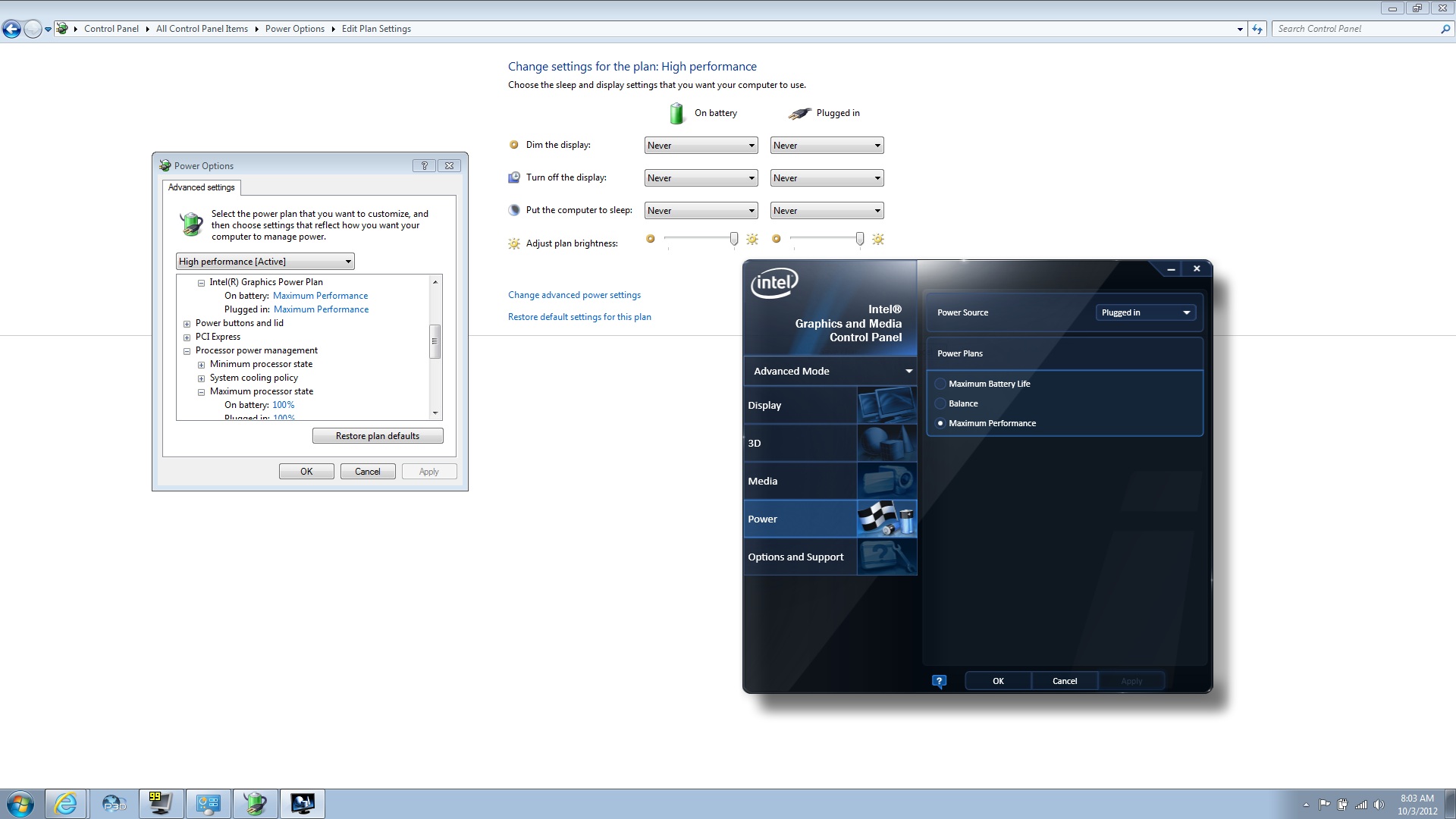
I'd try 2 things......one, move to a different house circuit in a different room and see if it goes away, or, second....buy an electrical noise line filter. I'm also a ham radio operator and in the old days we had dirty house lines and that fixed the issue. I haven't used one in ages so I can't recommend one. Perhaps DS tech support can if you call them. Good you got to those loose screws sooner than later. You saved over heating issues down the road. edit: I forgot one thing. When your running on battery only, the laptop goes into power saving mode and you're running on the Intel graphics only so the GPU fan is probably not even spinning up and the CPU is slowing down. Before I bought that line filter, I'd change the power setting to maximum performance while on battery. If the sound comes back while on battery, then you know it's the sound of the fans spinning up.
Edited by Bobby - 03 Oct 2012 at 7:57am |
|
|
|
|
Bobby
Groupie
Joined: 16 May 2012 Online Status: Offline Posts: 322 |
Quote Reply
Posted: 03 Oct 2012 at 8:05am |
|
Have to make it big to read.....scroll across.....
 Edited by Bobby - 03 Oct 2012 at 8:08am |
|
|
|
|
Bobby
Groupie
Joined: 16 May 2012 Online Status: Offline Posts: 322 |
Quote Reply
Posted: 03 Oct 2012 at 8:35am |
|
I just noticed....on that last picture of the Intel Graphics control panel....on the top right where the drop down says "Plugged In" change that to battery, then hit apply. I've already done that although I rarely run on battery because, at these power settings, i'd probably get 20 minutes of battery life

|
|
|
|
|
Trumpeteer23
Newbie
Joined: 11 May 2012 Online Status: Offline Posts: 40 |
Quote Reply
Posted: 03 Oct 2012 at 9:36pm |
|
can dirty outlets cause damage?
|
|
|
|
|
Bobby
Groupie
Joined: 16 May 2012 Online Status: Offline Posts: 322 |
Quote Reply
Posted: 03 Oct 2012 at 10:26pm |
|
No...they just tend to induce noise into your circuits. Either static or 60cycle hum. The noise you are suggesting sounds like 60cycle hum, although that would be coming through your speakers, even with the volume off.
Noisy electrical lines won't do damage unless there are voltage drops with it...but you'd notice lights dimming if that were the case.
|
|
|
|
|
Trumpeteer23
Newbie
Joined: 11 May 2012 Online Status: Offline Posts: 40 |
Quote Reply
Posted: 04 Oct 2012 at 7:20am |
|
Ok. Sweet. Thanks!
|
|
|
|
|
Post Reply
|
| Forum Jump | Forum Permissions You cannot post new topics in this forum You cannot reply to topics in this forum You cannot delete your posts in this forum You cannot edit your posts in this forum You cannot create polls in this forum You cannot vote in polls in this forum |

About Digital Storm
Contact Information
Facility Tour
Financing
Buy Now, Pay Later
Downloads
GSA Schedule
Terms & Conditions
Privacy Policy
Request Help
Call: 1-866-817-8676
(Hours 9AM-5PM PST)





 Topic Options