ESET issue/questionPost Date: 2013-03-24 |
Post Reply 
|
| Author | |
Tweetybird 
Newbie 

Joined: 25 Feb 2013 Online Status: Offline Posts: 17 |
 Quote Reply Quote Reply
 Topic: ESET issue/question Topic: ESET issue/questionPosted: 24 Mar 2013 at 5:03pm |
|
I received my laptop the other day and put ESET on it, I'm pretty sure I have it armed to the teeth, maybe too much so (I tried to use the screenshots from DST but for some reason I can't seem to see them very well, like they're too small which is strange). I checked the logs today and it's been doing this:
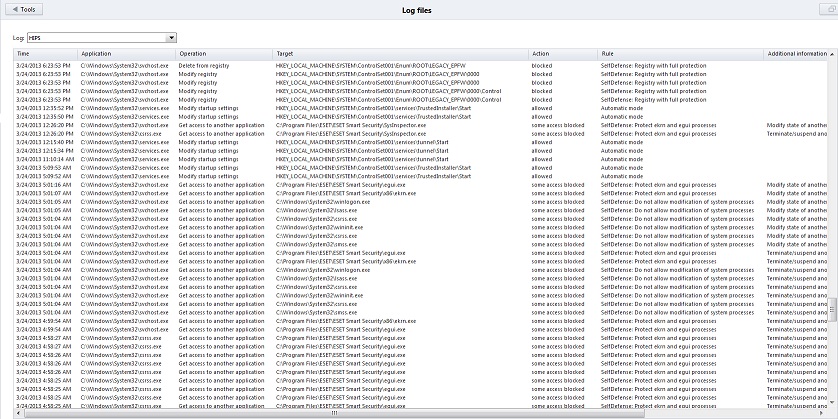 Do I have something set that makes it keep blocking something it shouldn't? Or is this a genuine issue because honestly, I couldn't see how I could have gotten something nasty on here THIS early in the game. The only thing I've put on it is Skyrim and I haven't used any browser except for getting ESET and also coming on here! Thanks for any help! Sorry the pic is little bigger than I'd intended. Edited by Tweetybird - 24 Mar 2013 at 5:04pm |
|
 |
|
|
DST4ME
DS ELITE 
Joined: 14 Apr 2008 Online Status: Offline Posts: 36758 |
Quote Reply
Posted: 25 Mar 2013 at 1:36am |
|
eset settings
that is the latest post with config, the pics in that one should be proper size. now your own image is small and its hard to read the details, can you post a better (bigger pic?) |
|
|
|
|
Tweetybird
Newbie
Joined: 25 Feb 2013 Online Status: Offline Posts: 17 |
Quote Reply
Posted: 25 Mar 2013 at 1:41pm |
|
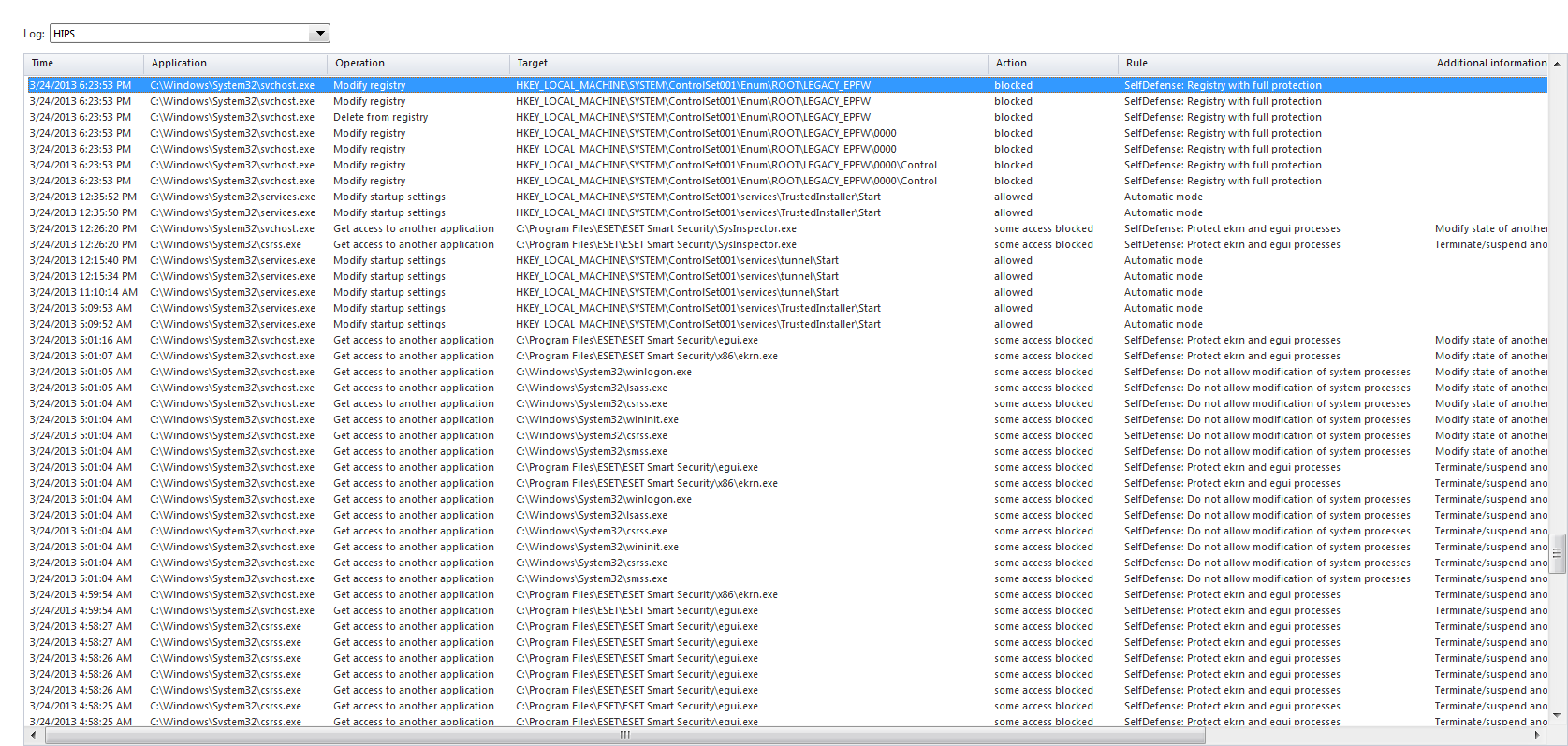
Sorry it took me till now to get back to you, had to work. This one is from last night (I think I forgot to resize, sorry):
 And this one if from just starting up my laptop just now: 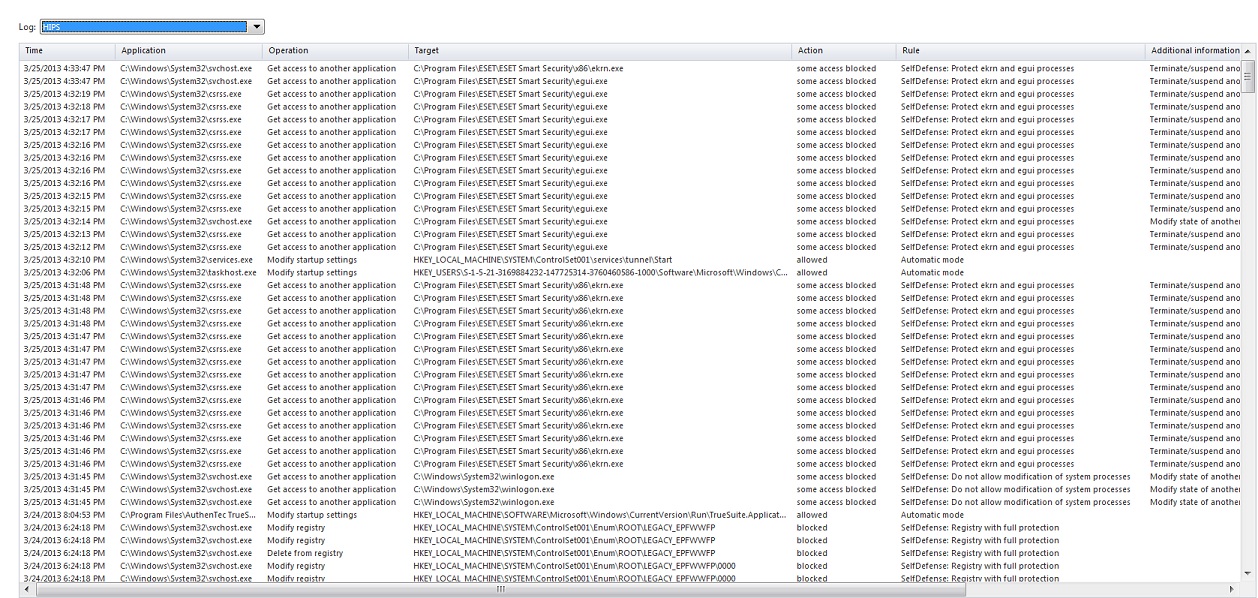 And I did have my settings as you had recommended so at least that's good. *sigh* |
|
|
|
|
DST4ME
DS ELITE
Joined: 14 Apr 2008 Online Status: Offline Posts: 36758 |
Quote Reply
Posted: 25 Mar 2013 at 10:13pm |
|
Thats normal stuff, its just blocking access to itself for self defence and not allowing some other modifications for startup.
put your firewall on interactive and let it ask you all that stuff that way you can tell to allow for example the startup modification or not. fyi startup is basically apps/etc trying to set themselves to start with windows. You don't want to let just anything to do that, it will slow down startup, bug down windows, etc. |
|
|
|
|
Tweetybird
Newbie
Joined: 25 Feb 2013 Online Status: Offline Posts: 17 |
Quote Reply
Posted: 26 Mar 2013 at 2:29am |
|
Thank you very much, I'm glad to hear it's normal stuff. I'm a little paranoid about things, brand new expensive piece of equipment and all and I'd rather not have anything happen. It just totally freaked me out that those things essentially look like they're repeatedly slamming themselves against the important stuff trying to get in. So what do I want to or absolutely need to allow with startup? Sorry for being such a spaz...
Edited by Tweetybird - 26 Mar 2013 at 2:31am |
|
|
|
|
DST4ME
DS ELITE
Joined: 14 Apr 2008 Online Status: Offline Posts: 36758 |
Quote Reply
Posted: 26 Mar 2013 at 9:20pm |
|
Well lets look at your startup processes, give us a screenshot of CCleaner's startup window, showing all the stuff.
If you are not familiar, download/install then run it, on the left panel choose "tools" and then choose "startup" and post a screen shot of that window. |
|
|
|
|
Tweetybird
Newbie
Joined: 25 Feb 2013 Online Status: Offline Posts: 17 |
Quote Reply
Posted: 30 Mar 2013 at 3:38am |
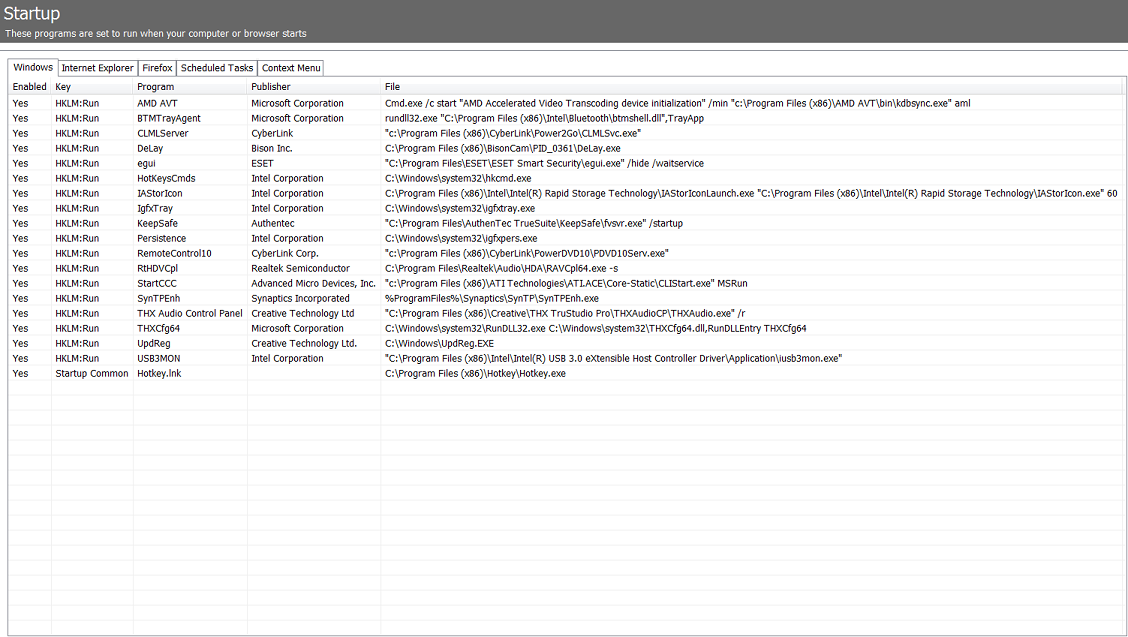 Sorry it's been a couple days. Been either too busy or too tired. |
|
|
|
|
Post Reply
|
| Forum Jump | Forum Permissions You cannot post new topics in this forum You cannot reply to topics in this forum You cannot delete your posts in this forum You cannot edit your posts in this forum You cannot create polls in this forum You cannot vote in polls in this forum |

About Digital Storm
Contact Information
Facility Tour
Financing
Buy Now, Pay Later
Downloads
GSA Schedule
Terms & Conditions
Privacy Policy
Request Help
Call: 1-866-817-8676
(Hours 9AM-5PM PST)





 Topic Options