evga X58 Lite EditionPost Date: 2009-06-17 |
Post Reply 
|
| Author | ||
Grimfate 
Newbie 

Joined: 06 Mar 2009 Online Status: Offline Posts: 28 |
 Quote Reply Quote Reply
 Topic: evga X58 Lite Edition Topic: evga X58 Lite EditionPosted: 17 Jun 2009 at 3:10am |
|
|
I see now that the default motherboard for building a system is the evga Lite edition. On the DS site it says sli but when I looked it up on the evga website the specs there said it was not sli ready. I'm confused.
|
||
 |
||
|
DST4ME
DS ELITE 
Joined: 14 Apr 2008 Online Status: Offline Posts: 36758 |
Quote Reply
Posted: 17 Jun 2009 at 3:40am |
|
|
from what I understand you can do tri sli, but only one slot is going to be 16x the other 2 are going to be 8x
|
||
|
||
|
venom
Newbie
Joined: 08 Oct 2008 Online Status: Offline Posts: 0 |
Quote Reply
Posted: 17 Jun 2009 at 8:12am |
|
|
Actually all 3 will be 8x if what others are reporting is correct.
|
||
|
||
|
Zurginator
Groupie 
Joined: 30 Mar 2009 Online Status: Offline Posts: 343 |
Quote Reply
Posted: 17 Jun 2009 at 11:11am |
|
|
It truly doesn't matter. Not even the 295 will saturate those 8 lanes, although the 3xx might...
|
||
|
||
|
justin.kerr
DS Veteran 
Joined: 06 May 2008 Online Status: Offline Posts: 5084 |
Quote Reply
Posted: 17 Jun 2009 at 11:20am |
|
|
Evga says the Pcie slots are 16x-8x-4x-8x.
a 295 will saturate a 16x lane. Gtx 285's and ATI 4890's will saturate 8x lanes. Edited by justin.kerr - 17 Jun 2009 at 11:34am |
||
|
||
|
DST4ME
DS ELITE
Joined: 14 Apr 2008 Online Status: Offline Posts: 36758 |
Quote Reply
Posted: 17 Jun 2009 at 12:05pm |
|
that is what I have seen on evga's site and forum also 
|
||
|
||
|
Zurginator
Groupie
Joined: 30 Mar 2009 Online Status: Offline Posts: 343 |
Quote Reply
Posted: 17 Jun 2009 at 12:29pm |
|
|
Hm... idk. xD
Also, is it worth paying 2x as much for the Classified instead of this? I mean sure, the Classified has all these 'nifty' features, but how often will they help? For instance: 2x 8-pins. What cooler in the world (besides Liquid Nitro) would be able to cool that kind of heat. ... Actually, what other 'nifty' features does it have? Besides the full x16 on all, I do know that is nice lol. |
||
|
||
|
DST4ME
DS ELITE
Joined: 14 Apr 2008 Online Status: Offline Posts: 36758 |
Quote Reply
Posted: 17 Jun 2009 at 12:35pm |
|
|
classified can do 3 GPUs and 2 other cards, its a bigger board, its got three times the amount of normal gold content in the CPU socket for better OC
|
||
|
||
|
Zurginator
Groupie
Joined: 30 Mar 2009 Online Status: Offline Posts: 343 |
Quote Reply
Posted: 17 Jun 2009 at 12:45pm |
|
|
But is it honestly worth 2x as much as the lite.
For the standard user, I mean. Plus the NB heatsink is hideous. >_< |
||
|
||
|
DST4ME
DS ELITE
Joined: 14 Apr 2008 Online Status: Offline Posts: 36758 |
Quote Reply
Posted: 17 Jun 2009 at 12:49pm |
|
|
Classified is for enthusiast, and people who want to tri sli and have room for a sound card and wireless card or that kind of config.
|
||
|
||
|
justin.kerr
DS Veteran
Joined: 06 May 2008 Online Status: Offline Posts: 5084 |
Quote Reply
Posted: 17 Jun 2009 at 12:50pm |
|
|
The 759 in no longer made, the 760 will not do 16x on three pcie slots.
|
||
|
||
|
Zurginator
Groupie
Joined: 30 Mar 2009 Online Status: Offline Posts: 343 |
Quote Reply
Posted: 17 Jun 2009 at 12:55pm |
|
|
Well I just found this EVGA board, and it's sexy:
http://www.newegg.com/Product/Product.aspx?Item=N82E16813188049 Is it any good? Edited by Zurginator - 17 Jun 2009 at 12:55pm |
||
|
||
|
justin.kerr
DS Veteran
Joined: 06 May 2008 Online Status: Offline Posts: 5084 |
Quote Reply
Posted: 17 Jun 2009 at 12:58pm |
|
That is the LE.== Light Edition.
 |
||
|
||
|
Zurginator
Groupie
Joined: 30 Mar 2009 Online Status: Offline Posts: 343 |
Quote Reply
Posted: 17 Jun 2009 at 1:00pm |
|
xD Fail? |
||
|
||
|
DST4ME
DS ELITE
Joined: 14 Apr 2008 Online Status: Offline Posts: 36758 |
Quote Reply
Posted: 17 Jun 2009 at 1:44pm |
|
|
lol ya that is the same version you asked about

|
||
|
||
|
Zurginator
Groupie
Joined: 30 Mar 2009 Online Status: Offline Posts: 343 |
Quote Reply
Posted: 17 Jun 2009 at 2:06pm |
|
I thought the 'lite' was the green and black 3x sli one. :/ |
||
|
||
|
DST4ME
DS ELITE
Joined: 14 Apr 2008 Online Status: Offline Posts: 36758 |
Quote Reply
Posted: 17 Jun 2009 at 2:08pm |
|
|
no LE is the light one. which is a black mobo
|
||
|
||
|
Bill the Cat
DS Veteran
Forum Bitch!
Joined: 27 Aug 2007 Online Status: Offline Posts: 1150 |
Quote Reply
Posted: 17 Jun 2009 at 2:46pm |
|
I think this is relevant.... I'm embarassed to tell you all, that I just realized that that all PCIeX16 slots on my EVGA 680i mobo are not created equal.  When I moved my pokey GTX 250 from the PCIeX16@8 slot to one of the PCIeX16@16 slots, the frame rate in the Far Cry 2 benchmark program went up 10%. When I moved my pokey GTX 250 from the PCIeX16@8 slot to one of the PCIeX16@16 slots, the frame rate in the Far Cry 2 benchmark program went up 10%.Edited by Bill the Cat - 17 Jun 2009 at 2:50pm |
||
|
3.6 GHz E6850, 4 GB RAM, GTS 250, TJ9, Win 7 64-bit
4.4 GHz i7 3930K, 16 GB RAM, GTX 670, 550D, Win 7 64-bit |
||
|
||
|
satsunada
Senior Member 
Joined: 21 May 2009 Online Status: Offline Posts: 682 |
Quote Reply
Posted: 17 Jun 2009 at 2:50pm |
|
|
It's not PCI-Ex16 in a generic sense Bill. PCI-E is the generic term. the xwhatever is the connection rating or something. Just assume bigger numbers after the x mean better things. |
||
|
||
|
Zurginator
Groupie
Joined: 30 Mar 2009 Online Status: Offline Posts: 343 |
Quote Reply
Posted: 17 Jun 2009 at 4:23pm |
|
|
Also:
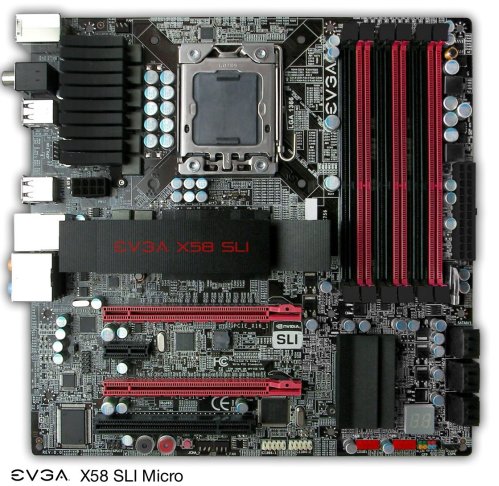
About freaking time. |
||
|
||
|
Bill the Cat
DS Veteran
Forum Bitch!
Joined: 27 Aug 2007 Online Status: Offline Posts: 1150 |
Quote Reply
Posted: 17 Jun 2009 at 4:26pm |
|
I admit that I've never looked at PCIe carefully. I thought the x16 implied a data bus width to the connector. In addition to that there's some sort of data throughput limitation. As in a PCIeX16@8 has 16 data lines (lanes) but only has the bandwith of an 8 lane card.
Have I smoking too much rope again? Edited by Bill the Cat - 17 Jun 2009 at 4:28pm |
||
|
3.6 GHz E6850, 4 GB RAM, GTS 250, TJ9, Win 7 64-bit
4.4 GHz i7 3930K, 16 GB RAM, GTX 670, 550D, Win 7 64-bit |
||
|
||
|
justin.kerr
DS Veteran
Joined: 06 May 2008 Online Status: Offline Posts: 5084 |
Quote Reply
Posted: 17 Jun 2009 at 4:37pm |
|
|
each lane carries 500 MB/s. on pcie 2.0 so 16 lanes x 500 mbs = 8 GTs bandwidth.
All motherboards have a maximum amount of lanes, so as more Pcie's are used, they take away fom the maximum total.
Here is an i7, I know different than you 680i, but it might help. lol
 Usually the top PCie x16 is full speed
|
||
|
||
|
Bill the Cat
DS Veteran
Forum Bitch!
Joined: 27 Aug 2007 Online Status: Offline Posts: 1150 |
Quote Reply
Posted: 17 Jun 2009 at 6:54pm |
|
Yep, got that right. I actually had a x16 card in a physical x16 slot, but that slot actually only had 8 lanes. When I moved the card to a 16 lane slot. the observed frame rate went up 10%. So the throughput went from 2 GB (250 MB/lane * 8 lanes) to 4 GB (this is PCIe 1 of course) and made only a tiny difference in performance. The wonder is that it made a difference at all. Annecdotally, it seems like even a low performance video card can benefit from changing from 8 to 16 lanes. But it is old and slow PCIe..... Edited by Bill the Cat - 17 Jun 2009 at 6:56pm |
||
|
3.6 GHz E6850, 4 GB RAM, GTS 250, TJ9, Win 7 64-bit
4.4 GHz i7 3930K, 16 GB RAM, GTX 670, 550D, Win 7 64-bit |
||
|
||
|
Zurginator
Groupie
Joined: 30 Mar 2009 Online Status: Offline Posts: 343 |
Quote Reply
Posted: 17 Jun 2009 at 11:16pm |
|
|
Bill: Do you know if it's 1.0 or 2.0? Because that could be what made the 8x to 16x such an increase, because the 1.0 is slower. I'm pretty sure a 16x in 1.0 is like an 8x in 2.0.
|
||
|
||
|
Zardoz8719
Senior Member
Joined: 04 Mar 2009 Online Status: Offline Posts: 543 |
Quote Reply
Posted: 18 Jun 2009 at 6:14am |
|
|
Golly, I love these post(s) where you feel like you should have earned "credit-hours" toward a degree after wading through them. Add charts and graphs...and the fact you don't (even) have to purchase an over-priced textbook... Does it get any better than this
 To all...thanks for the time, patience, attention to detail...and education. To all...thanks for the time, patience, attention to detail...and education. Edited by Zardoz8719 - 18 Jun 2009 at 6:15am |
||
|
||
|
Bill the Cat
DS Veteran
Forum Bitch!
Joined: 27 Aug 2007 Online Status: Offline Posts: 1150 |
Quote Reply
Posted: 18 Jun 2009 at 9:43am |
|
It's definitely PCIe 1.0 on the 680i, and yes, as far as throughput goes, PCIe 2.0 X8 should be the same as PCIe 1.0 X16. Sigh, I shouldn't have started to hang out here again. It's making my computer feel old..... Edited by Bill the Cat - 18 Jun 2009 at 9:44am |
||
|
3.6 GHz E6850, 4 GB RAM, GTS 250, TJ9, Win 7 64-bit
4.4 GHz i7 3930K, 16 GB RAM, GTX 670, 550D, Win 7 64-bit |
||
|
||
|
Zardoz8719
Senior Member
Joined: 04 Mar 2009 Online Status: Offline Posts: 543 |
Quote Reply
Posted: 18 Jun 2009 at 10:12am |
|
Yeah, but think how "young" you feel kibitzing with everyone--we all need a Hobbie. Hey, maybe it's time you looked into one of DSO's NEW "preconfigured" systems Edited by Zardoz8719 - 18 Jun 2009 at 10:13am |
||
|
||
|
EdH63
DS Veteran
Joined: 01 Sep 2007 Online Status: Offline Posts: 1826 |
Quote Reply
Posted: 18 Jun 2009 at 10:40am |
|
Are you saying it IS a benefit to switch the card to the next slot? |
||
|
||
|
Bill the Cat
DS Veteran
Forum Bitch!
Joined: 27 Aug 2007 Online Status: Offline Posts: 1150 |
Quote Reply
Posted: 18 Jun 2009 at 11:05am |
|
Eddie...., Yeah. Our moboards have 3 PCIeX16 slots. Two are black and one is blue. The two black slots have 16 lanes. The blue (middle) slot physically accepts cards with connectors for 16 lanes, but only 8 of them are wired up. The EVGA documentation is, typically, vague on this subject. I stupidly put my replacement GPU in the blue slot because it was convenient at the time. (This was my bad, not DSO's) Moving it to either of the 16 lane slots seems to have increased my frame rate by about 10%. This suggests that having only 2 GB of thruput on the bus was slightly throttling the GPU. Edited by Bill the Cat - 18 Jun 2009 at 11:07am |
||
|
3.6 GHz E6850, 4 GB RAM, GTS 250, TJ9, Win 7 64-bit
4.4 GHz i7 3930K, 16 GB RAM, GTX 670, 550D, Win 7 64-bit |
||
|
||
|
EdH63
DS Veteran
Joined: 01 Sep 2007 Online Status: Offline Posts: 1826 |
Quote Reply
Posted: 18 Jun 2009 at 3:24pm |
|
I gotcha. I see mine is in a black rail already so I guess I'm as good as it gets on a 680i. All this talk does make me want to build a brand new top O the line rig, but it's not necessary for me to this at this time. Hard not to place an order though. |
||
|
||
|
Bill the Cat
DS Veteran
Forum Bitch!
Joined: 27 Aug 2007 Online Status: Offline Posts: 1150 |
Quote Reply
Posted: 18 Jun 2009 at 5:49pm |
|
Exactly! I'm still perfectly content, if not exactly overjoyed" with the performance of my machine based on two year old technology. It's still doing what I need it to do. However, all this talk of PCIe 2.0, not to mention PCIe 3.0, is giving me an itchy trigger finger.
Still, it's going to take a new killer game that I can't play or some serious hardware failure to get me to replace the current box. When it comes, the death of my last 21" CRT is going to cause a massive cascasde of H/W upgrades. Hopefully big LED screens will be reasonable by then.
 |
||
|
3.6 GHz E6850, 4 GB RAM, GTS 250, TJ9, Win 7 64-bit
4.4 GHz i7 3930K, 16 GB RAM, GTX 670, 550D, Win 7 64-bit |
||
|
||
|
DST4ME
DS ELITE
Joined: 14 Apr 2008 Online Status: Offline Posts: 36758 |
Quote Reply
Posted: 18 Jun 2009 at 5:50pm |
|
|
lol if you like I can pay a visit to your crt now
|
||
|
||
|
Post Reply
|
| Forum Jump | Forum Permissions You cannot post new topics in this forum You cannot reply to topics in this forum You cannot delete your posts in this forum You cannot edit your posts in this forum You cannot create polls in this forum You cannot vote in polls in this forum |

About Digital Storm
Contact Information
Facility Tour
Financing
Buy Now, Pay Later
Downloads
GSA Schedule
Terms & Conditions
Privacy Policy
Request Help
Call: 1-866-817-8676
(Hours 9AM-5PM PST)





 Topic Options