fans maybe dying??Post Date: 2014-04-28 |
Post Reply 
|
| Author | |
ArkansasWoman777 
DS Veteran 

Joined: 19 Aug 2012 Online Status: Offline Posts: 4314 |
 Quote Reply Quote Reply
 Topic: fans maybe dying?? Topic: fans maybe dying??Posted: 28 Apr 2014 at 4:49am |
|
Its happened a couple of times but whenever i shut my pc off sometimes and then turn it back on afterwhile, the first couple of minutes i hear a grinding like kinda noise but it goes away after a few minutes and won't happen again until i turn off my pc and turn it back on hours later. Is it possible the fans are causing the issue and i will need to replace them eventually?
Edited by ArkansasWoman777 - 16 Jul 2015 at 8:36pm |
|
|
"Captain Sirius Black"
Storm Trooper i5 3570k Ordered: 11-27-12 Stage 1: 11-29-12 Stage 2: 12-2-12 Stage 3: 12-2-12 Stage 4: 12-4-12 Stage 5: 12-4-12 Stage 6: 12-10-12 Stage 7: 12-12-12 |
|
 |
|
|
bprat22
DS ELITE 
DigitalStorm East -- (Unofficially!)
Joined: 08 Jun 2011 Online Status: Offline Posts: 20391 |
Quote Reply
Posted: 28 Apr 2014 at 5:02am |
|
Hey, Arkansas. Sounds like a fan to me also. Just have to figure which one. Some power supplies turn on their fan, initially on boot, and then shut off until needed. Most fans you can stall for a few seconds with your finger or whatever to help isolate the issue or unplug them one at a time. You have the case fans, psu, cpu cooler and video card.
Good luck and let us know what you find. 
|
|
|
|
|
ArkansasWoman777
DS Veteran
Joined: 19 Aug 2012 Online Status: Offline Posts: 4314 |
Quote Reply
Posted: 28 Apr 2014 at 5:34am |
|
Ah the process of elimination oh joy...lol. I don't think its the video card so that rules that out. I going to have to let it be until we get some money saved up. Now do i have to buy coolermaster fans or can i buy other fans? Any recommendations?
|
|
|
"Captain Sirius Black"
Storm Trooper i5 3570k Ordered: 11-27-12 Stage 1: 11-29-12 Stage 2: 12-2-12 Stage 3: 12-2-12 Stage 4: 12-4-12 Stage 5: 12-4-12 Stage 6: 12-10-12 Stage 7: 12-12-12 |
|
|
|
|
kernols
Groupie 
Joined: 27 Jan 2009 Online Status: Offline Posts: 248 |
Quote Reply
Posted: 28 Apr 2014 at 7:16am |
|
I imagine you have the led sickleflows you are talking about? You could replace them with the exact same fan or go with corsair AF series fans. I use noiseblockers in my cases for case fans, ton of airflow and pretty quiet. Little pricey but i like them.
But like i was mentioning before in different posts, coolermaster fans have a major reputation for going out very fast especially if they are mounted horizontally. I know it comes down to luck as well, but after i have switched out all the led coolermasters, i havent had a fan come right out of the actual mount and dangle from the wires. lol true story. |
|
|
|
|
ArkansasWoman777
DS Veteran
Joined: 19 Aug 2012 Online Status: Offline Posts: 4314 |
Quote Reply
Posted: 28 Apr 2014 at 7:33am |
I think the led fans i got are the 120mm On/Off LED Computer Case Fan that cooler master has listed in their store. But i will most definitely probably go on the corsair site and bookmark the link or go on Amazon and get a couple Edited by ArkansasWoman777 - 28 Apr 2014 at 7:36am |
|
|
"Captain Sirius Black"
Storm Trooper i5 3570k Ordered: 11-27-12 Stage 1: 11-29-12 Stage 2: 12-2-12 Stage 3: 12-2-12 Stage 4: 12-4-12 Stage 5: 12-4-12 Stage 6: 12-10-12 Stage 7: 12-12-12 |
|
|
|
|
kernols
Groupie
Joined: 27 Jan 2009 Online Status: Offline Posts: 248 |
Quote Reply
Posted: 28 Apr 2014 at 7:41am |
|
That's where i do most of my shopping, corsair fans come in 2 packs different speeds for the AF series. The quiet edition ones are LED for the 120mm
Edited by kernols - 28 Apr 2014 at 7:42am |
|
|
|
|
ArkansasWoman777
DS Veteran
Joined: 19 Aug 2012 Online Status: Offline Posts: 4314 |
Quote Reply
Posted: 28 Apr 2014 at 8:41am |
I'll probably wind up just getting the regular quiet edition ones because i hardly ever turn on the led lights on the front. What are the colored rings for anyway? |
|
|
"Captain Sirius Black"
Storm Trooper i5 3570k Ordered: 11-27-12 Stage 1: 11-29-12 Stage 2: 12-2-12 Stage 3: 12-2-12 Stage 4: 12-4-12 Stage 5: 12-4-12 Stage 6: 12-10-12 Stage 7: 12-12-12 |
|
|
|
|
bprat22
DS ELITE
DigitalStorm East -- (Unofficially!)
Joined: 08 Jun 2011 Online Status: Offline Posts: 20391 |
Quote Reply
Posted: 28 Apr 2014 at 9:31am |
|
The colored rings are for looks. Color coordinate.
|
|
|
|
|
Alex
Admin Group 
Digital Storm Supervisor 
Joined: 04 Jun 2012 Online Status: Offline Posts: 16314 |
Quote Reply
Posted: 28 Apr 2014 at 2:04pm |
|
If it's your fans, try pushing the fans into their wheel hubs to try to re-align the bearings. If that does not help, it could be a bad bearing in one of the fans.
OR, if your system is liquid cooled, double check your fluid level, make sure it isn't 25% full, as you may hear such noises if the pump is not getting enough fluid. |
|

|
|
|
|
|
Meller
DS Veteran
Joined: 20 Feb 2013 Online Status: Offline Posts: 1627 |
Quote Reply
Posted: 01 May 2014 at 11:36pm |
Let's pray it's not the low fluid Alex is talking about. Pumps can burn up so quickly. |
|
|
Custom PC
Ryzen 9 5950X Gigabyte X570 Aorus Xtreme 128GB DDR4 3600mhz EVGA RTX 3090 FTW3 Ultra Gaming Samsung 980 Pro 512GB m.2 Samsung 960 PRO 2TB m.2 x2 |
|
|
|
|
ArkansasWoman777
DS Veteran
Joined: 19 Aug 2012 Online Status: Offline Posts: 4314 |
Quote Reply
Posted: 02 May 2014 at 12:17am |
|
Lol i'm not even water cooling
|
|
|
"Captain Sirius Black"
Storm Trooper i5 3570k Ordered: 11-27-12 Stage 1: 11-29-12 Stage 2: 12-2-12 Stage 3: 12-2-12 Stage 4: 12-4-12 Stage 5: 12-4-12 Stage 6: 12-10-12 Stage 7: 12-12-12 |
|
|
|
|
ArkansasWoman777
DS Veteran
Joined: 19 Aug 2012 Online Status: Offline Posts: 4314 |
Quote Reply
Posted: 06 Jun 2014 at 4:18am |
|
So i may have found what is causing the sound, i'm pretty much positive its the top 200 mm fan that is making that noise when the computer is off for quite awhile, but it always goes to back to normal after a few minutes. I assume that it just takes awhile for it to warm up??
Edited by ArkansasWoman777 - 06 Jun 2014 at 4:18am |
|
|
"Captain Sirius Black"
Storm Trooper i5 3570k Ordered: 11-27-12 Stage 1: 11-29-12 Stage 2: 12-2-12 Stage 3: 12-2-12 Stage 4: 12-4-12 Stage 5: 12-4-12 Stage 6: 12-10-12 Stage 7: 12-12-12 |
|
|
|
|
kernols
Groupie
Joined: 27 Jan 2009 Online Status: Offline Posts: 248 |
Quote Reply
Posted: 06 Jun 2014 at 4:59am |
Eventually it will probably start making the noise longer or do it random times after its been running for a while. Same thing happened to my fans on my old machine. Id just keep an eye on it when it gets pretty bad just replace it. |
|
|
|
|
bprat22
DS ELITE
DigitalStorm East -- (Unofficially!)
Joined: 08 Jun 2011 Online Status: Offline Posts: 20391 |
Quote Reply
Posted: 06 Jun 2014 at 9:45am |
|
Hi Arkansas... I would, if you haven't already, try setting the top fan control to max or min and see if anything changes. Integrated fan controls have a habit of going bad and the fan speeds vary. See if the front LEDs on the front fans vary in brightness, a sign the fan control might be going bad.
Not sure if this would cause any noises, but if the fans are slow to spool up, ya never know. |
|
|
|
|
Snaike
Moderator Group
Just a dude trying to keep the spam away
Joined: 23 Jan 2014 Online Status: Offline Posts: 9462 |
Quote Reply
Posted: 06 Jun 2014 at 11:35am |
This has my vote. It will probably make more and more noise until it's a constant whine, then seize. You still got some time with it, but getting it replaced is in your future... (or a dab of 3n1 or wd40 if you can get to the bearing). |
|
|
|
|
ArkansasWoman777
DS Veteran
Joined: 19 Aug 2012 Online Status: Offline Posts: 4314 |
Quote Reply
Posted: 06 Jun 2014 at 3:11pm |
|
The fan controller works fine, i think when i get a chance i'll just replace the top fan and see if that fixes the issue.
Or would it be alright if i just removed the top fan and not bother with it Edited by ArkansasWoman777 - 06 Jun 2014 at 4:55pm |
|
|
"Captain Sirius Black"
Storm Trooper i5 3570k Ordered: 11-27-12 Stage 1: 11-29-12 Stage 2: 12-2-12 Stage 3: 12-2-12 Stage 4: 12-4-12 Stage 5: 12-4-12 Stage 6: 12-10-12 Stage 7: 12-12-12 |
|
|
|
|
bprat22
DS ELITE
DigitalStorm East -- (Unofficially!)
Joined: 08 Jun 2011 Online Status: Offline Posts: 20391 |
Quote Reply
Posted: 07 Jun 2014 at 2:53am |
|
Unplug the fan and check temps. With the right cooler and video card, both blowing out the back, it might not do so much. I ran my ODE 600t without the top 200mm fan for a couple of weeks waiting for the fan control and saw no difference. But it was winter, also.
I would change it just because.
|
|
|
|
|
Snaike
Moderator Group
Just a dude trying to keep the spam away
Joined: 23 Jan 2014 Online Status: Offline Posts: 9462 |
Quote Reply
Posted: 07 Jun 2014 at 9:09am |
 |
|
|
|
|
ArkansasWoman777
DS Veteran
Joined: 19 Aug 2012 Online Status: Offline Posts: 4314 |
Quote Reply
Posted: 11 Jul 2015 at 2:35pm |
|
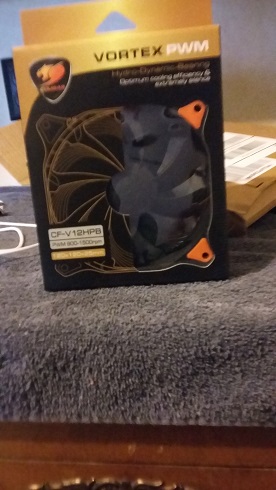
So instead of creating a new post i figured i would revive this post since one of the two front fans were beginning to make noise and were probably going to die eventually. I bought in replace two Cougar 120mm pwm fans. Here is a picture of one.
|
|
|
"Captain Sirius Black"
Storm Trooper i5 3570k Ordered: 11-27-12 Stage 1: 11-29-12 Stage 2: 12-2-12 Stage 3: 12-2-12 Stage 4: 12-4-12 Stage 5: 12-4-12 Stage 6: 12-10-12 Stage 7: 12-12-12 |
|
|
|
|
bprat22
DS ELITE
DigitalStorm East -- (Unofficially!)
Joined: 08 Jun 2011 Online Status: Offline Posts: 20391 |
Quote Reply
Posted: 11 Jul 2015 at 2:52pm |
|
Nice fans.
|
|
|
|
|
oldlady RPGer
DS Veteran
One of the cool kids
Joined: 09 Sep 2011 Online Status: Offline Posts: 1080 |
Quote Reply
Posted: 15 Jul 2015 at 8:08am |

|
|
|
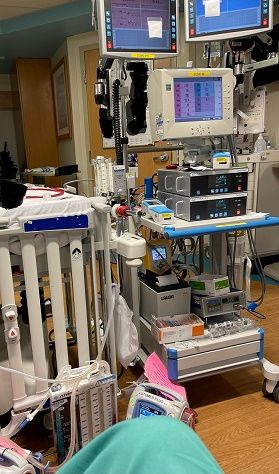
Me sitting my ECMO in PICU. Now you know why I like LC. ;)
|
|
|
|
|
Meller
DS Veteran
Joined: 20 Feb 2013 Online Status: Offline Posts: 1627 |
Quote Reply
Posted: 16 Jul 2015 at 6:15pm |
|
I think you meant dying in the title ;)
|
|
|
Custom PC
Ryzen 9 5950X Gigabyte X570 Aorus Xtreme 128GB DDR4 3600mhz EVGA RTX 3090 FTW3 Ultra Gaming Samsung 980 Pro 512GB m.2 Samsung 960 PRO 2TB m.2 x2 |
|
|
|
|
Dax Doomslayer
DS Veteran
Keeper of the commas
Joined: 29 Apr 2012 Online Status: Offline Posts: 4743 |
Quote Reply
Posted: 16 Jul 2015 at 6:38pm |
|
Yay - a Meller sighting!!
|
|
|
|
|
ArkansasWoman777
DS Veteran
Joined: 19 Aug 2012 Online Status: Offline Posts: 4314 |
Quote Reply
Posted: 16 Jul 2015 at 8:36pm |
fixed, and it's been a year since i made this topic and nobody noticed the misspelling...lol |
|
|
"Captain Sirius Black"
Storm Trooper i5 3570k Ordered: 11-27-12 Stage 1: 11-29-12 Stage 2: 12-2-12 Stage 3: 12-2-12 Stage 4: 12-4-12 Stage 5: 12-4-12 Stage 6: 12-10-12 Stage 7: 12-12-12 |
|
|
|
|
Meller
DS Veteran
Joined: 20 Feb 2013 Online Status: Offline Posts: 1627 |
Quote Reply
Posted: 17 Jul 2015 at 1:16am |
Lawl... |
|
|
Custom PC
Ryzen 9 5950X Gigabyte X570 Aorus Xtreme 128GB DDR4 3600mhz EVGA RTX 3090 FTW3 Ultra Gaming Samsung 980 Pro 512GB m.2 Samsung 960 PRO 2TB m.2 x2 |
|
|
|
|
Post Reply
|
| Forum Jump | Forum Permissions You cannot post new topics in this forum You cannot reply to topics in this forum You cannot delete your posts in this forum You cannot edit your posts in this forum You cannot create polls in this forum You can vote in polls in this forum |

About Digital Storm
Contact Information
Facility Tour
Financing
Buy Now, Pay Later
Downloads
GSA Schedule
Terms & Conditions
Privacy Policy
Request Help
Call: 1-866-817-8676
(Hours 9AM-5PM PST)





 Topic Options