Got BF3, need to update driverPost Date: 2011-10-25 |
Post Reply 
|
| Author | |
GameZrFun 
Newbie 

Joined: 13 Nov 2009 Online Status: Offline Posts: 28 |
 Quote Reply Quote Reply
 Topic: Got BF3, need to update driver Topic: Got BF3, need to update driverPosted: 25 Oct 2011 at 7:16pm |
|
Got my copy today. Says I need to update my driver for my GeForce GTX 570. I went into device manager and tried that way, but it said it was up to date. So I went to the Geforce site and it said 285.62 was the latest driver. So I'm about to give that a try. I've never updated a driver before. Do I just double click the file I downloaded and it installs on it 's own?
Thanks
|
|
 |
|
|
Alex
Admin Group 
Digital Storm Supervisor 
Joined: 04 Jun 2012 Online Status: Offline Posts: 16314 |
Quote Reply
Posted: 25 Oct 2011 at 7:38pm |
|
Yeah, NVIDIA just released a new driver.
Just download it and run it, it will take care of everything.
|
|

|
|
|
|
|
GameZrFun
Newbie
Joined: 13 Nov 2009 Online Status: Offline Posts: 28 |
Quote Reply
Posted: 25 Oct 2011 at 8:17pm |
|
Thanks. Thought that's all I had to do but just wanted to be sure
|
|
|
|
|
DST4ME
DS ELITE 
Joined: 14 Apr 2008 Online Status: Offline Posts: 36758 |
Quote Reply
Posted: 25 Oct 2011 at 11:25pm |
|
You must first uninstall the old drives then reboot then install new drivers and in the process you have to make sure to not let windows install drivers for it.
if you don't uninstall old drivers first, you could endup with conflicts and issues. Edited by DST4ME - 25 Oct 2011 at 11:26pm |
|
|
|
|
RiceEatin2000GT
DS Veteran 
Joined: 02 Oct 2008 Online Status: Offline Posts: 1699 |
Quote Reply
Posted: 26 Oct 2011 at 12:32am |

|
|

|
|
|
|
|
GameZrFun
Newbie
Joined: 13 Nov 2009 Online Status: Offline Posts: 28 |
Quote Reply
Posted: 26 Oct 2011 at 5:15pm |
|
Too late. But so far everything is okay.
|
|
|
|
|
DST4ME
DS ELITE
Joined: 14 Apr 2008 Online Status: Offline Posts: 36758 |
Quote Reply
Posted: 26 Oct 2011 at 5:20pm |
|
still go and uninstall old drivers, I would even uninstall both and then install new one.
software driver conflict is not going to show up right away, it may cause problem with other things in 2 weeks lets say. Edited by DST4ME - 26 Oct 2011 at 5:21pm |
|
|
|
|
GameZrFun
Newbie
Joined: 13 Nov 2009 Online Status: Offline Posts: 28 |
Quote Reply
Posted: 26 Oct 2011 at 8:27pm |
|
How do you uninstall drivers? And also make sure to not let windows install drivers for it?
|
|
|
|
|
DST4ME
DS ELITE
Joined: 14 Apr 2008 Online Status: Offline Posts: 36758 |
Quote Reply
Posted: 27 Oct 2011 at 12:16am |
|
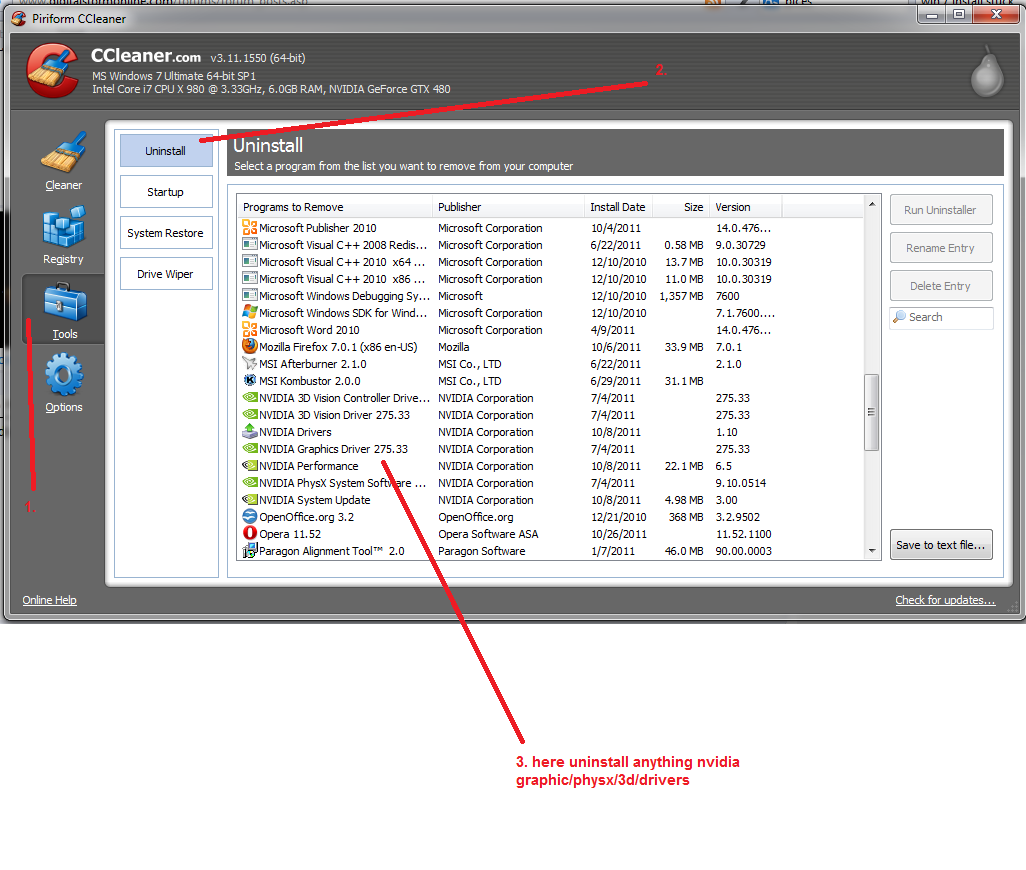
Do you have CCleaner
Edited by DST4ME - 27 Oct 2011 at 12:16am |
|
|
|
|
GameZrFun
Newbie
Joined: 13 Nov 2009 Online Status: Offline Posts: 28 |
Quote Reply
Posted: 27 Oct 2011 at 9:54am |
|
I do.
|
|
|
|
|
DST4ME
DS ELITE
Joined: 14 Apr 2008 Online Status: Offline Posts: 36758 |
Quote Reply
Posted: 29 Oct 2011 at 1:54am |
|
|
|
|
|
Alex
Admin Group
Digital Storm Supervisor
Joined: 04 Jun 2012 Online Status: Offline Posts: 16314 |
Quote Reply
Posted: 29 Oct 2011 at 2:31pm |
|
Actually, the newer drivers don't need such things done. The NVIDIA driver asks if you want it to do a clean install of the previous drier, and it takes care of everything. Worked perfectly every time for me!

|
|
|
|
|
|
|
|
DST4ME
DS ELITE
Joined: 14 Apr 2008 Online Status: Offline Posts: 36758 |
Quote Reply
Posted: 30 Oct 2011 at 12:40am |
|
That only if they choose the "custom install" express does not offer that, however unfortunately it does not remove the old folder and all files, it leaves traces behind which then can cause problems down the road.
|
|
|
|
|
GameZrFun
Newbie
Joined: 13 Nov 2009 Online Status: Offline Posts: 28 |
Quote Reply
Posted: 04 Nov 2011 at 7:31pm |
|
uploads/3202/CCDriver.pngSo uninstall all the nvidia stuff? I don't see anything from the previous version. How would I make sure the previous driver is completely gone?
Also today while playing BF3, after a little while of playing(maybe 45 minutes), I heard some extra fan noise. I haven't experianced that before I quit the game and checked my temps Graphics was the only one that looked high. Idle it's about 40 c. Could that be driver related?
|
|
|
|
|
DST4ME
DS ELITE
Joined: 14 Apr 2008 Online Status: Offline Posts: 36758 |
Quote Reply
Posted: 04 Nov 2011 at 8:34pm |
|
Your gpu temps could have gone up a bit and its fan kicked it for a bit to lower temps perhaps.
yes uninstall those from cc. to make sure all your gpu stuff is gone, run drivers sweeper after uninstall in safemode. after you install the new drivers, go to C:\NVIDIA\DisplayDriver, here you should only see a folder with the driver number of the dirvers you just installed, if there are others you need to delete them. |
|
|
|
|
Post Reply
|
| Forum Jump | Forum Permissions You cannot post new topics in this forum You cannot reply to topics in this forum You cannot delete your posts in this forum You cannot edit your posts in this forum You cannot create polls in this forum You cannot vote in polls in this forum |

About Digital Storm
Contact Information
Facility Tour
Financing
Buy Now, Pay Later
Downloads
GSA Schedule
Terms & Conditions
Privacy Policy
Request Help
Call: 1-866-817-8676
(Hours 9AM-5PM PST)





 Topic Options