GTX 670 Temp. Issues (Please Help)Post Date: 2013-10-24 |
Post Reply 
|
| Author | |
Burr 
Newbie 

Joined: 25 Feb 2013 Online Status: Offline Posts: 33 |
 Quote Reply Quote Reply
 Topic: GTX 670 Temp. Issues (Please Help) Topic: GTX 670 Temp. Issues (Please Help)Posted: 24 Oct 2013 at 8:36am |
|
As of yesterday, my EVGA GTX 670 has been heating to temperatures once unseen. For instance, I started "Sir, You Are Being Hunted" today and within a minute and a half, my temperature had gone from 37 degrees Celsius to 79 degrees Celsius. Besides that, it now idles at 38 or 43 degrees when it once never idled at more than 30 or 32 degrees. At heavy load, it used to be that it would never proceed past the mid-60 range.
It has been about two months since I have thoroughly cleaned my PC, and I partially cleaned today to see if any change would occur, but nothing changed. However, I have never taken the GPU out of the case and cleaned it, I have always been too worried about static shock. Thanks for the help. 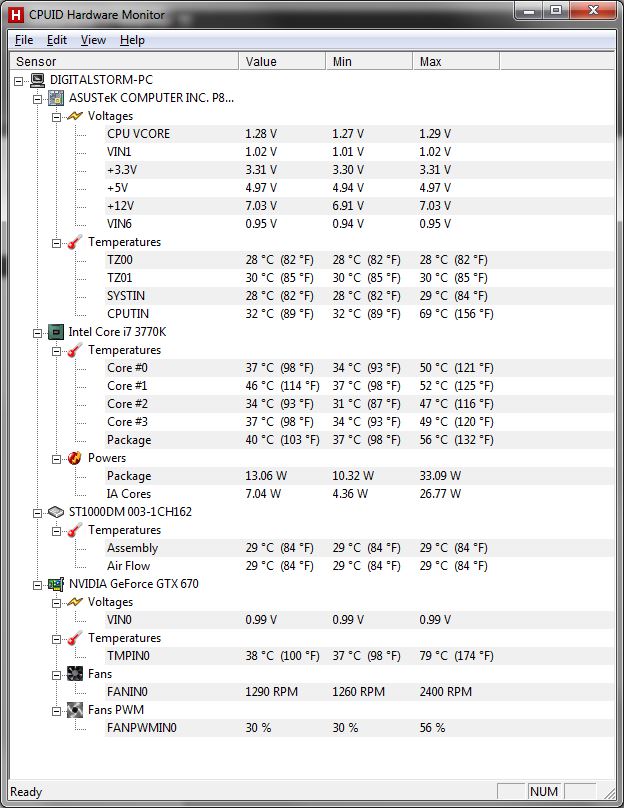
|
|
 |
|
|
bprat22
DS ELITE 
DigitalStorm East -- (Unofficially!)
Joined: 08 Jun 2011 Online Status: Offline Posts: 20391 |
Quote Reply
Posted: 24 Oct 2013 at 9:04am |
|
Hi Burr... Those temps for cpu cores and gpu are fine. But it looks like the 670 fan speed did jump some to keep it safe. It will work fine like that, anything below mid 80s C, but if it has been climbing then might be good to check things out.
Don't know what case you have, but make sure all the fans are working and clear of dust. Check the 670 fan, also. Check the back of the card where the heat exits the case, below the rear I/o ports, above the monitor ports, for any blockage. How are the ambient room temps? If 80s or less than you're good. A card rising in temps beyond what is usual is usually an air flow problem. It could be a card going bad, but not usually. The temps are good. But I can see your concern. Edited by bprat22 - 24 Oct 2013 at 9:05am |
|
|
|
|
fstcvc
DS Veteran 
Joined: 06 Jul 2013 Online Status: Offline Posts: 2551 |
Quote Reply
Posted: 24 Oct 2013 at 9:59am |
|
I agree with bp22... temps are still within normal operating range so check for airflow issues and clean if necessary!
Edited by fstcvc - 24 Oct 2013 at 10:00am |
|
|
HailStorm II
i7 4770K @ 4.5GHz Asus Maximus VI Extreme 16GB Corsair Dominator Platinum 3xSLI EVGA SuperClocked GTX TITAN Samsung 840Pro SSD 256GB+512GB HydroLux+XSPC CPU/MoBo/GPU Liquid Cooling |
|
|
|
|
Burr
Newbie
Joined: 25 Feb 2013 Online Status: Offline Posts: 33 |
Quote Reply
Posted: 24 Oct 2013 at 10:45am |
|
Maybe I didn't convey the true extent of my worry, as I didn't post the maximum temp it recieved. Within a mere matter of minutes, without even pushing my GTX670, the temperature had exceeded 112 degrees Celsius. Like I said it used to never surpass 65 degrees. Last night I fixed my airflow, as the pin connectors that are meant for the fan disk control(my case is Corsair 600t) had gone bad. So I hooked up my fans directly to the mobo, and hardly any improvement.
|
|
|
|
|
Burr
Newbie
Joined: 25 Feb 2013 Online Status: Offline Posts: 33 |
Quote Reply
Posted: 24 Oct 2013 at 10:47am |
In addition, it doesn't stop getting hotter. Even at the menu of a game, it continuously increases in temperature to the point where I feel like it's no longer safe to play. |
|
|
|
|
fstcvc
DS Veteran
Joined: 06 Jul 2013 Online Status: Offline Posts: 2551 |
Quote Reply
Posted: 24 Oct 2013 at 10:54am |
|
With temps that high, I would definitely check to make sure the GPU cooling system isn't blocked by dust. Usually spikes in temp are good indicators of the cooling system not doings its job correctly...
|
|
|
HailStorm II
i7 4770K @ 4.5GHz Asus Maximus VI Extreme 16GB Corsair Dominator Platinum 3xSLI EVGA SuperClocked GTX TITAN Samsung 840Pro SSD 256GB+512GB HydroLux+XSPC CPU/MoBo/GPU Liquid Cooling |
|
|
|
|
Burr
Newbie
Joined: 25 Feb 2013 Online Status: Offline Posts: 33 |
Quote Reply
Posted: 24 Oct 2013 at 10:57am |
|
That's my speculation, that dust has greatly affected it. Any recommendations with what the best technique for cleaning is?
I hate to sound like a helpless sob, but considering how much money I put into my ODE, I like to be as safe as possible. Thank you for your assistance. |
|
|
|
|
bprat22
DS ELITE
DigitalStorm East -- (Unofficially!)
Joined: 08 Jun 2011 Online Status: Offline Posts: 20391 |
Quote Reply
Posted: 24 Oct 2013 at 10:58am |
|
I'm surprised it even gets that hot. 97C is suppose to be max temp before it crowbars.
If the 600T front and top 200mm fans are working and the rear one is also, then it sounds like a bad card. My only other thought is to download the free msi Afterburner or EVGA precision and go into fan profile and up the fan speed by adjusting the fan speed curve. The card should shut down with no display before the temps you mentioned. Does seem odd. If the card's fan is working and clear then call DS about getting it RMA'd if they agree with the problem. This assumes a check for dust buildup was done. Edited by bprat22 - 24 Oct 2013 at 11:00am |
|
|
|
|
bprat22
DS ELITE
DigitalStorm East -- (Unofficially!)
Joined: 08 Jun 2011 Online Status: Offline Posts: 20391 |
Quote Reply
Posted: 24 Oct 2013 at 11:02am |
|
To clean the card of any dust as we suggested, I would remove the card and use some canned air to blow it out, both at the fan and the heat exit ports on the back. The fan is running on the card?
|
|
|
|
|
Burr
Newbie
Joined: 25 Feb 2013 Online Status: Offline Posts: 33 |
Quote Reply
Posted: 24 Oct 2013 at 11:03am |
|
Yeah, I thought it was odd, and that gives reason to believe a deal of error is involved in statistical readout. Thanks bprat22, if things don't work out, I hope the people at DS can help. I am going to examine it today after class and take it out and clean it.
|
|
|
|
|
Burr
Newbie
Joined: 25 Feb 2013 Online Status: Offline Posts: 33 |
Quote Reply
Posted: 24 Oct 2013 at 11:05am |
|
Yes, it runs just fine. But I noticed it must have a great deal
Of buildup as I went into MSI Afterburner and altered my fan speed and set it to a static rate, and it was still having trouble competing against the rise in temperature. The card has always outperformed my expectations, so you have all verified for me that the most conclusive answer would be a great deal of dust built up on the fan. It does sit on the ground too, so I guess it has a greater exposure to dust that way. |
|
|
|
|
bprat22
DS ELITE
DigitalStorm East -- (Unofficially!)
Joined: 08 Jun 2011 Online Status: Offline Posts: 20391 |
Quote Reply
Posted: 24 Oct 2013 at 11:10am |
|
For best results, if at all possible, is to keep the rig at least a couple of feet off the floor, where those dust balls and pet hair like to swirl about. Mine is on a 30" high file cabinet and I rarely need to clean it, and that's with 3 cats and forced hot air heat .
Keep us posted. We love to hear success stories.   |
|
|
|
|
Burr
Newbie
Joined: 25 Feb 2013 Online Status: Offline Posts: 33 |
Quote Reply
Posted: 24 Oct 2013 at 11:13am |
|
Yeah, I really wish I could. I have another computer on my desk, therefore there is no room. I may need to alter my setup. My pc on the ground does get dirty quickly, so much so, it's a hassle.
|
|
|
|
|
Ariktu
Groupie 
Joined: 21 May 2013 Online Status: Offline Posts: 492 |
Quote Reply
Posted: 24 Oct 2013 at 2:11pm |
|
did you make any changes at all near to the time you started to notice these changes?
Might be good to make sure it is not something else adding to or causing it. For example update your video card driver? |
|

|
|
|
|
|
Burr
Newbie
Joined: 25 Feb 2013 Online Status: Offline Posts: 33 |
Quote Reply
Posted: 24 Oct 2013 at 9:06pm |
|
Alright, so I finally took out my GTX670 and cleaned it, but I didn't need to open and clean it. Holy sh*t, there was a lot more dust than I had expected, but with that said, I expected a greater difference in temperature than what is being reported. However, I think it is safe to say the issue is resolved.
@Ariktu, no I haven't updated anything. The only difference that I saw in my computer, which led me to see an increase in temp from my gpu, was when the fan dial on my 600t broke, so I just instead hooked the fans directly up to the mobo, which is perfect, as my computer is effectively the same as before again. My temps this time around wont exceed past 79, or at least it seems. It is most likely that my graphics card is now able to combat the heat once again or that in the past, I simply never saw the maximum temps while playing, therefore I was never given reason to worry about it. 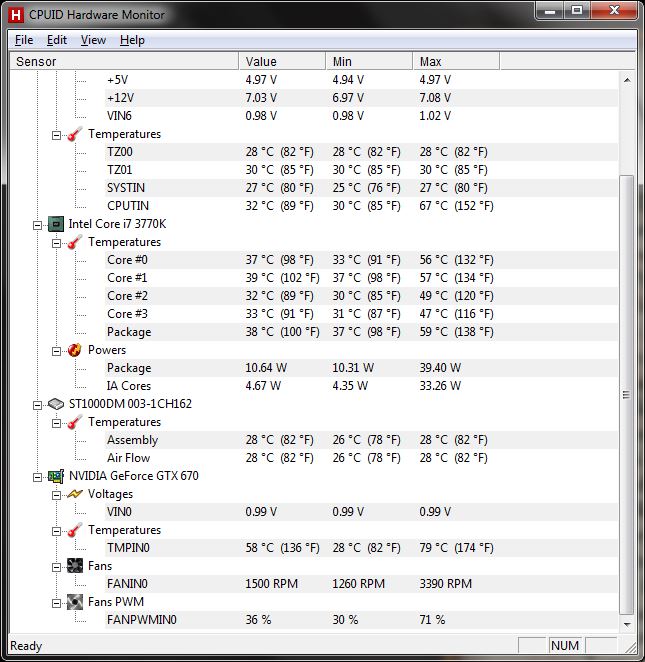
I really appreciate all of you helping subside my paranoia. One good thing has come out of this. I now have the courage to open up computer and work on it without being worried, haha.  Edited by Burr - 24 Oct 2013 at 9:06pm |
|
|
|
|
fstcvc
DS Veteran
Joined: 06 Jul 2013 Online Status: Offline Posts: 2551 |
Quote Reply
Posted: 24 Oct 2013 at 9:29pm |
 
You are now officially a Dust Bunny Ninja!! 
|
|
|
HailStorm II
i7 4770K @ 4.5GHz Asus Maximus VI Extreme 16GB Corsair Dominator Platinum 3xSLI EVGA SuperClocked GTX TITAN Samsung 840Pro SSD 256GB+512GB HydroLux+XSPC CPU/MoBo/GPU Liquid Cooling |
|
|
|
|
bprat22
DS ELITE
DigitalStorm East -- (Unofficially!)
Joined: 08 Jun 2011 Online Status: Offline Posts: 20391 |
Quote Reply
Posted: 25 Oct 2013 at 6:40am |
 Great to hear. Dang dust will do it every time. Great to hear. Dang dust will do it every time. The 79C temp is perfectly fine. Have fun.
|
|
|
|
|
Post Reply
|
| Forum Jump | Forum Permissions You cannot post new topics in this forum You cannot reply to topics in this forum You cannot delete your posts in this forum You cannot edit your posts in this forum You cannot create polls in this forum You cannot vote in polls in this forum |

About Digital Storm
Contact Information
Facility Tour
Financing
Buy Now, Pay Later
Downloads
GSA Schedule
Terms & Conditions
Privacy Policy
Request Help
Call: 1-866-817-8676
(Hours 9AM-5PM PST)





 Topic Options