help - no powerPost Date: 2009-06-08 |
Post Reply 
|
| Author | |
kleo 
Newbie 

Joined: 26 Feb 2009 Online Status: Offline Posts: 6 |
 Quote Reply Quote Reply
 Topic: help - no power Topic: help - no powerPosted: 08 Jun 2009 at 8:17am |
|
My system has no power today - worked fine yesterday. No lights on motherboard either. This is a new DG system - 3 mos old.
Power supply, yes?? Anything else I can try? How do you test power supply? |
|
 |
|
|
Bill the Cat
DS Veteran 
Forum Bitch!
Joined: 27 Aug 2007 Online Status: Offline Posts: 1150 |
Quote Reply
Posted: 08 Jun 2009 at 8:54am |
|
I assume that you've tried plugging other things into the outlet where your computer is plugged in. Is there a switch on the back of the PSU? Does the PSU have a fan that's running/not running? The only way I know to test a PSU is with a volt/ohm meter.
Maybe it's the PSU, but maybe it a motherboard failure.
|
|
|
3.6 GHz E6850, 4 GB RAM, GTS 250, TJ9, Win 7 64-bit
4.4 GHz i7 3930K, 16 GB RAM, GTX 670, 550D, Win 7 64-bit |
|
|
|
|
kleo
Newbie
Joined: 26 Feb 2009 Online Status: Offline Posts: 6 |
Quote Reply
Posted: 08 Jun 2009 at 9:48am |
|
I've tested the outlet and tried another power cord. The PSU fan is not running and there are no lights on the motherboard.
|
|
|
|
|
Zurginator
Groupie 
Joined: 30 Mar 2009 Online Status: Offline Posts: 343 |
Quote Reply
Posted: 08 Jun 2009 at 10:14am |
|
Flip the switch on the back of the Power Supply and try again.
If that doesn't work, you should jump start the PSU to see if it's that or the motherboard. |
|
|
|
|
Bill the Cat
DS Veteran
Forum Bitch!
Joined: 27 Aug 2007 Online Status: Offline Posts: 1150 |
Quote Reply
Posted: 08 Jun 2009 at 11:50am |
|
I hate to suggest it, but this is the kind of issue that you could take to Best Buy or even Staples or your local "screw driver" shop just for a thumbs up/thumbs down diagnosis on the PSU, if you're not inclined to do it your self. If the PSU is dead, replace it. If it's something worse, take a deep breath (not necessarily of just air) a stiff drink and comtemplate your options....
Oh yeah, one last thing.... Does the PSU have a fuse by any chance? Edited by Bill the Cat - 08 Jun 2009 at 11:52am |
|
|
3.6 GHz E6850, 4 GB RAM, GTS 250, TJ9, Win 7 64-bit
4.4 GHz i7 3930K, 16 GB RAM, GTX 670, 550D, Win 7 64-bit |
|
|
|
|
inferno23
Senior Member 
Joined: 09 May 2009 Online Status: Offline Posts: 519 |
Quote Reply
Posted: 08 Jun 2009 at 2:04pm |
|
I had an similar experience with my wii. it was on 1 day the next day it was off and wouldnt come back on after switching sockets and everything else. I have to tell you i was pissed. I unhooked for a day and pluged it in the next day with a prayer and to my hopes it came back on YAY i did a backflip. I dunno what was going on but i guess it was overheated or something. try keeping unplugged for a day or 2 and see if it wont work again
|
|
|
|
|
Bill the Cat
DS Veteran
Forum Bitch!
Joined: 27 Aug 2007 Online Status: Offline Posts: 1150 |
Quote Reply
Posted: 08 Jun 2009 at 8:50pm |
FYI:
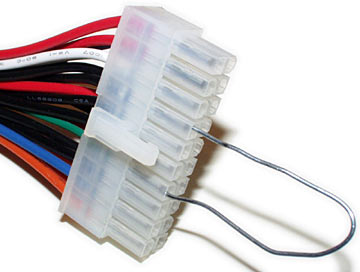
Modern ATX power supplies turn on when pin 14 on the ATX connector (the only green wire) is connected to ground (any black wire). A paper clip is adequate to do this:
Edited by Bill the Cat - 09 Jun 2009 at 11:04am |
|
|
3.6 GHz E6850, 4 GB RAM, GTS 250, TJ9, Win 7 64-bit
4.4 GHz i7 3930K, 16 GB RAM, GTX 670, 550D, Win 7 64-bit |
|
|
|
|
Post Reply
|
| Forum Jump | Forum Permissions You cannot post new topics in this forum You cannot reply to topics in this forum You cannot delete your posts in this forum You cannot edit your posts in this forum You cannot create polls in this forum You cannot vote in polls in this forum |

About Digital Storm
Contact Information
Facility Tour
Financing
Buy Now, Pay Later
Downloads
GSA Schedule
Terms & Conditions
Privacy Policy
Request Help
Call: 1-866-817-8676
(Hours 9AM-5PM PST)





 Topic Options