Help OC'ing a 5870?Post Date: 2010-04-15 |
Post Reply 
|
| Author | |
rholyrag 
Senior Member 

Joined: 17 Oct 2009 Online Status: Offline Posts: 841 |
 Quote Reply Quote Reply
 Topic: Help OC'ing a 5870? Topic: Help OC'ing a 5870?Posted: 15 Apr 2010 at 1:04pm |
|
This is my first attempt at overclocking a video card. Any help would be much appreciated.
Current settings in MSI Afterburner:
Core Voltage (mV) = 1162
Core Clock (MHz) = 850
Shader Clock (MHz) = Locked
Memory Clock (MHz) = 1200
If there is any other information needed, please let me know.
|
|
|
"What we do in life echoes in eternity" - Maximus from Gladiator
|
|
 |
|
|
justin.kerr
DS Veteran 
Joined: 06 May 2008 Online Status: Offline Posts: 5084 |
Quote Reply
Posted: 15 Apr 2010 at 1:19pm |
|
lots of way to approach it.
me personally, with 3 5870's, first I upped the memory 20Mhz, ran Kombuster, and a few game benchmarks, and if all is good, bump mem again 20Mhz, ect. some cards will overclock higher, with higher RAM, so that is why I set it first. Remember this is DDR5 RAM so take the memory Mhz x 4 so when you up it 20mhz you are really upping is 80Mhz, so 20 is a big jump. you should cap out around 1240-1350 on RAM.
The core, well I would bump the voltage to 1.25V and do the same technique as the RAM, up it 20, run tests, then up it again, ect. with the stock cooler most don't need more than 1.25V to get to 1000Mhz, all of mine needed 1.25-1.28 to get to 1060Mhz, but I have not had time to max them out yet.,
Once you get a failure, reduce clocks 20Mhz, retry, if all seems good, go to gaming, you still might have to reduce the core, or mem 20Mhz or so, for it to run all games perfect.
|
|

|
|
|
|
|
rholyrag
Senior Member
Joined: 17 Oct 2009 Online Status: Offline Posts: 841 |
Quote Reply
Posted: 15 Apr 2010 at 4:20pm |
|
Thanks again Justin for the help on oc'ing. I really appreciate your help.
Just started the oc'ing and started with the memory by upping to 20Mhz, ran Kombuster for 10 minutes at 1920x1200 and then ran 3Dmark on performance settings. No failures so will be upping another 20Mhz. Is this sufficient or do I need to change anything?
And making sure I understand the rest of the overclocking, once I cap out the ram, I need to up the core voltage to 1.25 and then increase the core clock 20Mhz at a time until I get a failure then reduce the clock 20Mhz and make sure all is good?
|
|
|
"What we do in life echoes in eternity" - Maximus from Gladiator
|
|
|
|
|
justin.kerr
DS Veteran
Joined: 06 May 2008 Online Status: Offline Posts: 5084 |
Quote Reply
Posted: 15 Apr 2010 at 4:29pm |
|
yep, sounds good. depending on your temps, and how far you want to push things, you can raise the core voltage more, but you will be adding a lot of heat, and won't gain much more speed.
|
|
|
|
|
|
|
|
rholyrag
Senior Member
Joined: 17 Oct 2009 Online Status: Offline Posts: 841 |
Quote Reply
Posted: 15 Apr 2010 at 9:37pm |
|
I was able to get the core clock to 900MHz, the memory clock to 1300MHz with the core voltage at 1.25V, and unless I missed something, this is the highest MSI Afterburner will allow me, and when I checked in CCC the settings above are the max settings in ATI overdrive.
These settings performed well in Kombuster and 3Dmark testing but when I played MW2 to test the overclock in game, I was able to play about 45 minutes to an hour then the screen changed to almost a tannish color with vertical lines. Upped the core voltage to 1.28V and played again for about 15 minutes without any problems. I will do more testing to ensure stability.
So is the gpu maxed out at those settings, or is there a way around the software?
|
|
|
"What we do in life echoes in eternity" - Maximus from Gladiator
|
|
|
|
|
justin.kerr
DS Veteran
Joined: 06 May 2008 Online Status: Offline Posts: 5084 |
Quote Reply
Posted: 15 Apr 2010 at 9:47pm |
|
hmm thats odd my max in CCC is 1800Mhz.

you can "unlock" the official MSI overclocking, that should allow you to go a bit higher.
go to my computer , click on you main hard drive, click on program files x86, click on MSI afterburner, find the file MSIAfterburner CFG file, open it in notepad, you will find near the bottom, EnableUnofficialOverclocking 0 make the zero a 1 and save it.
 |
|
|
|
|
|
|
|
rholyrag
Senior Member
Joined: 17 Oct 2009 Online Status: Offline Posts: 841 |
Quote Reply
Posted: 15 Apr 2010 at 10:00pm |
|
Thanks again Justin! I made the changes in the CFG file and it's allowing me to raise the core and memory clock. Will do more testing and let you know how things go...
 . .
|
|
|
"What we do in life echoes in eternity" - Maximus from Gladiator
|
|
|
|
|
justin.kerr
DS Veteran
Joined: 06 May 2008 Online Status: Offline Posts: 5084 |
Quote Reply
Posted: 15 Apr 2010 at 10:01pm |
|
when you want to unlock to 1800Mhz, let me know..

|
|
|
|
|
|
|
|
rholyrag
Senior Member
Joined: 17 Oct 2009 Online Status: Offline Posts: 841 |
Quote Reply
Posted: 16 Apr 2010 at 5:28pm |
|
After Justin helped me unlock MSI Afterburner max settings, I was able to raise the Core clock to 960mhz without it crashing and was able to raise the memory clock to 1320mhz without it crashing. Core voltage is set to 1.287V.
Screenshot of 3Dmark.
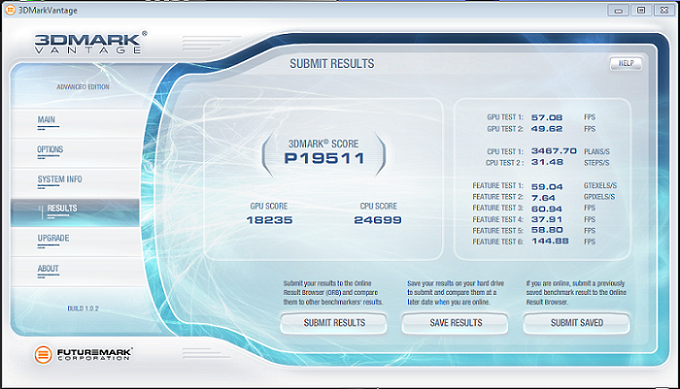 Justin, what is the max core voltage for the 5870? I understand by upping it is not going to get me much more performance, just seeing if I can hit 1000mhz...lol. Then we can try for 1800Mhz...lol
|
|
|
"What we do in life echoes in eternity" - Maximus from Gladiator
|
|
|
|
|
justin.kerr
DS Veteran
Joined: 06 May 2008 Online Status: Offline Posts: 5084 |
Quote Reply
Posted: 16 Apr 2010 at 5:51pm |
|
when using MSI afterburner, the program reads the cards voltage regulator, and has set limits on them.
Most 5870's you can go to 1.35v with MSI afterburner.
1320mhz on the RAM is really good, should not need to go any higher.. lol 5280 mhz RAM is very fast. the core you should be able to get 1000Mhz, just keep the temps in line, and add some voltage.
once you graduate from MSI afterburner, you can start editing your own BIOS and flashing it to your card.
I can tell you want 20K in vantage.
you do not need to do the feature tests, they have no bearing on the score. Edited by justin.kerr - 16 Apr 2010 at 5:52pm |
|
|
|
|
|
|
|
justin.kerr
DS Veteran
Joined: 06 May 2008 Online Status: Offline Posts: 5084 |
Quote Reply
Posted: 16 Apr 2010 at 6:01pm |
|
what ATI drivers are you using?
|
|
|
|
|
|
|
|
rholyrag
Senior Member
Joined: 17 Oct 2009 Online Status: Offline Posts: 841 |
Quote Reply
Posted: 16 Apr 2010 at 6:12pm |
10.3 drivers.
Will raise the core voltage and raise the core clock, leave the memory clock alone. I will take out the feature tests and will let you know how things go...
. Will also keep an eye on temps. |
|
|
"What we do in life echoes in eternity" - Maximus from Gladiator
|
|
|
|
|
rholyrag
Senior Member
Joined: 17 Oct 2009 Online Status: Offline Posts: 841 |
Quote Reply
Posted: 16 Apr 2010 at 9:01pm |
|
lol...no luck with raising the core clock past 960Mhz. Tried 980Mhz at 1.3V, 1.325V and 1.35V. Kombuster would fail in about 1.5 to 2 minutes.
The following settings have been rock solid so far: core voltage 1.287, core clock at 960Mhz and memory clock at 1320Mhz.
Justin, any thoughts on what may be keeping the card from overclocking higher?
|
|
|
"What we do in life echoes in eternity" - Maximus from Gladiator
|
|
|
|
|
justin.kerr
DS Veteran
Joined: 06 May 2008 Online Status: Offline Posts: 5084 |
Quote Reply
Posted: 16 Apr 2010 at 11:13pm |
|
VRM's get hot, so raising the fan speed to keep the VRM temps lower will help, also the RAM/core speed on graphics cards is a funny little dance, might try to lower the RAM to 1280 and see if that helps... every card is different, but you should be able to get a bit more out..
|
|
|
|
|
|
|
|
rholyrag
Senior Member
Joined: 17 Oct 2009 Online Status: Offline Posts: 841 |
Quote Reply
Posted: 18 Apr 2010 at 2:04pm |
|
Well the highest my 5870 would let me go was a core clock of 970MHz, with a memory clock of 1280MHz and core voltage set to 1.312V. Thank you Justin for the advice on lowering the memory clock. I tested several different core voltage and memory clock settings to try to get the core clock higher, but could not get it to pass Kombuster. I set the fan speed manually during testing to 100%, but still no success at the higher core clock. lol...the goal is still a 1000MHz, but maybe not with this card
!
Even though the 970MHz increased the performance a small margin, the minimal gain did not justify the additional heat from the higher voltage. So the current overclock settings for my 5870 is 1.287V core voltage, 960MHz core clock and 1320MHz memory clock.
Another BIG THANKS goes out to justin.kerr! I appreciate your help once again on another successful overclock!
|
|
|
"What we do in life echoes in eternity" - Maximus from Gladiator
|
|
|
|
|
justin.kerr
DS Veteran
Joined: 06 May 2008 Online Status: Offline Posts: 5084 |
Quote Reply
Posted: 19 Apr 2010 at 9:01am |
|
well, some just do better than others. There are a lot of tricks to get higher clocks, but they invole some BIOS changes, and hard mods, so that entails getting out the soldering iron, and if you have not soldered on a PCB before, well it takes some practice. lol

|
|
|
|
|
|
|
|
rholyrag
Senior Member
Joined: 17 Oct 2009 Online Status: Offline Posts: 841 |
Quote Reply
Posted: 20 Apr 2010 at 4:41pm |
|
lol...that's what I like about you, you always give me these good nuggets about how to improve performance and then you make me ask how...lol.
So do the hard mods have to be done before changes can be made to the BIOS?
Teach me Sensei...lol?
|
|
|
"What we do in life echoes in eternity" - Maximus from Gladiator
|
|
|
|
|
justin.kerr
DS Veteran
Joined: 06 May 2008 Online Status: Offline Posts: 5084 |
Quote Reply
Posted: 20 Apr 2010 at 4:58pm |
|
nope, you can flash the BIOS without the hard mods. 2 choices, 1. capture the BIOS off your card, modify it, then re-flash, or download a "pre-modded" BIOS and flash that.
You are starting to get into the more dangerous zone. lol a bad flash can brick your GPU, although I have flashed a crap load of times, and never an issue.
I can give you the links for the programs, will need to create a bootable USB drive, but I can walk you through it, if you dare risk it. lol
the hard mods, I can show you how, but when you start solder such tiny parts, you pretty much are guaranteed to mess a card or two up.
here is what a hard modded 5870 looks like.
   |
|
|
|
|
|
|
|
rholyrag
Senior Member
Joined: 17 Oct 2009 Online Status: Offline Posts: 841 |
Quote Reply
Posted: 21 Apr 2010 at 10:14pm |
|
lol...it would probably be best to start out with the easier of the two which would be to flash the BIOS. It would probably also be better to start out with a pre-modded BIOS and go from there. Your thoughts?
|
|
|
"What we do in life echoes in eternity" - Maximus from Gladiator
|
|
|
|
|
justin.kerr
DS Veteran
Joined: 06 May 2008 Online Status: Offline Posts: 5084 |
Quote Reply
Posted: 22 Apr 2010 at 9:09am |
|
when I get back home, I will post up the links to the programs, BIOS's you will need... But just be for-warned you can easily brick your card. Also I doubt you will be able to overclock your card much more this way, going to need some cooler temps also. but it is up to you lol
|
|
|
|
|
|
|
|
rholyrag
Senior Member
Joined: 17 Oct 2009 Online Status: Offline Posts: 841 |
Quote Reply
Posted: 22 Apr 2010 at 9:29pm |
|
Wouldn't flashing the BIOS to a gpu be similiar to flashing a motherboard BIOS?
|
|
|
"What we do in life echoes in eternity" - Maximus from Gladiator
|
|
|
|
|
Post Reply
|
| Forum Jump | Forum Permissions You cannot post new topics in this forum You cannot reply to topics in this forum You cannot delete your posts in this forum You cannot edit your posts in this forum You cannot create polls in this forum You cannot vote in polls in this forum |

About Digital Storm
Contact Information
Facility Tour
Financing
Buy Now, Pay Later
Downloads
GSA Schedule
Terms & Conditions
Privacy Policy
Request Help
Call: 1-866-817-8676
(Hours 9AM-5PM PST)





 Topic Options