Help pleasePost Date: 2012-10-02 |
Post Reply 
|
| Author | |
Ace Of Life 
Newbie 

Joined: 01 Sep 2009 Online Status: Offline Posts: 15 |
 Quote Reply Quote Reply
 Topic: Help please Topic: Help pleasePosted: 02 Oct 2012 at 1:24pm |
|
Budget:
[Please Type Here] 2500ish for laptop Expectations: [Please Type Here] basically traveling computer for gaming at max fps... I have already a nice desktop rig that DS built about 2 years ago Usage: [Please Type Here] Surfing,Games: LOL, WoW, CS:GO, Battlefield All video rendering/3d modeling is on my desktop Special Needs: [Please Type Here] high overclocks could be dusty work enviornment Basically I'm looking for a laptop for temporary uses before October 20th, I want to spend 2500 dollars and be able to play comfortably while at work related areas. This may or may not take over my work pc but will be used for gaming in between travel trips where i cant bring my desktop... I would like the best gaming setup prefereably with blue ray and 680nvidia worked in this budget. I have found this on MSI and was wondering what you thought, and if DS had something that could match or exceed current expectations http://www.msimobile.com/level3_productpage.aspx?id=367 I don't speak spec very well but is the msi the best bang for the buck. I currently have been looking at within MSI hoping that DS could build better etc. I love my DS desktop just thought I should get an idea on there laptops before purchasing the MSI one... To me the MSI one looks good on paper but I may be missing something that you guys could help me with I'm all ears and want to stay around the 2500 budget. Ty for your help in advance -Kyle |
|
 |
|
|
Bobby
Groupie 
Joined: 16 May 2012 Online Status: Offline Posts: 322 |
Quote Reply
Posted: 02 Oct 2012 at 2:37pm |
|
Here is the closest configuration to the one you are looking at:
Ticket Number: 733821 Total Price with Instant Savings: $2,588.00 Specifications: Chassis Model: Digital Storm x17 Laptop (Model: 9170) Display: 17.3 Inch (16:9) (Resolution: 1920 x 1080) (Glossy Surface) LED-Backlit Display Processor: Intel Core i7 3610QM (2.3 GHz Turbo Mode to 3.3Ghz) (Quad Core) (6MB Cache) Thermal Compound: Stock CPU and GPU Thermal Compound Memory: 16GB DDR3 1600MHz (2x8GB Sticks) Primary Hard Drive: Intel 240GB SSD (520 Series) (SATA 6Gb/s) Secondary Hard Drive: 750GB 7200RPM (SATA 3Gb/s) Optical Drive: Blu-Ray Player & Blu-Ray/DVD/CD Writer (Blu-Ray 6x) Wireless Card: Bigfoot Networks Killer Wireless-N 1202 (Reduces Latency for Online Gaming) Video Card(s): NVIDIA GeForce GTX 680M 4GB with NVIDIA Optimus Technology Windows OS: Microsoft Windows 7 Home Premium (64-Bit Edition) Warranty Plan: Life-time Expert Customer Care with 3 Year Limited Warranty That is a great set up. You could bump the CPU up to the 3820QM processor which would bring the total to $2,954.00 You said you wanted the "best gaming setup" and that would work for you. I have the 3820QM with the 680M and 16GB RAM and I really like it. I am not running the SSD's but have opted for two 750GB drives.....but that's because I fly a simulator and need all the room for scenery files. Edit: you might want to remove the link to the competiton, they sort of frown on that. At any rate, if you're constrained around that $2,500. limit, you can bump up the CPU and bump down the hard drives. I persoanlly think your choice of the NVidia 680M is an excellent one edit: removed reference to competitor's name.
Edited by Bobby - 02 Oct 2012 at 2:45pm |
|
|
|
|
Alex
Admin Group 
Digital Storm Supervisor 
Joined: 04 Jun 2012 Online Status: Offline Posts: 16314 |
Quote Reply
Posted: 02 Oct 2012 at 4:45pm |
|
Bobby has a great config that he recommended, and it can always be changed around to your needs/budget.
The link to MSI is fine, as they are not a direct competitor. |
|

|
|
|
|
|
Ace Of Life
Newbie
Joined: 01 Sep 2009 Online Status: Offline Posts: 15 |
Quote Reply
Posted: 03 Oct 2012 at 5:34am |
|
Thanks for the build bobby, As i compare the link MSI and DS build bobby made they look to be basically the same... is there anything I'm missing... the price is roughly the same as well.
|
|
|
|
|
bprat22
DS ELITE 
DigitalStorm East -- (Unofficially!)
Joined: 08 Jun 2011 Online Status: Offline Posts: 20391 |
Quote Reply
Posted: 03 Oct 2012 at 5:57am |
|
Hi Ace of Life...... I'll chime in until others that have and know laptops show up. I have an old 8 year old non-gaming laptop so not your best choice for advice.
 I believe the build Bobby showed you is a Clevo P170EM laptop. You could google a comparison between it and your MSI GT70 and see what's said by the reviewers. Good luck. DS has excellant support, so that might sway you in this direction. Edited by bprat22 - 03 Oct 2012 at 6:00am |
|
|
|
|
Baby Huey
Groupie
Joined: 26 Sep 2012 Online Status: Offline Posts: 222 |
Quote Reply
Posted: 03 Oct 2012 at 6:02am |
|
You are missing....
Technical Support:Life-time U.S. based technical support and customer service by our own in-house technicians Upgrades:Life-time labor free upgrades for component upgrades purchased directly from Digital Storm Assembly:Hand built by the industry's most skilled technicians using premium grade components Stress-Testing:Strict 72-hour stress-testing and benchmarking to ensure rock solid stable operation Quality Control:Analyzed by an extremely dedicated production manager that is obsessed with perfection That and the option to fine tune the machine to your specific needs. As in upgrading your OS to Pro or Ultimate. I am assuming you are talking about one of the pre specced MSI like the GT70? For me the 3 year warranty from a company that will actually speak with you when needed is worth any extra time or money involved. |
|
|
|
|
Ace Of Life
Newbie
Joined: 01 Sep 2009 Online Status: Offline Posts: 15 |
Quote Reply
Posted: 03 Oct 2012 at 6:29am |
|
Huey you got me wrong man, I love DS and thats why I'm here... I've purchased from them before and loved the customer support, forums, people, testing, etc... im just looking at specs... I cant see a difference... I'm not the best when it comes to comparing computers and want to make sure I'm getting the best for the buck or if changing one thing will make a huge improvement...
I have to have this computer in 17 days roughly so I don't know if DS can meet that time constraint or not... or if i should purchase from MSI if they are the same computer. Are these two the same computer? |
|
|
|
|
DomTheBomb
Groupie
Joined: 19 May 2012 Online Status: Offline Posts: 314 |
Quote Reply
Posted: 03 Oct 2012 at 6:50am |
|
Just going to add a few suggestions since I own a x17.
The x17 really isn't that portable, it weighs 7-8lbs and is very large. If you're going for portability I would suggest the x15E or the x11. Here's a x15E build with everything you wanted: Ticket Number: 733960 Price:$2538 Chassis Model: Digital Storm x15E Laptop (Model: 9150) Display: 15.6 Inch (16:9) (Resolution: 1920 x 1080) (Glossy Surface) LED-Backlit Display Processor: Intel Core i7 3720QM (2.6 GHz Turbo Mode to 3.6Ghz) (Quad Core) (6MB Cache) Thermal Compound: Premium IC Diamond CPU and GPU Thermal Compound (Reduces Thermal & Laptop Noise) Memory: 16GB DDR3 1600MHz (4x4GB Sticks) Primary Hard Drive: Intel 240GB SSD (520 Series) (SATA 6Gb/s) Secondary Hard Drive: - Not Available Optical Drive: Blu-Ray Player (Blu-Ray 6x) & DVD/CD Writer Wireless Card: Bigfoot Networks Killer Wireless-N 1202 (Reduces Latency for Online Gaming) Video Card(s): NVIDIA GeForce GTX 680M 4GB with NVIDIA Optimus Technology Windows OS: Microsoft Windows 7 Home Premium (64-Bit Edition) Warranty Plan: Life-time Expert Customer Care with 3 Year Limited Warranty The only disadvantage to the x15E is that you can only put in one hard drive. However, even with my x17 I only use one hard drive combined with a USB3.0 external, and I prefer this since I don't have the extra weight when I don't need the hard drive. I put in the i7 3720QM since it's what I have and I don't know how games would perform on the slower processor, but I'm sure it would be good too. If you want something really portable you could go with the x11 level 4. It would be a ton more portable while still performing well on its lower resolution. It's also a lot cheaper, and if you're only using the laptop as a temporary computer this would make more sense instead of a $2500 laptop, since the x17 is really more of a desktop replacement than a laptop in my opinion As far as the time scale goes if you ordered soon you should be able to have it in 17 days. It seems like laptop orders have been going really quickly recently. Good luck with whatever you decided to order!
|
|
|
DS x17, 1 Year 5 Months
i7 3720QM (2.6GHz/3.6GHz) 16GB 1600MHz DDR3 Nvidia GTX 680M 4GB 240GB Intel 520 SSD Windows 8.1 Pro |
|
|
|
|
Orange7
Senior Member 
Joined: 24 Apr 2012 Online Status: Offline Posts: 776 |
Quote Reply
Posted: 03 Oct 2012 at 7:21am |
|
You could easily swap the 240GB SSD for a 120GB if you wanted to save some cash. Also, 17 Days should be fine, but depending on where you live, you may be pushing it in a few days.
|
|
|
DS xm15 Stage 4
i7-3820 (2.7GHz/3.7GHz) 16GB 1600MHz DDR3 GT 630, 1GB 240GB Intel 520 |
|
|
|
|
Bobby
Groupie
Joined: 16 May 2012 Online Status: Offline Posts: 322 |
Quote Reply
Posted: 03 Oct 2012 at 7:32am |
ok....I see what you're asking. They are not the same platform. The laptops from Digital Storm are made by Clevo, They are exported to Sager in Southern California and configured by Digital Storm employees to be shipped to you. If you need the machine within 17 days, I'd have a configuration ticket in mind and call them directly to see if they can make your time constraint. Depending on where you live in the Country, you need to take into account ground shipping transit times. MSI has it's own platform. They tend to be a bit "flashier" than a Clevo (externaal lights) but the hardware is identical to the Clevo They can be bought in a lot of places including already prebuilt at brick and motar stores. The issue is warranty and support. Did I mention support? Finally, I tend to agree with DomTheBomb.....the power brick for the x17 is HUGE !!!! 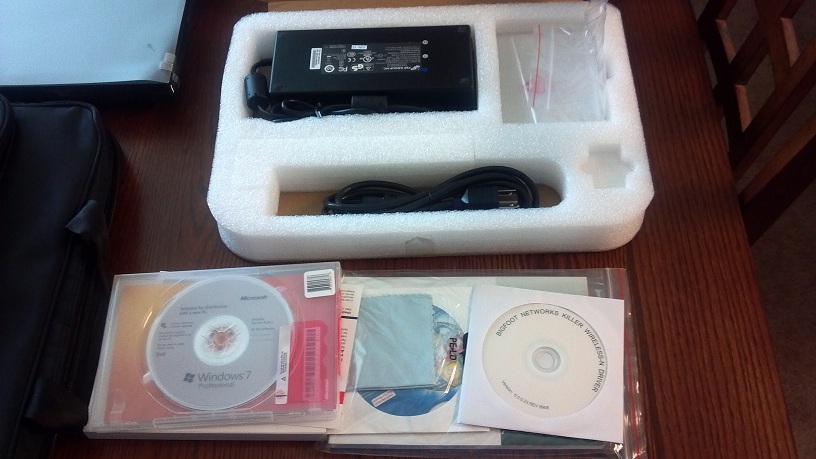 |
|
|
|
|
Baby Huey
Groupie
Joined: 26 Sep 2012 Online Status: Offline Posts: 222 |
Quote Reply
Posted: 03 Oct 2012 at 8:32am |
|
I know they may not be able to guarantee shipment, but my new x17 arrived yesterday and as ordered on 9/21. I could have been lucky. As for the my previous comment, I was not trying to be disparaging but you asked what you were missing. I just threw in what was important to me that was not included in the other package. It is reassuring to see Alex offer to help someone in another thread with a recently out of warranty DS system. I know that if I have any issues, DS will do their best to help me with them. Though I am not saying the other outfit will not, but according to their reviews it does not leave much to think about. I was pondering the same question as you for the last month. I noticed that the other build's main complaint was some coming in DoA. With the testing involved before a DS system ships to you, that pretty much rules that out unless there is possible damage from shipping. Though it seems they covered that as well by packaging everything up nicely. Or so I have heard.
|
|
|
|
|
Bobby
Groupie
Joined: 16 May 2012 Online Status: Offline Posts: 322 |
Quote Reply
Posted: 03 Oct 2012 at 8:40am |
You heard right  This what the packaging looks like: This what the packaging looks like: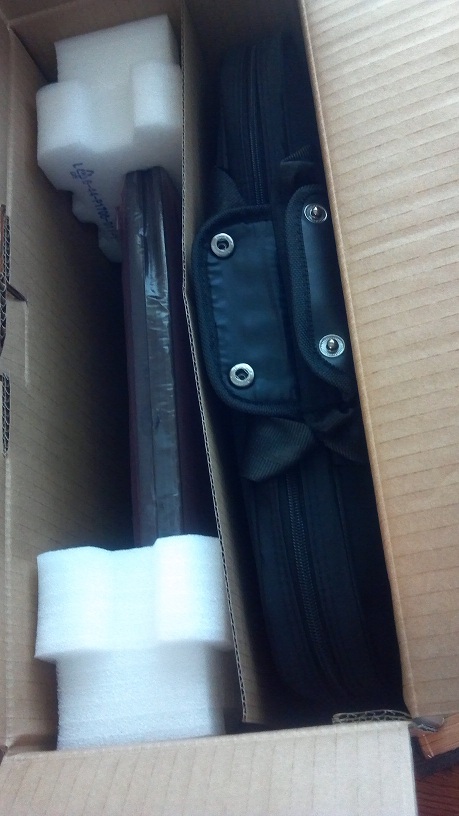 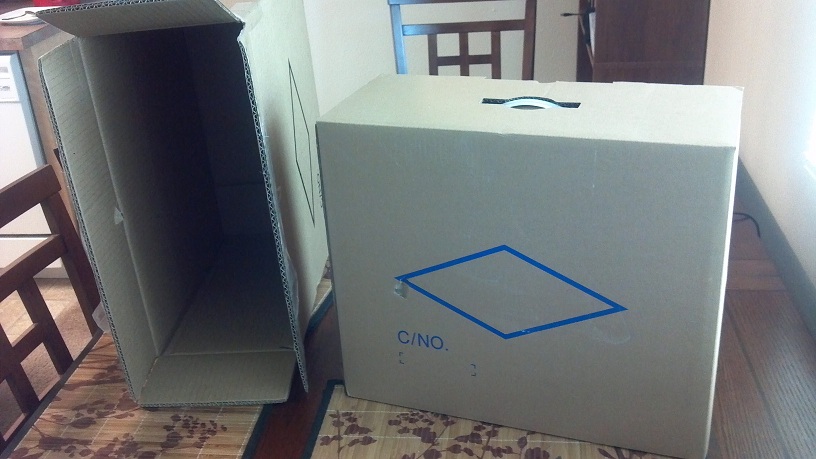 |
|
|
|
|
tju76
Senior Member
Joined: 06 Mar 2012 Online Status: Offline Posts: 804 |
Quote Reply
Posted: 03 Oct 2012 at 9:44am |
|
@bobby, you play simulators on a 17inch laptop screen? I really hope you have external monitors lol
|
|
|
|
|
|
|
Ace Of Life
Newbie
Joined: 01 Sep 2009 Online Status: Offline Posts: 15 |
Quote Reply
Posted: 03 Oct 2012 at 10:54am |
|
I'm really liking Don the bombs build, can someone tell me the difference in the memory of 4x4gb vs 2x8gb
|
|
|
|
|
bprat22
DS ELITE
DigitalStorm East -- (Unofficially!)
Joined: 08 Jun 2011 Online Status: Offline Posts: 20391 |
Quote Reply
Posted: 03 Oct 2012 at 11:53am |
|
Dom's 15E laptop has four DIMM slots for 4x4 ram sticks. If you use 2x8 it leaves 2 empty slots for easier and cheaper expansion, as in the build Bobby showed you.
They both can take 32GB ram. For 16gb ram the 4x4gb is initially cheaper but if you ever wanted to go to 32GB then with 4x4 you'd have to change all four. With 2x8, just add another 2x8 gb sticks. |
|
|
|
|
Bobby
Groupie
Joined: 16 May 2012 Online Status: Offline Posts: 322 |
Quote Reply
Posted: 03 Oct 2012 at 1:23pm |
If I had enough room for three 24" monitors, I'd get a beast of a desktop. I just don't have enough room which is why I have the laptop. While the 17.3" screen is really good for flying, it's hard to read the guages at the resolution I'm running this laptop at. I keep buying those lottery tickets.....some day I'll get a bigger place
|
|
|
|
|
Bobby
Groupie
Joined: 16 May 2012 Online Status: Offline Posts: 322 |
Quote Reply
Posted: 03 Oct 2012 at 1:30pm |
bprat22 is right....hopefully, they put the 2 sticks under the keyboard since those are a bitch to get to, freeing up the 2 slots under the bottom cover which are easy to work on. I don't believe the HM77 mobile board runs quad channel so the 2 sticks should run dual channel just fine. I think the only reason to go with 32GB ram is if you do a lot of video editing. If you think you might ever load that much RAM....be sure to get Windows 7 Pro or Ultimate. Windows 7 Home won't address that much ram
|
|
|
|
|
Ace Of Life
Newbie
Joined: 01 Sep 2009 Online Status: Offline Posts: 15 |
Quote Reply
Posted: 04 Oct 2012 at 5:46am |
|
Thank you Bobby, I appreciate your help as well... your build was great but I realized I would probably do better with a 15' display than a 17'....a case where size isn't always better haha.
Ticket Number: 733960 Price:$2538 Chassis Model: Digital Storm x15E Laptop (Model: 9150) Display: 15.6 Inch (16:9) (Resolution: 1920 x 1080) (Glossy Surface) LED-Backlit Display Processor: Intel Core i7 3720QM (2.6 GHz Turbo Mode to 3.6Ghz) (Quad Core) (6MB Cache) Thermal Compound: Premium IC Diamond CPU and GPU Thermal Compound (Reduces Thermal & Laptop Noise) Memory: 16GB DDR3 1600MHz (4x4GB Sticks) Primary Hard Drive: Intel 240GB SSD (520 Series) (SATA 6Gb/s) Secondary Hard Drive: - Not Available Optical Drive: Blu-Ray Player (Blu-Ray 6x) & DVD/CD Writer Wireless Card: Bigfoot Networks Killer Wireless-N 1202 (Reduces Latency for Online Gaming) Video Card(s): NVIDIA GeForce GTX 680M 4GB with NVIDIA Optimus Technology Windows OS: Microsoft Windows 7 Home Premium (64-Bit Edition) Warranty Plan: Life-time Expert Customer Care with 3 Year Limited Warranty This Is Doms build... my only changes to it would be... 2 8gb ram and maybe the display change... can someone tell me if the display 95% color Gamut make that much of a difference for the money?... Is it similiar to apples retina display? |
|
|
|
|
Ace Of Life
Newbie
Joined: 01 Sep 2009 Online Status: Offline Posts: 15 |
Quote Reply
Posted: 04 Oct 2012 at 5:54am |
|
Chassis Model: Digital Storm x15E Laptop (Model: 9150)
Display: 15.6 Inch (95% NTSC Color Gamut) (Matte Surface) (16:9) (1920 x 1080) LED-Backlit Display Processor: Intel Core i7 3720QM (2.6 GHz Turbo Mode to 3.6Ghz) (Quad Core) (6MB Cache) Thermal Compound: Premium IC Diamond CPU and GPU Thermal Compound (Reduces Thermal & Laptop Noise) Memory: 16GB DDR3 1600MHz (2x8GB Sticks) Primary Hard Drive: Intel 240GB SSD (520 Series) (SATA 6Gb/s) Secondary Hard Drive: - Not Available Optical Drive: Blu-Ray Player (Blu-Ray 6x) & DVD/CD Writer Wireless Card: Bigfoot Networks Killer Wireless-N 1202 (Reduces Latency for Online Gaming) Video Card(s): NVIDIA GeForce GTX 680M 4GB with NVIDIA Optimus Technology Windows OS: Microsoft Windows 7 Professional (64-Bit Edition) Warranty Plan: Life-time Expert Customer Care with 3 Year Limited Warranty |
|
|
|
|
Bobby
Groupie
Joined: 16 May 2012 Online Status: Offline Posts: 322 |
Quote Reply
Posted: 04 Oct 2012 at 8:43am |
|
I recommended the build I did based on the MSI model you were looking at which was also a 17.3" model. The only difference between the x17 and the x15E is the size obviously but also the 15E only has one drive bay. You can essentially stuff the same hardware in either one.
Remember that your one SSD now needs to store everything including the library folders and where an SSD will help load times in games, they do nothing for FPS. If you have your heart set on an SSD I might recommend unloading your library folders to an external HD. It really all depends on how much you intend to load Keep in mind that the page file, system restore files, hibernation files (I would disable that option anyway) and temp files are going to use "invisible" space. You really have a great build there and I am certain you will enjoy it. Have fun and don't forget the pics edit: spelling
Edited by Bobby - 04 Oct 2012 at 8:47am |
|
|
|
|
DomTheBomb
Groupie
Joined: 19 May 2012 Online Status: Offline Posts: 314 |
Quote Reply
Posted: 04 Oct 2012 at 8:45am |
|
The difference with the matte surface is that it reduces a lot of the glare that you get with a typical glossy screen. Most people prefer a matte screen, although you will get less contrast and brightness with a matte display.
Here's an article on the two types of screens: http://www.squidoo.com/matte-vs-glossy-screens Retina display refers to the screen resolution. The Apple retina displays have a resolution of 2880x1800 on a 15' screen, which gives a very high pixel density. Personally I think the retina displays look nice but you honestly wouldn't notice individual pixels with the 1920x1080 display unless you really looked for them. And glad I could help you with your build!
|
|
|
DS x17, 1 Year 5 Months
i7 3720QM (2.6GHz/3.6GHz) 16GB 1600MHz DDR3 Nvidia GTX 680M 4GB 240GB Intel 520 SSD Windows 8.1 Pro |
|
|
|
|
Post Reply
|
| Forum Jump | Forum Permissions You cannot post new topics in this forum You cannot reply to topics in this forum You cannot delete your posts in this forum You cannot edit your posts in this forum You cannot create polls in this forum You can vote in polls in this forum |

About Digital Storm
Contact Information
Facility Tour
Financing
Buy Now, Pay Later
Downloads
GSA Schedule
Terms & Conditions
Privacy Policy
Request Help
Call: 1-866-817-8676
(Hours 9AM-5PM PST)





 Topic Options