i7 2600k / ASUS p8p67 Deluxe Memory compatibilityPost Date: 2011-07-09 |
Post Reply 
|
| Author | ||
bakerac 
Newbie 

Joined: 26 Jan 2011 Online Status: Offline Posts: 38 |
 Quote Reply Quote Reply
 Topic: i7 2600k / ASUS p8p67 Deluxe Memory compatibility Topic: i7 2600k / ASUS p8p67 Deluxe Memory compatibilityPosted: 09 Jul 2011 at 5:51am |
|
|
Question on add-on memory compatibility. I got my system in March, and have been very pleased as it continues to be an excellent contributor to (among other things) Stanford's Folding at Home (which, by the way, is worthy, IMHO, of consideration by any of us who have spare cycles to contribute to support molecular dynamics computation in a massive distributed computing environment - http://folding.stanford.edu/English/WinGuide; http://folding.stanford.edu/English/Main) I saw at [a local computer store] a July 4th sale on 8 GByte (2x4GB) of Corsair XMS3 Dual Channel 1600 MHz memory at a good price with rebate. As much as I could tell, this would be compabible with my system. Below is a screen-snip of the ASUS AI Suite, CPU-Z for the CPU, Mem slot 1 and slot 2, along with the Cyberpower gadget in the upper right corner showing power consumption (less the monitor which is on a different ups). All of the memory is recognized - showing 12,268 MB. The BIOS and CPU-Z all see it in the SPD sections. The issue: After I initially installed the memory, the system would power itself off after a minute or two and reboot. Over the next half hour or so, it did it several more times. I adjusted the overclock to the point where it now seems stable.
After the long wind-up here's the question. a. Is there an issue with this mix? b. Is there a way to command the tRC in the bios of the Corsair memory to match the Adata? Is that necessary/beneficial? c. Is there anything obvious with the Corsair memory or its settings that make it unstable at 103x44 (4539 MHz), but stable at 100x42 (4200 MHz)? I would really like to get the OC higher - back up to the 4500 or 4600 MHz range. Thanks. 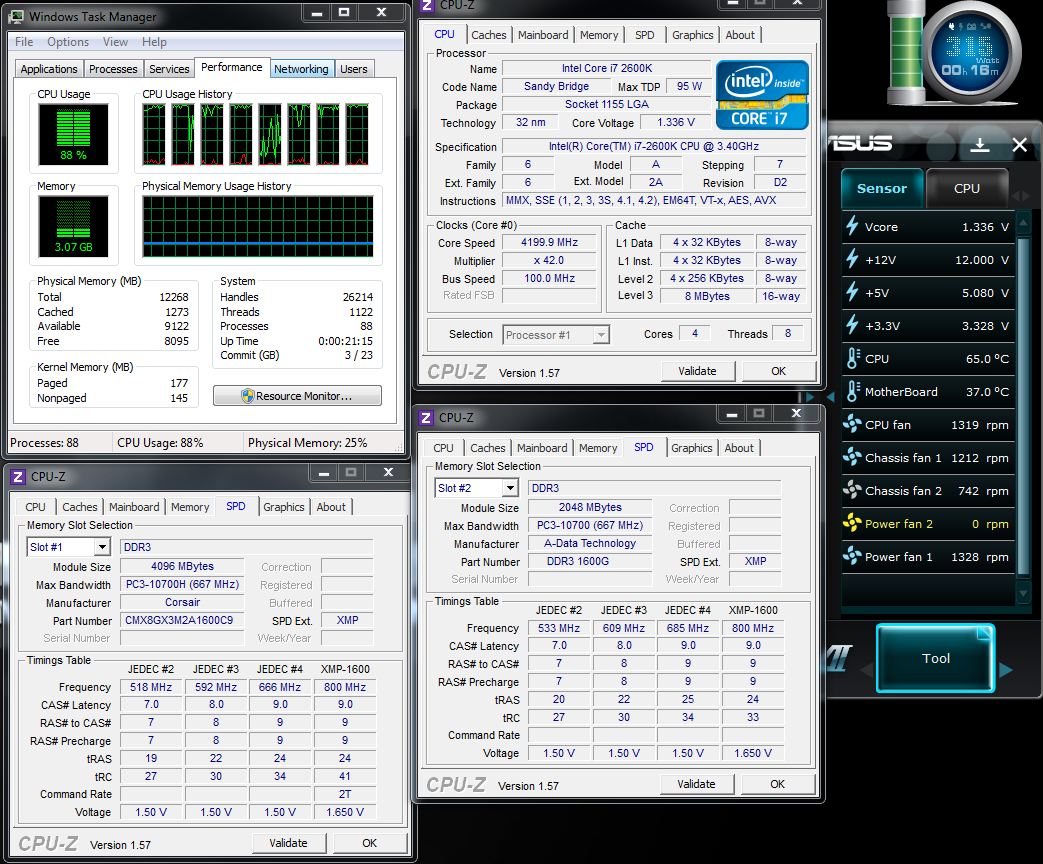 =================== - MSI Twin Frozr Video Card By: Sarah 2/11/2011 Quantity: 1 System Configuration: Chassis Model: Special Deal Hot Seller - HAF 922 Exterior Finish: - Standard Factory Finish Trim Accents: - Standard Factory Finish Processor: Intel Core i7 2600K 3.40GHz (Unlocked CPU for Extreme Overclocking) (Quad Core) Motherboard: ASUS P8P67 Deluxe (Intel P67 Chipset) (Features USB 3.0 and SATA 6Gb/s) System Memory: 4GB DDR3 1600MHz Digital Storm Certified Performance Series (Highly Recommended) (Hand Tested) Power Supply: 750W Corsair TX (Dual SLI Compatible) Expansion Bay: - Internal Digital Media Card Reader and Hard Drive Hot Swap Bay (EZ-Rack) Hard Drive Set 1: Operating System: 1x (500GB Solid State Hybrid (By: Seagate) (7200 RPM) (Model: ST95005620AS) Set 1 Raid Options: - No Thanks Hard Drive Set 2: Multimedia\Data: 1x (1TB Western Digital Caviar (7200 RPM) (64MB Cache) (Model: Black Edition WD1002FAEX) Hard Drive Set 3: Backup\Misc.: - No Thanks Optical Drive 1: Blu-Ray & DVD Writer/Reader (Burn + Play Blu-Ray & DVDs) (12x BD-R) (Lite-On iHBS112) Optical Drive 2: - No Thanks Internet Access: High Speed Network Port (Supports High-Speed Cable / DSL / Network Connections) Video Card(s): 1x NVIDIA GeForce GTX 560 Ti 1GB (Includes PhysX Technology) Add-on Card: - No Thanks Sound Card: Integrated Motherboard Audio Extreme Cooling: AIR: Stage 1: Noctua NH-U12P SE Dual 120mm Fans High Performance Cooler H20 Tube Color: - Not Applicable, I do not have a FrostChill or Sub-Zero LCS Cooling System Selected Chassis Airflow: Standard Factory Chassis Fans Internal Lighting: Internal Chassis Lighting System (Blue) Enhancements: - No Thanks Chassis Mods: - No Thanks Noise Reduction: - No Thanks CPU Boost: FREE: Overclock the processor between 3.6GHz to 3.9GHz Graphics Boost: FREE: Yes, Overclock the video card(s) as much as possible with complete stability Memory Boost: - No Thanks, Please do not overclock my memory OS Boost: - No Thanks, Please do not tweak the services on the operating system Windows OS: Microsoft Windows 7 Home Premium (64-Bit Edition)
|
||
 |
||
|
bakerac
Newbie
Joined: 26 Jan 2011 Online Status: Offline Posts: 38 |
Quote Reply
Posted: 09 Jul 2011 at 11:59am |
|
|
Update. The system power cycled itself after about 2+ hours on the 4200 MHz setting - I changed the OC setting once again to 100.3x41 - about 4100 MHz, and it's been up 4 hours 24 minutes at full load.
|
||
|
||
|
RiceEatin2000GT
DS Veteran 
Joined: 02 Oct 2008 Online Status: Offline Posts: 1699 |
Quote Reply
Posted: 09 Jul 2011 at 6:24pm |
|
|
u should never mismatch ram. At the very least you would want to run them both at the same exact settings so the faster ram would be limited to the slower rams speed.
|
||

|
||
|
||
|
RiceEatin2000GT
DS Veteran
Joined: 02 Oct 2008 Online Status: Offline Posts: 1699 |
Quote Reply
Posted: 09 Jul 2011 at 6:25pm |
|
|
also your b-clock with sandy bridge should always remain at 100, that could of been an issue. I would need to look at all of ur oC settings to give you some more guidance.
|
||
|
|
||
|
||
|
bakerac
Newbie
Joined: 26 Jan 2011 Online Status: Offline Posts: 38 |
Quote Reply
Posted: 14 Jul 2011 at 6:10am |
|
|
@ RiceEatin2000GT- Thanks for the comments. All 12 GB of memory (the orginal 2x2 GB A-Data from DS, and the add-on 2x4 GB Corsair I just added) seem to be quite stable now - I'll post some memtest results later.
My next step after the post above was to go back into the EUFI BIOS and put the OC settings on Auto. That seemed to be the magic trick. I took a finer look at the "official ASUS P8P67 Overclocking Guide", and saw the little blurb about running 4 dimm and high memory density configs. The 103 BClock suggested in the [H]ard|Forum article on 24-7 OC must have been without all the memory slots occupied. So, the steps I took in auto were: 41 multiplier - BIOS auto selected 100.3 Bclock. Stable. 44 multiplier - BIOS auto selected 100.3 BClock. Stable for a couple of days at 24/7 Folding. 1.368 Vcore; 324 watts. 66° C CPU when MB temp was 33° C. 46 multiplier - BIOS auto selected 100 BClock. ~ 4600 MHz. Stable for 2 3/4 hours so far of folding - No apparent gliches.
I'll go to bed and see how it is doing in the morning.
|
||
|
||
|
RiceEatin2000GT
DS Veteran
Joined: 02 Oct 2008 Online Status: Offline Posts: 1699 |
Quote Reply
Posted: 14 Jul 2011 at 12:34pm |
|
|
i would keep the bclk at 100 no matter what imo. Your settings look good just keep an eye on your v-core when using auto. Typically any multi from 44-47 should require 1.3-1.375 v-core. This also requires the proper line load calibration settings of course.
|
||
|
|
||
|
||
|
bakerac
Newbie
Joined: 26 Jan 2011 Online Status: Offline Posts: 38 |
Quote Reply
Posted: 14 Jul 2011 at 9:54pm |
|
|
@RiceEatin2000GT. I appreciate your reviewing and commenting on my travails. I had a couple of more auto shutdowns.
 I was stable with the mixed kinds of memory for days at 4400, when I tried to goose it up a bit more. I was stable with the mixed kinds of memory for days at 4400, when I tried to goose it up a bit more. You mentioned, "This also requires the proper line load calibration settings of course." Please advise what is the proper setting. Below is a snip of the DIGI+VRM page of the AI Suite II, as well as the TurboV EVO with both the CPU and Sensor monitors.. Many thanks. BTW, I guess one remedy is to get rid of the mixed memory - the 2x2 GB DS-standard A-DATA Gaming memory, and the 2x4 GB Corsair XMS3 Dual Channel 1600 memory. A-DATA doesn't seem to have 4 GB sticks in the same series of Gaming memory as Digital Storm installed, nor does Digital Storm have ANY 4 gig sticks in their upgrade center. Question - do you think I need to abandon the original memory in favor of the higher capacity Corsair, or do you know of a way with the Digital Storm 2x4 Adata memory to get up to 12 GB? ======================== In the DIGI+ VRM, there are a bunch of settings - a slider on the load-line calibration (set at its nominal HIGH - but the slider will go quite a bit more to the right); Current capacity set to 100%. In the last round in the BIOS, I set the DIGI+VRM from Auto Spread-spectrum OFF to ON, where it is now. 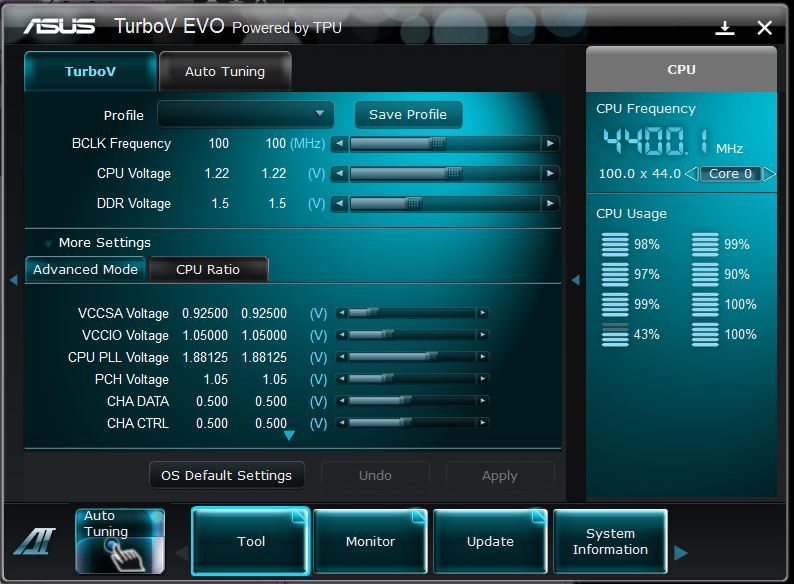 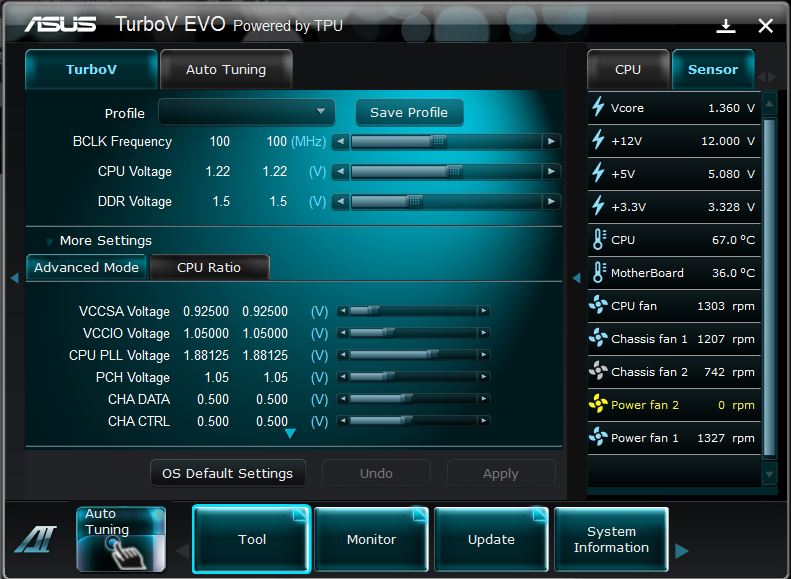  |
||
|
||
|
RiceEatin2000GT
DS Veteran
Joined: 02 Oct 2008 Online Status: Offline Posts: 1699 |
Quote Reply
Posted: 15 Jul 2011 at 2:00pm |
|
|
First thing i see that could be potentially wrong is your ram voltage. I do all my tweaking through the bios so if we could do that so i can help you the best that would be cool. Link me to the ram you bought? it seems like your voltage for it is at 1.5v. Thats more than likely to low for the ram that DS put in your computer along with what you bought. Typically 1600mhz ram is 1.65V unless its some low voltage stuff.
|
||
|
|
||
|
||
|
bakerac
Newbie
Joined: 26 Jan 2011 Online Status: Offline Posts: 38 |
Quote Reply
Posted: 15 Jul 2011 at 3:24pm |
|
|
Thanks for the note.
This is the memory. It, indeed, is rated for 1.65v, as is the Digital Storm A-Data memory. Current status - I'm 17.9 hours up on the 4400 MHz config I posted last night. Running relatively cool (67º C), although I might give my case fans a tweak. I think I set the AI Tweaker in the bios to the "XMP" setting. "If you install memory modules supportint the eXtreme Memory Profile (X.M.P.) Technology, choose this item to set the profiles supported by your memory modules for optimizing the system performance." I don't think I manually set the 1.5v. I did just reset the DDR voltage shown in the snip above to 1.65v it in the Windows AI suite - no apparant hiccup. But, of course, it's been stable for almost 18 hours at nearly full load (89% CPU, 99% GPU, 324 watts) at the 1.5v setting - so I'll see if that continues to be stable. I'd like to see if I could find a setting that would let me be stable at 4.5 GHz - do you have a suggestion on the load-line calibration? Again, thanks. ================================== Additional working: case fan config. (currently - HAF922 - top and front 200 mm fans blowing in; side 200 mm fan blowing out; back 120 mm fan blowing out. System came with side fan also blowing in per discussion with DS techs to keep a good positive pressure in case - but when I started OC, I got better temps by reversing side fan to blow out. I may reverse top and side so front & side blow in, top and back blow out).
|
||
|
||
|
RiceEatin2000GT
DS Veteran
Joined: 02 Oct 2008 Online Status: Offline Posts: 1699 |
Quote Reply
Posted: 15 Jul 2011 at 3:31pm |
|
|
at 4.5ghz i would start with this
obviously multi at 45 with 100 bclk v-core- 1.35v Line load calibration of very high vrm frequency of 350 phase control set to extreme This should be enough to get you stable for 4.5ghz. |
||
|
|
||
|
||
|
FrankW
DS Veteran
Joined: 22 Feb 2010 Online Status: Offline Posts: 2254 |
Quote Reply
Posted: 15 Jul 2011 at 4:18pm |
|
|
Bakerac wrote: case fan config.
(currently - HAF922 - top and front 200 mm fans blowing in; side 200 mm fan blowing out; back 120 mm fan blowing out. System came with side fan also blowing in per discussion with DS techs to keep a good positive pressure in case - but when I started OC, I got better temps by reversing side fan to blow out. I may reverse top and side so front & side blow in, top and back blow out). I think the normal fan setup for the HAF 922 would be the front and side blowing in and the back and top blowing out. Frank |
||
|
||
|
bakerac
Newbie
Joined: 26 Jan 2011 Online Status: Offline Posts: 38 |
Quote Reply
Posted: 23 Aug 2011 at 2:22pm |
|
|
Thanks for all the prior advice. Have a quick memory configuration follow up.
As I posted before, I have 2X2 GB Adata 1600, the original Digital Storm "certified memory". These were installed, per ASUS instructions for the p8p67 Deluxe mobo, in memory slots A2 and B2, or as depicted in CPU-Z in slots 2 and 4. I then added 2x4 Corsair 1600 memory in the two open slots - A1 and B1 (or slots 1 and 3). The specs on the Adata and Corsair memory are both 9.0-9-9-24 with max voltage 1.65v. There is another memory spec where the sticks differ - tRC is 33 on the Adata and 41 on the corsair. The question because I'm still having some small stability issues. Would there be any difference in the configurations below: Opt a (as currently installed) - a1 4GB; a2 2GB; b1 4GB; b2 2GB Opt b. a1 4GB; a2 4GB; b1 2GB; b2 2GB (corsair in channel a; adata in b) Opt c. a1 2gb; a2 2GB; b1 4GB; b2 4GB (adata in channel a; corsair in b) Opt d. a1 2GB; a2 4GB; b1 2GB; b2 4GB (swap the adata and corsair) Opt e. a2 4GB; b2 4GB (abandon the adata so there isn't any assymetry)
|
||
|
||
|
RiceEatin2000GT
DS Veteran
Joined: 02 Oct 2008 Online Status: Offline Posts: 1699 |
Quote Reply
Posted: 24 Aug 2011 at 2:33am |
|
|
id honestly ditch the 2 2gb sticks of adata and stick with the 8 gigs of corsair. the jump from 8 to 12 gigs really isnt something ur gonna notice unless you do some heavy video editing or something along those lines. What ram exactly did you buy?
Edited by RiceEatin2000GT - 24 Aug 2011 at 2:34am |
||
|
|
||
|
||
|
bakerac
Newbie
Joined: 26 Jan 2011 Online Status: Offline Posts: 38 |
Quote Reply
Posted: 24 Aug 2011 at 4:05am |
|
|
Thanks for the note.
This is the memory. XMS3 — 8GB Dual Channel DDR3 Memory Kit I just saw one post that addressed the 12 GB situation, and the config I have is what the "Best Answer" was. http://www.tomshardware.com/forum/312449-31-12gb-2x4gb-2x2gb-dual-channel-asus-p8p67. But, I've seen other posts that strongly discourage mixing memory types. Better part of valor would be for me to abandon the DS Adata 4 GB memory, and stick with the new 8 GB Corsair, putting them in the A2-B2 slots the original memory came in. I hope that if I take the mixed memory out of the equation, I can get my CPU O/C back up. I'm stable at 99.7X42 now - but anything higher and I had periodic episodes where after maybe multiple days of continuous service, the system just powers itself off and auto reboots. Temps were all good at 70 deg C or less under continuous 100% load. Product Description 8GB XMS Memory kit for dual channel systems, 1600MHz, 9-9-9-24, 1.65V Key Features Maximize your system memory capacity for ultimate performance Guaranteed to work on all dual channel Intel and AMD platforms XMS heat spreader World famous Corsair reliability and performance Package Contents Two 4GB memory modules System Requirements Designed for use with all DDR3 motherboards with two memory channels Edited by bakerac - 24 Aug 2011 at 4:07am |
||
|
||
|
Post Reply
|
| Forum Jump | Forum Permissions You cannot post new topics in this forum You cannot reply to topics in this forum You cannot delete your posts in this forum You cannot edit your posts in this forum You cannot create polls in this forum You cannot vote in polls in this forum |

About Digital Storm
Contact Information
Facility Tour
Financing
Buy Now, Pay Later
Downloads
GSA Schedule
Terms & Conditions
Privacy Policy
Request Help
Call: 1-866-817-8676
(Hours 9AM-5PM PST)





 Topic Options