Installing another GTX 780 for SLIPost Date: 2013-06-25 |
Post Reply 
|
| Author | |
Deathdenial 
Newbie 

Joined: 02 May 2013 Online Status: Offline Posts: 68 |
 Quote Reply Quote Reply
 Topic: Installing another GTX 780 for SLI Topic: Installing another GTX 780 for SLIPosted: 25 Jun 2013 at 12:22pm |
|
Well this will be the first time that I will be installing a video card. I could really use some pointer on what I need to do. I believe DS has already helped me a great deal by having the wiring ready but I am still very nervous and inexperience.  If anyone could give me a general guidelines on what to do, I know I'll be contacting DS on Thursday as well but I would prefer to have an idea on what I would be doing before I actually start. Please any help is great appreciated!  My case is the Storm Stryker, X79 Sabertooth motherboard. 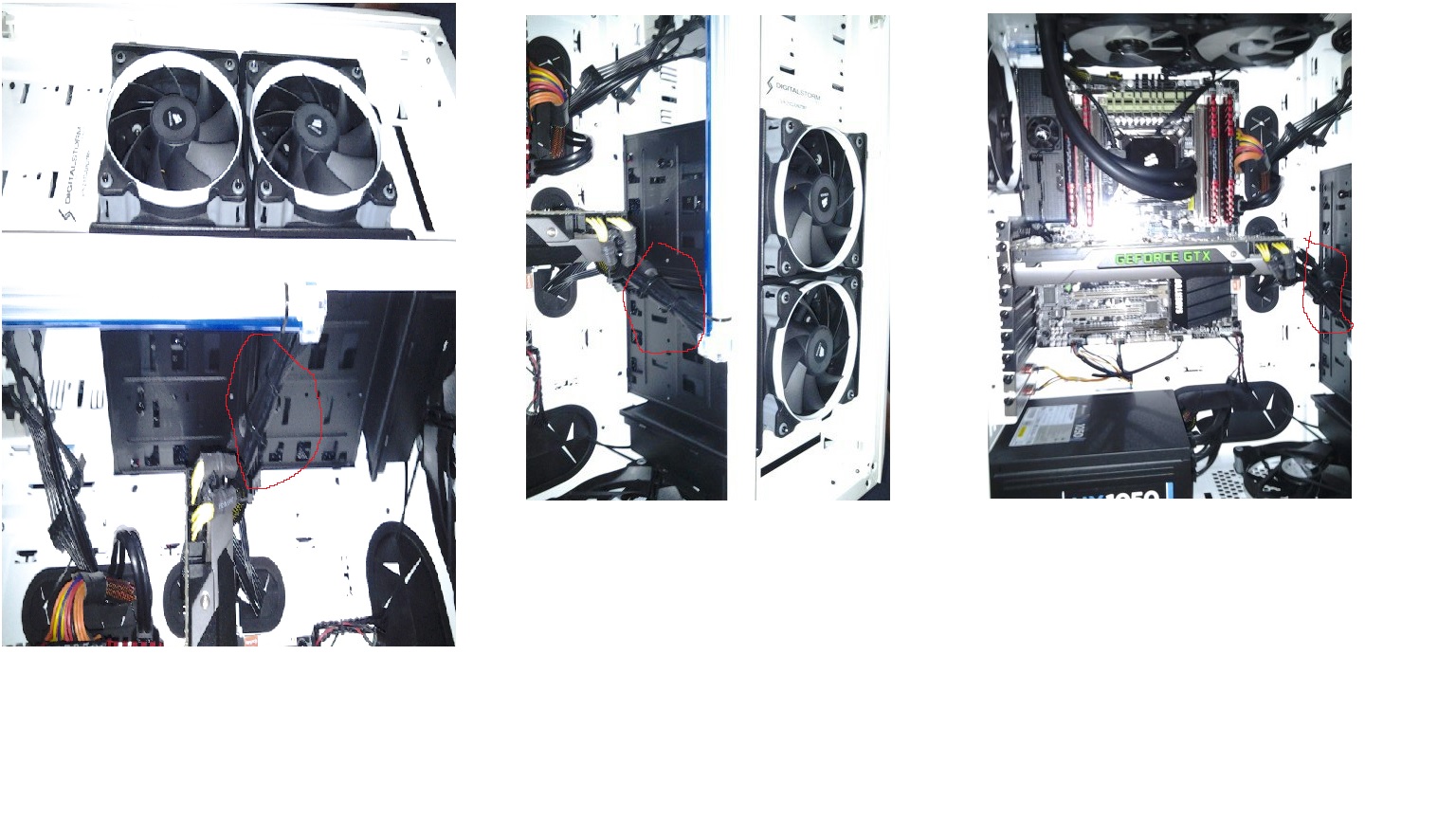 Edited by Deathdenial - 25 Jun 2013 at 12:23pm |
|
 |
|
|
bprat22
DS ELITE 
DigitalStorm East -- (Unofficially!)
Joined: 08 Jun 2011 Online Status: Offline Posts: 20391 |
Quote Reply
Posted: 25 Jun 2013 at 12:58pm |
|
To mount second 780... find the next Pcix16 slot, same color, remove the back panel plate that aligns to it. Mount the 780 into the slot until the locking clip catches. Lok down back plate of card with the screw. Cut ty-wraps if needed to find the 6 pin and 8 pin power cable to hook to card. Mount the sli bridge between the two cards. Looks like a flat cable. Power up and go into Nvidia Control Panel to set up sli.
Good luck. |
|
|
|
|
Deathdenial
Newbie
Joined: 02 May 2013 Online Status: Offline Posts: 68 |
Quote Reply
Posted: 25 Jun 2013 at 1:08pm |
Just what I needed, don't really get the part about cutting the ty-wraps though.... is that the yellow wire that is expose going in to my first card? Also, I browse around and saw that people recommend uninstalling drivers or do a clean OS install, is this necessary for SLI? Seem like it will be more work that I am unfamiliar with  Thanks for your help as always!  Edited by Deathdenial - 25 Jun 2013 at 1:16pm |
|
|
|
|
bprat22
DS ELITE
DigitalStorm East -- (Unofficially!)
Joined: 08 Jun 2011 Online Status: Offline Posts: 20391 |
Quote Reply
Posted: 25 Jun 2013 at 1:24pm |
|
The ty- wraps, what I call them, are the small black plastic tys that DS uses to keep the cabling tight and pretty.
Not sure you need to snip a couple or not. Just need to get the power plugs to the new card.
Don't mess with OS. The drivers I would take a wait and see. |
|
|
|
|
Deathdenial
Newbie
Joined: 02 May 2013 Online Status: Offline Posts: 68 |
Quote Reply
Posted: 25 Jun 2013 at 1:40pm |
|
So I am guessing that the wire that I circle is all I need for the SLI... Just need to hook that up to my card, and plug in the SLI bridge... Do I need to plug anything in to the power supply?
|
|
|
|
|
Deathdenial
Newbie
Joined: 02 May 2013 Online Status: Offline Posts: 68 |
Quote Reply
Posted: 25 Jun 2013 at 1:40pm |
Good to know! All about not messing with OS  |
|
|
|
|
bprat22
DS ELITE
DigitalStorm East -- (Unofficially!)
Joined: 08 Jun 2011 Online Status: Offline Posts: 20391 |
Quote Reply
Posted: 25 Jun 2013 at 1:55pm |
|
Can't tell from my 7" tablet what you've circled. Looks like the harness to the first card. Within that should be another set of connectors similar to what first card has. Those 6 and 8 pin connectors are power cables from the power supply. Lots of wiring from a typical psu.
Depending on the psu, sometimes an adapter plug to convert from 4 pin etc. to 6/8 pin is needed. Not sure in your case. Sometimes adapter plugs are included in your accessory box from DS if needed. |
|
|
|
|
Deathdenial
Newbie
Joined: 02 May 2013 Online Status: Offline Posts: 68 |
Quote Reply
Posted: 25 Jun 2013 at 2:34pm |
|
Ok Thanks
|
|
|
|
|
bprat22
DS ELITE
DigitalStorm East -- (Unofficially!)
Joined: 08 Jun 2011 Online Status: Offline Posts: 20391 |
Quote Reply
Posted: 25 Jun 2013 at 2:39pm |
|
Always a pleasure.
I have no doubt you'll be smoking the games with sli780 real soon, but let us know how it goes.
Have fun. |
|
|
|
|
Deathdenial
Newbie
Joined: 02 May 2013 Online Status: Offline Posts: 68 |
Quote Reply
Posted: 27 Jun 2013 at 9:19pm |
Just want to stop by to say thank you for your help! I called DS today and Brett, even though he say he would not be available today, still took the time to call me to help me out with my question! DS willingness to go beyond truly is amazing! 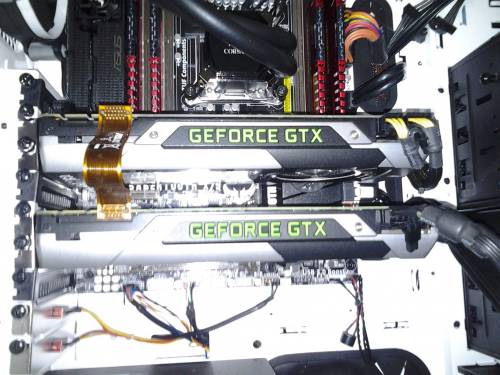 Just a quick question regarding ambient temperature inside the PC. I understand you can monitors CPU temp and GPU temp, but recently the light tube in my pc fell down... So I had to use some electrical tape to help seal them in place... 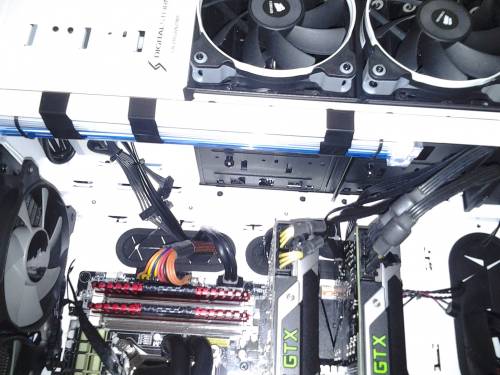 Is there a way to monitor the temp of my PC as a whole? I was thinking sticking a thermometer but figure I asked first Sitting next to the PC, I can feel hot air rushing out I am scared the tape might burn or unpleasant thing might happen  Thanks! |
|
|
|
|
bprat22
DS ELITE
DigitalStorm East -- (Unofficially!)
Joined: 08 Jun 2011 Online Status: Offline Posts: 20391 |
Quote Reply
Posted: 28 Jun 2013 at 3:15am |
|
Real nice job. Pc cases don't have temp sensors built into them like chips, drives, etc do. The small thermomter check is probably the best and cheapest way to go. If all the heat your feeling is coming out of the back then thats a good thing. Means the 780's cooling fans are doing their job to get the heat out. Your case has very good airflow. Just make sure all the case fans, especially the top 200mm fan are working.
A gaming rig with sli 780's and oc'd cpu will generate alot of heat, thats why I and others still recommend the cases with the best airflow. The trend is smaller, less fans and quiet. But there are tradeoffs. Your Stryker case, the Hafx, the 900d with its better airflow over the 800d , etc give good airflow. Enjoy your new setup.
|
|
|
|
|
retirednavysnipe
Senior Member 
Joined: 06 Apr 2012 Online Status: Offline Posts: 606 |
Quote Reply
Posted: 28 Jun 2013 at 6:52am |
|
Looks like you did a great job hooking up the sli. Like Bprat states that hot are out of the back is a good thing, ventilation is the savior of high price systems.
|
|
|
Hailstorm Black Ops
I7 3930K 4.5GHZ 16GB 1600MHZ ram 2 x GTX 680 120 GB SSD, 1 TB hardrive Fully liquid cooled CPU, GPU and chipset. |
|
|
|
|
Deathdenial
Newbie
Joined: 02 May 2013 Online Status: Offline Posts: 68 |
Quote Reply
Posted: 28 Jun 2013 at 8:18am |
|
Ok I guess I'll give the thermometer option a go! Thanks!
|
|
|
|
|
bprat22
DS ELITE
DigitalStorm East -- (Unofficially!)
Joined: 08 Jun 2011 Online Status: Offline Posts: 20391 |
Quote Reply
Posted: 28 Jun 2013 at 9:34am |
|
I wouldn't blame any heat for the light strip falling down. Heat could contribute to it, but maybe not. The kits use small, sticky pads to anchor them and doesn't take much for them to peel away. Gravity could've done it. Mine have been good for 2 years but are sitting on the bottom of the case. No place to fall.
|
|
|
|
|
Deathdenial
Newbie
Joined: 02 May 2013 Online Status: Offline Posts: 68 |
Quote Reply
Posted: 01 Jul 2013 at 9:44pm |
|
I have a quick question... I am getting a lot of stutter while in game on Borderland 2... Did a quick search and it has to do with the 320.18 drivers and the 780 not optimized for physx. One of the option to fix this was having a dedicated physx card...
So can my motherboard and psu handle another card? Was thinking a cheap alternatives... maybe a stand alone 760 as a dedicated physx card. I know it isn't my card throttle due to temp... both of my gpu temp were under 70 C the whole time... but stuttering was constant... every 10-15 min. PSU is corsair hx 1050 and motherboard is x79 sabertooth. Thanks! |
|
|
|
|
Ariktu
Groupie 
Joined: 21 May 2013 Online Status: Offline Posts: 492 |
Quote Reply
Posted: 01 Jul 2013 at 11:05pm |
|
did you try 320.49 that just came out?
I am not sure if they might have fixed that issue or not. |
|
|
|
|
bprat22
DS ELITE
DigitalStorm East -- (Unofficially!)
Joined: 08 Jun 2011 Online Status: Offline Posts: 20391 |
Quote Reply
Posted: 02 Jul 2013 at 3:43am |
|
Yes, your psu and x79 sabertooth can handle 3 cards. Physx card works for some with this problem and others, not so much. Try the drivers first.
|
|
|
|
|
Deathdenial
Newbie
Joined: 02 May 2013 Online Status: Offline Posts: 68 |
Quote Reply
Posted: 03 Jul 2013 at 3:49pm |
|
Is there a way to pernamently adjust the fan speed on these 780? I am modding Skyrim and one of the mod I want to use give me a CTD whenever evga precision X is running in background. This really frustrates me because without it, my temp goes up to 85+ on the GPU! Is there a way to adjust fan without evga precision X?
|
|
|
|
|
bprat22
DS ELITE
DigitalStorm East -- (Unofficially!)
Joined: 08 Jun 2011 Online Status: Offline Posts: 20391 |
Quote Reply
Posted: 03 Jul 2013 at 4:08pm |
|
I believe the cards fan speed proflie is in the cards bios, meaning fixed without 3rd party help
Try msi Afterburner and see if it works better for you. The 85c temp is fine especially if fan speed is only 70% for example. The manufactures keep speed low for noise but will increase it if needed. |
|
|
|
|
Alex
Admin Group 
Digital Storm Supervisor 
Joined: 04 Jun 2012 Online Status: Offline Posts: 16314 |
Quote Reply
Posted: 03 Jul 2013 at 5:39pm |
|
85+ is fine, the cards are designed to run quieter under stress which makes them a little more toasty. But, it's done on purpose, the cards will try to overclock themselves as well to get faster which will push temps again if you do increase fan speeds.
|
|

|
|
|
|
|
Psimon
Groupie
Joined: 16 Sep 2009 Online Status: Offline Posts: 249 |
Quote Reply
Posted: 06 Jul 2013 at 10:08am |
|
I've got dual 480's, and, yes, they run very hot, 85c+.
I use Afterburner now (formerly used Precision) for realtime temp displays on my Logitech G15's LED, as well as software-controlled/configurable fan speed settings. Pretty sure both will also let you save diagnostic readouts to a file too (for later perusal, as you're wrestling with CTD's). I've actually pushed one card to the 480's maximum temp of 100c (pretty sure it was with Skyrim Ultra settings + hi-rez mods) a few times. Fans were at 100%, of course. I quickly backed down the graphics after that :P |
|
|
CM HAF 932*EVGA X58 3X SLI* i7920 4.0Ghz OC*6GB Mushkin RAM*EVGA Titan Sprclked*Samsung 850 Pro 1TB*Logitech Z5500*Razer Death Adder*Corsair 1000HX PSU*LG 34UM95 Monitor*Windows7Ult64
|
|
|
|
|
Deathdenial
Newbie
Joined: 02 May 2013 Online Status: Offline Posts: 68 |
Quote Reply
Posted: 08 Jul 2013 at 12:11pm |
|
I managed to find a work around for the problem.. now I can have EVGA running without crashing Skyrim!
Although now, I think another problem has surface and I cannot pinpoint what it is. I feared it is the GPU! Under heavy stress, with fan at 90% and temp of 70-75 Celsius, I can hear clicking sound. It would just click... stop and 15 - 45 min later another click. Almost like the card is *settling in* or something. I don't how how to describe this, but I am sure it is not HD or SSD because I was copying files between the two and heard no clicking sound. Does anyone experience this problem that can point me in the right direction? This only occur under heavy stress, games like League of Legend, there is no clicking. Performance is great though, a lot of mods running and 40 fps is the lowest I have seen! Thanks DS! Thanks! Edited by Deathdenial - 08 Jul 2013 at 12:21pm |
|
|
|
|
bprat22
DS ELITE
DigitalStorm East -- (Unofficially!)
Joined: 08 Jun 2011 Online Status: Offline Posts: 20391 |
Quote Reply
Posted: 08 Jul 2013 at 12:27pm |
|
The "clicking" could be the case itself flexing, panels or frame shifting. My 600T case, on occasion, will make clicking/ static type noises and stops when I push the top mesh panel or front frame.
This usually happens when gaming for awhile and heat is building. Just a thought. Edited by bprat22 - 08 Jul 2013 at 12:30pm |
|
|
|
|
Nerek387
Groupie
Joined: 11 Jun 2013 Online Status: Offline Posts: 165 |
Quote Reply
Posted: 08 Jul 2013 at 2:08pm |
|
Another program I used prior to h2o cooling was EVGA precision, it was a great tool for OC'ing and fan speed support. Check it out it'll help with your high temps and allow your fans to be utilized 100%. IF you have the $$ upgrade to h2o cooling, I had 2 gtx 570SLI running around 80c at full load in my old system under fans. I now have 2 SLI GTX 770 with h2o cooling, full load these boys stay around 40c! Invest!
|
|
|
-Corsair 900D
-i7 4770K OC 4.5GHz -Asus Sabertooth -16GB Corsair Dominator 1600 -GeForce GTX 770 SLI -Samsung 840 Pro SSD 256GB -WD Black 1&2TB HDD 7200 -DS Custom CPU/GPU Liquid Cooling System |
|
|
|
|
Post Reply
|
| Forum Jump | Forum Permissions You cannot post new topics in this forum You cannot reply to topics in this forum You cannot delete your posts in this forum You cannot edit your posts in this forum You cannot create polls in this forum You cannot vote in polls in this forum |

About Digital Storm
Contact Information
Facility Tour
Financing
Buy Now, Pay Later
Downloads
GSA Schedule
Terms & Conditions
Privacy Policy
Request Help
Call: 1-866-817-8676
(Hours 9AM-5PM PST)





 Topic Options