Laptop Ram UpgradePost Date: 2020-01-31 |
Post Reply 
|
| Author | |
gamerinmind 
Newbie 

Joined: 31 Jan 2020 Online Status: Offline Posts: 3 |
 Quote Reply Quote Reply
 Topic: Laptop Ram Upgrade Topic: Laptop Ram UpgradePosted: 31 Jan 2020 at 2:34am |
|
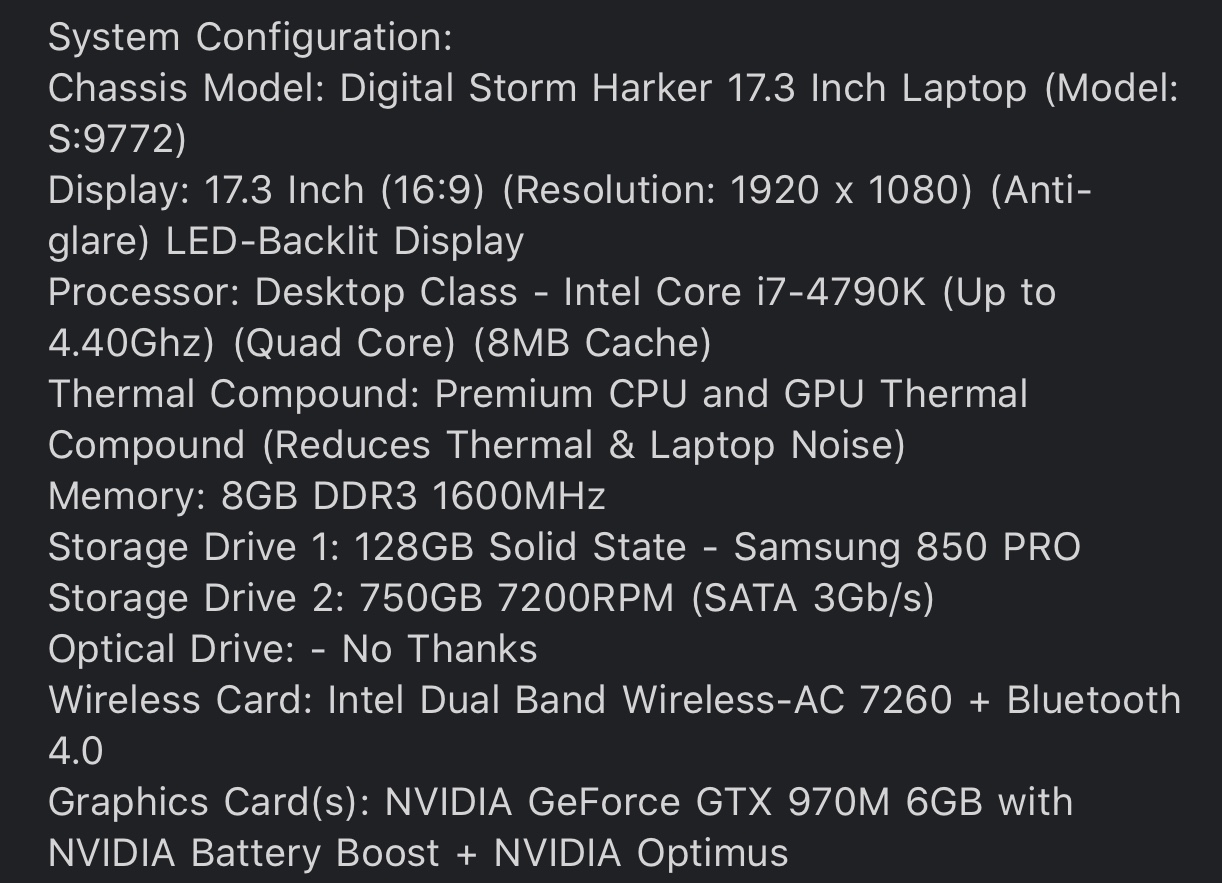
So I've had this laptop for a long time and it's been great, but here recently I've noticed a bottleneck with the RAM when playing games such as PUBG. I have a i7-4790K (yes, I have a desktop CPU in my laptop) and a GTX-970M 6GB. Where my issue comes in is with the RAM, I have 8 GB of RAM currently and want to add more to remove the bottleneck when gaming as I experience frame drops when the RAM maxes out. When the computer is idle, it's using around 3-4 GB of RAM which is leaves only 4-5 GB for any other process I want to run in the background such as Discord, Spotify, etc.
When using Crucial's software to scan my system and see what upgrades are available, its shows that I have 4 slots with only one being occupied with the 8 GB stick. After taking off the bottom cover of my laptop, I only see 2 slots where RAM can go instead of 4 like Crucial's website says as well when looking under the Performance-> Memory section of Task Manager it also says 1 of 4 slots is being used. So does anyone have any idea why I can only see 2 slots when taking the bottom of the laptop off when 2 different sources say I have 4 slots? |
|
 |
|
|
Snaike
Moderator Group 
Just a dude trying to keep the spam away
Joined: 23 Jan 2014 Online Status: Offline Posts: 9462 |
Quote Reply
Posted: 31 Jan 2020 at 2:47am |
|
What model laptop are we discussing? The Smart Guys® are gonna want to know....
|
|
|
|
|
gamerinmind
Newbie
Joined: 31 Jan 2020 Online Status: Offline Posts: 3 |
Quote Reply
Posted: 31 Jan 2020 at 3:05am |
|
|
|
|
|
HockeyBuck
DS Veteran 
Joined: 27 Jul 2012 Online Status: Offline Posts: 1608 |
Quote Reply
Posted: 31 Jan 2020 at 10:30am |
|
Think the DS Harker is a derivative of the Sager 9772. Couldn’t find any images of the boards RAM slots, but safe to say you will have 2 slots that you can see, and one is filled...so you should be fine getting another 8 GB DDR3 1600 MHz DIMM stick for a total of 16 GB RAM. You would need to talk to DS Support if you want more than 16 GB RAM to see what amount of RAM the mobo can take... as most laptop mobos are limited on RAM.
 Edited by HockeyBuck - 31 Jan 2020 at 10:31am |
|
|
|
|
GrandesBollas
Groupie 
Joined: 31 Jul 2019 Online Status: Offline Posts: 444 |
Quote Reply
Posted: 31 Jan 2020 at 11:16am |
|
Great job HB pointing out that the Harker is a Sager/Clevo NP9772. That unit has 4 RAM slots. Two are accessible via the back; the other two are available from the front after removing the keyboard.
https://www.youtube.com/watch?v=SH4neVi5JyM&t=1141s Edited by GrandesBollas - 31 Jan 2020 at 11:47am |
|
|
|
|
gamerinmind
Newbie
Joined: 31 Jan 2020 Online Status: Offline Posts: 3 |
Quote Reply
Posted: 31 Jan 2020 at 11:43am |
|
Wow, thanks for the help! I never thought to look under the keyboard (I haven't yet).
The link you posted doesn't work @GrandesBollas |
|
|
|
|
GrandesBollas
Groupie
Joined: 31 Jul 2019 Online Status: Offline Posts: 444 |
Quote Reply
Posted: 31 Jan 2020 at 11:45am |
|
Here are the two slots underneath the keyboard. The Clevo keyboards are magnetically attached. There are videos showing how to pop it out.

|
|
|
|
|
GrandesBollas
Groupie
Joined: 31 Jul 2019 Online Status: Offline Posts: 444 |
Quote Reply
Posted: 31 Jan 2020 at 11:50am |
|
Link fixed. Posting via the phone not the most efficient.

Here is a pic of the back, showing the back RAM slots: 
|
|
|
|
|
Cretae
DS Veteran
Joined: 22 Mar 2010 Online Status: Offline Posts: 7331 |
Quote Reply
Posted: 02 Feb 2020 at 5:26am |
 posts! posts!
|
|
|
|
|
Post Reply
|
| Forum Jump | Forum Permissions You cannot post new topics in this forum You cannot reply to topics in this forum You cannot delete your posts in this forum You cannot edit your posts in this forum You cannot create polls in this forum You cannot vote in polls in this forum |

About Digital Storm
Contact Information
Facility Tour
Financing
Buy Now, Pay Later
Downloads
GSA Schedule
Terms & Conditions
Privacy Policy
Request Help
Call: 1-866-817-8676
(Hours 9AM-5PM PST)





 Topic Options