Latest Nvidia Driver ??Post Date: 2018-11-17 |
Post Reply 
|
| Author | |
johndeniel 
Groupie 

Joined: 26 Dec 2016 Online Status: Offline Posts: 110 |
 Quote Reply Quote Reply
 Topic: Latest Nvidia Driver ?? Topic: Latest Nvidia Driver ??Posted: 17 Nov 2018 at 5:17pm |
|
I was just wondering how is everyone doing with the latest nvidia driver update which is 416.94 ? Because last time I updated to the latest which was 416.81 I had problems with my pc, mostly stuttering and even turns off my monitor then turns it back on again. I'm just too scared now to update to the latest driver because I'm afraid that I might run into the same issue again and I don't want that. But a side of me wanted to update because I need the witcher 3 flickering fix that comes with the latest update. Geez I've been having flickering with the witcher 3 which is not really that bad but it bothers me a lot like ughhh. I wanna hear your opinion guys :)
Edited by johndeniel - 17 Nov 2018 at 5:18pm |
|
 |
|
|
bprat22
DS ELITE 
DigitalStorm East -- (Unofficially!)
Joined: 08 Jun 2011 Online Status: Offline Posts: 20391 |
Quote Reply
Posted: 18 Nov 2018 at 2:20am |
|
I don’t update the graphics drivers when they come out. I’ve never had an issue updating but rarely see the need.
I haven’t played Witcher 3 in several months but I thought version 416.64 fixed the flicker. Never had the flicker issue when I played. 
If you do update, don’t use GeForce auto update from its message, but instead manually download it from GeForce site and select custom, Clean install. Less chance of issues. Of course this doesn’t prevent issues if the update has issues to begin with. Updating , both graphics and Windows is always a “keep fingers crossed” situation. Edited by bprat22 - 18 Nov 2018 at 2:33am |
|
|
|
|
johndeniel
Groupie
Joined: 26 Dec 2016 Online Status: Offline Posts: 110 |
Quote Reply
Posted: 18 Nov 2018 at 4:14am |
|
That 416.64 was just a hotfix and not an official one. I didnt took the risk installing it so I stayed by 416.34. Last time I went updating to 416.81 there was stuttering everywhere so I had to roll back to the previous. I'm just curious if the issue is fixed with the very latest one 416.94.
|
|
|
|
|
Snaike
Moderator Group 
Just a dude trying to keep the spam away
Joined: 23 Jan 2014 Online Status: Offline Posts: 9462 |
Quote Reply
Posted: 18 Nov 2018 at 8:48am |
|
I took bprat's advice (as everyone should!!) so many years ago when my first new nvidia driver came out after buying my system. I don't upgrade on day one, and usually wait until all the bugs and gremlins shave been squashed.
OMG.. lol.. I just looked and I am running my 1070 with 391.35! 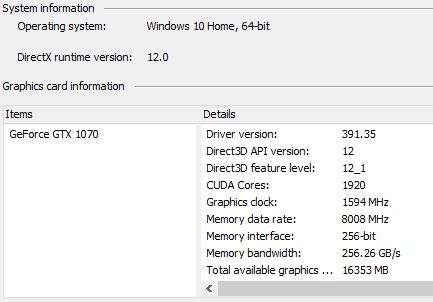 Perhaps it is time for an upgrade... Naw, if it ain't broke, don't fixit. 
|
|
|
|
|
hoserator
DS Veteran 
We don't need no stinking "Avatars" !
Joined: 08 Oct 2014 Online Status: Offline Posts: 7966 |
Quote Reply
Posted: 18 Nov 2018 at 11:14am |
|
I'm still using 368.81 with no issues. Some years ago I updated and had a mess so I stayed with this one since everything runs fine (GTX 980s). The subsequent driver, IIRC, was for the VR uses which I don't do.
|
|
|
|
|
johndeniel
Groupie
Joined: 26 Dec 2016 Online Status: Offline Posts: 110 |
Quote Reply
Posted: 18 Nov 2018 at 1:35pm |
|
Whoaa I see now :) Thank you guys for lending me some tips and letting me hear your experiences. So far I seem contented with 416.34 and with that being said, I guess I just have to stick with it for a little while. One thing that I hate for sure is the witcher 3 flickering issues. Can't play the game because it keeps on bothering me :( Sad
|
|
|
|
|
bprat22
DS ELITE
DigitalStorm East -- (Unofficially!)
Joined: 08 Jun 2011 Online Status: Offline Posts: 20391 |
Quote Reply
Posted: 19 Nov 2018 at 1:16am |
|
I reloaded the Witcher 3 a couple of weeks ago to play it again. Great game. Probably play it this week sometime.
If I have flickering, which I didn’t have before but not sure the driver I had, I would also try the newest driver if it supposedly fixes it. Just will do a manual, clean install. Can always change back. If it’s not broken don’t fix it, but in your case, it might be worth a shot. Good luck and let us know.
|
|
|
|
|
bprat22
DS ELITE
DigitalStorm East -- (Unofficially!)
Joined: 08 Jun 2011 Online Status: Offline Posts: 20391 |
Quote Reply
Posted: 19 Nov 2018 at 1:43am |
|
Have you tried different in game graphics settings, like High instead of Ultra with certain settings? Any mods running ?
|
|
|
|
|
johndeniel
Groupie
Joined: 26 Dec 2016 Online Status: Offline Posts: 110 |
Quote Reply
Posted: 19 Nov 2018 at 7:31am |
|
I've tried tweaking with the in-game settings and I somehow suppressed the flickering. But not all the time tho for the reason it still shows up at certain areas of the game. Mostly when inside of a structure/building. No I don't have any mods on and I've never tried modding my witcher 3 before. My driver is at 416.34. I'm not in the mood to risk upgrading to the last because of the issue I had last time with 416.81. I'm also running nvidia geforce gtx 1060 6gb
|
|
|
|
|
Post Reply
|
| Forum Jump | Forum Permissions You cannot post new topics in this forum You cannot reply to topics in this forum You cannot delete your posts in this forum You cannot edit your posts in this forum You cannot create polls in this forum You can vote in polls in this forum |

About Digital Storm
Contact Information
Facility Tour
Financing
Buy Now, Pay Later
Downloads
GSA Schedule
Terms & Conditions
Privacy Policy
Request Help
Call: 1-866-817-8676
(Hours 9AM-5PM PST)





 Topic Options