Lowest Build for Max CrysisPost Date: 2009-03-28 |
Post Reply 
|
| Author | |||
Instinct 
Groupie 
Joined: 27 Mar 2009 Online Status: Offline Posts: 67 |
 Quote Reply Quote Reply
 Topic: Lowest Build for Max Crysis Topic: Lowest Build for Max CrysisPosted: 28 Mar 2009 at 12:25am |
||
|
I am planning to buy a gaming desktop soon and would like to run Crysis in max (with at least 2x AA and 4x Anistrophic Filtering, thought 4x and 8x is more preferred respectively). I will most likely start playing it at 1680x1050 and start going up to 1920x1200 or 1920x1080 if I decide to upgrade my monitor. I chose Vista 32 bit because I may decide to play other games that are only 32 bit compatible. I was wondering if my RAM is good enough? I also heard you need a certain amount of CPU to fully operate your GPU at it's max (might be the term bottlenecking?). Should I upgrade my CPU to the 940? I mean DS will overclock it, but will it be enough to maximize my GPU performance? Should I use 2x 295 or 3x 285 at those resolutions for Crysis? I am around at a $3k budget.
Chassis Model: Cooler Master HAF 932 Exterior Finish: - Standard Factory Finish Interior Finish: - Standard Factory Finish Trim Accents: - Standard Factory Finish Processor: Intel Core i7 920 2.66GHz (Quad Core) Motherboard: EVGA X58 3X SLI (Intel X58 Chipset) (Supports Triple SLI or CrossFire) System Memory: 3GB DDR3 1333MHz Mushkin (Highly Recommended) (Digital Storm Certified) Power Supply: 1000W Corsair HX (Dual/Triple/Quad SLI Compatible) (Silent Edition) Card Reader: - No Thanks Hard Drive Set 1: Operating System: 1x (500GB Western Digital (16MB Cache) (7200 RPM) (SATA) Set 1 Raid Options: - No Thanks Hard Drive Set 2: Multimedia\Data: - No Thanks Hard Drive Set 3: Backup\Misc.: - No Thanks Optical Drive 1: DVD-ROM/CD-ROM (DVD Reader 16x / CD Reader 40x) Optical Drive 2: - No Thanks Internet Access: High Speed Network Port (Supports High-Speed Cable / DSL / Network Connections) Video Card: 2x SLI Quad (NVIDIA GeForce GTX 295 1.792GB) (Includes PhysX Technology) Add-on Card: - No Thanks Sound Card: Integrated Motherboard Audio Extreme Cooling: AIR: Stage 2: Cooler Master V8 (Compatible With i7 Processors) Liquid Color:- Not Applicable, I do not have a H20: Stage 3 Cooling System Selected Chassis Airflow: Standard Factory Chassis Fans Internal Lighting: Internal Chassis Lighting System (Blue) Enhancements: - No Thanks Chassis Mods: - No Thanks Boost Processor: Yes, Overclock the processor as much as possible with complete stability Boost Video Card: - No Thanks, Please do not overclock my video card(s) Boost Memory: - No Thanks, Please do not overclock my memory Tweak Windows: - No Thanks, Please do not tweak the services on the operating system Windows OS: Microsoft Windows Vista Ultimate I hoping to run Crysis at 60+ FPS, but if 1920x1200 isn't possible with that FPS, I'll just stay with 1680x1050. Can anyone estimate how much FPS I will get with this desktop config? I can't find the 230mm BLUE LED front fan :[ Edited by Instinct - 28 Mar 2009 at 12:42am |
|||
 |
|||
|
DST4ME
DS ELITE 

Joined: 14 Apr 2008 Online Status: Offline Posts: 36758 |
Quote Reply
Posted: 28 Mar 2009 at 12:29am |
||
|
ticket number please, there is very little difference between 3 x 285 and 2 x 295 in all games, except for crysis, 3 x 285 will provide 20 more fps at your resolution.
Edited by DST4ME - 28 Mar 2009 at 12:30am |
|||
|
|||
|
Instinct
Groupie
Joined: 27 Mar 2009 Online Status: Offline Posts: 67 |
Quote Reply
Posted: 28 Mar 2009 at 12:36am |
||
|
The ticket number is 264278. I would definitely add 100 dollars just to get 20 FPS more, as it is in within my budget.
Edited by Instinct - 28 Mar 2009 at 12:39am |
|||
|
|||
|
DST4ME
DS ELITE
Joined: 14 Apr 2008 Online Status: Offline Posts: 36758 |
Quote Reply
Posted: 28 Mar 2009 at 1:12am |
||
|
well you also need more ram
here you go Ticket# 264284 --- Price: $3551 (To see this build click here) Price after current promotion $3301 Copy of Specifications: Chassis Model: Cooler Master HAF 932 Exterior Finish: - Standard Factory Finish Interior Finish: - Standard Factory Finish Trim Accents: - Standard Factory Finish Processor: Intel Core i7 920 2.66GHz (Quad Core) Motherboard: EVGA X58 3X SLI (Intel X58 Chipset) (Supports Triple SLI or CrossFire) System Memory: 6GB DDR3 1333MHz Mushkin (Highly Recommended) (Digital Storm Certified) Power Supply: 1000W Corsair HX (Dual/Triple/Quad SLI Compatible) (Silent Edition) Card Reader: - No Thanks Hard Drive Set 1: Operating System: 1x (500GB Western Digital (16MB Cache) (7200 RPM) (SATA) Set 1 Raid Options: - No Thanks Hard Drive Set 2: Multimedia\Data: - No Thanks Hard Drive Set 3: Backup\Misc.: - No Thanks Optical Drive 1: DVD±R/RW/CD-R/RW (DVD Writer 20x / CD-Writer 48x) Optical Drive 2: - No Thanks Internet Access: High Speed Network Port (Supports High-Speed Cable / DSL / Network Connections) Video Card: 3x SLI Triple (NVIDIA GeForce GTX 285 1GB) (Includes PhysX Technology) Add-on Card: - No Thanks Sound Card: Integrated Motherboard Audio Extreme Cooling: AIR: Stage 2: Cooler Master V8 (Compatible With i7 Processors) Liquid Color:- Not Applicable, I do not have a H20: Stage 3 Cooling System Selected Chassis Airflow: Standard Factory Chassis Fans Internal Lighting: Internal Chassis Lighting System (Blue) Enhancements: - No Thanks Chassis Mods: - No Thanks Boost Processor: Yes, Overclock the processor as much as possible with complete stability Boost Video Card: - No Thanks, Please do not overclock my video card(s) Boost Memory: - No Thanks, Please do not overclock my memory Tweak Windows: - No Thanks, Please do not tweak the services on the operating system Windows OS: Microsoft Windows Vista Home Premium (64-Bit Edition) (For Enthusiasts) Restore Kit: Digital Storm Specialized Recovery System (DVD Image Based) Virus Protection: - No Thanks Office: - No Thanks Benchmarking: - No Thanks Install/Test Game: - No Thanks LCD Display: - No Thanks Surge Shield: - No Thanks Speakers: - No Thanks Keyboard: - No Thanks Mouse: - No Thanks External Storage: - No Thanks Exclusive T-Shirt: - No Thanks Priority Build: - No Thanks, Ship Within 5-10 Business Days After Order Is Successfully Processed Warranty: 3 Year Platinum Care Extended Parts & Labor Warranty I recommend you lc the cpu with a tri or quad sli system. here is Crysis WARHEAD with the mentioned cards: 
 Edited by DST4ME - 28 Mar 2009 at 1:12am |
|||
|
|||
|
Instinct
Groupie
Joined: 27 Mar 2009 Online Status: Offline Posts: 67 |
Quote Reply
Posted: 28 Mar 2009 at 2:02am |
||
|
Thanks for the graphs. So I guess my CPU is fine for Crysis at max? Why would I need more RAM if I'm using 32 bit Vista, it doesn't support more than 4 gb right ? I chose 32 because I still want to play css and other old games.
EDIT: It seems CSS and many of my other games support 64 bit, looks like I'll be upgrading to 64 and some RAM :D You also said: "I recommend you lc the cpu with a tri or quad sli system. " I don't understand, what should I upgrade? And does anyone have a new link for the 230mm Blue LED fans for the HAF? Edited by Instinct - 28 Mar 2009 at 2:44am |
|||
|
|||
|
<8) slunK parade
Senior Member 
Joined: 20 Jan 2009 Online Status: Offline Posts: 798 |
Quote Reply
Posted: 28 Mar 2009 at 2:59am |
||
|
if you have 3 graphics cards youll need 64 bit just for 3gb of DDR3
|
|||
|
|||
|
DST4ME
DS ELITE
Joined: 14 Apr 2008 Online Status: Offline Posts: 36758 |
Quote Reply
Posted: 28 Mar 2009 at 4:37am |
||
|
as SP said, you will need vista 64bit regardless, you have 3GB of ram in your config and 3.584GB of ram in 2 x 295, for a total of 6.584GB of ram.
in my config there is even more ram, you have to go with vista 64bit, you have no choice, and a good thing too  
230mm Blue LED I'm recommending you choose frostbite cooling for your CPU, since you are going to go either quad sli or tri sli with the GPUs, thats a lot of heat. |
|||
|
|||
|
Instinct
Groupie
Joined: 27 Mar 2009 Online Status: Offline Posts: 67 |
Quote Reply
Posted: 28 Mar 2009 at 11:21am |
||
|
If I choose frostbite cooling for my CPU, can I still upgrade my CPU or GPU?
|
|||
|
|||
|
DST4ME
DS ELITE
Joined: 14 Apr 2008 Online Status: Offline Posts: 36758 |
Quote Reply
Posted: 28 Mar 2009 at 2:30pm |
||
|
yes of course you can
|
|||
|
|||
|
Instinct
Groupie
Joined: 27 Mar 2009 Online Status: Offline Posts: 67 |
Quote Reply
Posted: 30 Mar 2009 at 7:09pm |
||
Will there be instructions on how to install the 230 mm in the package? I heard you also bought one before, how easy is it? |
|||
|
|||
|
DST4ME
DS ELITE
Joined: 14 Apr 2008 Online Status: Offline Posts: 36758 |
Quote Reply
Posted: 30 Mar 2009 at 7:16pm |
||
|
no I didn't buy one, I'm still waiting on parts I want for my PC.
there will be no instructions however here is the manual for the HAF which is self explanatory and should help you install it
|
|||
|
|||
|
Bouke285
Groupie
Joined: 06 Sep 2008 Online Status: Offline Posts: 44 |
Quote Reply
Posted: 17 Apr 2009 at 11:18am |
||
|
Just so you know crysis isnt that great so dont base your build on it.
|
|||
|
I know the plans I have for you, declares the Lord, plans to prosper you and not to harm you, plans to give you hope and a future." (Jeremiah 29:11)
|
|||
|
|||
|
issues1975
Groupie
Joined: 07 Mar 2009 Online Status: Offline Posts: 198 |
Quote Reply
Posted: 17 Apr 2009 at 11:39am |
||
|
It is very simple to install the front fan. Probably took me 5 minutes, if that. 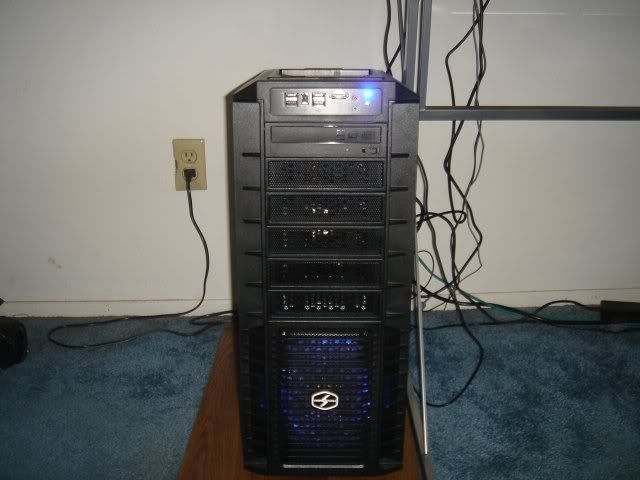
I think many people like to use Crysis as more of a benchmark when building systems than actually building a system to play 1 game.
If you're system can play Crysis maxed there's a good chance it will play just about any game released over the next year with max settings... |
|||

|
|||
|
|||
|
Bouke285
Groupie
Joined: 06 Sep 2008 Online Status: Offline Posts: 44 |
Quote Reply
Posted: 17 Apr 2009 at 2:00pm |
||
|
If you really want to test some thing try Age of Conan on max the graphics are amazing even for an mmorpg. I had no trouble with crysis on max but when I played this I had to bump down the settings.
|
|||
|
I know the plans I have for you, declares the Lord, plans to prosper you and not to harm you, plans to give you hope and a future." (Jeremiah 29:11)
|
|||
|
|||
|
DST4ME
DS ELITE
Joined: 14 Apr 2008 Online Status: Offline Posts: 36758 |
Quote Reply
Posted: 17 Apr 2009 at 2:48pm |
||
|
Bouke285 you had to put your settings down probably because age of conan does not support sli but crysis does, so in short age of conan is not a good game to base your system on.
|
|||
|
|||
|
Bouke285
Groupie
Joined: 06 Sep 2008 Online Status: Offline Posts: 44 |
Quote Reply
Posted: 17 Apr 2009 at 4:12pm |
||
|
I only have a single graphics card atm, I'm not saying crysis looks bad it looks amazing, but i'm saying it's not that hard to run my $1500 pc ran it perfectly well. My point is you dont need to spend tons of money on your pc to beable to play crysis or any other game on max settings.
|
|||
|
I know the plans I have for you, declares the Lord, plans to prosper you and not to harm you, plans to give you hope and a future." (Jeremiah 29:11)
|
|||
|
|||
|
DST4ME
DS ELITE
Joined: 14 Apr 2008 Online Status: Offline Posts: 36758 |
Quote Reply
Posted: 17 Apr 2009 at 4:17pm |
||
|
depending on your resolution do you do, for example at 1900 x 1200 to run many games on high settings including crysis you will need a dual sli
look at the fps difference between 1 x 260 and 1 x 295, huge difference, cause the 295 is a dual sli internally. at the end of the day how much money you need to drop on gpu depends on what games you play and your resolution, if you are below 1600 x 1200 then ya a single card will do
|
|||
|
|||
|
Post Reply
|
| Forum Jump | Forum Permissions You cannot post new topics in this forum You cannot reply to topics in this forum You cannot delete your posts in this forum You cannot edit your posts in this forum You cannot create polls in this forum You can vote in polls in this forum |

About Digital Storm
Contact Information
Facility Tour
Financing
Buy Now, Pay Later
Downloads
GSA Schedule
Terms & Conditions
Privacy Policy
Request Help
Call: 1-866-817-8676
(Hours 9AM-5PM PST)





 Topic Options