Mismatched GPU?Post Date: 2016-03-23 |
Post Reply 
|
| Author | |
act_ksw 
Newbie 

Joined: 22 Mar 2016 Online Status: Offline Posts: 4 |
 Quote Reply Quote Reply
 Topic: Mismatched GPU? Topic: Mismatched GPU?Posted: 23 Mar 2016 at 11:24am |
|
So I got my computer in the mail the yesterday, and it's a beast. But I noticed the GPU in it is an ASUS Strix 980 TI (which is okay, I ordered the generic one so, whatever brand they put in it is fine). But then I also noticed the disk/documents/extra parts/etc for the GPU are all for the EVGA version of the card.
So I'm wondering, is it worthwhile trying to obtain the ASUS Strix disk/documents/extra parts/etc? Also, does this possibly mean that I got a used/returned GPU that DS didn't have disk/documents, etc for? Has this happened to anyone else, or does it seem uncommon? |
|
 |
|
|
db188
DS Veteran 
Joined: 29 Jul 2014 Online Status: Offline Posts: 2115 |
Quote Reply
Posted: 24 Mar 2016 at 12:32am |
|
good question and yes, it is uncommon.
|
|
|
Aventum 3
I7-6700K Gigabyte G1 Z170X Gaming GT 16GB Corsair Dominator 3000MHz Corsair Hx1000i 1000W Samsung M.2 980 Pro 2TB;Samsung 850 EVO 1TB MSI RTX 3080 Ventus OC 10G LHR Gigabyte M28U 4K |
|
|
|
|
FrankW
DS Veteran
Joined: 22 Feb 2010 Online Status: Offline Posts: 2254 |
Quote Reply
Posted: 24 Mar 2016 at 7:49am |
|
|
|
act_ksw
Newbie
Joined: 22 Mar 2016 Online Status: Offline Posts: 4 |
Quote Reply
Posted: 24 Mar 2016 at 11:46am |
|
Well, I think it would really only bother me if it was used/returned for defect. I decided I don't really need the disc or manual since I'm downloading the drivers from the Nvidia website anyway.
However, I have had two crashes while playing games so far. In both instances, the screen turns white and freezes, and then I need to do a hard shut down because ctrl+alt+delete don't work. But I'm not sure if that's due to the GPU or something else (like the CPU, PSU)? The first time happened while playing Witcher 3 and the GPU temp was at ~82 degrees (according to Afterburner). The second time happened while watching a WoW cinematic and the GPU temp was just ~40 degrees. Does that sound like it could be a GPU issue? Or maybe something related to the cpu/psu/memory? Since it was while playing two different games (as opposed to using Web browser/Excel/etc) and I had done a clean reformat of my computer prior to that, I was thinking it could be hardware gpu-related. Anyway, if keeps happening maybe I will look into getting a replacement gpu, as it could be a clue that I did get a GPU that was returned and they put it in my machine after doing a test and deciding there was nothing wrong with it. I would imagine testing for some things like random crashes would be difficult to do. Edited by act_ksw - 24 Mar 2016 at 11:48am |
|
|
|
|
db188
DS Veteran
Joined: 29 Jul 2014 Online Status: Offline Posts: 2115 |
Quote Reply
Posted: 24 Mar 2016 at 12:53pm |
|
that does sound like a driver or hardware failure. try a clean driver installation and recheck all of your connections first and then see if you can reproduce the crash just to make sure. if it were me, i'd still like an explanation from DS about the strange mix up.
|
|
|
Aventum 3
I7-6700K Gigabyte G1 Z170X Gaming GT 16GB Corsair Dominator 3000MHz Corsair Hx1000i 1000W Samsung M.2 980 Pro 2TB;Samsung 850 EVO 1TB MSI RTX 3080 Ventus OC 10G LHR Gigabyte M28U 4K |
|
|
|
|
Alex
Admin Group 
Digital Storm Supervisor 
Joined: 04 Jun 2012 Online Status: Offline Posts: 16314 |
Quote Reply
Posted: 24 Mar 2016 at 3:56pm |
|
@act_ksw,
Thank you for asking about your concerns. I checked your order and you do have an ASUS graphics card (congrats on that!) however I see where you got EVGA accessories. This appears to be the fact that we upgraded the GPU to an ASUS after it initially had the reference based card from EVGA. If you would like us to send you the accessories for an ASUS card, please do let me know by sending me an email with your order information. Regarding the stability issue you are having, I'm not sure if it's linked to the situation that happened yesterday? I noticed that you had a support ticket in which you accidentally turned off the PC when it was still running which caused the BIOS to reset. Perhaps the BIOS is running in wrong settings causing stability issues for your overclock? Have you tried to load the factory saved profile in the BIOS to see if the issues go away? I recommend contacting us directly so we can help. You may also send me an email ([email protected]) and I can help arrange a support ticket with our team. |
|

|
|
|
|
|
act_ksw
Newbie
Joined: 22 Mar 2016 Online Status: Offline Posts: 4 |
Quote Reply
Posted: 24 Mar 2016 at 6:06pm |
|
Thanks for the info, Alex.
For loading the factory saved BIOS profile, do I just select the "Load Optimized Defaults" in the BIOS (I have the ASUS X99)? And that will put my BIOS at what they set it at when they finished overclocking the CPU? Also, there's no chance that when they upgraded the gpu they could have used one that was returned due to the previous owner having issues with it, right? Because if DS exclusively uses new GPUs when building new computers (and returned ones don't get mixed into the same pile), that would eliminate that possibility and I could check that off as a possible source of the gpu/system issues. |
|
|
|
|
Alex
Admin Group
Digital Storm Supervisor
Joined: 04 Jun 2012 Online Status: Offline Posts: 16314 |
Quote Reply
Posted: 24 Mar 2016 at 6:25pm |
|
You're welcome.
Any returns for graphics cards are sent back to our vendors for a full credit for us to get new units. Regarding your BIOS, what you've stated will not load the saved profile. Please see image below. Red Arrow = Go into the "Tools" section. Blue Arrow = Select the ASUS Overclocking Profile section. Green Arrow = Select any of the saved profiles we created to load Afterwards, then press F10 to bring up the save and exit dialog and press enter to confirm and re-start the PC. 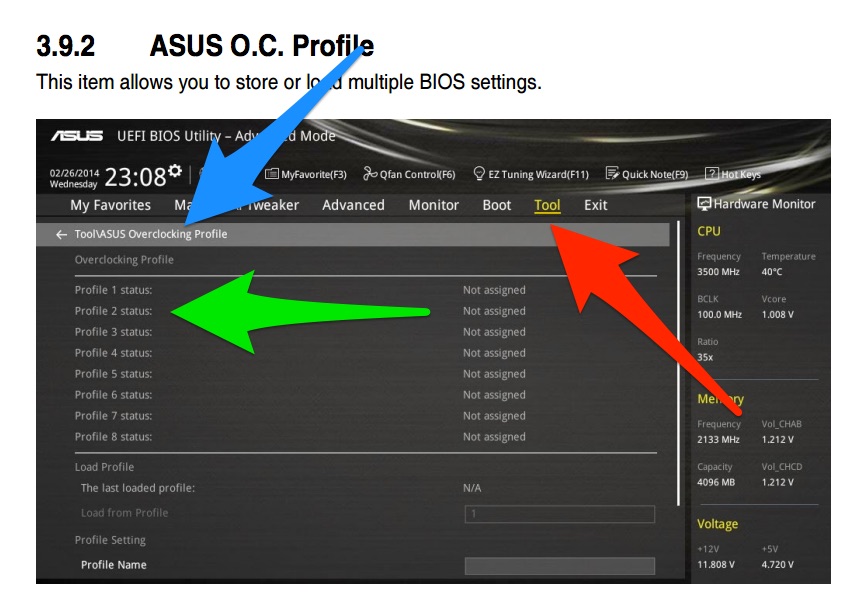
|
|
|
|
|
|
|
|
act_ksw
Newbie
Joined: 22 Mar 2016 Online Status: Offline Posts: 4 |
Quote Reply
Posted: 24 Mar 2016 at 9:31pm |
|
Thanks for the instructions! It looks like it was already set to the preset OC profile, so I think I'm good there.
Good news as well is I was able to play 1 and 1/2 hours of WoW without any crashing issues. So crossing my fingers that the crashes were just an anomaly. |
|
|
|
|
Alex
Admin Group
Digital Storm Supervisor
Joined: 04 Jun 2012 Online Status: Offline Posts: 16314 |
Quote Reply
Posted: 25 Mar 2016 at 3:43pm |
|
Sounds good!
|
|
|
|
|
|
|
|
Post Reply
|
| Forum Jump | Forum Permissions You cannot post new topics in this forum You cannot reply to topics in this forum You cannot delete your posts in this forum You cannot edit your posts in this forum You cannot create polls in this forum You can vote in polls in this forum |

About Digital Storm
Contact Information
Facility Tour
Financing
Buy Now, Pay Later
Downloads
GSA Schedule
Terms & Conditions
Privacy Policy
Request Help
Call: 1-866-817-8676
(Hours 9AM-5PM PST)





 Topic Options