My 10 year DS Journey & Why I Chose DS for 7th PC.Post Date: 2020-12-04 |
Post Reply 
|
| Author | ||
Spartacii 
Newbie 

Joined: 13 Nov 2015 Online Status: Offline Posts: 33 |
 Quote Reply Quote Reply
 Topic: My 10 year DS Journey & Why I Chose DS for 7th PC. Topic: My 10 year DS Journey & Why I Chose DS for 7th PC.Posted: 04 Dec 2020 at 5:22pm |
|
|
Very long story but this is my 10 year DS journey and my reasoning for my current configuration for my 7th PC from them. I will relate here why I considered two other boutique PC builders and ultimately why I once again chose DS. Between
2010 and 2016, I got a total of 6 DS systems. I have gradually passed
them down to family members as the years went by. Currently, the 1st is used by my mother-in-law, the 2nd is used by my dad, the 3rd is used by my wife, the 4th and 5th are in my office, and the 6th and latest one is for me at home. I have never had an issue with any of them and they run perfectly to this day, even the 10 year old one. I
have not gotten a new system since 2016 though due to the lack of
innovation & performance progression from Intel and them unable to
move beyond their 14mm Skylake node. Another
reason why I have not gotten a new system is because I have been happily
gaming on my 4 year old i7 6700k and 1080 TI at 1440p/60mhz. This
current system will most likely be quite adequate for the next couple
of years with perhaps the only thing needed would be upgrading the video
card for 1440p/120mhz and HDMI 2.1. With the coming PCI-E 4.0, Zen 3 and the Nivida 3000 & AMD 6000 video cards though, I have gotten the upgrade itch.
Also, I just recently bought a 48" LG CX OLED that can do 120mhz which
has all 4 HDMI 2.1 ports (unlike the Samsungs which only have 1 HDMI 2.1
port) and is both GSync, FreeSync & DolbyVision HDR compatible for
my room at my dad's house and another 65" LG CX OLED for my room at my
house. I have been PC gaming on HMDI TVs from the comfort of my couch or bed
for perhaps 15 years due to the immersiveness because of the size and I
simply can no longer game on small monitors, other than the ultrawide
49" ones which unfortunately do not yet have the vertical resolution I
would want. Although I love the brightness of
QLED and have QLED in my living room, my wife's room, my mother-in-law's
room, and my dad's house, I have an OLED in my own room in my house and
in my room at my dad's house because nothing beats the colors and
contrast of OLED in games. Yes, I am aware
of OLED issues with burn-in and image retention which I am not too
concerned about with modern TVs and I mitigate it by hiding the taskbar
& icons and using dark mode and screensavers. I also end up using
the OLEDs for gaming only and use the QLEDs for productivity and
non-gaming tasks to limit brightness degradation of the OLEDs over time. All
this meant that on the one hand, I needed to upgrade to a new HDMI 2.1
video card for my current gaming rig in my room to take advantage of
120mhz and VRR and also get another gaming PC for my room at my dad's
house now that I stay with him on the weekends since he's getting older. I
waited until PCI-E 4.0 NVME drives, Zen 3, Nivida 3000, & AMD 6000
video cards had come out and read reviews before pulling the trigger. I
admit that I considered two other boutique PC builders besides DS that
are just as well regarded. I will not mention who these other boutique PC builders that I considered are but I'm sure than PC connoisseurs will know the names. The reasons why I considered these two other boutique PC builders were: 1) They have more choices when compared to DS in regards to custom paint jobs. 2) They had faster rated options in regards to RAM than DS. Having said that, there were several reasons why I ended up returning to DS: 1) I have never had an issue with any of the 6 systems that I have gotten from DS. 2) DS is located 90 minutes from me so if there is a problem, I can drive to them and resolve it personally. 3)
DS has these forums which are not only helpful in regards to getting
support & answers but also I have noted that usually a simple post
from a user on the forums ends up getting attention from DS and
resolving the issue. 4) DS is willing to install air coolers and special order hardware if you ask for it. 5) The note section on the order/configuration screen is super convenient to express any special requirements. 6)
I began doing my window shopping about 6 months ago & I noted that
at that time, DS was more expensive for similar specs than those two
other boutique builders that I considered but for some reason, in the
last couple of months, I found DS to be less expensive than them. For all the reasons above, I pulled the trigger for my 7th DS system on 11/19/20. The
following is my configuration and my reasoning behind it. Please note
that this is only my personal reasoning for choosing this particular
build and that it is subjective and works for me and it is not
necessarily good/bad or right/wrong for someone else:
Chassis Model: Digital Storm Velox I decided against
the Lumos case because I prefer air cooling and the front glass limits
air intake. Also, I saw videos on YouTube in regards to the danger of
receiving broken glass panels damaged in transit. I
was very temped by the smaller size of the Lynx case which fits
perfectly in the space I planned for it in my room at my dad's house but
I found its looks only adequate. I was very
tempted to special order the Lian Li Lancool II Mesh RGB White which is
my speed for both airflow and looks but I ultimately decided to stick
with the Velox because I prefer its looks and I can get it in white. Having
said that, I wish that DS would update the pictures of the Velox on its
website to reflect the new glass panels on both sides which they have
been promising that they would update for a long time now and they still
haven't done it. Personally, I prefer the old look shown in the current pictures rather than the current all glass panels. The
Velox though is too big for the space in my room at my dad's house so I
will have to move my current gaming rig from my house to his and have
the Velox in my room in my house instead.
Exterior Finish: Exotic Paint Finish - Blanco White Of course I chose the white option for aesthetic reasons but I remember when DS offered more color choices years ago. I would love to get it in blue like you can for the Bolt case which would look perfectly in my room. The wider color choices when compared to DS is one of the reasons why I considered those other two boutique builders. Having
said that, I discovered that you can enter the Velox configuration
screen, change the case from the Velox to the Lynx and keep the Blanco
White color option. I wonder what would have happened if I had done that and if DS would actually paint the Lynx in white.
Processor: AMD Ryzen 9 5900X (12-Core) 4.8 GHz Turbo Of course I went with AMD rather than Intel now that Zen 3 is competitive in games to the best that Intel has to offer. Even
if Rocket Lake in March regains the performance crown which remains to
be seen, Intel will not be power efficient until Alder Lake due to
Rocket Lake being a back port and by than time Zen 4 will not be far
behind. I'm strictly a gamer and I do not do any real productivity work or multi-tasking so I know that the 12-core 5900X is overkill. At
first I considered the 6-core 5600X which is good for current games but
I think that as times goes by, more games will take advantage of more
cores, specially console ports since the new PS5 and Xbox Series X use
8-cores. I was going to then choose the 8-core
5800X which is more than great for current and future games but all
things being equal, I think that game optimization for console hardware
is overcome by PCs via brute force alone. From
what I have read, because developers optimize for consoles, these have
an advantage when similar specs are compared between consoles and PCs.
Which is one of the reasons why we always heard of bad console to PC
ports but when do we ever hear about bad PC to console ports? Therefore,
superior PC hardware when compared to console hardware must be chosen
so that PC can overcome these console optimization via brute force
alone. Also, my thinking is that sure a 5800X
can in the future, use all 8-cores in a game optimize for it but what
about all those background tasks that Windows run? Wouldn't I want a few
more cores for those tasks too? After all, it is too much of a hassle to quit every background task and system tray icon every time I play a game. But
the main reason why I chose the 5900X is because considering that I
keep my PCs around in some form or another for at least a decade, I do
not want to regret not having 12-cores later in the future. Yes,
I know that I can upgrade the CPU later but not in this case because
AMD's AM4 socket has reached end of life with the Zen 3 so there is no
upgrade path for me. Even if there was an
upgrade path though with the upcoming AM5 socket, I have never and I
will never upgrade a CPU as I do not have the skill set to do so nor the
time to be without a PC and have some else do it for me.
Motherboard: ASUS ROG Crosshair VIII Hero (Wi-Fi) (AMD X570 Chipset) (Up to 3x PCI-E Devices) Frankly,
the only reason why I chose this particular motherboard is because
Tom's Hardware recommended it as their choice for Best High-End X570
board. I almost went with the new version, the
Asus ROG Crosshair VIII Dark Hero and I have had DS special order
motherboards for my builds before, but this new version is currently out
of stock and it would have meant waiting a couple of months and it
offers little practical difference from the current version other than
passive cooling.
System Memory: G- Skill Trident Z Neo DDR4-3600 C16 2x16GB (F4-3600C16D-32GTZN) I
had DS special order this kit for me. It it not only very well reviewed
but the main reason is that the Ryzen architecture is quite receptive
to faster and better RAM which is one of the reasons why some reviews
comparing AMD's Zen 3 to Intel's 10th Gen show Zen only faster by only
2% when testing with lower rated RAM while other reviewers show Zen
being faster than that when tested with higher rated RAM. The Intel
systems on the other hand do not seem to show quiet as much difference
performance wise as AMD when tested with different rated RAM. Having
said that, I do wish that DS had the option of RAM faster than 3200Mhz
as 3600Mhz CL16 is the sweet spot for Ryzen systems. This is one of the
reasons why I considered the other two boutique PC builders because they
do offer faster RAM without special ordering it. I
almost considered waiting for PCIE 5.0 and DD5 RAM but it would not be
until 2022 when it gets down to the desktop market and it will be
expensive at the beginning and at first, the performance of the first
batch will not be any faster than the performance of DD4's fastest batch
and lastly because it it will take a couple of years to iron out all
the kinks and by then, AMD's Zen 5 and Intel's Meteor Lake will have
come out. Yes,
I know. Total overkill. Honestly, the only reason why I went with the
1200W option is because it is modular while the 1000W option is listed
as being semi-modular and while the 850W option is also modular, its
MTBF is rated as 100,000 hours and 80 Plus Gold certified while the
1200W has an MTBF of >100,000 hours and although the title lists it
as being 80 Plus Gold certified, when you click on its spec tab, it says
that it is 80 Plus Platinum certified. Peace of mind to me is worth the
$195 difference spread over 10 years between the 850W and the 1200W.
Storage Set 1: 1x SSD M.2 (1TB Samsung 980 PRO) (NVM Express) Boot
driver of course. It is the fastest option right now and surprisingly
affordable. I just wish that Samsung had already released the 2TB
version. Of course I don't need that much space for the OS drive but I choose the
1TB Samsung 980 Pro because it has almost twice the Peak Random Read
& Write and Sequential Write speed than the 250GB version.
Storage Set 2: 1x SSD M.2 (4TB Sabrent Rocket Q4) (NVM Express) This
will be my drive for games. My current game drive contains my entire
Steam/Epic/Origin/GoG library and it is enormous at over 2TB so yes, I
do need the space. I realize that games do not need nor benefit much
from NVME and a SATA SSD for games would suffice but...is there so why
not use it. Yes, I do realize that having two
M.2 drives might limit bandwidth on both under certain conditions but
the ASUS ROG Crosshair VIII Hero (Wi-Fi) (AMD X570) motherboard has one
M.2 slot drawing PCI-E 4.0 lanes from the Chipset side of the fence
while the other M.2 slot draws PCI-E 4.0 lanes from the CPU side of the
fence so no worries. Yes, I do realize that I
could get it much cheaper on my own but for reasons regarding the air
cooler that I chose and that I will get to later in that section, I
needed this drive to be installed by DS.
Storage Set 3: 1x SSD (4TB Samsung 860 EVO) This will be for my personal data of which I have almost 3TB worth of pictures, comics, music, videos, & docs. Yes,
I do realize that I could have gotten this drive much cheaper on my own
but I had already not only made a couple of special order requests but
had also changed my initial build after I pulled the trigger and got to
Stage One so I felt guilty about giving DS so much hassle with my
ambivalence and buying this from DS was my way to thank them for their
patience with me.
Graphics Card(s): 1x Radeon RX 6800 XT 16GB (VR Ready) It
was either this one or the Nvidia 3080. The 3080 is 6%-7% faster but I
really can't tell the difference between 141fps and 150fps. Yes,
Nvidia's Ray Tracking is currently superior to AMD's but it still
limits performance too much for my taste, is only in a couple of games
that I am interested in and even then, I really can't see much
difference with it on. Personally, I think
that we need two more generations for Ray Tracing to be prevalent
enough with little performance loss and noticeable enough difference for
it to be worth it. DLSS was the biggest draw
though. I see this as the main reason to choose Nvidia. Having said
that, I want to game at 1440p/120 not 4K so DLSS is not of much benefit
to me in that scenario while DLSS is only an option in only a few games
that I am interested in. Also, because AMD's
Super Resolution version of DLSS is open source and in the PS5 and
current Xbox and Microsoft is going to push it, it will have better
support in the long run from game developers who gravitate to the most
common denominator rather than something more proprietary like DLSS.
Look what happened between GSync and FreeSync for example. AMD does have Smart Access Memory but Nvidia will have its version of it soon too. Ultimately
though, it was the 6800XT's 16GB of VRAM that sealed it for me. I use
an obscene amount of graphical mods in many of my games and those 16GB
of VRAM makes my mouth water. Having said that,
since I'm in no hurry, I'm halfway hoping that DS will not get stock of
the CPU and GPU to fulfill my order until January when the Nvidia 3080
TI with 20GB of VRAM is released so I can ask DS for that one instead. That card will be the killer choice until Hopper and RDNA3 come out in a couple of years.
Extreme Cooling: Noctua NH-U14S Premium CPU Cooler with NF-A15 140mm Fan (Brown) This
was the biggest hurdle. I simply do not care about any and all possible
argument in favor of an AIO. Comparing the two, GamersNexus,
HardwareUnboxed or LunusTechTips conceded that a great air cooler is
competitive temperature wise to a good AIO. It can also run quieter than
an AIO by lowering the fan speed, good luck with lowering the fan speed
of an AIO. I do not plan to overclock (Ryzen
seems to loose single-thread performance if you overclock it) and I will
use the rig in an air conditioned room so temperatures are not a
concern for me. The biggest reason for me to
choose an air cooler over an AIO though is reliability, longevity and
maintenance. Steve at GamersNexus said that AIO manufacturers had told
him privately that a good AIO would last an average of 5-6 years. I
still have 10 year old PCs around so that's not reassuring to me. Sure,
I can replace the AIO when the pump fails if and when I eventually
notice that it has failed and yes, it will fail eventually but I should
rather say that I could pay someone else to do it for me since I do not
have the technical expertise to do it on my own but then, why would I go
to all that hassle when I can simple have an air cooler and never have
to worry about it as at most, the only point of failure to an air cooler
is the fan which on the other hand, I can replace on my own. Since
I pass along my computers down to family members whenever I get a new
one, I need my PCs to last at least 10 years without any maintenance or
hassle other than upgrading the video card or SSD down the road.
If an AIO can 100% promise me that it will not fail nor need any
maintenance for 10 years then I would be willing to consider it but
otherwise, I'm sticking to air coolers. So an
air cooler is a deal breaker for me and DS willingness to accommodate me
in regards to my requirement for an air cooler was another reason why I
chose DS rather than the other two boutique PC builders. Of
course DS, like most if not all PC builders discourages air coolers but
the real reason is not because of throttling, as a good air cooler like
the Noctuas will not throttle even Threadrippers but because of damage
in transit which cause RMAs and customer dissatisfaction. When
I expressed my desire for a quality air cooler, DS recommended me the
Be Quite! Dark Rock Pro 4 or the Noctua NH-U14S. I chose the Noctua
because of the brand of course and because it is a single tower and fan
cooler as opposed to a double tower and fan cooler. I
currently have the double tower and fan Noctua NH-D15 in two of my PCs
blocking the RAM slots and I cannot bother going to the hassle of having
someone remove it for me so I can upgrade the RAM. Single tower and fan
coolers from Noctua cool quite well and I can still upgrade the RAM in
the future. So I went with the Noctua NH-U14S
but then a few days later, I noticed that its width would most likely
block easy access to the M.2 slot situated between the primary PCI-E
slot and the CPU socket in the Asus motherboard. I
contacted DS and requested the smaller Noctua NH-U12S instead,
specially the Chroma.Black version of it that looks badass which would
allow me easier access to the M.2 slot in question but the Noctua
NH-U14S had already shipped and couldn't be returned. I
didn't care and was willing to pay for both since I want what I want
but unfortunately, both the regular ugly Noctua NH-U12S brown and its
better looking Chroma.Black version sibling were either out of stock or
being sold by third-party vendors at both Amazon and Newegg. DS
told me that they only special order from first party Amazon or Newegg
but that I could order the Noctua NH-U12S on my own and have it shipped
to DS and they would install it for me. The
Noctua NH-U12S was coming from overseas with an ETA of middle to late
December and since I'm still waiting for both the CPU and GPU to fulfill
my order and I'm in no hurry, I was tempted to wait but by this point, I
actually felt sorry for all the changes that I had made to my build and
how I had made DS go back and forth so I decided to stick to my
original option of the Noctua NH-U14S. This did
require me to have DS install the 4TB Sabrent Rocket Q4 NVME for me
though rather than me getting it on my own for a lesser price because
the Noctua NH-U14S would most likely end up blocking that M.2 slot. Cable Management: Exotic Cable Management - Red - (Cable Combs with Custom Color Sleeved Extension Cables) Pretty cables.
Chassis Fans: Corsair LL Series (RGB Fans) (Software Controlled Effects) Pretty lights.
Internal Lighting: Remote Controlled Advanced LED Lighting System (Multiple RGB Color Modes) More pretty lights.
Airflow Control: Corsair Commander PRO Management Control Board & Software (1x Board) I think the Corsair is better than the default DS one and I'm curious to see how DS will route all those damn cables.
OS Boost: - No Thanks, Please do not tweak the services on the operating system DS should really specify which services they disable.
Operating System: Microsoft Windows 10 Professional (64-Bit Edition) Honestly,
the other reason why I choose the Pro version is because you can delay
updates and I know that someday when I get a new PC again years from
now, I will pass this PC to my office so I will need Remote
Desktop/Group Policy.
Recovery Tools: USB Drive - Windows 10 Installation (Format and Clean Install) I like the peace of mind that if something goes wrong, I can always nuke everything and start from scratch.
Priority Build: - No Thanks, Ship Within 15-20 Business Days After Order Is Successfully Processed Why in the world would I want to rush this? Is like having a baby. It needs time to cook properly.
Warranty: Life-time Expert Care with 3 Year Limited Warranty (3 Year Labor & 1 Year Part Replacement) I
very much considered extending the warranty two more years just for the
peace of mind but like I said, six DS PCs and never had an issue so I
stuck with the regular warranty. Freight: As
I had mentioned before, I live about 90 minutes from where DS is
located. I actually drove to their old place in Fremont to pick up my
first PC from them back in 2010. Their new location in Gilroy is further
away from me but still doable. My plan was to drive to them again this
time but there was no option for doing so during check out, probably
because of COVID. On the other hand, I'm
glad that they have a freight option for security in transit purposes,
specially considering that I chose the air cooler option. --- Well
that's it, that's my story and I'm sticking to it. If you have read
this far, thank you for your attention. Thank you to the community and
to DS for 10 years of great service. Here's hoping for another 10 years.
|
||
|
Intel i7-12700K
Nvidia RTX 3090 AMD Ryzen 5900X AMD Radeon 6800XT |
||
 |
||
|
fwfdfireman
Groupie 
Joined: 18 Aug 2020 Online Status: Offline Posts: 409 |
Quote Reply
Posted: 04 Dec 2020 at 7:45pm |
|
|
That's the best "book" I have read in some time.

Thank You |
||
|
Old Gamers Never Die!
|
||
|
||
|
Cretae
DS Veteran 
Joined: 22 Mar 2010 Online Status: Offline Posts: 7331 |
Quote Reply
Posted: 05 Dec 2020 at 4:47am |
|
|
No quibbles from me. You know what you want and why. Doesn't get better than that, does it?

|
||
|
||
|
Bob100
Groupie
Joined: 13 Aug 2019 Online Status: Offline Posts: 180 |
Quote Reply
Posted: 05 Dec 2020 at 4:10pm |
|
I have the Lumos case and the front glass panels provide 5/8" wide slots that run the entire vertical length along both the left & right sides of the front panel. The front panel sits about 5/8" to 3/4" out from the front fan filters. There is also a 1/2" wide slot along the bottom of the front panel. Those 5/8" slots run the entire length along both sides of the top panel as well, which is also offset 5/8" to 3/4" above the top fan filters. There seems to be plenty of room for air inflow into that large Lumos case. I also have an air-cooled cpu and have not had temp issues at all with the Lumos. No broken glass upon delivery, but that is the luck of the draw. The computer was well packaged. |
||
|
||
|
Spartacii
Newbie
Joined: 13 Nov 2015 Online Status: Offline Posts: 33 |
Quote Reply
Posted: 06 Dec 2020 at 5:55pm |
|
The DS Lumos is a rebranding of the Corsair Crystal 570X. Back when it came out in 2016, reviewers gave it high marks as it is indeed a looker. Cases have evolved since then though and I note what Steve from GamersNexus said about case design this year: "This year marked a major turning point for case manufacturing and
design where we have finally gotten into territory where there's
actually a lot of cases that have potential for high performance
thermally or ship with a good configuration stock that allows for high
thermal performance. So this is finally starting to shape up to be a
fairly diverse case market where we have gotten away from just slab
glass on all the sides and put RGB LEDs in it and call it a day. Now
there's a lot of actually very good cases to look at and this round up
will hopefully help you figure out what to buy." I'm aware of the air vents on the side of the Lumos but I do not believe that side air vents are as airflow and thermal efficient as direct front air vents. As you can see on GamersNexus round up of best cases of 2020 (links below), every category, whether it was Best Overall Case, Best Mechanical Design Case, Best Budget Case, Best Out-of-the-Box Thermals, Best Noise Levels, or Best Normalized-Thermals, was won by front air vent cases like the Velox. https://www.youtube.com/watch?v=dhf97n0eqx4 https://www.gamersnexus.net/guides/3630-best-worst-pc-cases-2020 |
||
|
Intel i7-12700K
Nvidia RTX 3090 AMD Ryzen 5900X AMD Radeon 6800XT |
||
|
||
|
fwfdfireman
Groupie
Joined: 18 Aug 2020 Online Status: Offline Posts: 409 |
Quote Reply
Posted: 06 Dec 2020 at 6:20pm |
|
|
The reason a choose the Velox, best for air flow! And by the way, setting my fan curve through iCue to "Balanced" is perfect. "Quiet" was good for just normal PC usage but gaming, right now Assassin's Creed Valhalla, I sensed there was still a lot of heat needing to be ventilated. The "Balanced" setting was the sweet spot. Can feel the front 3 fans really pulling air, top two act like a chimney with blowers and the back fan just helps circulate as I don't feel a whole lot of heat being pushed out through it, some but not like the front or top. Loving the Velox case!
|
||
|
Old Gamers Never Die!
|
||
|
||
|
oldlady RPGer
DS Veteran
One of the cool kids
Joined: 09 Sep 2011 Online Status: Offline Posts: 1080 |
Quote Reply
Posted: 09 Dec 2020 at 2:54pm |
|
|
Spartacii
  Love your build. Love your build.
I just got our 6th DS rig. Bought my Husband a Lumos for his Birthday. My "cube" from 2011 is still running strong. Yes I've done some upgrades(Star Wars XP video card). The old 990X Extreme processor is still running well. My next big purchase will be an Aventum. And yes I have looked at other boutique builders. Especially the paint jobs.  Yet still its the customer service and THESE FORUMS that bring me back. I have learned so much here and am so grateful for the help. Yet still its the customer service and THESE FORUMS that bring me back. I have learned so much here and am so grateful for the help. 

|
||
|
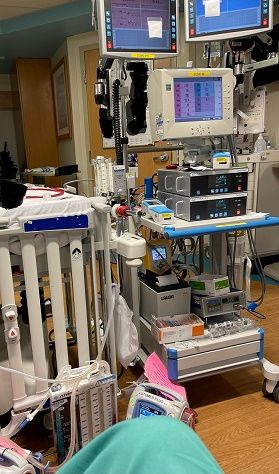
Me sitting my ECMO in PICU. Now you know why I like LC. ;)
|
||
|
||
|
hoserator
DS Veteran
We don't need no stinking "Avatars" !
Joined: 08 Oct 2014 Online Status: Offline Posts: 7966 |
Quote Reply
Posted: 10 Dec 2020 at 12:00pm |
|
|
Excellent write up and reasoned explanations as to the choices made. Who can argue? I love the Noctuas. They are very quiet and efficient at cooling.! It was painful to see them go from the lineup. Enjoy and please post some images. I think you can pick up at the site if you make that as the plan and schedule the time of pick up but you probably checked that.
Edited by hoserator - 10 Dec 2020 at 12:02pm |
||
|
||
|
Tidgxor
DS ELITE 
The Kokopelli kid
Joined: 17 Sep 2010 Online Status: Offline Posts: 13000 |
Quote Reply
Posted: 10 Dec 2020 at 12:22pm |
|
This still bothers me to this very day. Yes I get DS's concerns about shipping, but I will never stop wishing they'd bring the Noctuas back. Some of us folk are completely and totally fine with air cooling.
Edited by Tidgxor - 10 Dec 2020 at 12:24pm |
||
|
My Two Digital Storm Rigs: Mr. Bojangles (HAF-X, 2010) & Mrs. Bojingles (Bolt I, 2013).
|
||
|
||
|
Post Reply
|
| Forum Jump | Forum Permissions You cannot post new topics in this forum You cannot reply to topics in this forum You cannot delete your posts in this forum You cannot edit your posts in this forum You cannot create polls in this forum You can vote in polls in this forum |

About Digital Storm
Contact Information
Facility Tour
Financing
Buy Now, Pay Later
Downloads
GSA Schedule
Terms & Conditions
Privacy Policy
Request Help
Call: 1-866-817-8676
(Hours 9AM-5PM PST)





 Topic Options