My favorite site showing wrongPost Date: 2012-08-09 |
Post Reply 
|
| Author | |
Karn 
Newbie 

Joined: 23 Jul 2010 Online Status: Offline Posts: 53 |
 Quote Reply Quote Reply
 Topic: My favorite site showing wrong Topic: My favorite site showing wrongPosted: 09 Aug 2012 at 12:18pm |
|
My favorite site looks bad don't know what i did. Can anyone help?
ps. i made thsi post 5 times already so im sorry. its one of those days? Im tired of typing it all out again after 5 failed attempts to upload the eroor image. anyways it looks bad on just this pc not my oithers anf with all browsers, also im not m,essing with it again and having this window close on m,e after preview so is this post looks like crap im sorry im not chancing it again and having to do this all over again.-Robert 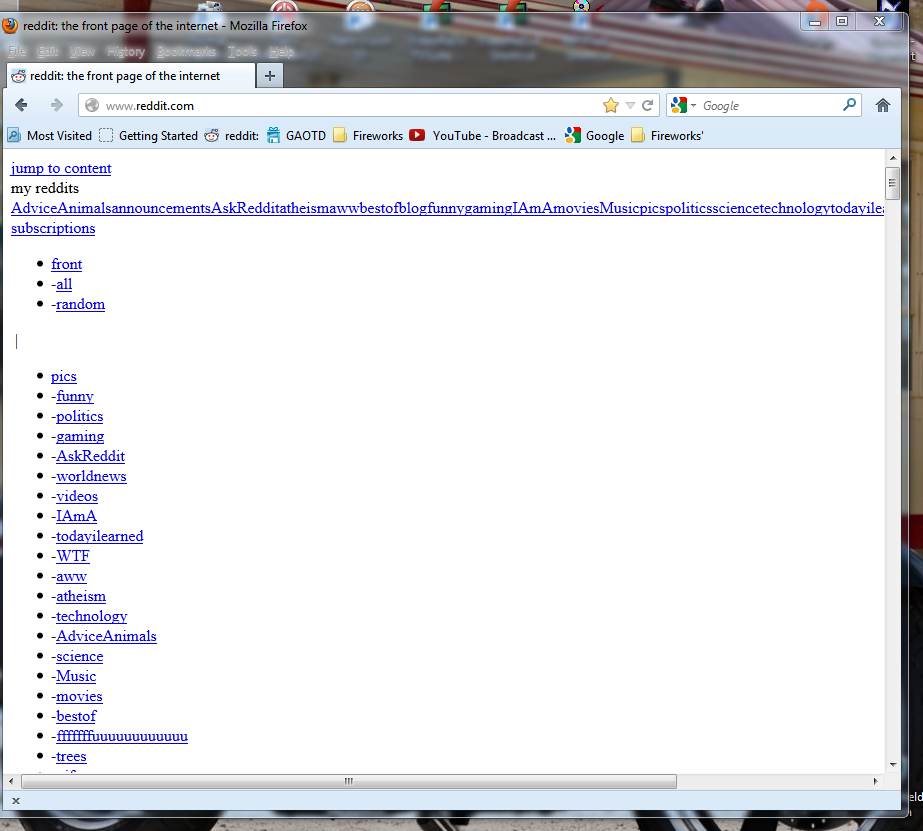 |
|
 |
|
|
Tidgxor
DS ELITE 
The Kokopelli kid
Joined: 17 Sep 2010 Online Status: Offline Posts: 13000 |
Quote Reply
Posted: 09 Aug 2012 at 1:00pm |
|
Does the site only display like that in Firefox?
|
|
|
My Two Digital Storm Rigs: Mr. Bojangles (HAF-X, 2010) & Mrs. Bojingles (Bolt I, 2013).
|
|
|
|
|
Karn
Newbie
Joined: 23 Jul 2010 Online Status: Offline Posts: 53 |
Quote Reply
Posted: 09 Aug 2012 at 1:12pm |
|
Hello! Thanks for replying. No it looks like that with Firefox, IE, chrome, and opera. But it looks fine on my other desktops using any browser. Just this computer and just that page and any sub reddits under the main page. I thought the site was the problem but it works fine on any other PC i have tried. So far googling has mentioned possible problems with iframes or after installing noscript or maybe a DNS issue. I am still trying to learn more. Thank you!
|
|
|
|
|
bprat22
DS ELITE
DigitalStorm East -- (Unofficially!)
Joined: 08 Jun 2011 Online Status: Offline Posts: 20391 |
Quote Reply
Posted: 09 Aug 2012 at 1:32pm |
|
My only thought which you probably tried is to go into the open browsers Tools....Internet Options.....Browse History......check to delete cookies, temp files, cache, etc. and see if it helps. You don't delete passwords. Good luck.
|
|
|
|
|
FrankW
DS Veteran 
Joined: 22 Feb 2010 Online Status: Offline Posts: 2254 |
Quote Reply
Posted: 09 Aug 2012 at 1:37pm |
|
Hi Karn,
1. Is www.reddit.com your favorite site. Is that the site you are trying to access? 2. Are you using a favorite link to access the site. 3. Try doing a Google search for the site and go there from the search link. 4. Try deleting your cookies for that site and log into the site again. Frank |
|
|
|
|
Karn
Newbie
Joined: 23 Jul 2010 Online Status: Offline Posts: 53 |
Quote Reply
Posted: 09 Aug 2012 at 2:07pm |
|
|
|
|
|
|
Karn
Newbie
Joined: 23 Jul 2010 Online Status: Offline Posts: 53 |
Quote Reply
Posted: 09 Aug 2012 at 2:13pm |
|
Hello. Thank you bpratt22!
Yes I tried those and also used ccleaner. Hello FrankW! Yes www.reddit.com is the site. I tried the link in your post thank you but it did not change. I was using a favorite link to access it. I tried googling and then clicking the links and it did not change. I've tried to delete the cookies but it does not help. Thank you! |
|
|
|
|
Karn
Newbie
Joined: 23 Jul 2010 Online Status: Offline Posts: 53 |
Quote Reply
Posted: 09 Aug 2012 at 2:23pm |
|
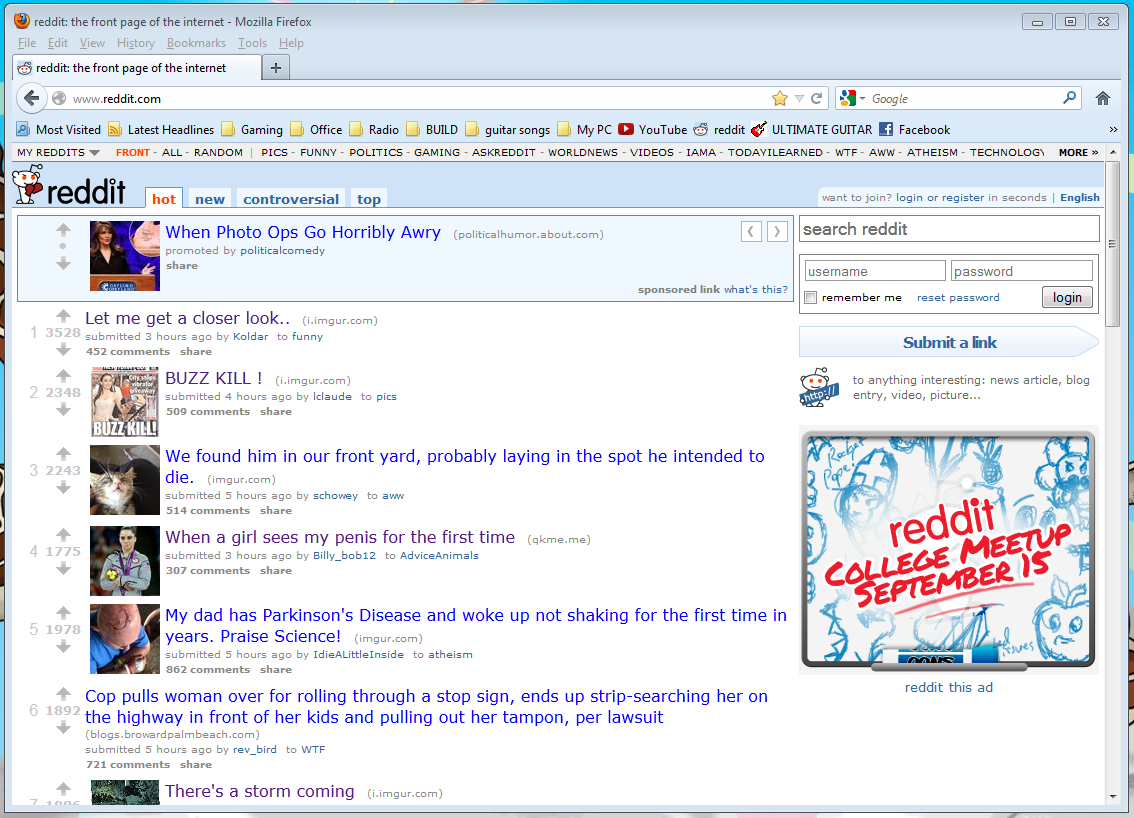
Here is what it looks like on my other PC so I know its not the website.
 |
|
|
|
|
Karn
Newbie
Joined: 23 Jul 2010 Online Status: Offline Posts: 53 |
Quote Reply
Posted: 09 Aug 2012 at 2:27pm |
|
Geez i should have chosen a different subreddit but i wanted to show the front page.
Some weird stuff happening. Sorry if anyone is offended. |
|
|
|
|
FrankW
DS Veteran
Joined: 22 Feb 2010 Online Status: Offline Posts: 2254 |
Quote Reply
Posted: 09 Aug 2012 at 2:30pm |
|
Karn,
I was thinking it was a cookie or phishing problem. Did this just start today? Did it work at all today. Have you tried shutting off the computer completely and restarting? Are you having any problem playing a game with this computer? Frank |
|
|
|
|
Karn
Newbie
Joined: 23 Jul 2010 Online Status: Offline Posts: 53 |
Quote Reply
Posted: 09 Aug 2012 at 4:12pm |
|
Thank you FrankW. I rid the PC of cookies. Not sure about phishing. Powering off and rebooting does not help. A few days ago I had to unpower my modem because Comcast doubled the speed. I cannot remember if I had the problem before this or not sorry.
I use Online Armor with Avira Anti-Virus, plus superantispyware pro and use malwarebytes often. But these have never given me any trouble working together. -Karn |
|
|
|
|
surf71zx
Groupie 
Joined: 07 Jan 2011 Online Status: Offline Posts: 485 |
Quote Reply
Posted: 10 Aug 2012 at 3:23pm |
|
Karn I would try System Restore, go back in time to an earlier date. Go to accessories and system tools and restore it.
|
|
|
|
|
Orange7
Senior Member 
Joined: 24 Apr 2012 Online Status: Offline Posts: 776 |
Quote Reply
Posted: 10 Aug 2012 at 5:55pm |
|
I would try to change your rendering settings. It may not be allowing the images or scripting that reddit uses to function. Just go into internet options and make sure that nothing is extremely restrictive or hinders image/script rendering.
|
|
|
DS xm15 Stage 4
i7-3820 (2.7GHz/3.7GHz) 16GB 1600MHz DDR3 GT 630, 1GB 240GB Intel 520 |
|
|
|
|
Karn
Newbie
Joined: 23 Jul 2010 Online Status: Offline Posts: 53 |
Quote Reply
Posted: 13 Aug 2012 at 3:17pm |
|
Hello. Thank you everyone for your help! It seems I have found a solution to my problem. I would like to share it with anyone who may need this now or in the future. My problem was with the Avira Anti-Virus web protection component. Here is a link for more information.
http://www.reddit.com/r/24hoursupport/comments/y50sz/official_fix_reddit_doesnt_load_css_margin_tags/ Take care -Karn |
|
|
|
|
timmerfree
Newbie
Joined: 11 Sep 2012 Online Status: Offline Posts: 12 |
Quote Reply
Posted: 11 Sep 2012 at 4:06pm |
|
I have the same issue for espn.com and my reddit won't even load. I know I don't use Avira Anti-Virus so I was wondering what component of your web protection exactly was causing the problem
|
|
|
|
|
Post Reply
|
| Forum Jump | Forum Permissions You cannot post new topics in this forum You cannot reply to topics in this forum You cannot delete your posts in this forum You cannot edit your posts in this forum You cannot create polls in this forum You cannot vote in polls in this forum |

About Digital Storm
Contact Information
Facility Tour
Financing
Buy Now, Pay Later
Downloads
GSA Schedule
Terms & Conditions
Privacy Policy
Request Help
Call: 1-866-817-8676
(Hours 9AM-5PM PST)





 Topic Options