My ram overclockPost Date: 2008-08-11 |
Post Reply 
|
| Author | |
Rolet 
Groupie 
Joined: 02 May 2008 Online Status: Offline Posts: 287 |
 Quote Reply Quote Reply
 Topic: My ram overclock Topic: My ram overclockPosted: 11 Aug 2008 at 8:56pm |
|
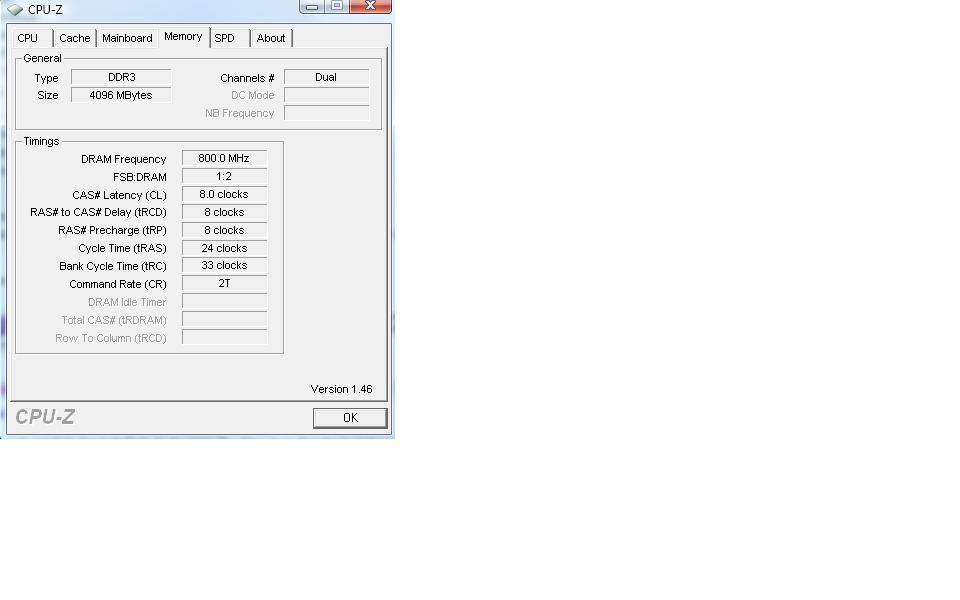
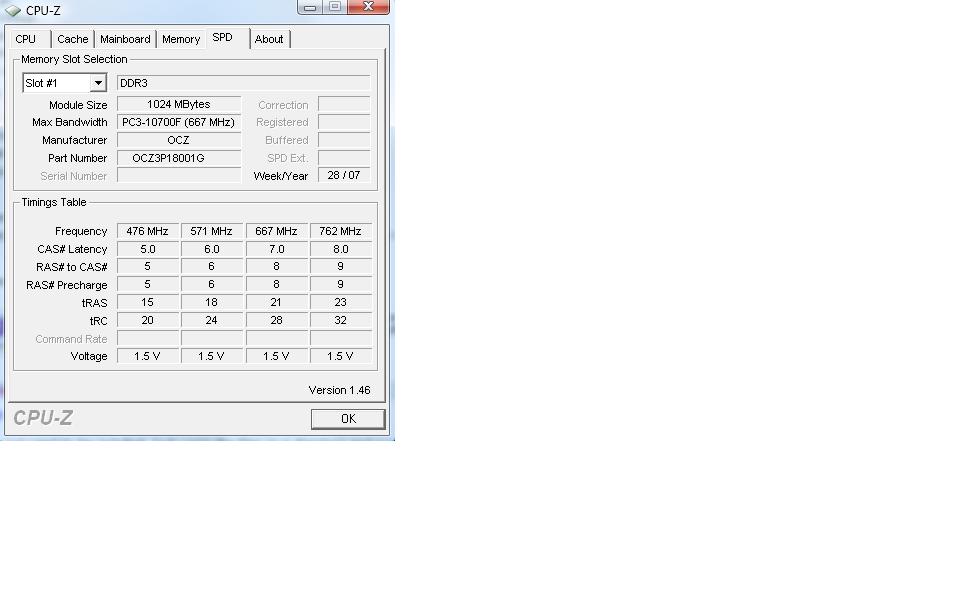
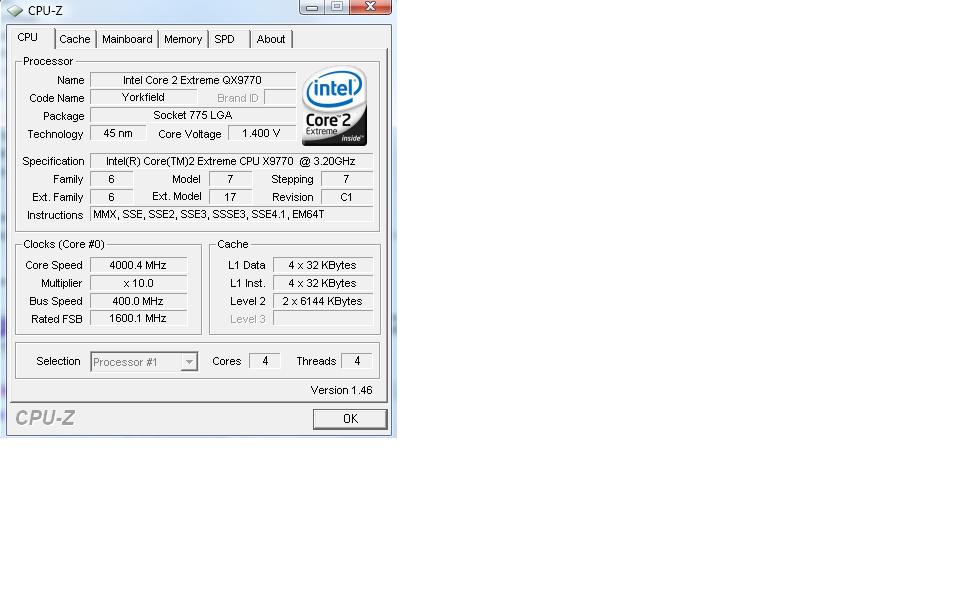
Can someone tell me at what MHZ my ram is at? I have no idea what any of this means
    |
|
|
x9700 @ 3.60 Ghz
XFX 790i Ultra 1200W PC Power & Cooling ESA 2 8800 Ultra OC 4GB 1800 OCZ 150g raptor (Raid 0), 1TB Watercool CPU/Dual GPU Creative XiFi Fatality Vista Ultimate 64-bit |
|
 |
|
|
Rolet
Groupie
Joined: 02 May 2008 Online Status: Offline Posts: 287 |
Quote Reply
Posted: 11 Aug 2008 at 9:39pm |
|
hah thanks harley
 1600...thats odd since my ram is 1800 and is suppose to be overclocked. ah, I see, getting me all confused!  j/k Edited by Rolet - 11 Aug 2008 at 9:40pm |
|
|
x9700 @ 3.60 Ghz
XFX 790i Ultra 1200W PC Power & Cooling ESA 2 8800 Ultra OC 4GB 1800 OCZ 150g raptor (Raid 0), 1TB Watercool CPU/Dual GPU Creative XiFi Fatality Vista Ultimate 64-bit |
|
|
|
|
Rolet
Groupie
Joined: 02 May 2008 Online Status: Offline Posts: 287 |
Quote Reply
Posted: 11 Aug 2008 at 9:47pm |
|
So my ram is at 1760MHZ?

|
|
|
x9700 @ 3.60 Ghz
XFX 790i Ultra 1200W PC Power & Cooling ESA 2 8800 Ultra OC 4GB 1800 OCZ 150g raptor (Raid 0), 1TB Watercool CPU/Dual GPU Creative XiFi Fatality Vista Ultimate 64-bit |
|
|
|
|
Rolet
Groupie
Joined: 02 May 2008 Online Status: Offline Posts: 287 |
Quote Reply
Posted: 11 Aug 2008 at 9:59pm |
|
hah, thats ok. I'm at a loss for ram as well. All the timings and stuff are so confusing.
|
|
|
x9700 @ 3.60 Ghz
XFX 790i Ultra 1200W PC Power & Cooling ESA 2 8800 Ultra OC 4GB 1800 OCZ 150g raptor (Raid 0), 1TB Watercool CPU/Dual GPU Creative XiFi Fatality Vista Ultimate 64-bit |
|
|
|
|
TomD
Groupie

Joined: 22 Jun 2008 Online Status: Offline Posts: 289 |
Quote Reply
Posted: 11 Aug 2008 at 10:30pm |
|
Your RAM is running at 1600MHz (800Mhz X 2).
If you bought 1800 RAM you can go into your BIOS, changed the sync mode to "unlinked", then change the speed to 1800. Honestly, I doubt you will be able to tell the difference in performance.
You shouldn't have been charged for RAM overclocking, since you are actually running below your rated speed. The 1800 wouldn't overclock much if at all anyway - 1800 is close to the max the board can run.
You did get a nice memory fan out of the deal at least. Edited by TomD - 11 Aug 2008 at 10:30pm |
|
|
|
|
Rolet
Groupie
Joined: 02 May 2008 Online Status: Offline Posts: 287 |
Quote Reply
Posted: 12 Aug 2008 at 1:16am |
|
Dang that sucks
Oh well, yeah the fan is nice. I will leave it as it is since the system is running fine, don't want to mess anything up. Thanks for all the help  |
|
|
x9700 @ 3.60 Ghz
XFX 790i Ultra 1200W PC Power & Cooling ESA 2 8800 Ultra OC 4GB 1800 OCZ 150g raptor (Raid 0), 1TB Watercool CPU/Dual GPU Creative XiFi Fatality Vista Ultimate 64-bit |
|
|
|
|
Post Reply
|
| Forum Jump | Forum Permissions You cannot post new topics in this forum You cannot reply to topics in this forum You cannot delete your posts in this forum You cannot edit your posts in this forum You cannot create polls in this forum You cannot vote in polls in this forum |

About Digital Storm
Contact Information
Facility Tour
Financing
Buy Now, Pay Later
Downloads
GSA Schedule
Terms & Conditions
Privacy Policy
Request Help
Call: 1-866-817-8676
(Hours 9AM-5PM PST)





 Topic Options