new build for gaming onlyPost Date: 2011-05-25 |
Post Reply 
|
| Author | |||
cV^Saint 
Newbie 

Joined: 25 May 2011 Online Status: Offline Posts: 22 |
 Quote Reply  Topic: new build for gaming only Posted: 25 May 2011 at 6:02pm |
||
|
Budget:
7500.00 Expectations: high end gaming 2 monitors 1900X1080 Usage: gaming only] Special Needs: [Please Type Here] Saved Ticket #: [Please Type Here] Specifications:Chassis Model: Special Deal Hot Seller - Cooler Master 942 HAF X Exterior Finish: - Standard Factory Finish Trim Accents: - Standard Factory Finish Processor: Intel Core i7 Extreme Edition 990X 3.46GHz (Six-Core) (Extreme Performance) Motherboard: ASUS Rampage III Extreme (Intel X58 Chipset) (Features USB 3.0 and SATA 6Gb/s) System Memory: 12GB DDR3 2000MHz Corsair Dominator GT with DHX (3x4GB Sticks) (CMT12GX3M3A2000C9) Power Supply: 1500W Silverstone (Dual/Triple/Quad SLI Compatible) (Recommended) Expansion Bay: - No Thanks Hard Drive Set 1: Operating System: 1x (600GB Western Digital VelociRaptor (10K RPM) (32MB Cache) (Model: WD6000HLHX) Set 1 Raid Options: - No Thanks Hard Drive Set 2: Multimedia\Data: - No Thanks Hard Drive Set 3: Backup\Misc.: - No Thanks Optical Drive 1: DVD-R/RW/CD-R/RW (DVD Writer 24x / CD-Writer 48x) Optical Drive 2: - No Thanks Internet Access: High Speed Network Port (Supports High-Speed Cable / DSL / Network Connections) Video Card(s): 2x SLI Quad SLI (NVIDIA GeForce GTX 590 3GB (PhysX) (EVGA Classified) Add-on Card: - No Thanks Sound Card: Creative Labs X-Fi Titanium Fatal1ty Professional Extreme Cooling: H20: Stage 6: Sub-Zero LCS Dual Loop: CPU & Quad SLI/CrossFire Video Cards H20 Tube Color: Red Tubing with High-Performance Fluid (UV Lighting Reactive) Chassis Airflow: Upgrade Chassis With LED Performance Fans (Red) (Up to 6 Fans) Internal Lighting: Internal Chassis Lighting System (Red) Enhancements: Strike-X AeroCool Temperature Display & Fan Controller (Requires Chassis Airflow Upgrade) Chassis Mods: - No Thanks Noise Reduction: - No Thanks CPU Boost: Stage 3: Overclock the processor between 4.2GHz to 4.6GHz (Requires i7 990X Processor) Graphics Boost: - No Thanks, Please do not overclock my video card(s) Memory Boost: Memory Fan Kit Only (Does not include memory overclocking service) OS Boost: Yes, Disable and tweak all of the non-crucial services on the operating system Windows OS: Microsoft Windows 7 Home Premium (64-Bit Edition) Recovery Tools: Advanced Recovery Kit (40GB Hard Drive Partition of Image With OS & Drivers) Virus Protection: - No Thanks Office: - No Thanks Benchmarking: - No Thanks Pre-Install Game: - No Thanks Display: - No Thanks Surge Shield: APC 1500VA Uninterruptible Backup Surge Conditioner (Recommended) Speakers: - No Thanks Keyboard: - No Thanks Mouse: - No Thanks External Storage: - No Thanks Exclusive T-Shirt: - No Thanks Priority Build: - No Thanks, Ship Within 5-15 Business Days After Order Is Successfully Processed Warranty: Life-time Expert Customer Care with 3 Year Limited Warranty |
|||
 |
|||
|
DST4ME
DS ELITE 
Joined: 14 Apr 2008 Online Status: Offline Posts: 36758 |
Quote Reply
Posted: 25 May 2011 at 6:04pm |
||
|
that all wrong.
so you gonna be gaming on both monitors right? if so we recommend tri sli, and for that you should wait for the highend SB platform x79, it will blow away the current x58 platform. your own build is all over the place and not the best config. stay aways from dual gpu cards, they are not a good choice (590/6990) and also quad sli 590 will lose to tri sli 580/570. Edited by DST4ME - 25 May 2011 at 6:05pm |
|||
|
|||
|
cV^Saint
Newbie
Joined: 25 May 2011 Online Status: Offline Posts: 22 |
Quote Reply
Posted: 25 May 2011 at 6:09pm |
||
|
ok any idea when that x79 will be out? gaming on 1 monitor then gonna go to 2 monitors. ok so i will go tri sli then
|
|||
|
|||
|
DST4ME
DS ELITE
Joined: 14 Apr 2008 Online Status: Offline Posts: 36758 |
Quote Reply
Posted: 25 May 2011 at 6:10pm |
||
|
Well lets slow down.
the x79 is due out Q4 of this year. do you have your monitors already? if yes come back in sept/oct and we can see what is out and what you would need, perhaps better gpu versions might be out too. Edited by DST4ME - 25 May 2011 at 6:11pm |
|||
|
|||
|
cV^Saint
Newbie
Joined: 25 May 2011 Online Status: Offline Posts: 22 |
Quote Reply
Posted: 25 May 2011 at 6:15pm |
||
|
no monitors yet that was gonna be my other question i want to game on 2 monitors
|
|||
|
|||
|
cV^Saint
Newbie
Joined: 25 May 2011 Online Status: Offline Posts: 22 |
Quote Reply
Posted: 25 May 2011 at 6:19pm |
||
|
so there is no system right now that will be close to the x79 for highend gaming??
|
|||
|
|||
|
Anglis
Newbie
Joined: 07 May 2011 Online Status: Offline Posts: 83 |
Quote Reply
Posted: 25 May 2011 at 6:29pm |
||
|
There is. P67 with dual 6970's or GTX 580 3GB edition x2 will run two monitors just fine. You can youtube people running the 400 series nvidia cards and dual 5870 ati cards with 3 monitors maxxing out Bad Company 2 or Dragon age Origins and those are last gen cards. 3 way CF or sli is nice, but not necessarily needed quite yet, unless you want everything on the newest game completely maxed out with full ubersampling AA the works and even then, only few games on the market require that.
The problem I have with waiting on new tech is this. Once that new tech comes out, well they'll introduce a new tech..then a newer one, so if you wait, you'll just keep waiting and waiting because something new and better comes out every 5-6 months. If you're into gaming, and not folding, then the current generation will last you for years in gaming. With a 7500 budget...for just gaming, well once you get past 3k in hardware, nothing else is needed for performance. With that budget you could get a nice customized rig that is beautiful to look at. You could go with a 30 inch dell ultrasharp IPS panel, or 3 way dell ultra sharp 23 inch and play in full surround. |
|||
|
|||
|
DST4ME
DS ELITE
Joined: 14 Apr 2008 Online Status: Offline Posts: 36758 |
Quote Reply
Posted: 25 May 2011 at 6:37pm |
||
|
Anglis with all due respect that is your problem with the waiting, not everybody has that problem.
just because I want to get the most for my money with a new platform, it does not mean that I have to wait for everything else under the sun. for high res and that much buget its foolish to go with the p67 and dual sli 580 3GB. while 580 will run 2 monitors just fine, it wont' with all games, also the pc is not just for toay, what happens when next year or so some newer games are more demanding and need tri sli lets say? now he has a system that can't do tri sli. lets see people max out metro and other high demanding games at that res with dual 5870 or sli 480 on 3 large monitors. @cV^Saint, what is the budget for monitors? for your money the x79 is replacing the x58 in 3 to 4 months. I can't agree that spending my money now on a old platform makes sense when I can more for my money and a new platform in 4 months. for a budget that high you should get the most for your money IMHO. Edited by DST4ME - 25 May 2011 at 6:38pm |
|||
|
|||
|
cV^Saint
Newbie
Joined: 25 May 2011 Online Status: Offline Posts: 22 |
Quote Reply
Posted: 25 May 2011 at 6:40pm |
||
|
i have 1500.00 put away for monitors
|
|||
|
|||
|
DST4ME
DS ELITE
Joined: 14 Apr 2008 Online Status: Offline Posts: 36758 |
Quote Reply
Posted: 25 May 2011 at 6:41pm |
||
|
Ok at 1500, you are looking at 2 x 23"/24" monitors or one 30" monitor.
with your budget I would go with one 30" and plans to add a second later. what do you think? Edited by DST4ME - 25 May 2011 at 6:41pm |
|||
|
|||
|
Anglis
Newbie
Joined: 07 May 2011 Online Status: Offline Posts: 83 |
Quote Reply
Posted: 25 May 2011 at 6:54pm |
||
|
I respect your opinion DST4ME, you build some sweet machines! I agree with all your builds though. I love your rig btw, I just disagree a little is all.
And that is just my opinion on waiting just like it's your opinion to wait on the newer tech, but like opinions, they might not wont to wait 4+ months for new tech when something this generation will still be phenomenal a couple years down the road. I just know my 5870 maxes out metro on a single monitor. Like I said..most games, but not all games a CF/SLI setup will max out or get close to it with that resolution (dual monitors). Hell I purchased my 5870 when they first hit the market and it's still running strong being able to max out any game I throw at it. But like DST said, man if you want to wait for the newer tech, he's right. It will be better and I totally wouldnt blame you at all because then you would be able to run 3 way SLI/CF which is sexy. Currently, if you want to run 3 way, you need the x58 and I will agree with DST, that would be a waste as it just doesn't perform like the P67. If I had your budget man, and you just didn't want to wait, I'd do something like this, and have DSO do some cool modding and tweaking to make the system look awesome visually. Ticket Number: 559808 pecifications: Chassis Model: Special Deal Hot Seller - Black OPS HailStorm Edition Exterior Finish: - Standard Factory Finish Trim Accents: - Standard Factory Finish Processor: Intel Core i7 2600K 3.40GHz (Unlocked CPU for Extreme Overclocking) (Quad Core) Motherboard: ASUS P8P67 Deluxe (Intel P67 Chipset) (New & Improved B3 Revision Without SATA 3G Issue) <b></b> System Memory: 8GB DDR3 1600MHz Corsair Dominator DHX (High-Performance) <b></b> Power Supply: 1000W Corsair (Dual/Triple/Quad SLI Compatible) <b></b> Expansion Bay: - No Thanks Hard Drive Set 1: Operating System: 1x (160GB Solid State (By: Intel) (Model: 320 Series SSDSA2CW160G3K5) <b></b> Set 1 Raid Options: - No Thanks Hard Drive Set 2: Multimedia\Data: 1x (1TB Western Digital Caviar (7200 RPM) (64MB Cache) (Model: Black Edition) <b></b> Hard Drive Set 3: Backup\Misc.: - No Thanks Optical Drive 1: Blu-Ray Player/DVD Player (Play Blu-Ray and Play DVDs) <b></b> Optical Drive 2: DVD-R/RW/CD-R/RW (DVD Writer 24x / CD-Writer 48x) <b></b> Internet Access: High Speed Network Port (Supports High-Speed Cable / DSL / Network Connections) Video Card: 2x CrossFire Dual (ATI Radeon HD 6970 2GB) <b></b> Add-on Card: - No Thanks Sound Card: Creative Labs X-Fi Titanium Fatal1ty Champion (Includes Front I/O) (PCI-Express Slot Based) <b></b> Extreme Cooling: H20: Stage 6: Sub-Zero LCS Dual Loop: CPU & Dual SLI/CrossFire Video Cards & Chipset <b></b> H20 Tube Color:Blue Tubing with High-Performance Fluid (UV Lighting Reactive) <b></b> Chassis Airflow: Standard Factory Chassis Fans Internal Lighting: Internal Chassis Lighting System (UV) (Creates Glowing Effect for H20 Tubes) <b></b> Enhancements: Scythe Kaze Master Temperature Display & Fan Controller (Requires Chassis Airflow Upgrade) (KM01-BK) <b></b> Chassis Mods: - No Thanks Noise Reduction: - No Thanks Boost Processor: Stage 2: Overclock CPU 4.5GHz to 4.8GHz (Requires Pro or Deluxe Series Motherboard) <b></b> Boost Video Card: - No Thanks, Please do not overclock my video card(s) Boost Memory: - No Thanks, Please do not overclock my memory Boost OS: - No Thanks, Please do not tweak the services on the operating system Windows OS: Microsoft Windows 7 Home Premium (64-Bit Edition) Recovery Tools: Windows Recovery Toolkit (Bundled with Windows 7 CD) Virus Protection: - No Thanks Office: - No Thanks Benchmarking: - No Thanks Install/Test Game: - No Thanks Display: - No Thanks Surge Shield: - No Thanks Speakers: - No Thanks Keyboard: - No Thanks Mouse: - No Thanks External Storage: - No Thanks Exclusive T-Shirt: - No Thanks Priority Build: - No Thanks, Ship Within 5-15 Business Days After Order Is Successfully Processed Warranty: Life-time Expert Customer Care with 3 Year Limited Warranty Then I'd add the Dell Ultra sharp 30 or Dual out two 23 ultra sharps. Remember, that build I did eventually sacrifices money to power ratio for stuff not technically needed anymore, just stuff added for looks/bragging/w/e. Remember, this is just what I would do with your budget and just my opinion. I'd never spend just $7500 alone on just a computer because eventually you completely stop adding performance after a certain point and some stuff is literally never needed like 16GB of ram (unless you want to feel space and you're really into aesthetics), but maybe a whole setup involving speakers/monitors/looks etc. Edited by Anglis - 25 May 2011 at 7:01pm |
|||
|
|||
|
DST4ME
DS ELITE
Joined: 14 Apr 2008 Online Status: Offline Posts: 36758 |
Quote Reply
Posted: 25 May 2011 at 7:06pm |
||
|
No single gpu can max out metro on 1900 x 1200 or higher unless you are running 1200 x 1000 res.

You build is ok but you got extras that are not needed, but if he gets that, in 4 months he will kick himself in teh butt. plus again in the future and future games at 2560 x 1600 or dual 2560 x 1600 res, that config will fall short. for that money he can get a 6 core highend chip, keeping his pc feeling more powerful for years to come, comparing to a 2600k. Edited by DST4ME - 25 May 2011 at 7:11pm |
|||
|
|||
|
Anglis
Newbie
Joined: 07 May 2011 Online Status: Offline Posts: 83 |
Quote Reply
Posted: 25 May 2011 at 7:24pm |
||
|
Yeah I know it has extra's not needed. I stated that, but I said I had the money to blow then I would. When you have 7k+ to blow on a system, then eventually parts are added that are not needed, and are more for aesthetics then anything.
ALso, I play Metro over 30 FPS with pretty much everything on high with 1920x1080. Yeah I don't max out AA, you got me there, but performance is still high for an old card. I use a 920 which is OC and so is my video card with 6GB corsiar dominator 1600. I know that a current sli/cf setup with two cards won't max out metro at a 2560 resolution, but it will max out 90% of the other games on the market! My point is, just because something is about to be considered old doesn't mean you're wasting your money as the value of the PC and what they want in it is placed by the person wanting it. Same goes for cars, everyone has their own taste, and I do compare PC to Cars when using analogy haha. Like some people live and die by Ford Vs Chevy, 5.4 liter on a Cobra vs 6.2 Hemmy in a Challenger..sames goes for CPU/Video card in the gaming world. No matter how many benchmarks, new tech comes out, some people will swear by something and that is that. Like me and you don't agree with the GTX 590 or 6990, but I know some people who want two of those and no matter what, you can't change their mind! (wow I got way off course haha) DST4ME makes great builds for cost to performance ratio so in short, listen to him for advice, as you can see he posts some great builds here. Edited by Anglis - 25 May 2011 at 7:30pm |
|||
|
|||
|
Anglis
Newbie
Joined: 07 May 2011 Online Status: Offline Posts: 83 |
Quote Reply
Posted: 26 May 2011 at 12:46am |
||
|
Oh if you really want it now, plus want tri sli/cf then you can go with Maximus Mobo. It goes x16x8x8. The Deluxe and Pro both are x8x8 in crossfire/sli.
x16x8x8 is still really good for gaming, i mean you might see at most 2-5% drop in performance, which is barely anything you'd notice. Now on the other hand..for benchmarking..well you would definitely want to wait for the x79. I just wish the Mobo was blue and white instead of red...especially for us who like blue themes! |
|||
|
|||
|
DST4ME
DS ELITE
Joined: 14 Apr 2008 Online Status: Offline Posts: 36758 |
Quote Reply
Posted: 26 May 2011 at 1:06am |
||
|
Anglis, the p67 does not have x16 x8 x8 to truely give, its advertised that way but you will endup with less bandwidth.
the mobo will have to beg steal and borrow to comeup with anything even close to that, your performance will be more like x8 x8 x4 or x16 x8 x4. for this reason you don't see any of recommend p67 for tri sli/cf. x79 will have much better performance in tri sli then p67 in tri sli. Edited by DST4ME - 26 May 2011 at 1:06am |
|||
|
|||
|
ironmb
Senior Member 
Joined: 18 Feb 2011 Online Status: Offline Posts: 506 |
Quote Reply
Posted: 26 May 2011 at 1:09am |
||
|
You're both wrong... the Maximus IV mobo is 16x // 8x8x // 8x8x8 //. If the OP is playing games like Metro, and Crysis at max settings with full AA, he should wait for the new socket / cpus. If he isn't going to be playing these 24/7, he should just go dual SLi.
|
|||

|
|||
|
|||
|
DST4ME
DS ELITE
Joined: 14 Apr 2008 Online Status: Offline Posts: 36758 |
Quote Reply
Posted: 26 May 2011 at 1:27am |
||
|
ironmb if you do some research you will see that the p67 does not have enough lanes for a proper tri sli setup to get the x8 x8 x8 you guys think you will get.
do some research on the forum, its been discussed before. justin and dragoon has some good posts on it way back I think. |
|||
|
|||
|
ironmb
Senior Member
Joined: 18 Feb 2011 Online Status: Offline Posts: 506 |
Quote Reply
Posted: 26 May 2011 at 1:29am |
||
|
I didn't say it was a platform for Tri SLi, i simply told you it was not 16x8x8. You do some research. |
|||
|
|
|||
|
|||
|
DST4ME
DS ELITE
Joined: 14 Apr 2008 Online Status: Offline Posts: 36758 |
Quote Reply
Posted: 26 May 2011 at 1:37am |
||
|
I said the performance will endup being like a x16 x8x 4 or x8 x8 x4, I was not talking about the false advertisement that the mobo does, tho I don't see how it could do x16 x8 x4, so forget I said that, lol.
You said it was 8x8x8 , I'm saying it can't do that, and to find out why, if you are interested, some research on the forum would explain in detail what I'm saying, and how the p67 platform brings limitation for tri sli setup. If that came across wrong, then I apologize. otherwise x8 x8 x8 is just fine for tri sli setup, if you could actually get that. Edited by DST4ME - 26 May 2011 at 4:49am |
|||
|
|||
|
Anglis
Newbie
Joined: 07 May 2011 Online Status: Offline Posts: 83 |
Quote Reply
Posted: 26 May 2011 at 8:49am |
||
|
It's actually advertised as x8x16x16 which is straight strange. I've read thread after thread and review after review of reviews on all these SB you are correct that most people just dual with these but can you link some pages that show multiple people saying it's even worse then x8x8x8?
As far as gaming anyway and Real-World-Numbers.. you don't see a big difference between x16x16 and x8x8at all. At most the difference between them shows at 5k+ resolution and you'll only see a drop of maybe 4 FPS..on paper, not the human eye and anything under 5k+ resolution, you won't any difference. So if they maximus IV extreme ran 3 video cards even at x8x8x8, it would still be fine for a gamer as he wouldn't notice a difference anyway. The only people who do notice the difference are bench markers, because they do more then just test games FPS. You will see these type of tests everywhere on the web, and they yield the same results. http://www.hardocp.com/article/2010/08/23/gtx_480_sli_pcie_bandwidth_perf_x16x16_vs_x8x8 Anyway, can someone give me a link that shows a ton of tests that show the 3rd card only going at x4? I know the Deluxe goes to x8x8x4...but that is the deluxe, I'd hope for $150 more, the Maximus would at least yield x8x8x8. Edited by Anglis - 26 May 2011 at 8:55am |
|||
|
|||
|
Dragoonseal
DS Veteran 
Joined: 03 Apr 2009 Online Status: Offline Posts: 2247 |
Quote Reply
Posted: 26 May 2011 at 10:12am |
||
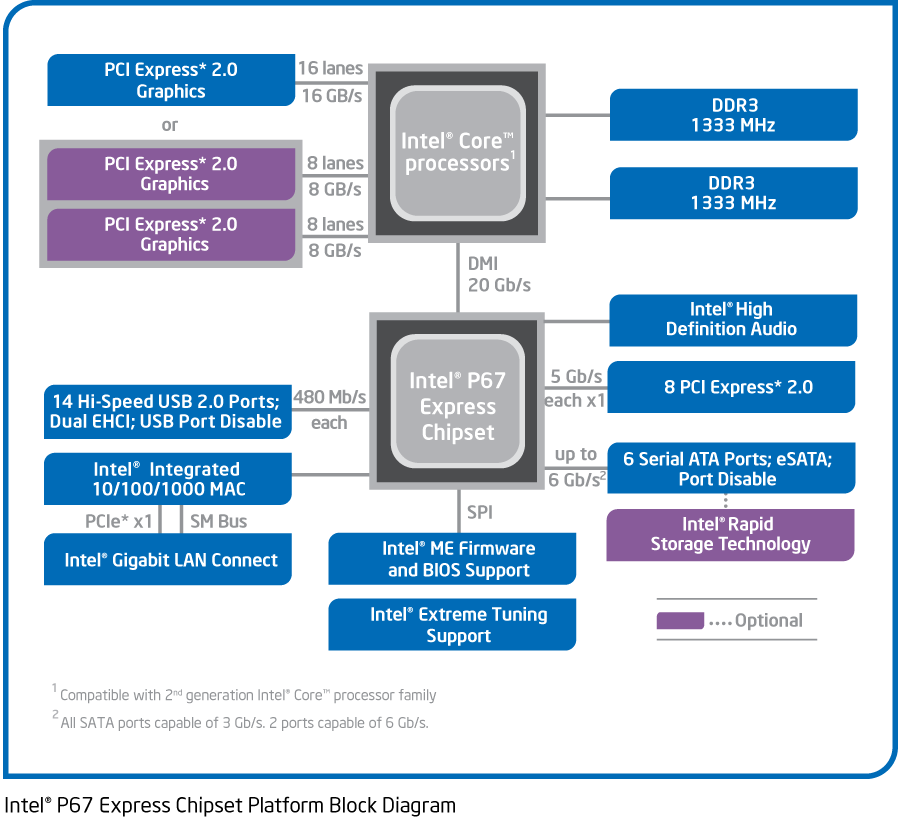 The P67 chipset only has 16 PCIe 2.0 lanes, this is a fundamental limitation regardless of what the motherboard manufacturers try to advertise. This means x16, x8/x8, or x4/x4/x4/x4. There's also 8 extra PCIe 2.0 lanes dangling off of the PCH, or at least they're listed as PCIe 2.0, but they only have the bandwidth of a PCIe 1.0 lane, not sure what's up with that. If they're not being used for other things such as USB 3.0 or Marvell 6Gb/s SATA lanes then some mobos will make use of these to make an additional PCIe slot. However, keep in mind that even if all 8 of those extra lanes were used it's only going to add up to the bandwidth of a x4 PCIe 2.0 slot, and more over the slot is going to have much greater latency than the normal straight-to-CPU lanes, since it has to go through the PCH first. In other words, it would make a really poor GPU slot, even worse so for a triple GPU setup because good luck getting that third GPU to keep up with and sync with the other two GPUs. If you see motherboards advertising bullcrap like x16/x16/x16 or whatever other ridiculous claims for a P67 just ignore it. It's x16 or x8/x8, that's all you get, plus maybe a x4 if they hack in a lane through the PCH. The justification for their ridiculous bandwidth claims come from things like having three full x16 ready PCIe lanes and then having a little asterisk (*) notation buried in the bowels of its instruction manual stating how those full x16 lanes go down to x8 lanes if cards are used in two slots or x4/x4/x4 if cards are used in three or more slots. That or they use an NF200 chip and just full out blatantly lie and list x8 lanes as x16 lanes, when they're not, never been able to figure out their legal loop hool justification for that. |
|||
|
Lilim
Intel Core i7 920 @4.2GHz HAF 932 - Dual SLI Nvidia GTX 480s 3x Intel X25-M G2 (80GB) SSD RAID0 |
|||
|
|||
|
DST4ME
DS ELITE
Joined: 14 Apr 2008 Online Status: Offline Posts: 36758 |
Quote Reply
Posted: 26 May 2011 at 12:53pm |
||
|
Thanks Dragoon.
@Anglis, Dragoon had gone over this before in another thread, he was kind enough to do it again here for you guys. so as you see its the limitation with the platform, and lot of false advertisement. as for x16 vs x8 not matter much, we know that, if you search my posts you will see me tell people that x8 is just fine too. |
|||
|
|||
|
Anglis
Newbie
Joined: 07 May 2011 Online Status: Offline Posts: 83 |
Quote Reply
Posted: 26 May 2011 at 1:42pm |
||
|
Thanks DST4ME and Dragoon! Been looking for that stuff. I see people over at Overclockers.net with the Maximus using 3 way sli and not one of them ever mentioned x4x4x4 if used for 3 way. I always just thought it'd be x8x8x8. Usually those guys over there are pretty knowledgeable, I guess they just didn't feel the need to explain haha.
So at x4x4x4, I'm still guessing 3 way is better then 2 when running a 5k resolution...but cost to performance ratio drops big time I take it? I've never seen gaming benchmarks with that. Edited by Anglis - 26 May 2011 at 1:44pm |
|||
|
|||
|
DST4ME
DS ELITE
Joined: 14 Apr 2008 Online Status: Offline Posts: 36758 |
Quote Reply
Posted: 26 May 2011 at 1:51pm |
||
|
at 5k tri sli is better.
Edited by DST4ME - 26 May 2011 at 1:52pm |
|||
|
|||
|
Anglis
Newbie
Joined: 07 May 2011 Online Status: Offline Posts: 83 |
Quote Reply
Posted: 26 May 2011 at 2:00pm |
||
|
So one more question..the NF200 is just a gimmick then? When I see readings from the ASUS website of people posting their mobo's, for one it showed 3 GTX 580's in slot 1,2 and 4. It showed them reading as x8x16x16. So even though it's showing them as that, in reality it's not even close?
|
|||
|
|||
|
DST4ME
DS ELITE
Joined: 14 Apr 2008 Online Status: Offline Posts: 36758 |
Quote Reply
Posted: 26 May 2011 at 11:24pm |
||
|
Exactly. look at the platform, there is not enough lanes to have that.
Edited by DST4ME - 26 May 2011 at 11:24pm |
|||
|
|||
|
Dragoonseal
DS Veteran
Joined: 03 Apr 2009 Online Status: Offline Posts: 2247 |
Quote Reply
Posted: 27 May 2011 at 8:39am |
||
You'd be really surprised as just how few people seem to really understand chipset limitations and really pick apart motherboards and see what's what. Mobo manufacturers use the most grossly misleading, convoluted, detail lacking advertising I have ever had the misfortune of having to deal with. It takes me literately hours of digging through crap all over the internet to find out even the most basic need to know information about specific boards. You have to find a detailed tech sheet list of every third party chip used on the board, good luck even finding those, you have to pour through the board manuals, you have to check many reviews to gather a lot omitted information, you have to research all the third party chips find out exactly what they do, what kind of connections they require, and how much bandwidth they take, then cross reference that with the spec sheets to see how many of each are being used, etc, etc, etc. All of this just to get the basic need to know information of how the chipset's PCIe lanes/bandwidth are being utilized. It's a complete pain in the ass, I haven't taken the time to research any specific board since the x58 chipset, I've only done some general research on the P67 chipset itself and I know that all the same third party chips are still being used, so at the very least I know when it's safe to call bullcrap on stuff like claims of x16/x16/x16 and such.
Ouch, yeah that gets expensive quick, it's a lot of pixels to push. Since 5760x1200 is basically just 1920x1200x3, then figure out what you need to run your target games at 1920x1200 well (like say a 570 or better) and then triple that.
I wouldn't call it a gimmick, it has its function and it performs it, it's just fraudulently marketed to a ridiculous level, I don't understand how they legally get away with it. It's important to know what it is, it's the nForce 200 chip, made by Nvidia specifically for extra Nvidia GPU to GPU communication. It's like an extra SLI bridge, built right into a motherboard. When first introduced it was going to be a requirement for SLI. Originally SLI only worked on Nvidia produced chipsets, but after losing legal battles with Intel and no longer being allowed to produce motherboard chipsets for Intel CPUs in comes the NF200, motherboard manufacturers would have to buy Nvidia's $30 chip to place on their board to allow SLI with multiple Nvidia cards. However several factors changed this, Intel announced their upcoming X58 chipset was going to have built in Crossfire support with ATI GPUs, it was made public that the only thing preventing SLI in any PCIe chipset was a software block, and in general motherboard manufacturers told Nvidia to go to hell, and thus the NF200 requirement was dropped. It in turn got marketed as a way to increase PCIe lanes on motherboards. This is not what it does however, as stated it just allows extra Nvidia GPU to GPU communication like an extra SLI bridge. Importantly of note is that it was specifically for Nvidia SLI communication, not to aid in the communication between ATI cards or any other type of PCIe card for that matter, and I've yet to see any evidence to show that this has ever changed. No bandwidth is added, everything still has to be funneled through whatever amount of PCIe lanes are supplied by the chipset, yet they have somehow warped this and turned it into marketing it as doubling any PCIe lane counts, x8/x8/x4 turns into x16/x16/x8, x8/x8/x8/x8 turns into x16/x16/x16/x16. Magic. The NF200 is just supposed to organize and squeeze Nvidia SLI data through better. So can it do this, does it help? Yes and no. By and large, no. Triple SLI/Crossfire in x16/x8/x8 or x8/x8/x8 bench higher on any X58 motherboard without a NF200 than any with a NF200. Magic. The issue is those amounts of PCIe lane bandwidth are simply not a bottleneck and all the NF200 does is add additional and unneeded latency as the data has another chip to pass through. On the other hand I have seen significant improvements from a NF200 on some of those weird triple SLI P55 motherboards. The P55 boards have the same situation as the P67 boards, they only have 16 PCIe 2.0 lanes (diagram). "But oh ho ho, what do I spy here" says the crafty motherboard manufacturer, "8 extra PCIe 1.0 lanes dangling from PCH? Lets make them into a Frankenstein x4 PCIe lane and market it as a triple GPU P55 board, genius!" These boards fail hard, again same P67 issue, crappy high latency x4 lane taking the long route through the PCH, can't keep up with the others, triple GPU performance sucks. However, there are some boards that do this along with a NF200, and while still sucking, suck significantly less. I'm not sure if the NF200 bypasses the Frankenstein x4 lane completely and multiplexes the three GPUs through the full x16 PCIe 2.0 lanes (something you could not normally do without breaking them down into x4/x4/x4/x4, and letting four lanes go to waste), or if it just synchronizes them better and uses the x4 lane as little as possible. Either way, it definitely helps. At the end of the day, triple GPU motherboards on a 16 PCIe lane chipset is still dumb, NF200 or not, but I'm not sure you could call an NF200 a complete gimmick as it can help in some situations. I prefer to just call it an excuse for false advertising and hope it dies in a fire before Intel's next chipset. |
|||
|
Lilim
Intel Core i7 920 @4.2GHz HAF 932 - Dual SLI Nvidia GTX 480s 3x Intel X25-M G2 (80GB) SSD RAID0 |
|||
|
|||
|
Invader Mig
Groupie 
Joined: 05 Aug 2009 Online Status: Offline Posts: 244 |
Quote Reply
Posted: 27 May 2011 at 10:19am |
||
|
Dragoon, that was one of the single greatest posts I've read in a while, about anything.
 On a related note, how many lanes will the new chips coming out with later this year have? Still 32 like the x58? Edited by Invader Mig - 27 May 2011 at 10:21am |
|||
|
|||
|
Anglis
Newbie
Joined: 07 May 2011 Online Status: Offline Posts: 83 |
Quote Reply
Posted: 27 May 2011 at 10:28am |
||
|
Nice!
I knew the current p67 Mobo's have limitations with tri sli/cf but then again I'm just getting involved with them, so I didn't know every single detail about them, and like you said, I've been digging up info on them, but it's very hard to find! I know more about the x58. Thanks for all the help Dragoon and DST. |
|||
|
|||
|
Dragoonseal
DS Veteran
Joined: 03 Apr 2009 Online Status: Offline Posts: 2247 |
Quote Reply
Posted: 27 May 2011 at 12:06pm |
||
The sum of my knowledge on the upcoming X78 chipset consists almost entirely of this: http://www.techpowerup.com/143179/Intel-X79-Enthusiast-Chipset-Sketched-in-Roadmap.html And this: http://www.techpowerup.com/145058/Computex-2011-Launchpad-for-Intel-X79-Motherboards.html So looks like it's gonna be 36 PCIe 2.0 lanes again, but no one knows for sure yet. More would be nice, but I'd like to think that 36, like on the X58, is good enough 99% of the time, we're not really breaking the bandwidth on x8 lanes yet. But on the up side, massive quad channel bandwidth RAM and 10 SATA 6Gb/s ports with a fat x8 PCIe 3.0 pipeline straight to the CPU, whaaaaat? Yes, yes, and yes some more please. Nothing against AMD, but I see stuff like this and then I see fanboys crying "Really Intel, another new motherboard socket?" and I can't help but think holy mother of God, seriously? Can you look at 5-6+ year old motherboards and seriously want to stick modern CPUs in them? Do you really think that's what makes Intel systems so amazing, the CPU and nothing else? Grr and stuff, those people get under my skin. |
|||
|
Lilim
Intel Core i7 920 @4.2GHz HAF 932 - Dual SLI Nvidia GTX 480s 3x Intel X25-M G2 (80GB) SSD RAID0 |
|||
|
|||
|
DST4ME
DS ELITE
Joined: 14 Apr 2008 Online Status: Offline Posts: 36758 |
Quote Reply
Posted: 27 May 2011 at 6:02pm |
||
|
As far as I know also the x79 will still have 36 lanes same at x58 but as dragoon pointed out there are lot of other improvement as far as connectivity and etc.
For now as long as you can actually get x8x8x8 your good to go for tri sli, difference is not much but at the rate the gpus are going, I'm thinking in 3 to 4 years we gonna need x16 lanes. |
|||
|
|||
|
Post Reply
|
| Forum Jump | Forum Permissions You cannot post new topics in this forum You cannot reply to topics in this forum You cannot delete your posts in this forum You cannot edit your posts in this forum You cannot create polls in this forum You can vote in polls in this forum |

About Digital Storm
Contact Information
Facility Tour
Financing
Buy Now, Pay Later
Downloads
GSA Schedule
Terms & Conditions
Privacy Policy
Request Help
Call: 1-669-235-3810
(Hours 9AM-5PM PST)





 Topic Options