New Rig: Withhold Hard Drive Installation?Post Date: 2012-07-08 |
Post Reply 
|
| Author | |
jbru13 
Newbie 
Joined: 11 Feb 2012 Online Status: Offline Posts: 7 |
 Quote Reply  Topic: New Rig: Withhold Hard Drive Installation? Posted: 08 Jul 2012 at 2:00pm |
|
Budget:
[$2500-3000] Expectations: [Extremely fast multicore capabilities, ability to run all games with max settings at 1920x1080, as quiet as possible, in an attractive case] Usage: [Professional visual fx apps (Nuke, After Effects), editing, gaming] Special Needs: [Please Type Here] Saved Ticket #: [706169] Specifications: [Please Type Here] Hi guys, here's the rig I'm putting together. My main question is about the 240GB Intel 520 ssd. I've read that Intel SSD's are the most reliable, so I'm opting for that. And after past experience with a small SSD, I don't want to go for anything smaller than 240GB, since every program you install seems to enjoy dumping crap onto your system drive without telling you, and it just gets stressful trying to manage it all the time. That said, my main beef is paying about $480 for a drive that is about $330 on Amazon.com. I did see that not installing the drive is an option. I was wondering if anyone here had any experience with that? What is the process of installing the OS when your PC is shipped without a hard drive? Do you miss out on any of the stability testing? Is a full system recovery kit supplied so that everything gets installed as intended? I have built my own rigs before, but a big part of the appeal of ordering from DS is the peace of mind of knowing everything has been tested, and I wouldn't want to miss out on that, even if these SSD's are extremely overpriced. (Not sure why the markup on these is way higher than anything else on the site). |
|
 |
|
|
jbru13
Newbie
Joined: 11 Feb 2012 Online Status: Offline Posts: 7 |
Quote Reply
Posted: 08 Jul 2012 at 2:10pm |
|
Here's the specs without having to load the ticket number:
Ticket Number: 706174 Total Price with Instant Savings: $3,073.00 Direct Load URL: http://www.digitalstormonline.com/comploadsaved.asp?id=706174 Specifications: Chassis Model: Special Deal Hot Seller - Corsair Obsidian 550D Exterior Finish: - Standard Factory Finish Trim Accents: - Standard Factory Finish Processor: Intel Core i7 3930K 3.2GHz (Unlocked CPU for Extreme Overclocking) (Six-Core) Motherboard: ASUS P9X79 DELUXE (Intel X79 Chipset) (Features USB 3.0 and SATA 6Gb/s) System Memory: 16GB DDR3 1600MHz Digital Storm Certified Performance Series (Highly Recommended) (Hand Tested) Power Supply: 1050W Corsair Pro Silver 1050HX (Dual/Triple/Quad SLI Compatible) Expansion Bay: - No Thanks Hard Drive Set 1: Operating System: 1x (240GB Solid State (By: Intel) (Model: 520 Series) Set 1 Raid Options: - No Thanks Hard Drive Set 2: Multimedia\Data: - No Thanks Hard Drive Set 3: Backup\Misc.: - No Thanks Optical Drive 1: Blu-Ray & DVD Writer/Reader (Burn + Play Blu-Ray & DVDs) (12x BD-R) Optical Drive 2: - No Thanks Internet Access: High Speed Network Port (Supports High-Speed Cable / DSL / Network Connections) Video Card: 1x NVIDIA GeForce GTX 670 2GB (Includes PhysX) Add-on Card: - No Thanks Sound Card: Integrated Motherboard Audio Extreme Cooling: H20: Stage 2: Digital Storm Vortex 240mm Radiator Liquid CPU Cooler (Extreme-Performance Edition) H20 Tube Color:- Not Applicable, I do not have a FrostChill or Sub-Zero LCS Cooling System Selected Chassis Airflow: Standard Factory Chassis Fans Internal Lighting: - No Thanks Enhancements: - No Thanks Chassis Mods: - No Thanks Noise Reduction: Noise Suppression Package Stage 1 (Optimized Airflow & Fan Speeds Only) LaserMark: - No Thanks Boost Processor: Stage 1: Overclock CPU 4.0GHz to 4.4GHz Boost Video Card: - No Thanks, Please do not overclock my video card(s) Boost Memory: - No Thanks, Please do not overclock my memory Boost OS: FREE: Yes, Disable and tweak all of the non-crucial services on the operating system Windows OS: Microsoft Windows 7 Professional (64-Bit Edition) Recovery Tools: Windows Recovery Toolkit (Bundled with Windows 7 CD) Virus Protection: - No Thanks Office: - No Thanks Game: - No Thanks Display: - No Thanks Surge Shield: - No Thanks Speakers: - No Thanks Keyboard: - No Thanks Mouse: - No Thanks External Storage: - No Thanks Exclusive T-Shirt: - No Thanks Priority Build: - No Thanks, Ship Within 10-15 Business Days After Order Is Successfully Processed Warranty: Life-time Expert Customer Care with 3 Year Limited Warranty |
|
|
|
|
Orange7
Senior Member 

Joined: 24 Apr 2012 Online Status: Offline Posts: 776 |
Quote Reply
Posted: 08 Jul 2012 at 2:15pm |
|
The Intel 520 series is an amazing series of SSD's.
As far as installing the operating system, DS would probably send the OS installation disk with the computer. You would simply boot off of that, and it should perform the installation for you. Also, make sure to check that Intel will cover the drive if it is sold through Amazon. If they do, then the only reason for the price difference would be that (I believe) DS buys all of their's straight from Intel. [Edit:] Everything below. Also, as far as your previous builds go, I would switch out the 240GB Intel 520 for the 120GB 520 and the 1TB Caviar Black. It gives you more space, same boot time, is cheaper, and any programs on the Intel will still load just as fast, as before, although the Caviar Black is also no slouch. In addition, depending on whether you care more about editing or gaming, you could downgrade the processor to the 3820 and upgrade the GPU to 2x670 in SLI. It would allow for much better gaming, but you would notice a drop in editing performance. Edited by Orange7 - 08 Jul 2012 at 2:21pm |
|
|
DS xm15 Stage 4
i7-3820 (2.7GHz/3.7GHz) 16GB 1600MHz DDR3 GT 630, 1GB 240GB Intel 520 |
|
|
|
|
bprat22
DS ELITE 
DigitalStorm East -- (Unofficially!)
Joined: 08 Jun 2011 Online Status: Offline Posts: 20391 |
Quote Reply
Posted: 08 Jul 2012 at 2:24pm |
|
Also., drop the Noise Sppression package. The 550d is quiet as-is and the package is a waste. Good luck.
|
|
|
|
|
jbru13
Newbie
Joined: 11 Feb 2012 Online Status: Offline Posts: 7 |
Quote Reply
Posted: 08 Jul 2012 at 4:45pm |
|
Thanks for the replies guys. bprat are you certain that nothing in the noise suppression package is useful? I know that the case in the Slade has all the noise insulation installed already, but the way the noise suppression package is described, it makes it sound like all the fans inside the system are tweaked to favor quietness, which hopefully would mean I don't have to spend half a day trying to figure out how to use Speedfan to keep some random fan from getting all out of line, which I've gone through before.
|
|
|
|
|
bprat22
DS ELITE
DigitalStorm East -- (Unofficially!)
Joined: 08 Jun 2011 Online Status: Offline Posts: 20391 |
Quote Reply
Posted: 08 Jul 2012 at 5:15pm |
|
You could go for it., its not very expensive, but tweeking means lowerring their speed. That case only has 2 x 120mm fans for supply and one for exhaust. Turning down the rpm either thru bios if plugged into the mobo or resistor pacs is reducing airflow. It is quiet already so why mess with needed cooling. DS might even suggest not using it when not needed. Hope this helps.
|
|
|
|
|
tju76
Senior Member
Joined: 06 Mar 2012 Online Status: Offline Posts: 804 |
Quote Reply
Posted: 08 Jul 2012 at 6:54pm |
|
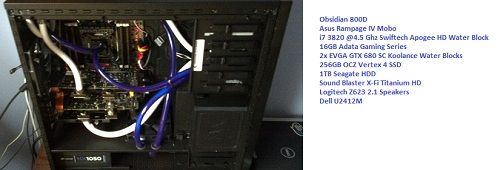
If your looking for a fast speed ssd look at the vertex 4 lower priced then intel 520 and faster
|
|
|
|
|
|
|
Post Reply
|
| Forum Jump | Forum Permissions You cannot post new topics in this forum You cannot reply to topics in this forum You cannot delete your posts in this forum You cannot edit your posts in this forum You cannot create polls in this forum You can vote in polls in this forum |

About Digital Storm
Contact Information
Facility Tour
Financing
Buy Now, Pay Later
Downloads
GSA Schedule
Terms & Conditions
Privacy Policy
Request Help
Call: 1-669-235-3810
(Hours 9AM-5PM PST)





 Topic Options