OC of 4.4ghz running 24/7?Post Date: 2011-08-21 |
Post Reply 
|
| Author | |
ZRX1200Rider 
Newbie 

Joined: 26 Jun 2011 Online Status: Offline Posts: 21 |
 Quote Reply Quote Reply
 Topic: OC of 4.4ghz running 24/7? Topic: OC of 4.4ghz running 24/7?Posted: 21 Aug 2011 at 3:31pm |
|
I just got my Black Ops Assassin with a stage 1 overclock and it seems to be running at 4.4ghz all the time. Is this normal? According to CPU-Z it shows my core speed at 4400mhz all the time.
|
|
|
Black Ops Assassin
2600K 4.4ghz OC @ 1.36v ASUS P8Z68-V PRO Corsair HX1050 Intel 320 SSD 120GB WD Caviar Black 500GB GTX 570HD 1.2GB Corsair A70 Windows 7 Pro 64-bit |
|
 |
|
|
RiceEatin2000GT
DS Veteran 
Joined: 02 Oct 2008 Online Status: Offline Posts: 1699 |
Quote Reply
Posted: 21 Aug 2011 at 10:10pm |
|
what is it showing for ur voltage? Depending on how they overclocked your processor it should downvolt/downclock. We can worry about that in a bit. Running at that clock speed as long as your voltage is proper is more than safe.
Edited by RiceEatin2000GT - 21 Aug 2011 at 10:10pm |
|

|
|
|
|
|
ZRX1200Rider
Newbie
Joined: 26 Jun 2011 Online Status: Offline Posts: 21 |
Quote Reply
Posted: 21 Aug 2011 at 10:58pm |
|
Voltage is 1.36v. Core speed varies between 4399.9mhz to 4400.9mhz.
|
|
|
Black Ops Assassin
2600K 4.4ghz OC @ 1.36v ASUS P8Z68-V PRO Corsair HX1050 Intel 320 SSD 120GB WD Caviar Black 500GB GTX 570HD 1.2GB Corsair A70 Windows 7 Pro 64-bit |
|
|
|
|
RiceEatin2000GT
DS Veteran
Joined: 02 Oct 2008 Online Status: Offline Posts: 1699 |
Quote Reply
Posted: 21 Aug 2011 at 11:06pm |
|
that v-core is spot on so dont be worried about that. If you want to go into bios and try and get the cpu to downvolt do this.
First find the voltage setting if you see it set to offset(plus or minus) go and make sure enhanced intel speed step technology is set to enabled and also make sure cpu c1e is on enabled and not auto, there is some weird but where it will make auto be off alot of the times. While ur in there just check but dont change that cpu c3 and cpu c6 is enabled. |
|
|
|
|
|
|
|
ZRX1200Rider
Newbie
Joined: 26 Jun 2011 Online Status: Offline Posts: 21 |
Quote Reply
Posted: 22 Aug 2011 at 12:31am |
|
I did some more research and found out that because I had my power settings on high performance, it was running the CPU at 100% all the time. I changed it to balanced and now my cpu clocks down to 1.6ghz when not being taxed. My core voltage also decreased as well. I'm a noob when it comes to this stuff, but I'm learning. Cheers. |
|
|
Black Ops Assassin
2600K 4.4ghz OC @ 1.36v ASUS P8Z68-V PRO Corsair HX1050 Intel 320 SSD 120GB WD Caviar Black 500GB GTX 570HD 1.2GB Corsair A70 Windows 7 Pro 64-bit |
|
|
|
|
RiceEatin2000GT
DS Veteran
Joined: 02 Oct 2008 Online Status: Offline Posts: 1699 |
Quote Reply
Posted: 22 Aug 2011 at 12:41am |
thats odd u shouldn't have to change the power plan settings on a desktop for the built in features of the motherboard/chip to work. I would try putting it back on high performance and checking those bios options. |
|
|
|
|
|
|
|
Alex
Admin Group 
Digital Storm Supervisor 
Joined: 04 Jun 2012 Online Status: Offline Posts: 16314 |
Quote Reply
Posted: 22 Aug 2011 at 12:43am |
|
Your CPU voltage is perfectly fine, running at 4.4GHz like that is no problem. You can run it like that straight for 10 years+ with no problem.
|
|

|
|
|
|
|
DST4ME
DS ELITE 
Joined: 14 Apr 2008 Online Status: Offline Posts: 36758 |
Quote Reply
Posted: 22 Aug 2011 at 4:24pm |
|
With a 1.36 vcore as Alex said, with 24/7 use your cpu will die well after 10 years.
once vcore goes above 1.4 that is when 24/7 use can start hurting, higher above 1.4, the sooner cpu will die, at 1.5 vcore your cpu should die within a year or 2 max with 24/7 use. |
|
|
|
|
sdwas
Groupie 
Joined: 21 Jul 2011 Online Status: Offline Posts: 158 |
Quote Reply
Posted: 22 Aug 2011 at 4:58pm |
|
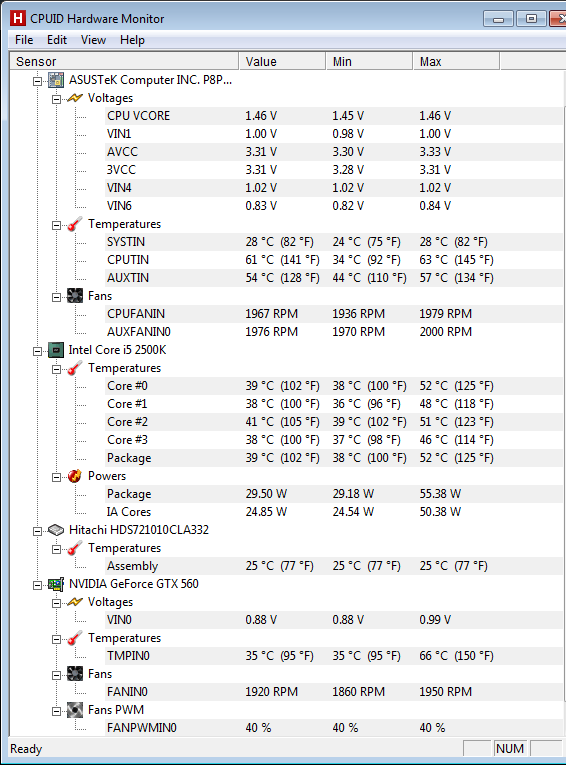
I'm sorry to hijack this thread, but at least I'm on topic. Based on what Alex and DST4ME just stated, does that mean I may have problems if I run my system 24/7? Below is the hardware monitor and the CPU VCORE seems to be a consistent 1.46. I should add that I have the ODE Level 0.
 |
|
|
|
|
DST4ME
DS ELITE
Joined: 14 Apr 2008 Online Status: Offline Posts: 36758 |
Quote Reply
Posted: 22 Aug 2011 at 5:52pm |
|
With that vcore and 24/7 use, your cpu is looking at early death.
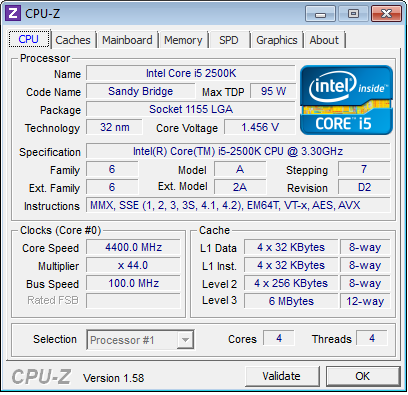
what does CPU-z report it to be? Personally I would lower the oc and go with a 1.39 vcore, that should land you around 4.4 I think, which is a good spot to be, 4.4 to 4.7 seems to be the spot with good vcores depending on the chip. Edited by DST4ME - 22 Aug 2011 at 5:53pm |
|
|
|
|
sdwas
Groupie
Joined: 21 Jul 2011 Online Status: Offline Posts: 158 |
Quote Reply
Posted: 22 Aug 2011 at 7:01pm |
|
Here is the CPU-Z. If I do need to lower the OC, are there any guides on how to do this? Would I be better off contacting DS customer support? Thanks as always, these forums are an excellent learning tool.
|
|
|
|
|
DST4ME
DS ELITE
Joined: 14 Apr 2008 Online Status: Offline Posts: 36758 |
Quote Reply
Posted: 22 Aug 2011 at 7:11pm |
|
Contact DS and tell them you would like to get the highest oc with keeping the vcore under 1.4.
|
|
|
|
|
Post Reply
|
| Forum Jump | Forum Permissions You cannot post new topics in this forum You cannot reply to topics in this forum You cannot delete your posts in this forum You cannot edit your posts in this forum You cannot create polls in this forum You cannot vote in polls in this forum |

About Digital Storm
Contact Information
Facility Tour
Financing
Buy Now, Pay Later
Downloads
GSA Schedule
Terms & Conditions
Privacy Policy
Request Help
Call: 1-866-817-8676
(Hours 9AM-5PM PST)





 Topic Options