Overclocking (A1 mobo?)Post Date: 2007-12-13 |
Post Reply 
|
| Author | |
mrausche 
Newbie 
Joined: 22 Nov 2007 Online Status: Offline Posts: 6 |
 Quote Reply Quote Reply
 Topic: Overclocking (A1 mobo?) Topic: Overclocking (A1 mobo?)Posted: 13 Dec 2007 at 3:25pm |
|
Considering this setup:
Copy of Specifications: Case: Digital Storm Twister PRO (Black Anodized Aluminum Finish) Power Supply: 620W Corsair HX (Dual SLI Compatible) (Silent Edition) Processor: Intel Core 2 Quad Q6600 2.4GHz (1066MHz FSB) (8MB Cache) Motherboard: nVidia 680i LT Core 2 Quad (By: eVGA) (nForce 680i SLI) Memory: 2GB DDR2 Corsair at 800MHz Dominator (Dual Channel) (High-Performance) Floppy / Card: - No Thanks Hard Drive 1: 160GB Western Digital (16MB Cache) (7200 RPM) (SATA) Hard Drive 2: 160GB Western Digital (16MB Cache) (7200 RPM) (SATA) Raid Option: Setup hard drive 1 and 2 in a Raid 0 Stripe (Read and Write Performance Boost) Hard Drive 3: - No Thanks Optical Drive 1: DVD±R/RW/CD-R/RW (DVD Writer 20x / CD-Writer 48x) Optical Drive 2: - No Thanks Network Card: High Speed Network Port (Supports High-Speed Cable / DSL / Network Connections) Video Card: nVidia GeForce 8800GT 512MB (By: eVGA) (PCI-Express) TV Tuner: - No Thanks Sound Card: Motherboard Multi-Channel High Definition Audio (7.1 Channel) Physics Card: - No Thanks Cooling: Air Cooled Stage 2 (Silent Artic Cooling Heat-sink (Copper Heatpipes) Case Lighting: Blizzard Internal Lighting (Blue Edition) (Cold Cathode Tubes) Round Cables: - No Thanks User Manual: Personalized Platinum Digital Storm Binder (Includes Paperwork/Benchmarks/CDs/Manuals) Overclock Processor: Yes, Overclock the processor as much as possible with complete stability Overclock Video Card: - No Thanks, Please do not overclock my video card(s) Overclock Memory: - No Thanks, Please do not overclock my memory - What clock speed would be reasonable to expect DS to get the processor to? (I realize this is a difficult question to answer because some processors can be pushed further than others). What about with an e6850? (I'm torn between dual and quad right now heh) - What is the difference between the 680i mobo and the A1 revision? Can I expect a significantly higher OC with an A1 mobo? - Will this setup be bottlenecked with 800 mhz ram? - Is onboard sound going to affect performance in other areas? (I will basically only be using headphones with this PC) Much thanks in advance! |
|
 |
|
|
skyR
Newbie
Digital Storm Apprentice 
Joined: 08 Oct 2007 Online Status: Offline Posts: 2220 |
Quote Reply
Posted: 13 Dec 2007 at 3:32pm |
|
You can expect a ~3GHz overclock with a Q6600 and a ~3.6GHz with a E6850.
The setup won't be bottlenecked by the ram. On board sound will not affect performance. |
|
|
|
|
|
|
|
Bill the Cat
DS Veteran 
Forum Bitch! 
Joined: 27 Aug 2007 Online Status: Offline Posts: 1150 |
Quote Reply
Posted: 13 Dec 2007 at 3:34pm |
|
What skyR said, plus....
The Rev. A1 board does make a difference. I believe it has more control options in the BIOS, and it has better chip set cooling. Edited by Bill the Cat - 13 Dec 2007 at 3:35pm |
|
|
3.6 GHz E6850, 4 GB RAM, GTS 250, TJ9, Win 7 64-bit
4.4 GHz i7 3930K, 16 GB RAM, GTX 670, 550D, Win 7 64-bit |
|
|
|
|
Solo
Senior Member 
Joined: 27 Oct 2007 Online Status: Offline Posts: 395 |
Quote Reply
Posted: 13 Dec 2007 at 3:36pm |
|
they got my E6850 to 3.5 .
I have ultra case and stage 2 cooling 1066mhz 2gb ram
|
|
|
|
|
EdH63
DS Veteran
Joined: 01 Sep 2007 Online Status: Offline Posts: 1826 |
Quote Reply
Posted: 13 Dec 2007 at 6:08pm |
|
My specs are below
|
|
|
|
|
Kenny
Newbie
Digital Storm Engineering
Joined: 24 Aug 2007 Online Status: Offline Posts: 509 |
Quote Reply
Posted: 14 Dec 2007 at 2:48am |
=> yeah, you're right, but there is one more difference... The 680i A1 supports Tri-SLI(3-way SLI), and the 680i LT T1 supports only Dual SLI(2-way SLI). The pictures below here are 680i A1 Motherboard. 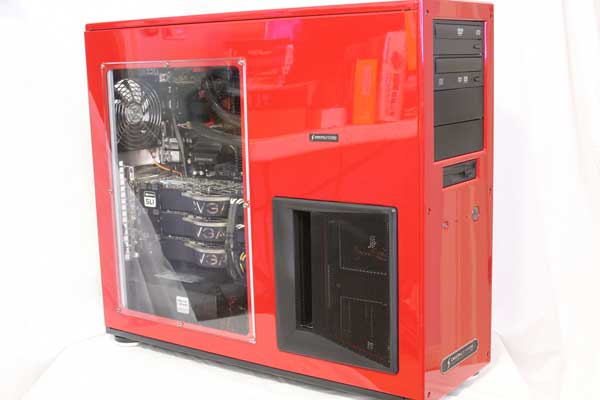
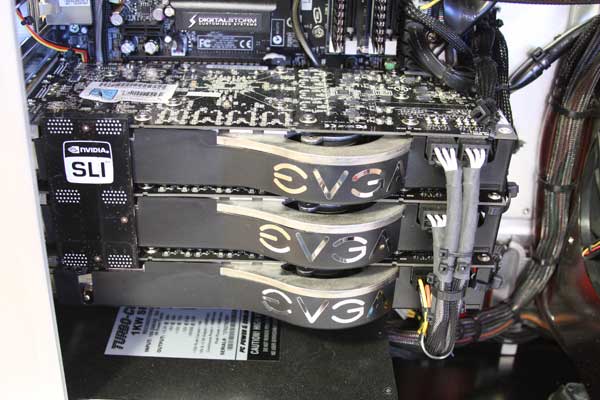
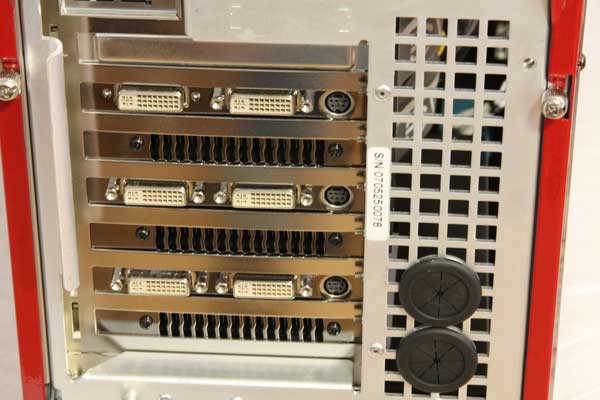 Edited by Kenny - 14 Dec 2007 at 11:08am |
|
|
We're here with you ! &(*_~)&
|
|
|
|
|
Solo
Senior Member
Joined: 27 Oct 2007 Online Status: Offline Posts: 395 |
Quote Reply
Posted: 14 Dec 2007 at 3:40am |
|
SOMEBODY is showing off =P
|
|
|
|
|
RecklessFable
Newbie
Joined: 11 Dec 2007 Online Status: Offline Posts: 2 |
Quote Reply
Posted: 14 Dec 2007 at 11:17am |
|
I submitted my config to customer service for comments. I was going with the Pro case and the Q6600, and here was the relevant part of the reply:
Ticket Number: 100051
"... Also, you would be better off getting an Ultra or Extreme case for ventillation. We are finding that the pro case isn't allowing proper airflow and causing instability issues when we try to OC. So either upgrade the case or don't oc the CPU ..."
The problem for me was that is is over a $200 upsell just on the case, so I decided to just drop to the LT mobo, regular cooling, pretty much everything else that I'd be doing to OC.
I'd check with them BEFORE buying in order to find out what they expect to be able to do with respect to OCing in the Pro case.
|
|
|
|
|
Rausch
Guest 
|
Quote Reply
Posted: 14 Dec 2007 at 7:18pm |
|
Thanks for the heads up!
|
|
|
|
|
Bill the Cat
DS Veteran
Forum Bitch!
Joined: 27 Aug 2007 Online Status: Offline Posts: 1150 |
Quote Reply
Posted: 14 Dec 2007 at 9:24pm |
I went through a similar experience. I don't mean to bad mouth the PRO case, but it is a tight space to install a heat producing 8800 series card. The Extreme case I wound up with is an impressive hunk of iron. With only the stock fans, the 3.6 GHz the CPU runs in the low 50s C under 100% load.
DSO didn't say they wouldn't or couldn't build the system you want, only that you may not be happy with the result. It's still your choice. Without the overclocking, the PRO based system is still going to be damn fast. Edited by Bill the Cat - 14 Dec 2007 at 9:28pm |
|
|
3.6 GHz E6850, 4 GB RAM, GTS 250, TJ9, Win 7 64-bit
4.4 GHz i7 3930K, 16 GB RAM, GTX 670, 550D, Win 7 64-bit |
|
|
|
|
Tyler Lowe
Newbie
Joined: 14 May 2008 Online Status: Offline Posts: 0 |
Quote Reply
Posted: 14 Dec 2007 at 11:09pm |
|
There are other ways to fix the Pro Case's lack of airflow, but it's a bit of a pain. It can be dealt with for a little over $50 in fans and some time invested. Currently, I have 1 vga slot fan set to draw air in under my GPU, a second slot fan to draw air off the top of my GPU, and an HDD cooler installed in one of my 5.25" drive bays. I have also modified a drive bay cover to allow for additional air flow by milling away the center and placing a piece of mesh over the opening. My B3 stepping Q6600 is idling at 36C on the CPU at a 22C ambient, and hovers around a 38C idle when it's 24C in the room, so I feel fairly safe in calling that a 14C rise. Temps under load stay under 44C on the CPU, and under 55C on the Cores. So it is possible to tame the beast.
I think if DSO were to offer to install a second front mounted 120mm fan in 3 empty 5.25" bays (customer would be limited to 1 DVD drive), the problem would be close to, if not entirely solved. There would still be the matter of expelling the hot air, but tbh, I think the majority of the Pro case's air flow problem comes from the way the intake fan is mounted. I contacted Silverstone about it, and they expressed complete shock that the case was not able to cool my components adequately, but also offered up no solutions, other than to say they liked the HDD cooler idea.
 The addition of the slot coolers was to combat what I believed was an overheating GPU. Oblivion would lock up after playing for more than 2 hours. Installed the slot coolers, and the lockups stopped, so I would say that was the problem. A side effect of this installation was I dropped another 2C from my CPU temps  . .Edited by Tyler Lowe - 14 Dec 2007 at 11:26pm |
|
|
|
|
sundowner
Senior Member
Joined: 11 Sep 2007 Online Status: Offline Posts: 501 |
Quote Reply
Posted: 15 Dec 2007 at 4:42am |
Essentially what I requested with my order, hopefully the fan will help. |
|
|
Pro case with extra fan
Quad Q6600 2.4 OC'd 3.1! Nvidia 8800GT Asus Maximus Formula Mobo 2xgb 800mhz corsair xfire - xuntiltheendx |
|
|
|
|
mrausche
Newbie
Joined: 22 Nov 2007 Online Status: Offline Posts: 6 |
Quote Reply
Posted: 17 Dec 2007 at 2:41pm |
|
Does anyone know if the pro case is having heating/overclocking issues when it has an E6850 instead of a q6600 installed?
I basically play mmos and some RTS games, and don't touch FPS games. Because of this I figure I'll be safe for the next 3 years or so with a dual core processor instead of a quad. Opinions? Thanks for all the help everyone! |
|
|
|
|
Bill the Cat
DS Veteran
Forum Bitch!
Joined: 27 Aug 2007 Online Status: Offline Posts: 1150 |
Quote Reply
Posted: 17 Dec 2007 at 3:43pm |
|
The guys at DSO, who build all these machines, know. You're not dealing with the evil empire here.... Call'em up and have a discussion.
|
|
|
3.6 GHz E6850, 4 GB RAM, GTS 250, TJ9, Win 7 64-bit
4.4 GHz i7 3930K, 16 GB RAM, GTX 670, 550D, Win 7 64-bit |
|
|
|
|
skyR
Newbie
Digital Storm Apprentice
Joined: 08 Oct 2007 Online Status: Offline Posts: 2220 |
Quote Reply
Posted: 17 Dec 2007 at 3:57pm |
The Q6600 gives off more heat than a E6850 so no it wouldn't have heat issues. Depends.. if you just run the game and nothing else than a duo would be a good choice. I usually have a lot of stuff opened when playing an MMO so I would get the quad. |
|
|
|
|
|
|
|
4261
Newbie
Joined: 26 Aug 2007 Online Status: Offline Posts: 99 |
Quote Reply
Posted: 17 Dec 2007 at 6:05pm |
I got my E6600 to 3.15GHz no problem (except figuring out how to do it).
Having sex the 1st time was easier!!
|
|
|
|
|
RecklessFable
Newbie
Joined: 11 Dec 2007 Online Status: Offline Posts: 2 |
Quote Reply
Posted: 19 Dec 2007 at 6:35pm |
|
I was just a little annoyed that they offer the option to OC for a price, but when you check, the recommend against it.
I doubt I'll even pin the processor(s) any time soon though, and if I do, it'll be my new experiment to OC it.
|
|
|
|
|
Post Reply
|
| Forum Jump | Forum Permissions You cannot post new topics in this forum You cannot reply to topics in this forum You cannot delete your posts in this forum You cannot edit your posts in this forum You cannot create polls in this forum You can vote in polls in this forum |

About Digital Storm
Contact Information
Facility Tour
Financing
Buy Now, Pay Later
Downloads
GSA Schedule
Terms & Conditions
Privacy Policy
Request Help
Call: 1-866-817-8676
(Hours 9AM-5PM PST)





 Topic Options