Problem with overheating.Is it the SLI or ram?Post Date: 2009-07-27 |
Post Reply 
|
| Author | |
brian 
Senior Member 
Joined: 03 Aug 2007 Online Status: Offline Posts: 505 |
 Quote Reply Quote Reply
 Topic: Problem with overheating.Is it the SLI or ram? Topic: Problem with overheating.Is it the SLI or ram?Posted: 27 Jul 2009 at 6:35pm |
|
From my stats down below you can see that I'm running an OCd 8500 to 3.6 and have 2 8800GTS in SLI. And just upgraded my ram to 4 gig. My case is a Antec 900 with 2 fans in the front (pushing in), and big @#% fan up top (pushing out), 1 on the side (pushing in) and of course the exhaust fan (pushing out).
Now is there something I can do besides getting new fans that plow a massave amount of air into the rig to cool it down? I've seen fans on Newegg that push upward of 150 plus CFM. Is that what I need? Right now the Antec 900 case really doens't have much room for all the cables in it. (meaning they are pushing into the slot where the lower front fan is pushing air and has 2 hard drives in the space also.
Right now the graphic cards get down to 54 and 50, but thats with AC on in the apartment all day long. When I play Crysis, before I upgraded the ram I could play before the cards go crazy (because the heat) for about an hour. Now with the new ram, I can only play for about 5 minutes.
So could the new ram (now I have 4 sticks of 1066) be the cause of the graphic cards getting super hot? Or could it be because of the SLI?
The gaming usually stops when my graphc card.. (and I think its just the lower one) at 65 degrees. Then I need to get out of the game because the screen goes black.
I have a few questions up there in the paragraphic.... If someone could answer all of them please.
|
|
|
Antec 900 case
Nvidia 750i FTW Motherboard Zalman 9500 CPU cooler 8400 3.6 2 gig of 1066 ram 1 Evga GTX 465 24" Samsung LCD 3DMark06= 17,360 |
|
 |
|
|
DST4ME
DS ELITE 

Joined: 14 Apr 2008 Online Status: Offline Posts: 36758 |
Quote Reply
Posted: 27 Jul 2009 at 7:16pm |
|
your case is too small so it does not have much room breath IMO.
give us a screen shot of HWMonitor, keep it open while you are gaming then after 45 minutes or so, give us a screenshot of hwm and lets see what is going on. 65c is nothing to make your card shutdown, so either you got the temp wrong or something else is going on. |
|
|
|
|
brian
Senior Member
Joined: 03 Aug 2007 Online Status: Offline Posts: 505 |
Quote Reply
Posted: 28 Jul 2009 at 4:38am |
|
Well I took a picture of HWMonitor before I started Crysis and after not even 5 minutes of playing time did it shut down. Now normally the graphics get a strange and lines start to show up.. and then a blank screen. This is the first time it totally stopped.
NOW I did put in 2 more gigs of ram. Before I put the 2 new ones in, I was playing Crysis for a long time, now it wont let me play that long. The reason I think its overheating is because on the screen the graphics start to go all weird and then game stops or goes black. Do you think it could be the voltages?? I did increase them I think (awhile ago) I can try and reinstall the drivers again, but I just did that. Really it all started after I installed the 2 extra rams. But the computer boots up fine and reads all 4 rams, so Im not sure what the problem would be. |
|
|
Antec 900 case
Nvidia 750i FTW Motherboard Zalman 9500 CPU cooler 8400 3.6 2 gig of 1066 ram 1 Evga GTX 465 24" Samsung LCD 3DMark06= 17,360 |
|
|
|
|
brian
Senior Member
Joined: 03 Aug 2007 Online Status: Offline Posts: 505 |
Quote Reply
Posted: 28 Jul 2009 at 4:46am |
|
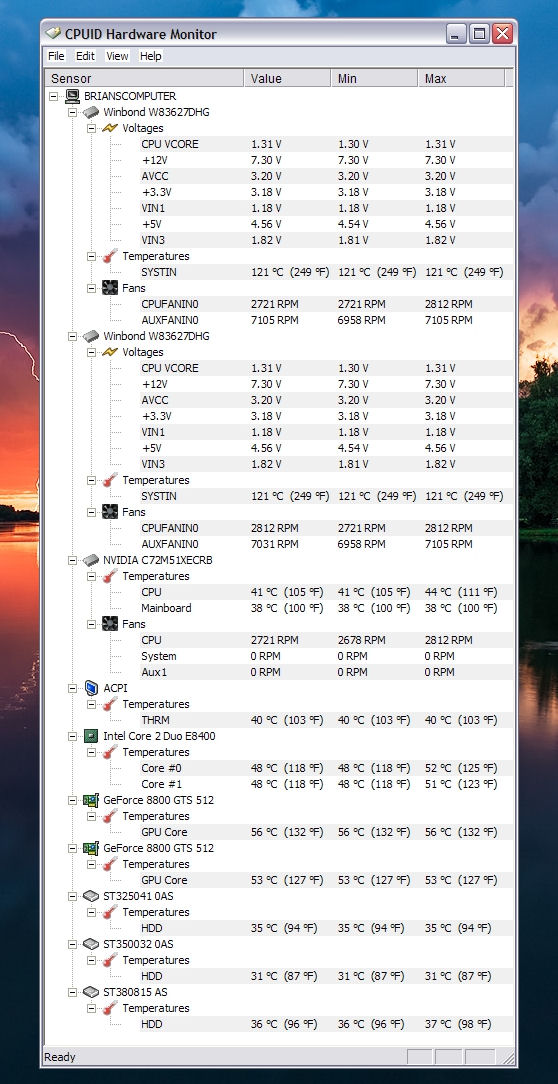
Before playing Crysis
 |
|
|
Antec 900 case
Nvidia 750i FTW Motherboard Zalman 9500 CPU cooler 8400 3.6 2 gig of 1066 ram 1 Evga GTX 465 24" Samsung LCD 3DMark06= 17,360 |
|
|
|
|
brian
Senior Member
Joined: 03 Aug 2007 Online Status: Offline Posts: 505 |
Quote Reply
Posted: 28 Jul 2009 at 4:47am |
|
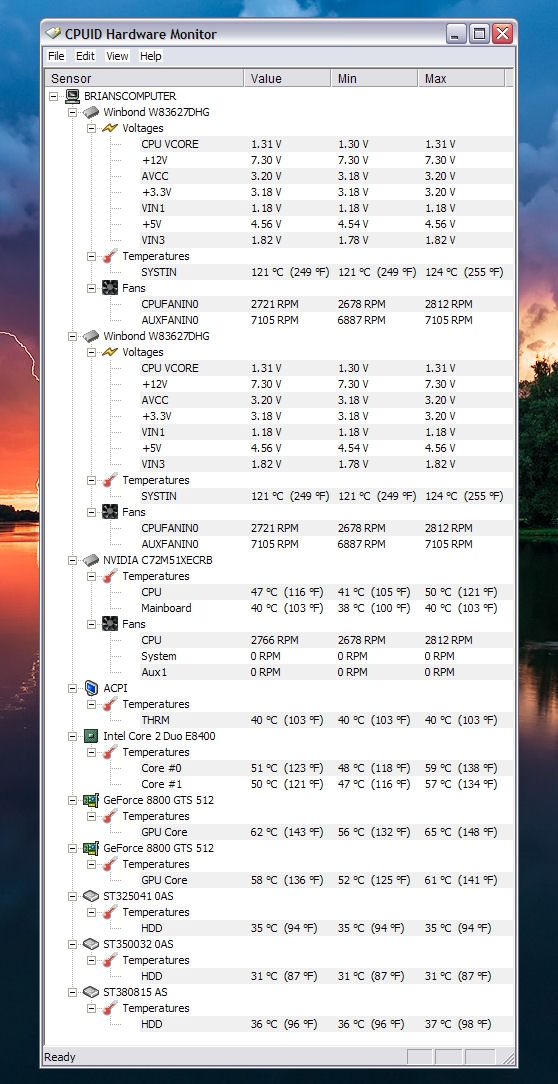
After about 5 minutes of playing Crysis and the game shutting down by itself.
 |
|
|
Antec 900 case
Nvidia 750i FTW Motherboard Zalman 9500 CPU cooler 8400 3.6 2 gig of 1066 ram 1 Evga GTX 465 24" Samsung LCD 3DMark06= 17,360 |
|
|
|
|
brian
Senior Member
Joined: 03 Aug 2007 Online Status: Offline Posts: 505 |
Quote Reply
Posted: 28 Jul 2009 at 4:48am |
|
If you see the top GC temp has increased slightly and VIN3 has increased. But Im not sure what Im really looking at as far as voltages and stuff like that.
|
|
|
Antec 900 case
Nvidia 750i FTW Motherboard Zalman 9500 CPU cooler 8400 3.6 2 gig of 1066 ram 1 Evga GTX 465 24" Samsung LCD 3DMark06= 17,360 |
|
|
|
|
DST4ME
DS ELITE
Joined: 14 Apr 2008 Online Status: Offline Posts: 36758 |
Quote Reply
Posted: 28 Jul 2009 at 5:50am |
|
set your ram voltages back to what they are suppose to be, looks like your northbridge is overheating.
run memtest and see if they pass the test Edited by DST4ME - 28 Jul 2009 at 5:52am |
|
|
|
|
brian
Senior Member
Joined: 03 Aug 2007 Online Status: Offline Posts: 505 |
Quote Reply
Posted: 28 Jul 2009 at 8:39am |
|
ok , i went to the bios and looked at all my voltages.
A little history, I was new to overclocking so I went on youtube and found a video about overclocking with a 7501 MB and a 8400 CPU. Both I have. So I followed this guys suggestions per the video on setting my voltages Under the bios I took all the voltages off auto (due to overclocking) and manually set them. Here is what the guy said to do (in the video) CPU core - 1.34 CPU FSB - 1.2 memory - was at 2.2 per what the sticks said on the side... I changed that to 2.1 nForce SPP or SPF (cant read it in the picture) - 1.45 NT200something voltage level - 1.25 Now are those all good? I'm overclocking just my CPU from 3.0 to 3.6 Now he was overclocking to 3.8.... not 3.6... is that going to make a difference? Since I was in the bios I did set just the memory voltage back to 2.2 (from 2.1) Now what?? |
|
|
Antec 900 case
Nvidia 750i FTW Motherboard Zalman 9500 CPU cooler 8400 3.6 2 gig of 1066 ram 1 Evga GTX 465 24" Samsung LCD 3DMark06= 17,360 |
|
|
|
|
brian
Senior Member
Joined: 03 Aug 2007 Online Status: Offline Posts: 505 |
Quote Reply
Posted: 28 Jul 2009 at 8:48am |
|
Now here is a picture of HWMonitor after I changed the memory voltage back to 2.2
You can see .. on the left side is before I changed and the the right pic is after. You can now see there are 3 temps listed now... not just 1 (system) as in the left (old)picture. Why is that? 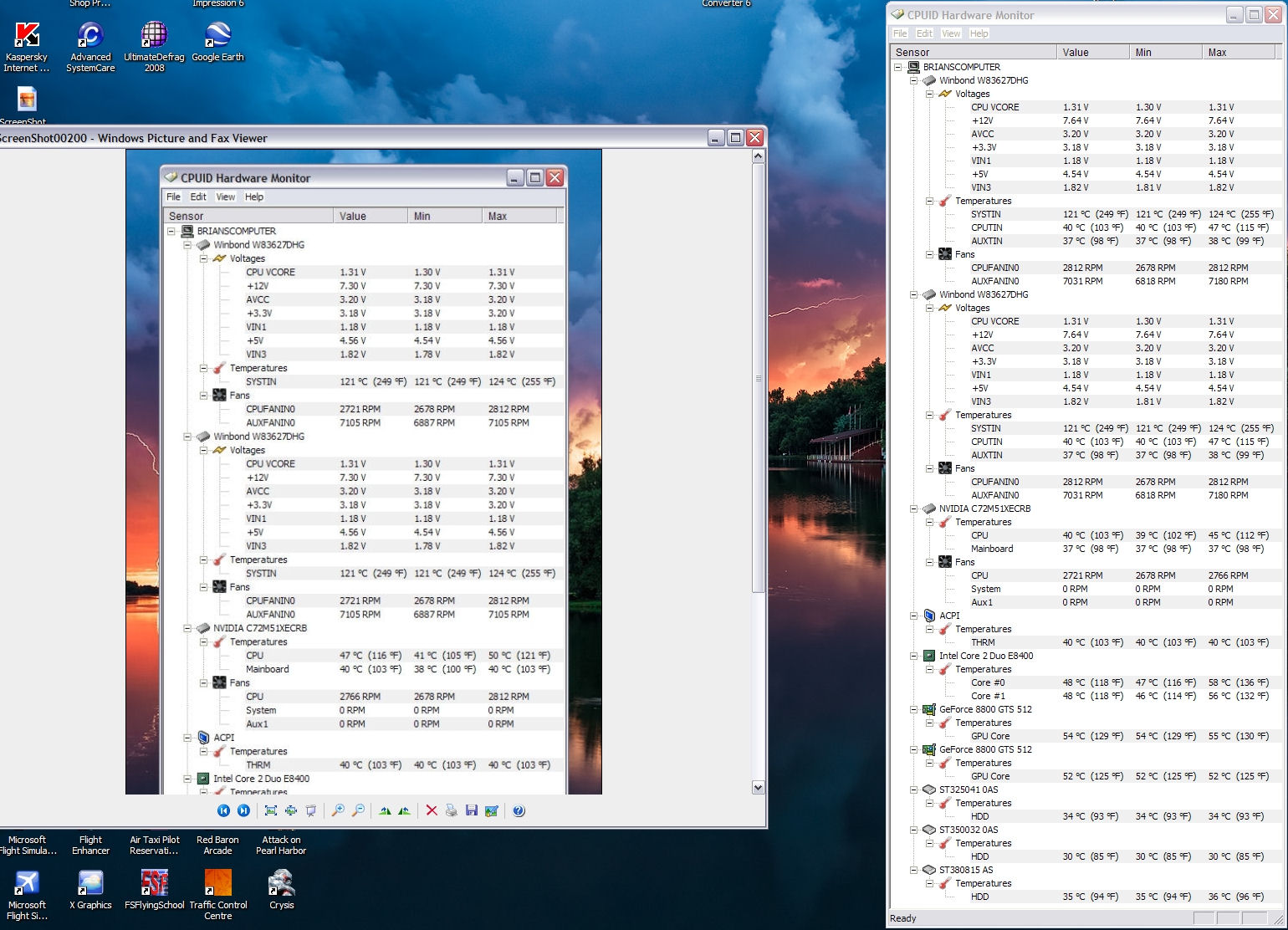 |
|
|
Antec 900 case
Nvidia 750i FTW Motherboard Zalman 9500 CPU cooler 8400 3.6 2 gig of 1066 ram 1 Evga GTX 465 24" Samsung LCD 3DMark06= 17,360 |
|
|
|
|
DST4ME
DS ELITE
Joined: 14 Apr 2008 Online Status: Offline Posts: 36758 |
Quote Reply
Posted: 28 Jul 2009 at 11:47am |
|
well first off you never use somebody else's settings for your own, each system is different.
second is your PC still shutting off now? if PC is still shutting off, did your run memtest? save your bios settings if you like and then set bios to default and see if the PC is still shutting off. |
|
|
|
|
justin.kerr
DS Veteran 
Joined: 06 May 2008 Online Status: Offline Posts: 5084 |
Quote Reply
Posted: 28 Jul 2009 at 2:00pm |
|
I imagine that most of HWmonitors info is wrong. lol, because if it is correct, you have some serious problems.
I would try to measure the power supply voltages with a digital multi meter, to make sure HW monitor is wrong.
Your north bridge would be melted if Hwmonitor is correct, might want to check it out with a infrared temp meter.
I did some testing this weekend and found out that HWmonitor does not read the Intel CPU registries correctly, so sometimes it is correct, and others way off.
Adding ram will not make anything on the computer hotter, except for the north bridge.
As DST said earlier, have you tried reseting the MB to default, and run Crysis with everything stock? Edited by justin.kerr - 28 Jul 2009 at 2:07pm |
|
|
|
|
brian
Senior Member
Joined: 03 Aug 2007 Online Status: Offline Posts: 505 |
Quote Reply
Posted: 28 Jul 2009 at 7:21pm |
|
ok...ill reset the bios and then run memtest.
once that runs for awhile..ill take a pic of temps |
|
|
Antec 900 case
Nvidia 750i FTW Motherboard Zalman 9500 CPU cooler 8400 3.6 2 gig of 1066 ram 1 Evga GTX 465 24" Samsung LCD 3DMark06= 17,360 |
|
|
|
|
DST4ME
DS ELITE
Joined: 14 Apr 2008 Online Status: Offline Posts: 36758 |
Quote Reply
Posted: 28 Jul 2009 at 7:41pm |
|
well first set the bios to default and lets see if it still crashes
|
|
|
|
|
brian
Senior Member
Joined: 03 Aug 2007 Online Status: Offline Posts: 505 |
Quote Reply
Posted: 29 Jul 2009 at 9:10am |
|
wow... what a trip i just took...
well i reset my bios and restarted the computer.. but before I did that I made sure that the boot order, the CPU and the ram was correctly set. You know to the original specs for the CPU and ram. I then booted and it booted just fine, but windows didnt open. (I was nervous now).. now what did I forget to turn on since I reset the bios to fail safe settings. Well it took me awhile to figure it out and I just happen to activate the right settings to work. At the beggining, everything worked but I had to internet. So I went back and enabled something... something.. lan. (I dont know what it really was) and walla... internet. Now can anyone tell me what I should and shouldnt enable in the bios?? I need help from the top. |
|
|
Antec 900 case
Nvidia 750i FTW Motherboard Zalman 9500 CPU cooler 8400 3.6 2 gig of 1066 ram 1 Evga GTX 465 24" Samsung LCD 3DMark06= 17,360 |
|
|
|
|
DST4ME
DS ELITE
Joined: 14 Apr 2008 Online Status: Offline Posts: 36758 |
Quote Reply
Posted: 29 Jul 2009 at 12:16pm |
|
if everything is working fine then leave the bios alone.
is the PC shutting down still or is not doing that anymore? |
|
|
|
|
brian
Senior Member
Joined: 03 Aug 2007 Online Status: Offline Posts: 505 |
Quote Reply
Posted: 31 Jul 2009 at 4:28am |
|
Well I put the CPU back to 3.0 and the voltages back to normal.
What I mean DST is... there are certain things you enable or not enable in the bios when your first setting up a computer.. etc... intel speedstep - enable or not to enable... things like that.. I dont want to enable something I dont need. This is where I need help.. I dont know what to enable or not. Yeah the computer works now, with all 4 gig in, its running a little cooler and I can now play and not have the game shut down on me. SO it must have been the OC. |
|
|
Antec 900 case
Nvidia 750i FTW Motherboard Zalman 9500 CPU cooler 8400 3.6 2 gig of 1066 ram 1 Evga GTX 465 24" Samsung LCD 3DMark06= 17,360 |
|
|
|
|
DST4ME
DS ELITE
Joined: 14 Apr 2008 Online Status: Offline Posts: 36758 |
Quote Reply
Posted: 31 Jul 2009 at 9:07am |
|
bios default normally is where you want to be with a few minor adjustments, things like speedstep are a matter of preference, if you are not oced, forget speedstep. I'm not familiar with your bios, so i'm not sure what options you are looking at.
|
|
|
|
|
brian
Senior Member
Joined: 03 Aug 2007 Online Status: Offline Posts: 505 |
Quote Reply
Posted: 31 Jul 2009 at 9:41pm |
|
ok thanks for all your help
|
|
|
Antec 900 case
Nvidia 750i FTW Motherboard Zalman 9500 CPU cooler 8400 3.6 2 gig of 1066 ram 1 Evga GTX 465 24" Samsung LCD 3DMark06= 17,360 |
|
|
|
|
venom
Newbie 
Joined: 08 Oct 2008 Online Status: Offline Posts: 0 |
Quote Reply
Posted: 31 Jul 2009 at 11:56pm |
|
If the reading for the +12V is right then your system/game is shutting down due to a lack of power most likely. I would suggest testing the PSU with a PSU tester or multimeter, and if the readings are okay then it is something else. Otherwise borrow another PSU or get a replacement.
4 sticks of ram has never worked good on the 680/780/790 motherboards due to the crappy nvidia chipset. It takes alot of tweaking to get it to work properly. The 121*C temp is completely wrong, you can ignore that (common issue). Your GPU and CPU temps are great, so it isn't an overheating issue. Also, the +5V is out of ATX spec (if that reading is right), and the +3.3V is a bit low. Edited by venom - 31 Jul 2009 at 11:59pm |
|
|
|
|
Post Reply
|
| Forum Jump | Forum Permissions You cannot post new topics in this forum You cannot reply to topics in this forum You cannot delete your posts in this forum You cannot edit your posts in this forum You cannot create polls in this forum You cannot vote in polls in this forum |

About Digital Storm
Contact Information
Facility Tour
Financing
Buy Now, Pay Later
Downloads
GSA Schedule
Terms & Conditions
Privacy Policy
Request Help
Call: 1-866-817-8676
(Hours 9AM-5PM PST)





 Topic Options