Question on CPU TempsPost Date: 2010-07-20 |
Post Reply 
|
| Author | ||
ZFrost 
Newbie 

Joined: 19 Jun 2010 Online Status: Offline Posts: 15 |
 Quote Reply Quote Reply
 Topic: Question on CPU Temps Topic: Question on CPU TempsPosted: 20 Jul 2010 at 4:47pm |
|
|
So I've been watching my CPU temps the past few days and I'm just trying to make sure everything is as it's supposed to be, they seem slightly high in my opinion. I picked the Asetek LC CPU option for the cooling, should I consider replacing it with something like the NH-D14?
Anyway, here's the temps. The highest I've seen one of the cores get to under heavy load is 81°C. 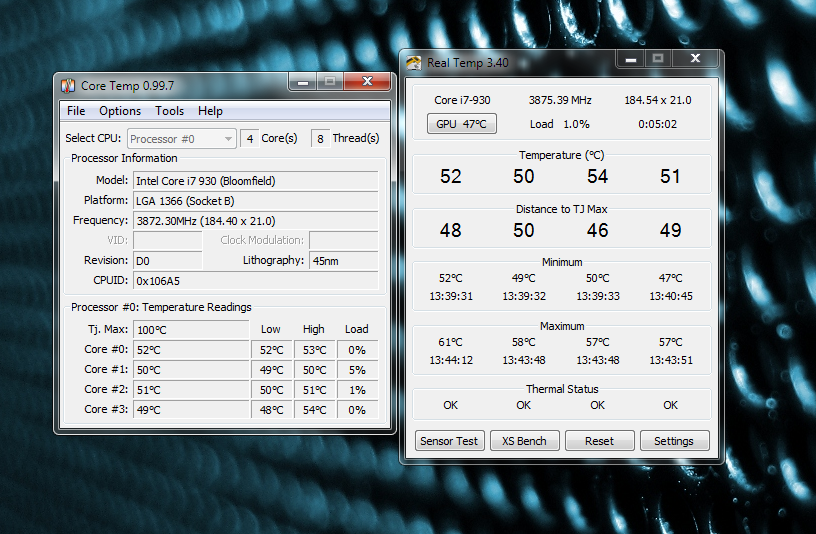 |
||
 |
||
|
!ender_
DS Veteran 
Joined: 24 Oct 2007 Online Status: Offline Posts: 4219 |
Quote Reply
Posted: 20 Jul 2010 at 5:40pm |
|
|
they look a little warm, but you are at 3.8 ghz and that is a cheap cooler, so nothing really looks out of place
|
||
|
||
|
ZFrost
Newbie
Joined: 19 Jun 2010 Online Status: Offline Posts: 15 |
Quote Reply
Posted: 20 Jul 2010 at 5:48pm |
|
I guess more what I was wondering is am I shortening the life of the CPU by letting it run at those temperatures all the time? The cooler was the one thing I didn't do much research on before ordering and now I kinda regret it. If switching to a good air cooler with increase the life of the processor, I'm definitely for it. |
||
|
||
|
!ender_
DS Veteran
Joined: 24 Oct 2007 Online Status: Offline Posts: 4219 |
Quote Reply
Posted: 20 Jul 2010 at 5:54pm |
|
|
every aspect of overclocking shortens the life of your hardware, thats kind of the idea. but really, you wont be using that pc to game after 4ish years, and the chip will last that long.
id opt for some better cooling if it were me, but its under warranty for a reason. they set it up that way, so if it blows, and its under warranty, youre a-ok!
|
||
|
||
|
JJJJ_Shabadoo
Groupie 
Joined: 22 May 2010 Online Status: Offline Posts: 320 |
Quote Reply
Posted: 20 Jul 2010 at 6:13pm |
|
|
If it were me, I'd probably go for some better cooling and, in the meantime, maybe drop your overclock a bit (I was able to drop my max core temps by about 20 degrees C just by lowering my voltage).
|
||
|
||
|
ZFrost
Newbie
Joined: 19 Jun 2010 Online Status: Offline Posts: 15 |
Quote Reply
Posted: 20 Jul 2010 at 6:18pm |
|
I'm pretty much clueless when it comes to overclocking, so I'm going to have to look up how to do that. But yeah, it seems like probably for the best until I can get a better cooling system. |
||
|
||
|
!ender_
DS Veteran
Joined: 24 Oct 2007 Online Status: Offline Posts: 4219 |
Quote Reply
Posted: 20 Jul 2010 at 6:32pm |
|
|
what motherboard do you have?
its a pretty easy process
|
||
|
||
|
JJJJ_Shabadoo
Groupie
Joined: 22 May 2010 Online Status: Offline Posts: 320 |
Quote Reply
Posted: 20 Jul 2010 at 6:41pm |
|
|
As discussed in this thread:
https://www.digitalstormonline.com/forums/forum_posts.asp?TID=11451&KW= I'm not an overclocker either and most things I've picked up have been from the boards here. I just went into my BIOS (I have an an ASUS board and needed to hit del on system start) and lowered the CPU voltage by a click or two at a time (in my BIOS I pressed the minus key), then entered Windows and ran Prime95. If there are no errors, you can then lower the voltage a click or two again and run Prime95 again. Repeat. If there are errors running Prime95, then raise the voltage up again. If you can get Prime95 to run stably for 24 hours you should be golden. Justin also recommended lowering the multiplier to help lower temps, though in my case I was able to get my temps to an acceptable level by just lowering the voltage (and therefore not effecting my clock speeds). Edited by JJJJ_Shabadoo - 20 Jul 2010 at 6:42pm |
||
|
||
|
AndydViking
Senior Member 
Joined: 10 Sep 2009 Online Status: Offline Posts: 733 |
Quote Reply
Posted: 20 Jul 2010 at 6:48pm |
|
|
Hey Zfrost. Digital Storm set my asetek cooler up with only 1 pulling fan. Before you go replacing the entire cooler I would add a pushing fan for a "push/pull" configuration. People on the EVGA forums that went push/pull with their Asetek/Corsair H50 have been very happy.
I had an Asetek and replaced it with a Noctua. Although I love my Noctua I wish I'd have tried push/pull first.
Buy a good fan like the scyth gentle typhoon. If it doesn't impact your temps on the Asetek to your liking then replace the Asetek with the Venemous X or meglahalems rev. B or similar cooler. You can use that fan on those CPU coolers.
The Noctua's are great but their a few better performing heatsink (if you need go that route) that I'd check out befor I'd just go Noctua.
I'd also like to know what motherboard and case you have. If you have a hole for the CPU retention plate replacing the cooler will be much easier.
|
||
|
||
|
ZFrost
Newbie
Joined: 19 Jun 2010 Online Status: Offline Posts: 15 |
Quote Reply
Posted: 20 Jul 2010 at 6:48pm |
|
Sounds easy enough, I definitely appreciate the help!
It's the EVGA X58 LE Edition SLI. |
||
|
||
|
!ender_
DS Veteran
Joined: 24 Oct 2007 Online Status: Offline Posts: 4219 |
Quote Reply
Posted: 20 Jul 2010 at 9:19pm |
|
|
try to edit the bios on your own. your looking to turn vcore down
you can test the new voltages a lot faster with intel burn test
if you get stuck in the bios just come back and post
|
||
|
||
|
justin.kerr
DS Veteran
Joined: 06 May 2008 Online Status: Offline Posts: 5084 |
Quote Reply
Posted: 20 Jul 2010 at 10:59pm |
|
|
81C under what load? what is your ambient temps? without knowing those two bits of info, there is no way to tell anything.. if your ambients are 85F and load is with prime95, then you have very good temps.
If you don't mind some extra noise you can swap out the radiator fan with one that is more powerful, or just add another for a push pull setup to lower temps.
you can try to lower your V core in the BIOS, this will depend on the CPU batch you have, some need the V core that Digital Storm has inputed, some can get by on less, it is trial and error to find out.
I would not worry about temps unless you are having stability issues. use it, enjoy it.
 |
||

|
||
|
||
|
ZFrost
Newbie
Joined: 19 Jun 2010 Online Status: Offline Posts: 15 |
Quote Reply
Posted: 21 Jul 2010 at 12:17pm |
|
|
Well a little update, after lowering the voltage a couple of notches and opening the airflow in my computer room a bit more I've seen a pretty large improvement. It's now idling in the high 30's / low 40's, and on Prime95 stress testing it's only getting up to about 75 on a full load. I think I'll still look around for a better quality cooler, but this will work well enough for now. I appreciate everyone's help!
|
||
|
||
|
!ender_
DS Veteran
Joined: 24 Oct 2007 Online Status: Offline Posts: 4219 |
Quote Reply
Posted: 21 Jul 2010 at 12:45pm |
|
|
yea thats not a bad prime temp at all
|
||
|
||
|
Alci
Groupie
Joined: 16 Apr 2010 Online Status: Offline Posts: 250 |
Quote Reply
Posted: 04 Aug 2010 at 2:05pm |
|
|
I know this is sort of a hijack, but can anyone explaing to me why coolers like asetek 550lc and 570LX are not real liquid cooling?
(BTW my DS system is going on 4 months old and I havent had a single problem. Not a single crash. thx DS)
|
||
|
||
|
ablahblah
DS Veteran
Joined: 12 Jun 2009 Online Status: Offline Posts: 2312 |
Quote Reply
Posted: 04 Aug 2010 at 2:28pm |
|
|
it's not modular, doesn't cool as well, sometimes leaks, isn't user-servicable, has a smaller reservoir/coolant capacity, and can't be customized at all. real LC involves much better and stronger pumps, more radiators (very very rarely do you see a single 120mm rad LC loop), bigger radiators, larger reservoirs, and more efficient cooling. AIO LC is like AIO desktops, have to sacrifice a lot to try to hit the user-friendly AIO mark.
|
||
|
R4D4RPR00F
Core i7 920 @ 3.9Ghz Asus Sabertooth X58 EVGA GTX 570 Mushkin 6GB 1414Mhz |
||
|
||
|
!ender_
DS Veteran
Joined: 24 Oct 2007 Online Status: Offline Posts: 4219 |
Quote Reply
Posted: 04 Aug 2010 at 2:33pm |
|
|
it doesnt even have a res right? its just a small rad hooked up to a 120mm fan?
|
||
|
||
|
ablahblah
DS Veteran
Joined: 12 Jun 2009 Online Status: Offline Posts: 2312 |
Quote Reply
Posted: 04 Aug 2010 at 3:26pm |
|
|
I think the radiator might have some sort of tiny functionality as a res since it holds some amount of liquid at a time. LOL.

|
||
|
R4D4RPR00F
Core i7 920 @ 3.9Ghz Asus Sabertooth X58 EVGA GTX 570 Mushkin 6GB 1414Mhz |
||
|
||
|
Alci
Groupie
Joined: 16 Apr 2010 Online Status: Offline Posts: 250 |
Quote Reply
Posted: 04 Aug 2010 at 3:29pm |
|
|
thx |
||
|
||
|
Post Reply
|
| Forum Jump | Forum Permissions You cannot post new topics in this forum You cannot reply to topics in this forum You cannot delete your posts in this forum You cannot edit your posts in this forum You cannot create polls in this forum You cannot vote in polls in this forum |

About Digital Storm
Contact Information
Facility Tour
Financing
Buy Now, Pay Later
Downloads
GSA Schedule
Terms & Conditions
Privacy Policy
Request Help
Call: 1-866-817-8676
(Hours 9AM-5PM PST)





 Topic Options