"expert" config choices not working?Post Date: 2012-10-13 |
Post Reply 
|
| Author | |
caver 
Newbie 

Joined: 07 Oct 2012 Online Status: Offline Posts: 65 |
 Quote Reply Quote Reply
 Topic: "expert" config choices not working? Topic: "expert" config choices not working?Posted: 13 Oct 2012 at 7:03am |
|
After pretty much deciding on a system using the "easy" menu I decided to see what "expert" offered. However, whenever I try I get the "please wait" message and it just stays there.
is that normal? Do I need to go fix lunch and come back?
|
|
 |
|
|
bprat22
DS ELITE 
DigitalStorm East -- (Unofficially!)
Joined: 08 Jun 2011 Online Status: Offline Posts: 20391 |
Quote Reply
Posted: 13 Oct 2012 at 7:08am |
|
It should open right up. Try clicking on Compatibilty View in Address Bar next to Refresh.
Its a long shot but ya might get lucky.
|
|
|
|
|
caver
Newbie
Joined: 07 Oct 2012 Online Status: Offline Posts: 65 |
Quote Reply
Posted: 13 Oct 2012 at 7:35am |
|
actually compatability view was worse. I couldnt use either mode.
It did say I should upgrade to IE 9 but I am already at 8 so surprised that 9 would be the minimum.
I did also notice (back in normal view) that when I clicked on "expert" the actual choices did change, they were just not accessible behind the frozen "please wait" message.
So now do I upgrade to IE9 and hope that fixes this problem but it doesnt jack with something else....
|
|
|
|
|
caver
Newbie
Joined: 07 Oct 2012 Online Status: Offline Posts: 65 |
Quote Reply
Posted: 13 Oct 2012 at 7:48am |
|
well shows what I know. Apparently 8 is as high as I can go with XP.
Surely the DS expert config doesn't require Win vista/7 and IE 9? the site is presumably for people with old computers who want new ones :)
|
|
|
|
|
bprat22
DS ELITE
DigitalStorm East -- (Unofficially!)
Joined: 08 Jun 2011 Online Status: Offline Posts: 20391 |
Quote Reply
Posted: 13 Oct 2012 at 7:54am |
|
Another long shot is to go to bottom of Forum home page and Delete Cookies to reset.
Edited by bprat22 - 13 Oct 2012 at 7:54am |
|
|
|
|
FrankW
DS Veteran 
Joined: 22 Feb 2010 Online Status: Offline Posts: 2254 |
Quote Reply
Posted: 13 Oct 2012 at 10:05am |
|
The Expert Mode will work with Firefox. You should have a second browser for things just like this.
Expert Mode will also work with IE-8 and 9. You may have IE-8 optioned so it is blocking the information. Are you sure you don't get a yellow bar across the top or bottom of the browser screen asking permission to show this information?? Frank |
|
|
|
|
ArkansasWoman777
DS Veteran
Joined: 19 Aug 2012 Online Status: Offline Posts: 4314 |
Quote Reply
Posted: 13 Oct 2012 at 10:07am |
|
It does it sometimes on chrome but not all the time
|
|
|
|
|
ArkansasWoman777
DS Veteran
Joined: 19 Aug 2012 Online Status: Offline Posts: 4314 |
Quote Reply
Posted: 13 Oct 2012 at 10:08am |
|
but it goes to working again when i click refresh
|
|
|
|
|
bprat22
DS ELITE
DigitalStorm East -- (Unofficially!)
Joined: 08 Jun 2011 Online Status: Offline Posts: 20391 |
Quote Reply
Posted: 13 Oct 2012 at 10:16am |
|
Yep, I've also had the same issue, randomly with IE 9.
Like Frank said, Firefox is what DS recommends. Here's a quote from FAQ. "All of the latest, most popular, web browsers on both Windows XP, and the Apple MAC OS X can be used with this forum, including; Internet Explorer, Mozilla, Firefox, Safari, Netscape, Opera, and other variants of these browsers. Although all these browsers can be used for this forum, we highly recommend using Firefox on all platforms." Maybe I'll try it out.
Edited by bprat22 - 13 Oct 2012 at 10:17am |
|
|
|
|
Alex
Admin Group 
Digital Storm Supervisor 
Joined: 04 Jun 2012 Online Status: Offline Posts: 16314 |
Quote Reply
Posted: 13 Oct 2012 at 11:26am |
|
Expert mode should work with Internet Explorer.
@caver, could you share the details on exactly what system configuration you are viewing and browser version so I can share it with our team? |
|

|
|
|
|
|
caver
Newbie
Joined: 07 Oct 2012 Online Status: Offline Posts: 65 |
Quote Reply
Posted: 13 Oct 2012 at 12:10pm |
|
soo..I resolved my problem. I went in and deleted the browsing history in IE per Bpratt's suggestion and when I got the same frozen "please wait" message I refreshed and now it works....
Alex: I am using IE 8.0.6001.18702 several config numbers had same issue but my latest is : 737016
edit: as an aside. it would be nice to be able to choose to "overwrite" a config number. in some cases I wanted to save them differently but after many ongoing changes, in many cases I would have preferred to just overwrite it rather than jot down a new number.
Edited by caver - 13 Oct 2012 at 12:14pm |
|
|
|
|
bprat22
DS ELITE
DigitalStorm East -- (Unofficially!)
Joined: 08 Jun 2011 Online Status: Offline Posts: 20391 |
Quote Reply
Posted: 13 Oct 2012 at 1:13pm |
|
Glad the Expert Mode is working. Gives you more to play with.

In that config you only need the 1050hx psu if you want to trim expenses. You might not need the added usb3 card. The front of Hafx has 2x usb3 and the Deluxe x79 mobo has 6x usb3 on the back i/o panel. The Advanced Recovery kit might not come with backup CDs if the drive fails. Rig looks real nice.  Edited by bprat22 - 13 Oct 2012 at 1:19pm |
|
|
|
|
Alex
Admin Group
Digital Storm Supervisor
Joined: 04 Jun 2012 Online Status: Offline Posts: 16314 |
Quote Reply
Posted: 13 Oct 2012 at 5:43pm |
|
Glad to hear you got it ironed out, thank you for sharing your feedback on the tickets. I'll share your feedback with our team.
|
|
|
|
|
|
|
|
caver
Newbie
Joined: 07 Oct 2012 Online Status: Offline Posts: 65 |
Quote Reply
Posted: 14 Oct 2012 at 7:35pm |
|
well,
expert configs not working again. I tried clearing my history, refreashing, etc. a no go. Not sure why it is doing it but is is frustrating :)
|
|
|
|
|
Alex
Admin Group
Digital Storm Supervisor
Joined: 04 Jun 2012 Online Status: Offline Posts: 16314 |
Quote Reply
Posted: 14 Oct 2012 at 9:16pm |
|
Anyone else having the same issue?
@Caver, could you let me know what configuration (saved or default) you are using? I tried to load the config you mentioned above and I had no issues with IE9 (http://www.digitalstormonline.com/comploaddreadnought.asp?id=737016). |
|
|
|
|
|
|
|
Asangard
DS Veteran
Joined: 21 Aug 2009 Online Status: Offline Posts: 2209 |
Quote Reply
Posted: 14 Oct 2012 at 9:19pm |
|
Hi Alex,
I play around with the configuration alot and always click on expert mode. I have had no problems here.
|
|
|
Not from Without, Therefore, the 1st step on the Holy Warrior path, Is to recognize thyself as thy 1st enemy. |
|
|
|
|
Alex
Admin Group
Digital Storm Supervisor
Joined: 04 Jun 2012 Online Status: Offline Posts: 16314 |
Quote Reply
Posted: 14 Oct 2012 at 9:20pm |
|
Thanks for the feedback!
|
|
|
|
|
|
|
|
bprat22
DS ELITE
DigitalStorm East -- (Unofficially!)
Joined: 08 Jun 2011 Online Status: Offline Posts: 20391 |
Quote Reply
Posted: 15 Oct 2012 at 2:33am |
|
No problem here.
caver... Like Frank suggested, download and use Firefox to see if it helps. This does sound like your browser but who knows. Firefox is a quick and easy way to try a work-around. Edited by bprat22 - 15 Oct 2012 at 4:15am |
|
|
|
|
Asangard
DS Veteran
Joined: 21 Aug 2009 Online Status: Offline Posts: 2209 |
Quote Reply
Posted: 15 Oct 2012 at 5:42am |
|
To add to my earlier post I use IE9 with no problems with expert mode.
|
|
|
Not from Without, Therefore, the 1st step on the Holy Warrior path, Is to recognize thyself as thy 1st enemy. |
|
|
|
|
Alex
Admin Group
Digital Storm Supervisor
Joined: 04 Jun 2012 Online Status: Offline Posts: 16314 |
Quote Reply
Posted: 15 Oct 2012 at 11:12am |
|
|
|
|
|
|
|
|
|
caver
Newbie
Joined: 07 Oct 2012 Online Status: Offline Posts: 65 |
Quote Reply
Posted: 15 Oct 2012 at 7:47pm |
|
sorry for the delay, long work day to earn money for my DS system :) the 1st time I tried expert it didnt work and deleting my browsing history fixed it. I could then use expert no problem. the 2nd time I had been using expert and playing with configs and boom. wouldnt work again. I deleted history but no dice. I eventually was looking at sites under privacy in the internet options and noticed that some DS sites were blocked. (I never did see a yellow bar up top telling me this) I then "allowed" those sites and it now works...for now.
The weird thing is that I didnt mess with sites the first time and deleting my browsing history didnt work the 2nd..
I am using IE 8 with windows XP
|
|
|
|
|
caver
Newbie
Joined: 07 Oct 2012 Online Status: Offline Posts: 65 |
Quote Reply
Posted: 15 Oct 2012 at 8:35pm |
|
apparently its a cookies thing. happened again. 1st 2 solutions didnt work. had to go in and enable cookies for googleheads.com and several other google-ish sites.
|
|
|
|
|
JerryW
Groupie 
Joined: 10 Oct 2012 Online Status: Offline Posts: 214 |
Quote Reply
Posted: 15 Oct 2012 at 9:27pm |
|
Expert mode works with up-to-date PC based web browsers. Works with Safari on my iPhone 4s runniing iOS 6.0. Does not work with Safari on my 1st Gen iPad running iOS 5.1.1.
|
|
|
|
|
Alex
Admin Group
Digital Storm Supervisor
Joined: 04 Jun 2012 Online Status: Offline Posts: 16314 |
Quote Reply
Posted: 16 Oct 2012 at 10:21am |
|
Thanks for the feedback guys.
|
|
|
|
|
|
|
|
caver
Newbie
Joined: 07 Oct 2012 Online Status: Offline Posts: 65 |
Quote Reply
Posted: 26 Oct 2012 at 4:04pm |
|
looks like it is probably a bias on older browsers and/or possibly security settings. I happened to check the DS site to play around with a Bolt config from a different computer and had the same behaviour with expert settings. that machine was also running IE 8
|
|
|
i7 3930K 3.2GHz OC
ASUS P9X79 DLX X79 32GB DDR3 1600Mhz DSC 2x 240GB Solid State EVGA Classified GTX680 4GB |
|
|
|
|
Alex
Admin Group
Digital Storm Supervisor
Joined: 04 Jun 2012 Online Status: Offline Posts: 16314 |
Quote Reply
Posted: 27 Oct 2012 at 6:10pm |
|
That's weird, we don't seem to have any issues here and have not had any other individuals really say they had an issue with expert mode not working?
|
|
|
|
|
|
|
|
ArkansasWoman777
DS Veteran
Joined: 19 Aug 2012 Online Status: Offline Posts: 4314 |
Quote Reply
Posted: 28 Oct 2012 at 10:22am |
|
Half the time when i click on expert mode it just stays at please wait
|
|
|
|
|
JerryW
Groupie
Joined: 10 Oct 2012 Online Status: Offline Posts: 214 |
Quote Reply
Posted: 28 Oct 2012 at 2:14pm |
This is an Example. You can see your in Expert Mode with the Please Wait. The only thing you can do is refresh which puts you out of Expert Mode.  Edited by JerryW - 28 Oct 2012 at 2:15pm |
|
|
|
|
caver
Newbie
Joined: 07 Oct 2012 Online Status: Offline Posts: 65 |
Quote Reply
Posted: 28 Oct 2012 at 5:13pm |
|
yep, that was my experiance too. Sometimes I can get it to work, sometimes not. never seems to be the same solution. I tried again tonight on a Bolt and it worked....

|
|
|
i7 3930K 3.2GHz OC
ASUS P9X79 DLX X79 32GB DDR3 1600Mhz DSC 2x 240GB Solid State EVGA Classified GTX680 4GB |
|
|
|
|
Alex
Admin Group
Digital Storm Supervisor
Joined: 04 Jun 2012 Online Status: Offline Posts: 16314 |
Quote Reply
Posted: 28 Oct 2012 at 11:23pm |
|
Hmmmmm,,,, thank you for sharing. What web browser and version are you using?
|
|
|
|
|
|
|
|
bprat22
DS ELITE
DigitalStorm East -- (Unofficially!)
Joined: 08 Jun 2011 Online Status: Offline Posts: 20391 |
Quote Reply
Posted: 29 Oct 2012 at 2:23am |
|
I have had various issues in the past but not in quite awhile. Been working great for me IE9.
It was mentioned but just a reminder, what has helped me is to go to Community Forum home screen, click on Delete Cookies Set By This Forum at bottom of page. It might help. Good luck. |
|
|
|
|
JerryW
Groupie
Joined: 10 Oct 2012 Online Status: Offline Posts: 214 |
Quote Reply
Posted: 29 Oct 2012 at 6:11am |
|
Something to chew on:
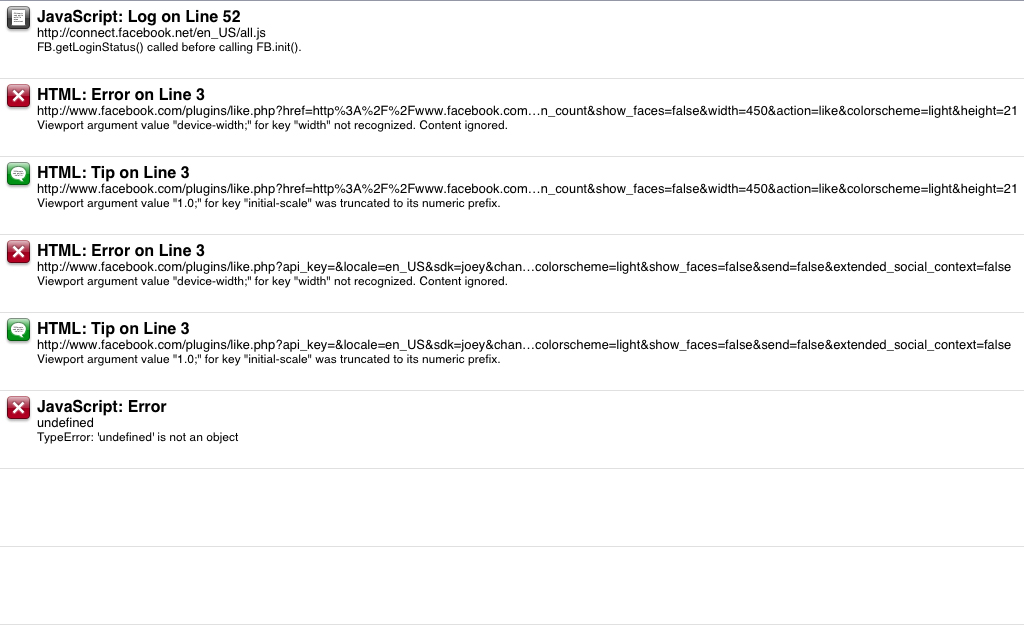 |
|
|
|
|
Post Reply
|
| Forum Jump | Forum Permissions You cannot post new topics in this forum You cannot reply to topics in this forum You cannot delete your posts in this forum You cannot edit your posts in this forum You cannot create polls in this forum You can vote in polls in this forum |

About Digital Storm
Contact Information
Facility Tour
Financing
Buy Now, Pay Later
Downloads
GSA Schedule
Terms & Conditions
Privacy Policy
Request Help
Call: 1-866-817-8676
(Hours 9AM-5PM PST)





 Topic Options