Received DS Computer but didnt get OCPost Date: 2011-08-10 |
Post Reply 
|
| Author | |
heeshboy 
Newbie 
Joined: 02 Jun 2011 Online Status: Offline Posts: 49 |
 Quote Reply Quote Reply
 Topic: Received DS Computer but didnt get OC Topic: Received DS Computer but didnt get OCPosted: 10 Aug 2011 at 12:27am |
|
Hi all,
Finally got my DS custom computer, but I realized that my computer wasn't overclocked to the settings they told me (4.8GHz in email they sent me). I checked CPU-Z as well as the systems control panel menu and I read 3.4GHz in both applications. Am I supposed to switch to the 4.8 myself? I thought my computer is supposed to come already overclocked. I'm kind of disappointed :( |
|
 |
|
|
Dragoonseal
DS Veteran 

Joined: 03 Apr 2009 Online Status: Offline Posts: 2247 |
Quote Reply
Posted: 10 Aug 2011 at 12:41am |
Both CPU-Z and Windows system info will display the default speed of the CPU, which is 3.4GHz for your 2600K. Windows system info will show either the overclocked speed or the current speed (not sure which) right after the default speed, but it isn't always accurate, most applications never will be, but CPU-Z will always read it correctly. For CPU-Z you have to look under the "Core Speed" read out on the bottom left of the CPU tab. If the CPU isn't under use it will clock itself down significantly to something like 1700MHz. To see its full OCed speed put it under load with something like Prime95, LinX, or just the Windows Experience Index test, and watch CPU-Z while you do so. |
|
|
Lilim
Intel Core i7 920 @4.2GHz HAF 932 - Dual SLI Nvidia GTX 480s 3x Intel X25-M G2 (80GB) SSD RAID0 |
|
|
|
|
maxyme
DS Veteran
Joined: 14 Aug 2010 Online Status: Offline Posts: 1514 |
Quote Reply
Posted: 10 Aug 2011 at 8:08am |
|
Prime doesn't enable turbo boost for me. So Idk if that's my mobo or just how it works.
|
|
|
Steam:pcmaster160
|
|
|
|
|
Bensonc120
Groupie 
Joined: 17 Mar 2011 Online Status: Offline Posts: 129 |
Quote Reply
Posted: 26 Aug 2011 at 12:25am |
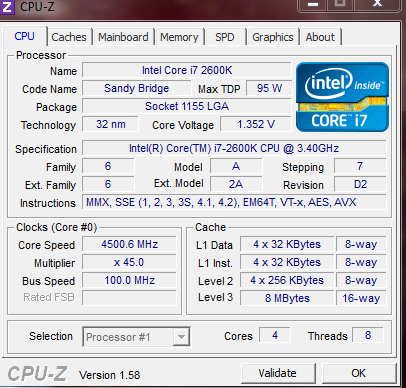 Dragoon how come my "core speed" from cpuz is 4500 at idle? Is this supposed to be at 1600~1700mhz and only go up to 4500mhz when I'm at full load? Sorry to hijack this thread. |
|
|
Thermaltake Core
Intel Core i5-10400 MSI Z490 Vengeance 32GB DDR4 3200mhz Samsung M.2 SSD EVO 970 1TB Asus ROG Strix 1080 Ti Asus PG278QR Monitor |
|
|
|
|
RiceEatin2000GT
DS Veteran
Joined: 02 Oct 2008 Online Status: Offline Posts: 1699 |
Quote Reply
Posted: 26 Aug 2011 at 12:45am |
|
go into your bios and make sure eist is set to enabled and also c1e is set to enable. Some times when c1e is on auto the mobo chooses off, this will prevent the processor from downclocking. Also if DS set a manual voltage it will clock down to 1600mhz but not down volt. This way of overclocking is fine.
Edited by RiceEatin2000GT - 26 Aug 2011 at 3:37am |
|

|
|
|
|
|
Bensonc120
Groupie
Joined: 17 Mar 2011 Online Status: Offline Posts: 129 |
Quote Reply
Posted: 26 Aug 2011 at 1:06am |
|
Ok got it to idle down to 1600Mhz. Do you recommend leaving this option or just keeping it at 4500Mhz all the time?
This is kinda fun I can totally see why you guys like tweaking and fiddling with your oc  |
|
|
Thermaltake Core
Intel Core i5-10400 MSI Z490 Vengeance 32GB DDR4 3200mhz Samsung M.2 SSD EVO 970 1TB Asus ROG Strix 1080 Ti Asus PG278QR Monitor |
|
|
|
|
RiceEatin2000GT
DS Veteran
Joined: 02 Oct 2008 Online Status: Offline Posts: 1699 |
Quote Reply
Posted: 26 Aug 2011 at 3:39am |
did they overclock manually or did they have it on offset, more so does it down volt to around 1v at idle along with 1600mhz. It makes sense to have it down clock even if its going to run at the same voltage since it will still shave off a few degrees C at idle. |
|
|
|
|
|
|
|
Bensonc120
Groupie
Joined: 17 Mar 2011 Online Status: Offline Posts: 129 |
Quote Reply
Posted: 26 Aug 2011 at 1:59pm |
|
Well, I have 2 OC profiles one is manual and the other one is offset. I have it set at manual right now but I will try switching to offset mode profile to see if the voltage will decease at idle.
|
|
|
Thermaltake Core
Intel Core i5-10400 MSI Z490 Vengeance 32GB DDR4 3200mhz Samsung M.2 SSD EVO 970 1TB Asus ROG Strix 1080 Ti Asus PG278QR Monitor |
|
|
|
|
RiceEatin2000GT
DS Veteran
Joined: 02 Oct 2008 Online Status: Offline Posts: 1699 |
Quote Reply
Posted: 26 Aug 2011 at 2:14pm |
to be honest if your at the 1.35 manual and 4.5ghz i would be super happy with that and leave it alone. Just enjoy your comp :D |
|
|
|
|
|
|
|
Post Reply
|
| Forum Jump | Forum Permissions You cannot post new topics in this forum You cannot reply to topics in this forum You cannot delete your posts in this forum You cannot edit your posts in this forum You cannot create polls in this forum You cannot vote in polls in this forum |

About Digital Storm
Contact Information
Facility Tour
Financing
Buy Now, Pay Later
Downloads
GSA Schedule
Terms & Conditions
Privacy Policy
Request Help
Call: 1-866-817-8676
(Hours 9AM-5PM PST)





 Topic Options