Reset Button on Dreadnought?Post Date: 2013-05-12 |
Post Reply 
|
| Author | |
armoredsaint 
Groupie 

Joined: 24 Mar 2013 Online Status: Offline Posts: 170 |
 Quote Reply Quote Reply
 Topic: Reset Button on Dreadnought? Topic: Reset Button on Dreadnought?Posted: 12 May 2013 at 11:08am |
|
I haven't had to push it yet, but I wonder if it forces a reset/restart or will it bring up a dialoge box asking if you want to restart/shutdown?
Same goes for the Power button? 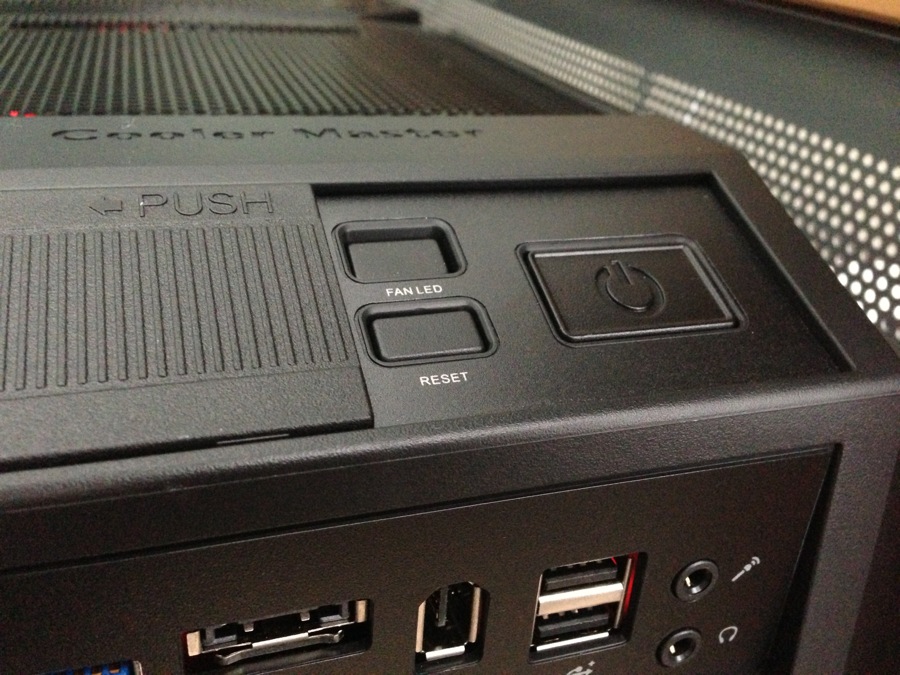
I love the Red Lighting so much more after it was re-located  

|
|
|
Old Dinosaur Dreadnought: Sabertooth, i7 3770k 4.4Ghz, Dominator DHX 32gb, H100i, HX1050, V12XT, GTX1660
Delivered: 4/17/13 |
|
 |
|
|
ArkansasWoman777
DS Veteran 
Joined: 19 Aug 2012 Online Status: Offline Posts: 4314 |
Quote Reply
Posted: 12 May 2013 at 1:11pm |
|
The power button just turns the computer off. Don't know about the reset button
|
|
|
"Captain Sirius Black"
Storm Trooper i5 3570k Ordered: 11-27-12 Stage 1: 11-29-12 Stage 2: 12-2-12 Stage 3: 12-2-12 Stage 4: 12-4-12 Stage 5: 12-4-12 Stage 6: 12-10-12 Stage 7: 12-12-12 |
|
|
|
|
bprat22
DS ELITE 
DigitalStorm East -- (Unofficially!)
Joined: 08 Jun 2011 Online Status: Offline Posts: 20391 |
Quote Reply
Posted: 12 May 2013 at 2:14pm |
|
The Reset button gives no message. Resets right away. Not much need for it. Using Windows for restart and power on/off is the way to go. The power button held in for a few seconds sometimes helps if a system freezes.
How's the new rig after the wiring and internal light fix? Edit.. just saw your updated post. Edited by bprat22 - 12 May 2013 at 2:17pm |
|
|
|
|
armoredsaint
Groupie
Joined: 24 Mar 2013 Online Status: Offline Posts: 170 |
Quote Reply
Posted: 12 May 2013 at 6:46pm |
it's running great so far and with the red light in it's new place, much improved. but as you read they scratched up my panel, so annoying, but it's being replaced  Edited by armoredsaint - 12 May 2013 at 6:48pm |
|
|
Old Dinosaur Dreadnought: Sabertooth, i7 3770k 4.4Ghz, Dominator DHX 32gb, H100i, HX1050, V12XT, GTX1660
Delivered: 4/17/13 |
|
|
|
|
Tidgxor
DS ELITE
The Kokopelli kid
Joined: 17 Sep 2010 Online Status: Offline Posts: 13000 |
Quote Reply
Posted: 12 May 2013 at 7:45pm |
|
I just tested this, out of curiosity. When I press the reset button it brings up the "Shut Down" dialogue box, asking me what I want to do "Sleep, Reset, Shut Down" etc. However, bprat is right, it generally just instantly resets the computer, I have no idea what I changed that caused it do behave this way. I checked and there are no general settings for that button's behavior, a la laptops and such.
|
|
|
My Two Digital Storm Rigs: Mr. Bojangles (HAF-X, 2010) & Mrs. Bojingles (Bolt I, 2013).
|
|
|
|
|
DomTheBomb
Groupie
Joined: 19 May 2012 Online Status: Offline Posts: 314 |
Quote Reply
Posted: 12 May 2013 at 8:39pm |
|
I believe that the reset button restarts everything connected to the motherboard and clears the memory in the process. It's preferable to hit the reset button instead of the power button because the power isn't just terminated in the middle of operation.
Basically, if you accidently hit the reset button on your brother's desktop while he's gaming, he's not going to be happy. 
|
|
|
DS x17, 1 Year 5 Months
i7 3720QM (2.6GHz/3.6GHz) 16GB 1600MHz DDR3 Nvidia GTX 680M 4GB 240GB Intel 520 SSD Windows 8.1 Pro |
|
|
|
|
armoredsaint
Groupie
Joined: 24 Mar 2013 Online Status: Offline Posts: 170 |
Quote Reply
Posted: 13 May 2013 at 1:40pm |
|
i just tried it on mine, it restarted the computer without a dialogue box, then later it gives you that typical message your computer wasn't shutdown properly with options to run safe mode, check etc...
|
|
|
Old Dinosaur Dreadnought: Sabertooth, i7 3770k 4.4Ghz, Dominator DHX 32gb, H100i, HX1050, V12XT, GTX1660
Delivered: 4/17/13 |
|
|
|
|
Tidgxor
DS ELITE
The Kokopelli kid
Joined: 17 Sep 2010 Online Status: Offline Posts: 13000 |
Quote Reply
Posted: 13 May 2013 at 5:38pm |
|
Yeah, that is the standard response. I have no idea why mine is doing what it is doing, I can't figure out how/if/when, I changed it. I don't think it was anything DS did as my computer has been reformatted and the BIOS has been reset and changed, since they had it.
|
|
|
My Two Digital Storm Rigs: Mr. Bojangles (HAF-X, 2010) & Mrs. Bojingles (Bolt I, 2013).
|
|
|
|
|
Post Reply
|
| Forum Jump | Forum Permissions You cannot post new topics in this forum You cannot reply to topics in this forum You cannot delete your posts in this forum You cannot edit your posts in this forum You cannot create polls in this forum You can vote in polls in this forum |

About Digital Storm
Contact Information
Facility Tour
Financing
Buy Now, Pay Later
Downloads
GSA Schedule
Terms & Conditions
Privacy Policy
Request Help
Call: 1-866-817-8676
(Hours 9AM-5PM PST)





 Topic Options