Skyrim or XM15 lvl4 at faultPost Date: 2011-11-16 |
Post Reply 
|
| Author | |
Athronos 
Newbie 

Joined: 07 Sep 2011 Online Status: Offline Posts: 11 |
 Quote Reply Quote Reply
 Topic: Skyrim or XM15 lvl4 at fault Topic: Skyrim or XM15 lvl4 at faultPosted: 16 Nov 2011 at 9:50am |
|
Hi
I was wondering if anyone else had been having a lot of problems with their DS laptop in regards to Skyrim. When I play Skyrim it will crash around max of every 30 min or as quickly as every 3 min and also their is allot of graphical glitches. Alot of the time when I look at walls in certain ways if im inside a building they will become texture less and all yellow but if im outside then it will become purple. Is their updates that might help me solve this problem? I've updated literally all of the drivers and re installed the game and it still keeps having problems. The only other question I had is why my desktop that has lesser hardware stats can run Skyrim at Ultra but this laptop goes into lag crazy mode if I try. Is the nvidea 555M just a buggy graphics card? Thanks From Athronos Desktop (Custom) Case HAF 922 GPU PNY GTX460 Enthusiast Edition 1GB DDR5 RAM 6GB DDR3 MoBo Asus P6X58D Premium Hard Drive Western Digital Caviar Black 1TB 7200RPM 6GB sec 64mb cache Edited by Athronos - 16 Nov 2011 at 10:00am |
|
 |
|
|
Tidgxor
DS ELITE 
The Kokopelli kid
Joined: 17 Sep 2010 Online Status: Offline Posts: 13000 |
Quote Reply
Posted: 16 Nov 2011 at 11:32am |
|
Is Skyrim the only game you are experiencing issues with?
|
|
|
My Two Digital Storm Rigs: Mr. Bojangles (HAF-X, 2010) & Mrs. Bojingles (Bolt I, 2013).
|
|
|
|
|
Athronos
Newbie
Joined: 07 Sep 2011 Online Status: Offline Posts: 11 |
Quote Reply
Posted: 16 Nov 2011 at 11:35am |
|
Yeah
Edited by Athronos - 16 Nov 2011 at 11:38am |
|
|
|
|
Unlicensedhitman
Groupie 
Joined: 25 Aug 2010 Online Status: Offline Posts: 292 |
Quote Reply
Posted: 16 Nov 2011 at 11:55am |
|
Did you add the game to use the Nvidia GPU?
|
|
|
Digital Storm xm15 laptop
-15.6" (1366x768) -Windows 7 HP 64-bit -Intel Core i5 2.4 Ghz -Nvidia GeForce 330GT 1GB + Intel HD w/ Nividia Optimus -6GB DDR3 ram -Intel 80GB SSD -Intel Wireless N 6300 |
|
|
|
|
Athronos
Newbie
Joined: 07 Sep 2011 Online Status: Offline Posts: 11 |
Quote Reply
Posted: 16 Nov 2011 at 12:36pm |
|
Not at first I had to go in and white list it. Oh I should have mentioned that this is the steam version of Skyrim.
|
|
|
|
|
Alex
Admin Group 
Digital Storm Supervisor 
Joined: 04 Jun 2012 Online Status: Offline Posts: 16314 |
Quote Reply
Posted: 16 Nov 2011 at 12:49pm |
|
Make sure your NVIDIA GPU is being used and not the Intel graphics. Go into the NVIDIA Control panel, in the program settings tab in manage 3D settings, add the Skyrim EXE file and force it to use the NVIDIA GPU.
|
|

|
|
|
|
|
Athronos
Newbie
Joined: 07 Sep 2011 Online Status: Offline Posts: 11 |
Quote Reply
Posted: 16 Nov 2011 at 12:58pm |
|
That's what I did.
|
|
|
|
|
criTalon
Groupie
Joined: 27 Oct 2011 Online Status: Offline Posts: 234 |
Quote Reply
Posted: 16 Nov 2011 at 1:20pm |
|
I don't think this is a problem with DS' XM15 in general, nor is it a buggy video card, but closer to compatibility issues mixed with some game bugs.
Why? Because I have a friend who has the exact same problem as you, but he plays on a desktop with the 560 vcard.
Bethseda did state that they were coming out with a patch to fix up a lot of the bugs and game issues, so hopefully that fixes the issues that quite a lot of ppl are experiencing.
btw - ode lv1 is rocking this game
 |
|
|
|
|
Alex
Admin Group
Digital Storm Supervisor
Joined: 04 Jun 2012 Online Status: Offline Posts: 16314 |
Quote Reply
Posted: 16 Nov 2011 at 1:36pm |
|
Try the latest graphics driver for your GPU:
Make sure you pick custom for the install type and select the clean install option.
|
|
|
|
|
|
|
|
Athronos
Newbie
Joined: 07 Sep 2011 Online Status: Offline Posts: 11 |
Quote Reply
Posted: 16 Nov 2011 at 1:49pm |
|
Sadly I updated the graphics driver last night when it started to crash excessively. This afternoon I tried switching the shortcut I was using to launch the game and it seems to have made it crash less often, If I used the Steam launcher it would crash all the time but with the .exe itself its back to about every 30 minutes. So it probably has to do with bugs in the game. Oh yeah I tried it on my desktop and it crashes just the same and has massive lag spikes so im near positive its a bug with the game.
|
|
|
|
|
Alex
Admin Group
Digital Storm Supervisor
Joined: 04 Jun 2012 Online Status: Offline Posts: 16314 |
Quote Reply
Posted: 16 Nov 2011 at 2:23pm |
|
Might be with the game, let's see if there are any new patches or drivers that come out. |
|
|
|
|
|
|
|
Athronos
Newbie
Joined: 07 Sep 2011 Online Status: Offline Posts: 11 |
Quote Reply
Posted: 16 Nov 2011 at 2:51pm |
|
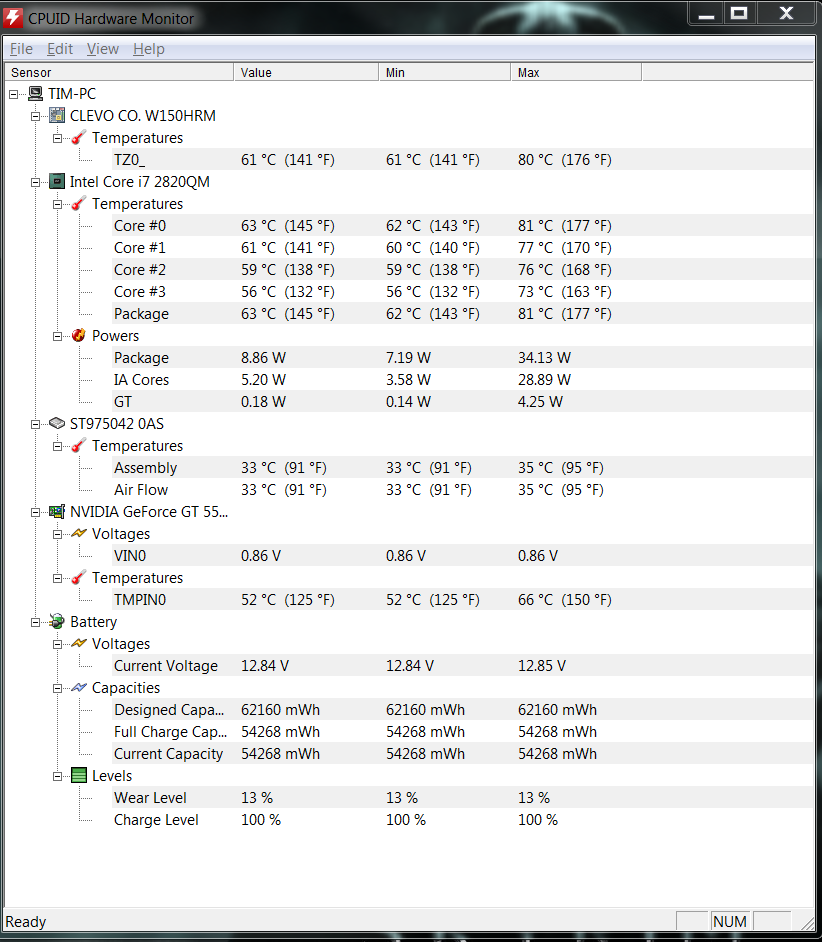
I ran a temperature test while I was playing the game just to see what it would hit and it ended up with a max of 81 degrees C is that acceptable? The temp monitor at the time below.
 Edited by Athronos - 16 Nov 2011 at 2:52pm |
|
|
|
|
Unlicensedhitman
Groupie
Joined: 25 Aug 2010 Online Status: Offline Posts: 292 |
Quote Reply
Posted: 16 Nov 2011 at 3:20pm |
|
I think I see your issue.
You should try playing the game without hardware monitering programs for temperatures run in the background. It causes your GPU's to constantly switch between the Intel GPU and the Nvidia GPU therefore causing game issues. |
|
|
Digital Storm xm15 laptop
-15.6" (1366x768) -Windows 7 HP 64-bit -Intel Core i5 2.4 Ghz -Nvidia GeForce 330GT 1GB + Intel HD w/ Nividia Optimus -6GB DDR3 ram -Intel 80GB SSD -Intel Wireless N 6300 |
|
|
|
|
Athronos
Newbie
Joined: 07 Sep 2011 Online Status: Offline Posts: 11 |
Quote Reply
Posted: 16 Nov 2011 at 3:53pm |
|
I only did that once and the game had absolutely no problems at all. It ran better than when I didn't have things running in the background. I did that merely to see what the game was making my computer run at.
|
|
|
|
|
Bronwen
Groupie
Joined: 29 Mar 2010 Online Status: Offline Posts: 193 |
Quote Reply
Posted: 16 Nov 2011 at 4:28pm |
|
I think it might be a skyrim problem. I have issues with the game with ctd for no reason. I will look at loading it up on my xm17 and see what happens though just to give it a try. Also check out the skyrim fourms there is a lot of information there about the crashing.
|
|
|
|
|
jmaster299
Newbie
Joined: 27 Aug 2011 Online Status: Offline Posts: 0 |
Quote Reply
Posted: 17 Nov 2011 at 12:05am |
|
There is a known issue with Skyrim and new drivers are supposed to come out next week. I don't have a link for you, sorry, but I saw the post on another game forum for it.
|
|
|
|
|
Bloodluster1
Newbie
Joined: 31 Jul 2009 Online Status: Offline Posts: 79 |
Quote Reply
Posted: 17 Nov 2011 at 9:42am |
|
My XM15 laptop (GT555M and 2630QM) runs Skyrim just fine. I'm not running at Ultra or at full 1080p (I'm running it at 720p). Also, you may need to force run the game with your Nvidia GT555M. Just right click the program and go to something like "Run with Graphics Processor" then hit "High-Performance Nvidia GPU." I tried adding the file to automatically run with the GPU but for some reason it won't automatically do it. And about the HWMonitor, I run that in the background and it doesn't mess with the game.
|
|
|
|
|
Athronos
Newbie
Joined: 07 Sep 2011 Online Status: Offline Posts: 11 |
Quote Reply
Posted: 17 Nov 2011 at 10:09am |
|
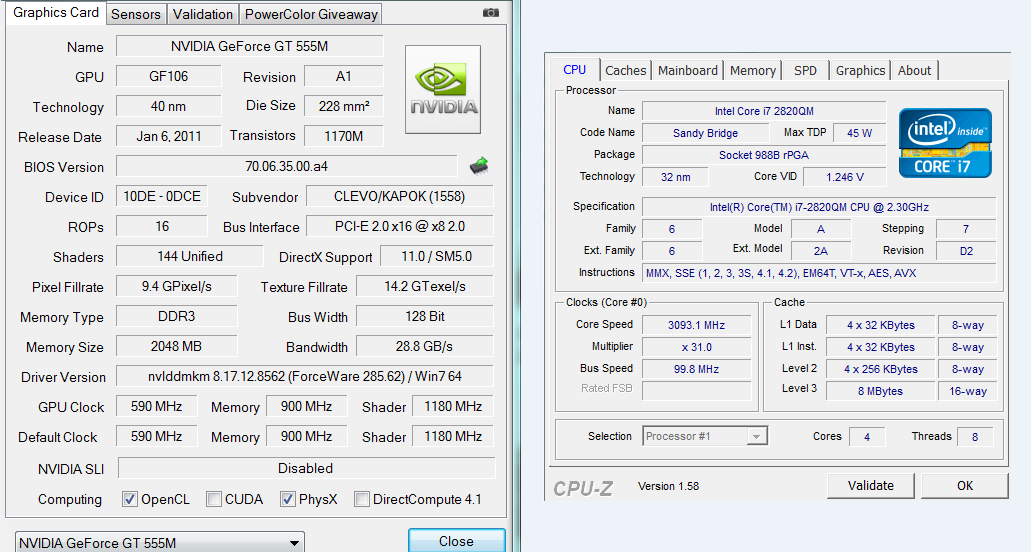
Yeah my laptop goes lag crazy if i try to run skyrim on ultra. The frame rate spazzes and moving the cross-hair becomes sluggish.
 Edited by Athronos - 17 Nov 2011 at 10:21am |
|
|
|
|
Athronos
Newbie
Joined: 07 Sep 2011 Online Status: Offline Posts: 11 |
Quote Reply
Posted: 17 Nov 2011 at 10:25am |
|
I seem to have fixed the crashing problem somewhat. I updated the software for my Logitech G930 headset and changed the audio settings and now its only crashed twice in near 4 5 hours of game play.
|
|
|
|
|
Alex
Admin Group
Digital Storm Supervisor
Joined: 04 Jun 2012 Online Status: Offline Posts: 16314 |
Quote Reply
Posted: 17 Nov 2011 at 2:35pm |
|
Interesting. Try to uninstall it to see if the issue goes away completely.
|
|
|
|
|
Athronos
Newbie
Joined: 07 Sep 2011 Online Status: Offline Posts: 11 |
Quote Reply
Posted: 17 Nov 2011 at 4:14pm |
|
Allot of the forms said that it was a problem with the way Skyrim treated audio and you had to use 44.1Khz 16-bit as the setting, So with or without the software it will still be a issue. With the windows audio manager, or with Realtek.
|
|
|
|
|
Post Reply
|
| Forum Jump | Forum Permissions You cannot post new topics in this forum You cannot reply to topics in this forum You cannot delete your posts in this forum You cannot edit your posts in this forum You cannot create polls in this forum You can vote in polls in this forum |

About Digital Storm
Contact Information
Facility Tour
Financing
Buy Now, Pay Later
Downloads
GSA Schedule
Terms & Conditions
Privacy Policy
Request Help
Call: 1-866-817-8676
(Hours 9AM-5PM PST)





 Topic Options