SSD QuestionPost Date: 2011-11-21 |
Post Reply 
|
| Author | |
TrainerRich 
Newbie 
Joined: 14 Oct 2011 Online Status: Offline Posts: 10 |
 Quote Reply Quote Reply
 Topic: SSD Question Topic: SSD QuestionPosted: 21 Nov 2011 at 1:39pm |
|
Hello this is my first SSD that I've owned and I have a few questions about optimization. My main question is how do I limit the amount of writes or reads or what ever it is called when my internet browser takes space on my SSD? I'm currently using firefox and I'm not sure how to limit the cache when I'm on the internet.
I could be using the wrong terminology but basically I don't want browsing on the internet to take up any space on my SSD. How do I go about setting options to achieve this? Any answers or guides would be greatly appreciated. |
|
 |
|
|
DST4ME
DS ELITE 

Joined: 14 Apr 2008 Online Status: Offline Posts: 36758 |
Quote Reply
Posted: 21 Nov 2011 at 4:17pm |
|
|
|
TrainerRich
Newbie
Joined: 14 Oct 2011 Online Status: Offline Posts: 10 |
Quote Reply
Posted: 21 Nov 2011 at 10:54pm |
|
Not yet. Should I download it on my ssd drive? What do I do with it after I download it; or I should say what folders should I run it on?
Thanks again |
|
|
|
|
DST4ME
DS ELITE
Joined: 14 Apr 2008 Online Status: Offline Posts: 36758 |
Quote Reply
Posted: 22 Nov 2011 at 12:29am |
|
Download and install it then go to the app's tab and check whatever you want deleted.
you don't need to specify any files or folders, cc does it on its own, if you have some custom files/folder you want to clean you can specify it in the options sections. download and install it and let me know. 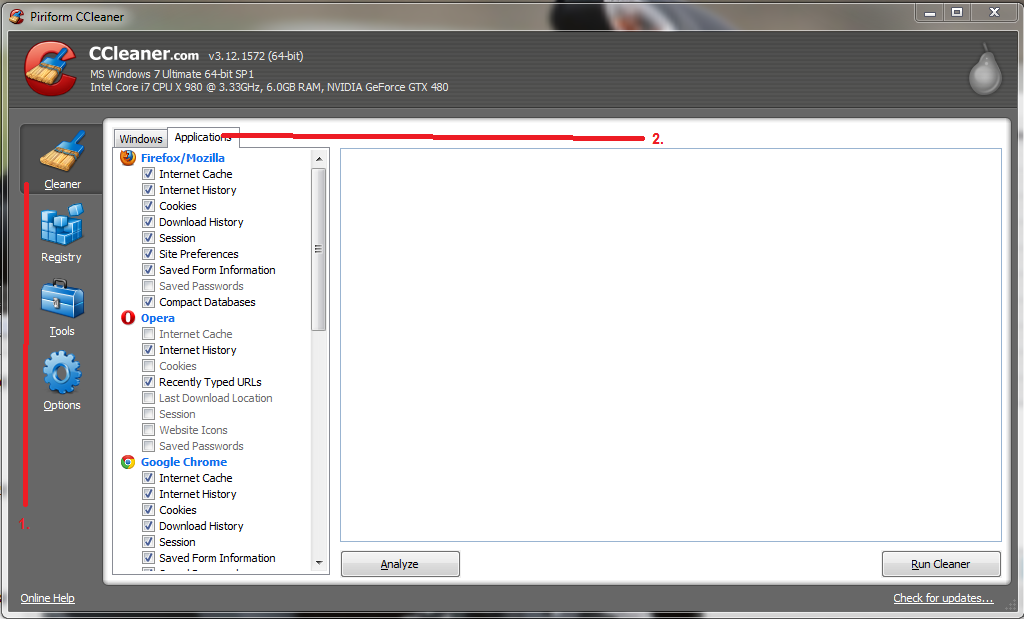
after step 2 check what you liked cleaned and then hit "run cleaner" and cc will do the rest. |
|
|
|
|
Post Reply
|
| Forum Jump | Forum Permissions You cannot post new topics in this forum You cannot reply to topics in this forum You cannot delete your posts in this forum You cannot edit your posts in this forum You cannot create polls in this forum You cannot vote in polls in this forum |

About Digital Storm
Contact Information
Facility Tour
Financing
Buy Now, Pay Later
Downloads
GSA Schedule
Terms & Conditions
Privacy Policy
Request Help
Call: 1-866-817-8676
(Hours 9AM-5PM PST)





 Topic Options