Starting to Overclock 470XPost Date: 2010-11-06 |
Post Reply 
|
| Author | |
AussieJT 
Newbie 
Joined: 08 Feb 2010 Online Status: Offline Posts: 50 |
 Quote Reply Quote Reply
 Topic: Starting to Overclock 470X Topic: Starting to Overclock 470XPosted: 06 Nov 2010 at 10:56am |
|
Hi all,
I got my DS rig on Friday and have started frantically putting it all together. I will be sure to write a review once I am satisfied that this is all working out fine! As this is my first Dual GPU rig and have been trying to get my head around it all and utilizing all of the software available (Furmark, MSI etc) to really test this thing out. I am running a single HP 23' monitor at 1920x1080 with a HDMI cable running from the top GPU. Here is my rig: Chassis Model: Special Deal Hot Seller - Cooler Master HAF 932Here is my question... Below is a screenshot of MSI after having run Furmark for 2-3 mins. I ran it for about 40 mins prior to this but did not take any screenshots. You will note that GPU 1 temps, fan speed and usage all go up as they should (temp to 92, usage to 99) but GPU 2 does not even move... 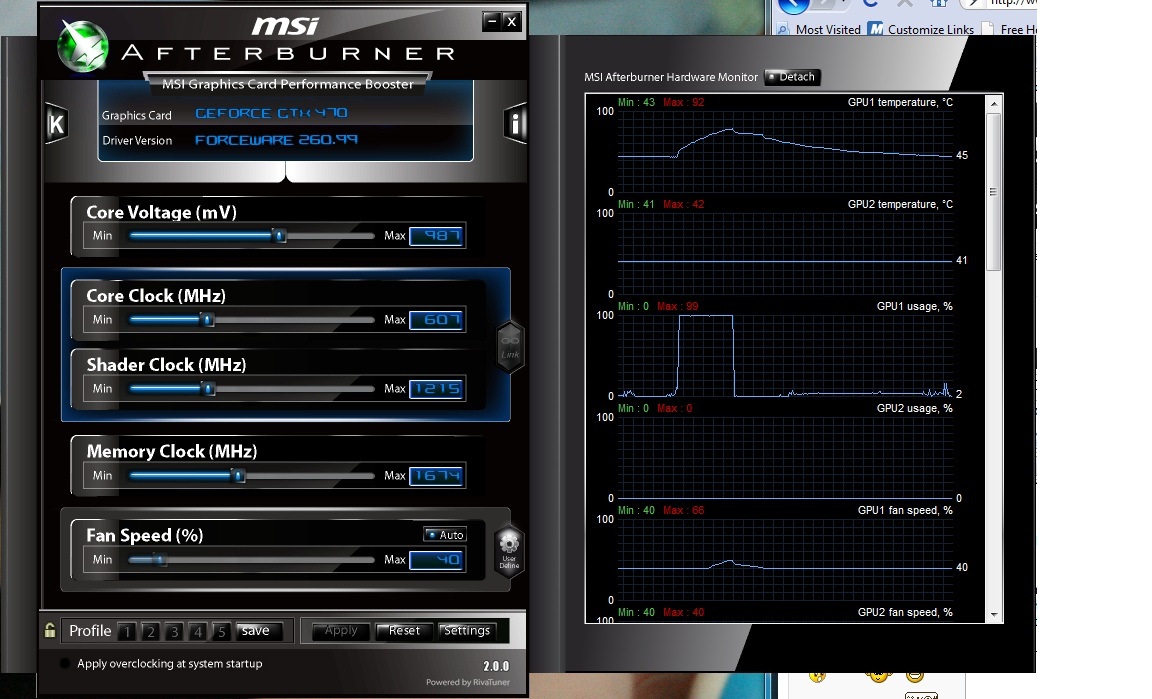 Is this right? I want to try and make sure that everything is in order before I go ahead and start the OC process as is described in http://www.digitalstormonline.com/forums/forum_posts.asp?TID=12677 Edited by AussieJT - 06 Nov 2010 at 11:00am |
|
 |
|
|
justin.kerr
DS Veteran 

Joined: 06 May 2008 Online Status: Offline Posts: 5084 |
Quote Reply
Posted: 06 Nov 2010 at 12:08pm |
|
running full screen? SLI enabled?
Temps too high, must mod the fan profile.
|
|

|
|
|
|
|
Dragoonseal
DS Veteran
Joined: 03 Apr 2009 Online Status: Offline Posts: 2247 |
Quote Reply
Posted: 06 Nov 2010 at 12:14pm |
|
I prefer a fan profile that looks like this:
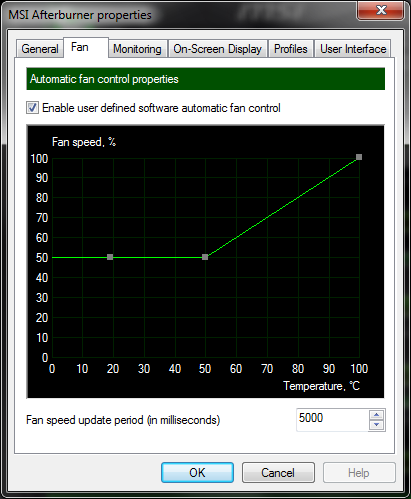 That way it scales with the temps until it finds a happy medium, without ever getting super loud. If you are overclocking you may want it to ramp up the fan faster though. And like Justin mentioned, if you are running two cards in SLI make sure to use the correct version of Kombustor and in full screen. Start menu --> All Programs --> MSI Kombustor --> MSI Kombustor (DX11 - Multi-GPU). |
|
|
Lilim
Intel Core i7 920 @4.2GHz HAF 932 - Dual SLI Nvidia GTX 480s 3x Intel X25-M G2 (80GB) SSD RAID0 |
|
|
|
|
AussieJT
Newbie
Joined: 08 Feb 2010 Online Status: Offline Posts: 50 |
Quote Reply
Posted: 06 Nov 2010 at 3:29pm |
|
I have changed the fan profile to meet that of yours Dragoonseal... I had seen this from you in an earlier post, just had not gotten to it yet. I am running Kombustor DX11 Multi-GPU and I have changed the primary GPU to GPU 2 and run it for another 5 mins... Below is the MSI screen shot while in action (sorry for the size)... But GPU 2 is all out of whack - even the numbers do not make sense to me like why the core, mem and shader clocks are so far out
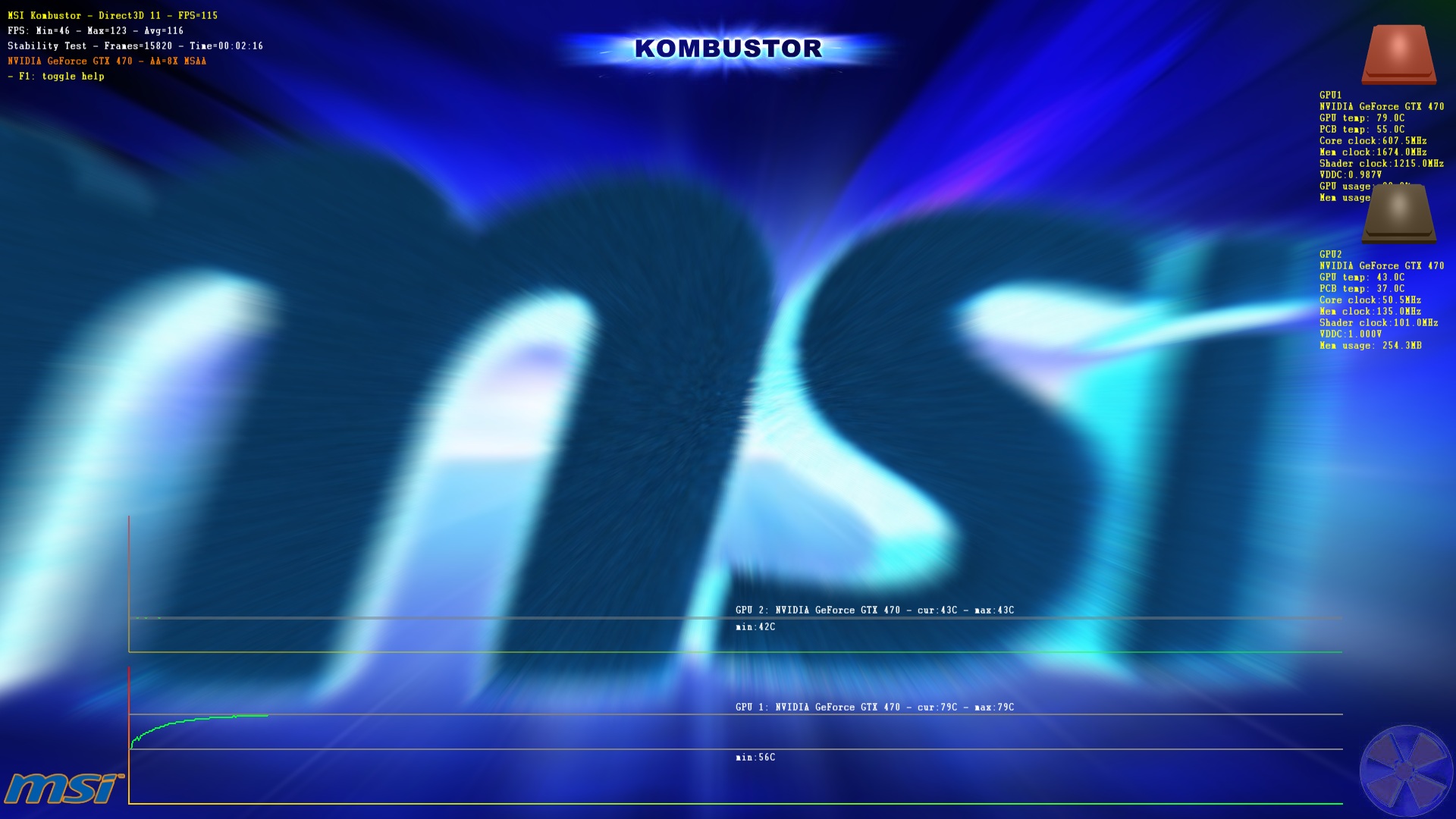 At full peg at 78 degrees temp max (better than the 90 of before) GPU 1 is hot to touch on the edge however GPU 2 is cool... You may even be able to make out on the MSI one that it looks like GPU 2 is only sending irregular signals as it is not a nice consistent smooth line but look slike it cuts in then out... Could it need a reseat? If so why would afterburner and recognize it? |
|
|
|
|
Dragoonseal
DS Veteran
Joined: 03 Apr 2009 Online Status: Offline Posts: 2247 |
Quote Reply
Posted: 06 Nov 2010 at 3:37pm |
|
GPU 2 isn't being used. Make sure the SLI bridge is connected between the two? Also right click the desktop and go to NVIDIA Control Panel, there will be a Set SLI and PhysX configuration option on the left menu, make sure SLI is enabled in it.
|
|
|
Lilim
Intel Core i7 920 @4.2GHz HAF 932 - Dual SLI Nvidia GTX 480s 3x Intel X25-M G2 (80GB) SSD RAID0 |
|
|
|
|
AussieJT
Newbie
Joined: 08 Feb 2010 Online Status: Offline Posts: 50 |
Quote Reply
Posted: 06 Nov 2010 at 4:25pm |
|
I had looked at that when I first turned the computer on and thought that's what I had selected... Apparently not! So now it all reads fine, thanks for the help Dragoon - That was the easiest fix ever (although it really makes me look like an idiot)...
 Now onto OCing these things... From the other forums and just to refresh - Bump up the Core by about 20, run Kombustor for 15 mins or so making sure there is nothing crazy going on... Keep doing this until it either crashes, blue screen or jumpy, wind back the 20 then up the voltage 30 or so... Then start again with the Core? I should get to about 800ish correct? And Afterburner will change both cards through the one correct? After this is done tomorrow I will be sure to get my review out... That is after I play SC2 for a few hours, Medal of Honor LE for a few hours and Napolean Total War (Free Game Now) for a few hours  |
|
|
|
|
AussieJT
Newbie
Joined: 08 Feb 2010 Online Status: Offline Posts: 50 |
Quote Reply
Posted: 07 Nov 2010 at 9:17am |
|
So this is what I have come up with at a first take at the SLI 470 OC...
 First I bumped it up to 637MHz and it all went fine... Then to 667MHz and MSI ran fine with no crash or anything however I am a little worried about the GPU 2 temp... I have the fans set like Dragoon has said above and the rig is about as open for airflow as it could get... Should I be worried? I plan on running this up until it crashes then bumping the voltage up a bit then doing all that again without affecting the Mem until last correct? I do not want it to crash due overheating GPU though  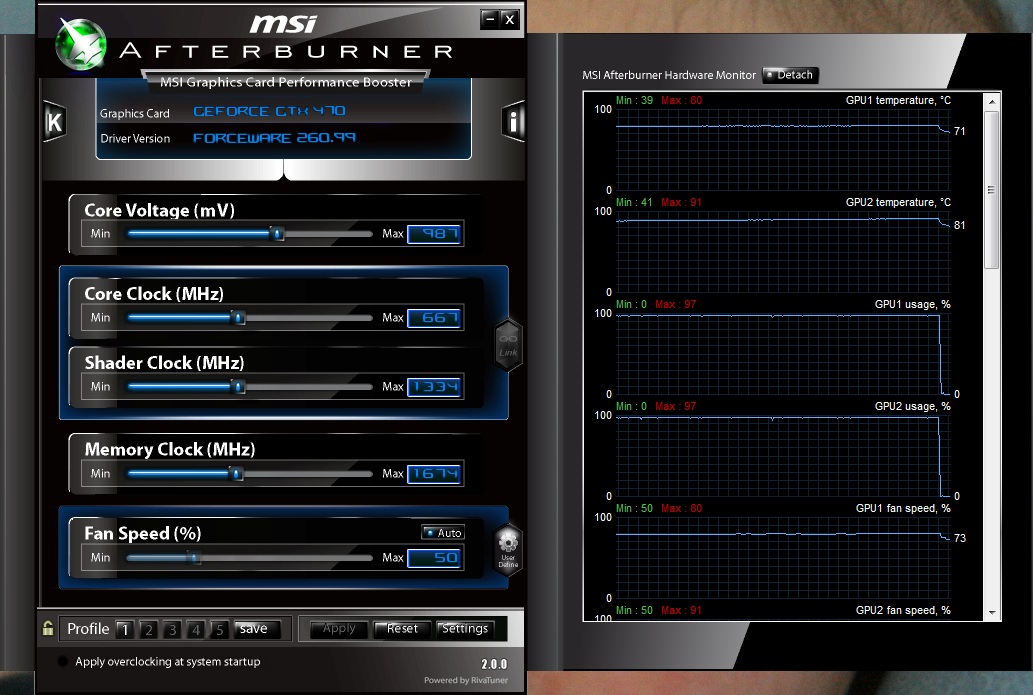 |
|
|
|
|
Post Reply
|
| Forum Jump | Forum Permissions You cannot post new topics in this forum You cannot reply to topics in this forum You cannot delete your posts in this forum You cannot edit your posts in this forum You cannot create polls in this forum You cannot vote in polls in this forum |

About Digital Storm
Contact Information
Facility Tour
Financing
Buy Now, Pay Later
Downloads
GSA Schedule
Terms & Conditions
Privacy Policy
Request Help
Call: 1-866-817-8676
(Hours 9AM-5PM PST)





 Topic Options