Storage shoppingPost Date: 2011-03-30 |
Post Reply 
|
| Author | |
breadCrumb 
Newbie 
Joined: 08 Dec 2010 Online Status: Offline Posts: 28 |
 Quote Reply Quote Reply
 Topic: Storage shopping Topic: Storage shoppingPosted: 30 Mar 2011 at 6:56pm |
|
Hey guys, I'm in the market for an external drive of some sort to add to my network consisting of two towers and laptop. Basically I have a whole bunch of programs I can download for free from school like Visio and such and I'm looking for a safe storage medium that has a good transfer rate. Maybe with some sort of NAS software built in. Anyway I know little about hard drive features and options to be considering, so anyone with an opinion please share. I imagine anything over 1-2 TB is probably gonna be excessive (I think anyway), and I was hoping to keep the price tag at around 100-300 range.
Much appreciated. |
|
 |
|
|
maxyme
DS Veteran 
Joined: 14 Aug 2010 Online Status: Offline Posts: 1514 |
Quote Reply
Posted: 30 Mar 2011 at 9:20pm |
|
A few weeks ago they sold a 1tb brand name one for $50 don't remember the brand but its a good deal for that price and size.
|
|
|
Steam:pcmaster160
|
|
|
|
|
ablahblah
DS Veteran

Joined: 12 Jun 2009 Online Status: Offline Posts: 2312 |
Quote Reply
Posted: 31 Mar 2011 at 12:28am |
|
I personally like the Seagate GoFlex series. I'd recommend you give the GoFlex Pro 750GB model a shot, it's got a 7200RPM drive compared to most externals with a 5400RPM drive. All of the Goflex models can be adapted to multiple connectors too, at the moment its configurable for USB 2.0, Firewire, eSATA, and USB 3.0. eSATA I'm favoring right now because USB 3.0 is pointless, most SSDs don't even venture into USB 3.0 territory, and according to a review by MaximumPC, eSATA performs better anyways.
GoFlex Pro 750GB eSATA adapter Bear in mind, however, that it's powered eSATA. You'll need a connector that can provide an eSATA signal and power. If you lack connectors looking like these on your case: 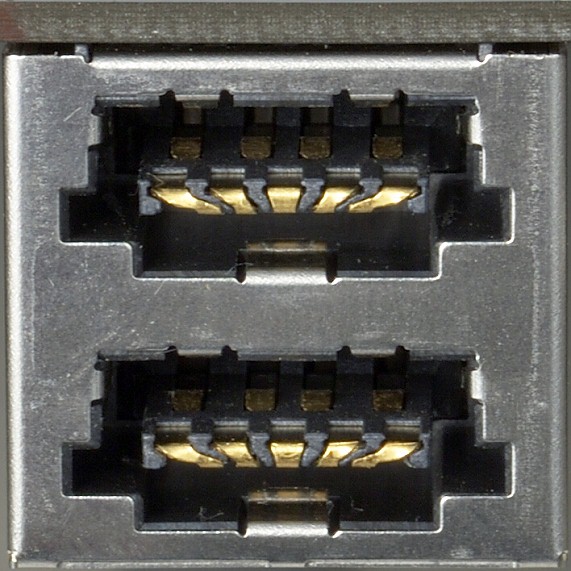 then you might need to just stick with USB or Firewire, unless you can find yourself a powered eSATA adapter of some means that splices in power for it. can't find one on amazon/newegg, surprisingly. Edited by ablahblah - 31 Mar 2011 at 12:40am |
|
|
R4D4RPR00F
Core i7 920 @ 3.9Ghz Asus Sabertooth X58 EVGA GTX 570 Mushkin 6GB 1414Mhz |
|
|
|
|
breadCrumb
Newbie
Joined: 08 Dec 2010 Online Status: Offline Posts: 28 |
Quote Reply
Posted: 31 Mar 2011 at 2:41am |
|
Looks good, gonna browse around for some prices on it. I have the hub for the eSata hookup but that doesn't necessarily mean its connected to anything at the moment. It's an x58 classified and I believe that supports it? I wasn't sure if a single drive was the best way to go or with something like this http://www.newegg.com/Product/Product.aspx?Item=N82E16822108065 with two cheap 1TB WD's or something thrown together with a RAID formation?
|
|
|
|
|
DST4ME
DS ELITE 
Joined: 14 Apr 2008 Online Status: Offline Posts: 36758 |
Quote Reply
Posted: 31 Mar 2011 at 5:39am |
|
I like to buy the enclosure myself and then drop whatever drive I want in there and I can change that drive if needed.
Your esata port on the mobo does not support multi drive you will need to get a esata pci card that supports multi drive if that is what you want to do. raid for storage is a bad idea IMHO. |
|
|
|
|
justin.kerr
DS Veteran
Joined: 06 May 2008 Online Status: Offline Posts: 5084 |
Quote Reply
Posted: 31 Mar 2011 at 10:14am |
|
All large storage setups are RAID, all secure sites that save DATA are in RAID.

|
|

|
|
|
|
|
DST4ME
DS ELITE
Joined: 14 Apr 2008 Online Status: Offline Posts: 36758 |
Quote Reply
Posted: 31 Mar 2011 at 6:51pm |
|
not raid zero, raid one yes for data security, even the ones that do raid zero use different types of drives, and don't use software raid.
the OP is talking about raid 0 with 2 regular drives and software raid, no company uses that setup for storage/security. Edited by DST4ME - 31 Mar 2011 at 6:53pm |
|
|
|
|
breadCrumb
Newbie
Joined: 08 Dec 2010 Online Status: Offline Posts: 28 |
Quote Reply
Posted: 01 Apr 2011 at 12:39am |
|
Thanks for the responses, couple extra questions:
What is multidrive? I don't see it listed on the specs on things. How do you know if your eSata does support it? I don't have the option of another PCIE slot being taken up or PCI for that matter so would that make the enclosure the better route? How bad would the performance be thru ethernet on the local network? Also curious now what type of drives they do use for RAID storage? I thought it was possible to setup any type of RAID configuration not just 0? Thanks, again I know nothing and I've done a little reading but find it's best to just get some advice from guys that know their stuff. |
|
|
|
|
DST4ME
DS ELITE
Joined: 14 Apr 2008 Online Status: Offline Posts: 36758 |
Quote Reply
Posted: 01 Apr 2011 at 2:21am |
|
by multi drive I mean an external that has more then one hdd in it, two or more, the esata port will make use of only one drive and not see the rest, a pci esata card that supports multi drive will not have that problem, I don't know why they made these esata ports on the x58 this way and not gave it support for multi.
business use different kinds of drives, like sas drives, and etc. You can setup other raids then just 0, I thought you were talking about setting up zero. |
|
|
|
|
ablahblah
DS Veteran
Joined: 12 Jun 2009 Online Status: Offline Posts: 2312 |
Quote Reply
Posted: 01 Apr 2011 at 2:24am |
|
Buying an enclosure is great because of the flexibility, the reason why I like the GoFlex drive though is because it's in a nice 2.5" style enclosure, while being easily and simply adaptable to multiple types of connectors. Your mobo has a powered eSATA port too, so that'll work fine!
Edited by ablahblah - 01 Apr 2011 at 2:25am |
|
|
R4D4RPR00F
Core i7 920 @ 3.9Ghz Asus Sabertooth X58 EVGA GTX 570 Mushkin 6GB 1414Mhz |
|
|
|
|
breadCrumb
Newbie
Joined: 08 Dec 2010 Online Status: Offline Posts: 28 |
Quote Reply
Posted: 02 Apr 2011 at 11:32am |
|
I looked it over and realized the only problem with the GoFlex is since I have two towers and a laptop on the network, unless I get the sharing dock it's going to be dependent on leaving the tower its hooked up into running at all times. I honestly hadn't even thought about the fact I would want to be able to access it independently of any of the one computer.
 Once the sharing dock purchase is factored in, the flexibility of getting a NAS becomes more appealing since the prices started to equal out. So now I just have to decide on the most practical internal drives to populate one with to RAID. Once the sharing dock purchase is factored in, the flexibility of getting a NAS becomes more appealing since the prices started to equal out. So now I just have to decide on the most practical internal drives to populate one with to RAID.Anyway, appreciate all your guy's feedback. |
|
|
|
|
Post Reply
|
| Forum Jump | Forum Permissions You cannot post new topics in this forum You cannot reply to topics in this forum You cannot delete your posts in this forum You cannot edit your posts in this forum You cannot create polls in this forum You cannot vote in polls in this forum |

About Digital Storm
Contact Information
Facility Tour
Financing
Buy Now, Pay Later
Downloads
GSA Schedule
Terms & Conditions
Privacy Policy
Request Help
Call: 1-866-817-8676
(Hours 9AM-5PM PST)





 Topic Options