System spec questionPost Date: 2012-09-12 |
Post Reply 
|
| Author | |
JohnD212 
Groupie 

Joined: 05 Jul 2012 Online Status: Offline Posts: 125 |
 Quote Reply Quote Reply
 Topic: System spec question Topic: System spec questionPosted: 12 Sep 2012 at 10:32pm |
|
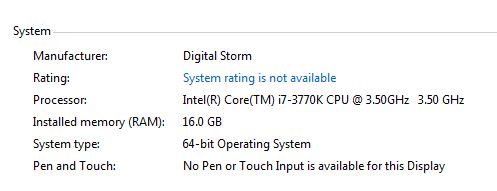
I have my new system set up and I have a 4.5GHZ overclocked system WHen I go into my computer and right click and look at properties I see the following picture. It says I only have a 3.5 GHZ. Why is that? How do I know I got my 4.5GHZ overclock?
|
|
 |
|
|
Tidgxor
DS ELITE 
The Kokopelli kid
Joined: 17 Sep 2010 Online Status: Offline Posts: 13000 |
Quote Reply
Posted: 12 Sep 2012 at 10:53pm |
|
Download CPU-Z then put your CPU under some stress. The Windows Experience Index test always worked for me, but for some it doesn't seem to change the reading. Anything really CPU intensive such as a testing program or even a CPU-heavy game will work. Just crank up the power and watch the reading in CPU-Z raise to 4.5Ghz. Essentially what is happening is that your CPU is "idling" at the moment. Additionally, few programs read the true Hz of the CPU by default. For instance my CPU is originally 3.5Ghz as well, but it is running at 4.5Ghz, though most programs just show it as 3.5Ghz since that's its "hardware level" label.
|
|
|
My Two Digital Storm Rigs: Mr. Bojangles (HAF-X, 2010) & Mrs. Bojingles (Bolt I, 2013).
|
|
|
|
|
Alex
Admin Group 
Digital Storm Supervisor 
Joined: 04 Jun 2012 Online Status: Offline Posts: 16314 |
Quote Reply
Posted: 12 Sep 2012 at 11:18pm |
|
Well said.
|
|

|
|
|
|
|
JohnD212
Groupie
Joined: 05 Jul 2012 Online Status: Offline Posts: 125 |
Quote Reply
Posted: 13 Sep 2012 at 8:53am |
|
Ok. I had no idea it did that but it makes sense. I will test it when I'm playing a game. For some reason when I tried to run the Windows Experience test it made my system blue screen. I might try again tonight.
Any reason why it might cause my system to blue screen? |
|
|
|
|
Tidgxor
DS ELITE
The Kokopelli kid
Joined: 17 Sep 2010 Online Status: Offline Posts: 13000 |
Quote Reply
Posted: 13 Sep 2012 at 9:13am |
|
Well, Its probably one of two things. Does it blue screen every time you try to run the test?
Its probably either a driver issue, or related to the overclock. Personally I would run it again and see if you get another BSOD. If you do, try temporarily disabling your Overclock and see if that fixes the issue. If the BSOD continues with no overclocking, then its likely a driver issue. |
|
|
My Two Digital Storm Rigs: Mr. Bojangles (HAF-X, 2010) & Mrs. Bojingles (Bolt I, 2013).
|
|
|
|
|
JohnD212
Groupie
Joined: 05 Jul 2012 Online Status: Offline Posts: 125 |
Quote Reply
Posted: 13 Sep 2012 at 9:17am |
|
oh ok. I only ran it once (literally 10 minutes after setting up the system) and the BSOD was enough to make me not want to try it again for a little while. I'll give another try tonight. Is it fairly easy to disable the Overclock? I'm sure I'll have to call DS to figure out how but I'm hoping it's easy to do.
|
|
|
|
|
bprat22
DS ELITE
DigitalStorm East -- (Unofficially!)
Joined: 08 Jun 2011 Online Status: Offline Posts: 20391 |
Quote Reply
Posted: 13 Sep 2012 at 10:00am |
|
Hi JohnD212... DS has a pretty good flowchart that is easy to follow.
Go to Support tab, on top of this page, click My Account, login with name and account # and use the first flowchart under blue screen, etc called During Gameplay/ Stability. Follow the righthand path for multiple games and it takes you there in a few question. Basically its reboot, hit delete key a few times on power up, Bios opens, load default setup( F5) and save/exit(F10, I believe). Good Luck.
Edited by bprat22 - 13 Sep 2012 at 10:18am |
|
|
|
|
Post Reply
|
| Forum Jump | Forum Permissions You cannot post new topics in this forum You cannot reply to topics in this forum You cannot delete your posts in this forum You cannot edit your posts in this forum You cannot create polls in this forum You can vote in polls in this forum |

About Digital Storm
Contact Information
Facility Tour
Financing
Buy Now, Pay Later
Downloads
GSA Schedule
Terms & Conditions
Privacy Policy
Request Help
Call: 1-866-817-8676
(Hours 9AM-5PM PST)





 Topic Options