Testing results of new rigPost Date: 2012-07-05 |
Post Reply 
|
| Author | |
Asangard 
DS Veteran 

Joined: 21 Aug 2009 Online Status: Offline Posts: 2209 |
 Quote Reply Quote Reply
 Topic: Testing results of new rig Topic: Testing results of new rigPosted: 05 Jul 2012 at 2:52pm |
|
Here is my build:
Chassis Model: Special Deal Hot Seller - Cooler Master 942 HAF X Exterior Finish: - Standard Factory Finish Trim Accents: - Standard Factory Finish Processor: Intel Core i5 3570K 3.40 GHz (Unlocked CPU) (Quad Core) (Requires Z77 Motherboard) Motherboard: ASUS SABERTOOTH Z77 (Intel Z77 Chipset) (Features Thermal Armor and Thermal Radar) System Memory: 16GB DDR3 1600MHz Digital Storm Certified Performance Series (Highly Recommended) (Hand Tested) Power Supply: 1050W Corsair Pro Silver 1050HX (Dual/Triple/Quad SLI Compatible) Expansion Bay: - No Thanks Hard Drive Set 1: Operating System: 1x (180GB Solid State (By: Intel) (Model: 520 Series) Set 1 Raid Options: - No Thanks Hard Drive Set 2: Multimedia\Data: 1x (500GB Western Digital/Seagate/Hitachi/Samsung (7200 RPM) (16MB Cache) Hard Drive Set 3: Backup\Misc.: - No Thanks Optical Drive 1: DVD-R/RW/CD-R/RW (DVD Writer 24x / CD-Writer 48x) Optical Drive 2: - No Thanks Internet Access: High Speed Network Port (Supports High-Speed Cable / DSL / Network Connections) Video Card(s): 2x SLI Dual (NVIDIA GeForce GTX 670 4GB (Includes PhysX) Add-on Card: - No Thanks Sound Card: Integrated Motherboard Audio Extreme Cooling: AIR: Stage 2: Noctua NH-D14 SE2011 Extreme Performance H20 Tube Color: - Not Applicable, I do not have a FrostChill or Sub-Zero LCS Cooling System Selected Chassis Airflow: Standard Factory Chassis Fans Internal Lighting: Internal Chassis Lighting System (Red) Enhancements: - No Thanks Chassis Mods: - No Thanks Noise Reduction: - No Thanks LaserMark: - No Thanks CPU Boost: Stage 2: Overclock CPU 4.5GHz to 4.8GHz (Requires Pro/Deluxe/Sabertooth Motherboard) Graphics Boost: - No Thanks, Please do not overclock my video card(s) Memory Boost: - No Thanks, Please do not overclock my memory OS Boost: - No Thanks, Please do not tweak the services on the operating system Windows OS: Microsoft Windows 7 Professional (64-Bit Edition) Recovery Tools: Windows Recovery Toolkit (Bundled with Windows 7 CD) Virus Protection: - No Thanks Office: - No Thanks Game: - No Thanks Display: - No Thanks Surge Shield: - No Thanks Speakers: - No Thanks Keyboard: - No Thanks Mouse: - No Thanks External Storage: - No Thanks Exclusive T-Shirt: FREE: Digital Storm T-Shirt - Black (Extra Large) Priority Build: - No Thanks, Ship Within 10-15 Business Days After Order Is Successfully Processed Warranty: Life-time Expert Customer Care with 3 Year Limited Warranty Just to recap I ordered this on Friday Jun15th and it shipped on Friday Jun 22 and it arrived in Michigan on Friday Jun 29th. 2 weeks total.  After installing all my software and transferring files and downloading 122 mods for Skyrim I finally got to test this beast out. Here are my test results. Test results are using the Dell UltraSharp U2410 (1920 x 1200 resolution) monitor and Skyrim. It is the only game I am currently playing. I used FRAPS to monitor FPS and HWMonitor, Real Temps and GPUz to monitor the system 1st I just ran Skyrim on Ultra Settings with no mods just to see how it ran. With vsync disabled FPS was 120 to 150. I had to re-enable vsync as screen tearing was really bad. This maxes FPS at 60. Game ran silky smooth. Next I ran Prime95 and FurMark for an hr just to see what max temps I was getting. Ambient Temp for test was 75 F. Idle CPU Temps for the 4 cores HM 30c,32c,38c,38c Idle CPU Temps for the 4 cores RT 29c,31,37,37c Max CPU Temps for the 4 cores HM 68c,79c,81c,73c Max CPU Temps for the 4 cores RT 74c,84c,83c,79c Temps for the graphics cards were the same for both HM and GPUz. Fans set to auto. Graphics Cards Zotac GTX 670 4GB Idle Temp card 1 - 35c Idle Temp card 2 - 31c Max Temp card 1 - 86c Max Fan speed 65%, GPU usage 99% Max Temp card 2 - 84c Max Fan speed 61%, GPU usage 99% Fans set to manual at 80% (at 80% fans were quite loud, at 65% fairly quiet) Max Temp card 1 - 70c Max Temp card 2 - 67c Next I ran Skyrim on Ultra Settings with all 122 mods installed and a number of ini tweaks. In other words I pushed the graphics about as much as posible. Ambient temp was 80F. I set GPUz to log the data and logged 2 1/4 hrs on card 1 and 1 1/2 hrs on card 2. GPUz logs the data every second. I left vsync enabled and outdoors FPS didn't drop below the max of 60. Indoors at a shop FPS dropped to a low of 45. After the tests were done I disable vsync and outdoors FPS ran in the 70 to 80 range mostly with 100 in some areas. Max CPU Temps for the 4 cores HM 56c,61c,66c,58c Max CPU Temps for the 4 cores RT 57c,65c,67c,62c Obviously Skyrim is not CPU intensive as temps were 16 to 19c lower than with Prime95. The following is the logged data from GPUz Graphics Card #1 Max Temp 87c, most of the time 70 to 80c Max fan speed 67% Max memory used 2.683GB out of 4GB vram MemController Load 50% in heavy Graphics areas mid to upper 30s normally one spike at 69% Graphics Card #2 Max Temp 84c, most of the time 70 to 80c Max fan speed 62% Max memory used 2.725GB out of 4GB vram MemController Load 50% in heavy Graphics areas mid to upper 30s normally one spike at 61%. Next I disabled all the mods and ran tests with just the Ultra settings and the ini tweaks. I logged 12 minutes of data on each card just for a comparison. I ran from one town to another and back FPS never droped below the 60 max with vsync. Next I spent 1 min in the shop where FPS dropped to a low of 50. Graphics Card #1 Max Temp 84c, most of the time 60 to 70c Max fan speed 65% Max memory used 1.715GB out of 4GB vram MemController Load 50% in shop with low to mid 20s outdoors. Graphics Card #2 Max Temp 82c, most of the time 60 to 70c Max fan speed 61% Max memory used 1.599GB out of 4GB vram MemController Load 50% in shop with low to mid 20s outdoors. As you can see there was a big drop in vram usage when I disabled all the mods. In the test with all the mods in less than a minute Skyrim was using over 2GBs of vram on each card and never dropped below 2GBs. With the mods disabled the vram usage never got over 2GBs. So for me at least this confirms that my choice of going with the 4GB GTX 670s was a good one. From the data it looks like Skyrim, heavly modded uses more than the 2GB of vram that comes with the standard card. I am completely statisfied with the performance I have seen both from the data and in game with this rig.  |
|
|
Not from Without, Therefore, the 1st step on the Holy Warrior path, Is to recognize thyself as thy 1st enemy. |
|
 |
|
|
Alex
Admin Group 
Digital Storm Supervisor 
Joined: 04 Jun 2012 Online Status: Offline Posts: 16314 |
Quote Reply
Posted: 05 Jul 2012 at 3:00pm |
|
Awesome review! Especially with the data provided. Post some pics.
|
|

|
|
|
|
|
bprat22
DS ELITE 
DigitalStorm East -- (Unofficially!)
Joined: 08 Jun 2011 Online Status: Offline Posts: 20391 |
Quote Reply
Posted: 05 Jul 2012 at 3:03pm |
|
Thanks for the awesome testing results. You have great rig and the tests confirm it. Hats off to you for your picks and DS for their build quality.

|
|
|
|
|
Asangard
DS Veteran
Joined: 21 Aug 2009 Online Status: Offline Posts: 2209 |
Quote Reply
Posted: 05 Jul 2012 at 3:14pm |
|
Alex I posted pics in a previous post. But here they are again.
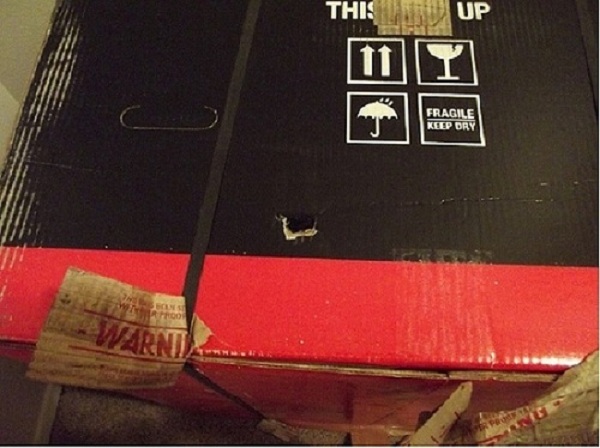 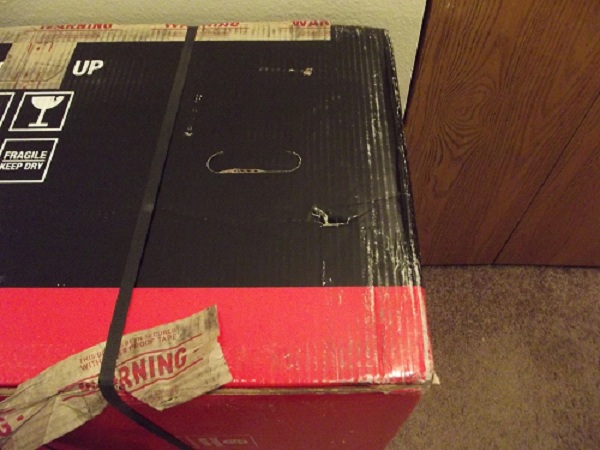 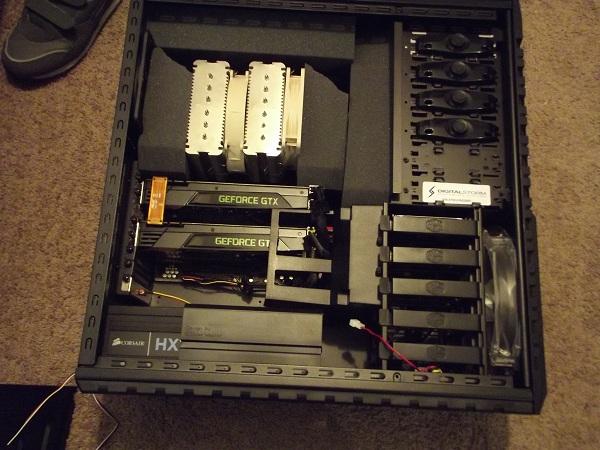 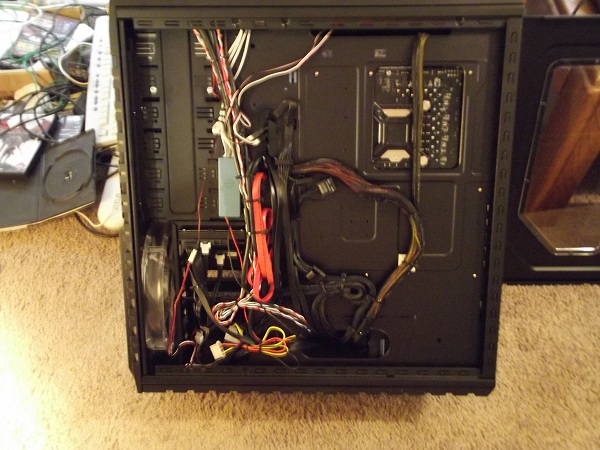 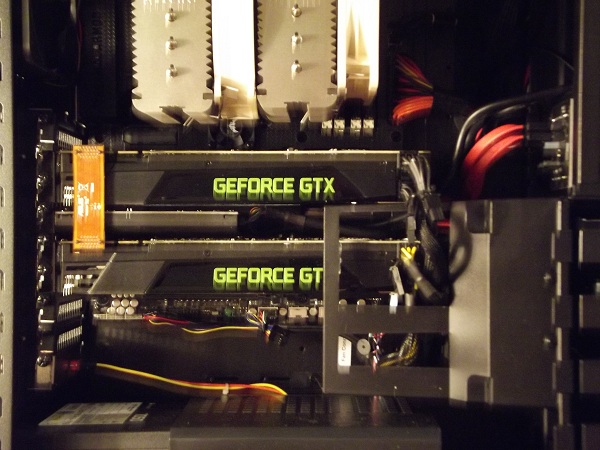 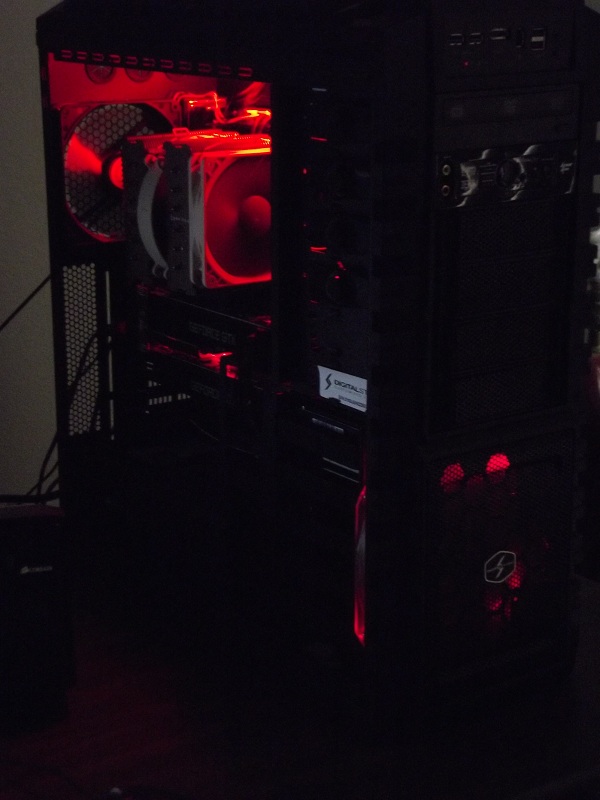 
|
|
|
Not from Without, Therefore, the 1st step on the Holy Warrior path, Is to recognize thyself as thy 1st enemy. |
|
|
|
|
Alex
Admin Group
Digital Storm Supervisor
Joined: 04 Jun 2012 Online Status: Offline Posts: 16314 |
Quote Reply
Posted: 05 Jul 2012 at 3:51pm |
|
Ah ok thanks!
|
|
|
|
|
|
|
|
Err0xx
Groupie 
Joined: 19 May 2012 Online Status: Offline Posts: 106 |
Quote Reply
Posted: 05 Jul 2012 at 6:07pm |
|
The question I would like to see an answer to, that you may be able to answer is about the 4gb graphics cards.
Windows uses extra ram because it's there. Graphics cards, in relation to software are the same. The fact that you have 4gb means that smart game programming will use as much of this 4gb as it can, yet not necessarily benefit from it, similiar to how windows will use more ram if you have more free, yet past a certain point, the benefits of "using" this extra memory become so small as to not matter. What I'm getting at is I have another PC in the house that has 2 GTX690 video cards, which have 2gb of vram per card. I run Skyrim with about 128 mods on it. On Ultra everything, with all mods enabled, I see about 1.8 to 2gb of VRAM usage, yet my FPS are higher than yours, and there is no slowdown whatsoever. Also in my house is a computer with 2 GTX680s. Running Skyrim with the exact same 128 mods, ultra everything, the FPS is higher than yours but lower than my 690s, by a pretty good margin. In conclusion, based on my testing with 2gb and 4gb cards, games use the extra VRAM just because it's there as unused VRAM is wasted VRAM, even when the difference it makes is nonexistent. I feel confident that if you had cards with 6gb VRAM, you would see even more average VRAM usage just because its there. I've never seen a benchmark and can't find one (after hours of looking) that show any form of a benefit of 4gb per card as opposed to 2gb. The result across all benchmarks, is that the end result Frames-Per-Second, with identical graphics quality settings under the same conditions, in a 4gb vs. 2gb card, are not affected by VRAM. In other words, even though the 4gb cards have a higher average VRAM usage and more available VRAM, the 2gb cards produce the exact same FPS and performance under identical testing conditions. All tests I've seen are 2gb vs. 4gb, anything lower than 2gb is eventually going to affect performance, but so far, there have been no performance differences between 2gb and 4gb. So what I'm getting at, is I can test the exact same game, under the exact same conditions using 2 different 2gb cards but I don't personally own a 4gb card, I've had to rely on a friends borrowed PC in a different temperature environment with a few of different variables to test the same game with a 4gb card. Do you have access to a 2gb card on another pc to do a direct comparison to your 4gb card with all other variables being as close as possible? This is a test that the online world would be heavily interested in, including myself, even though other tests have already been done. This is still a pretty new testing zone. I took a PC with almost identical everything, except video cards and slight temperature differences, and based on running skyrim with the same 128 mods ultra everything the following results were recorded: 2 GTX 670 4GB SLI = 87 FPS average (~ 2.84gb VRAM used per card) **This test used a PC with slightly different other hardware, but comparable. Same CPU** 2 GTX 680 2GB SLI = 104 FPS average (1.9 - 2gb VRAM used per card) 2 GTX 690 4GB (2GB per GPU) = 178 FPS Average (Not recorded - software had problems monitoring VRAM usage on dual GPU Cards) Despite the higher available VRAM, it didn't equate to higher performance. For testing purposes, all were done on a 1920 x 1080 monitor and all involved the same route across central Skyrim, through some of the most demanding environments for shadows, etc. I would just be curious to see how your results compared to mine. Thanks for your review. Edited by Err0xx - 05 Jul 2012 at 6:25pm |
|
|
|
|
Asangard
DS Veteran
Joined: 21 Aug 2009 Online Status: Offline Posts: 2209 |
Quote Reply
Posted: 06 Jul 2012 at 8:55am |
|
No I don't have a 2GB card to test. All my data was record with vysnc on. This caps FPS at the refresh rate of your monitor. In my case 60 FPS. I went back and disabled vysnc and used FRAPS recorded the AVG FPS. I made 3 different runs around Skyrim using different paths and my results were: 1st run - 84.56 FPS 2nd run - 87.439 FPS 3rd run - 90.324 FPS The screen tearing cassed by high FPS over the frame rate for me is unplayable. So for gaming purposes I will have vshnc enabled. You said: "The fact that you have 4gb means that smart game programming will use as much of this 4gb as it can" And again : " I feel confident that if you had cards with 6gb VRAM, you would see even more average VRAM usage just because its there." If this is true then why was the max vram usage I saw only 2.7GB? This left 1.3GB unused. Aso as stated in my original post I tested Skyrim with and without mods installed. For the tests without mods the vram usage never got over 1.7 GB even though my cards have 4GB. So the game from my tests without mods installed didn't use all the available vram. As I stated in my original post vram used dropped considerably without any mods installed. Also my tests were on a slightly higher resolution monitor (1920 x 1200) than yours so performance should be slighly less than what you saw. Also there is no way we can really compare our results unless we were using the exact same mods, ini tweaks, monitor resolution not to mention equipment. You said that you had 128 mods and I didn't see anywhere in your post about ini tweaks. I was using 122 mods and a number of ini tweaks. There are litterly thousands of mods for Skyrim out. Every mod effects the game and performance differently. You have a particular point of view and that is fine. I did only spend 24 minutes testing without mods as compared to 3 3/4 hrs with mods installed. I will go back and unistall all my mods and ini tweaks and spend a comparable amount of time testing without mods to see how much vram is used.
|
|
|
Not from Without, Therefore, the 1st step on the Holy Warrior path, Is to recognize thyself as thy 1st enemy. |
|
|
|
|
Tidgxor
DS ELITE
The Kokopelli kid
Joined: 17 Sep 2010 Online Status: Offline Posts: 13000 |
Quote Reply
Posted: 06 Jul 2012 at 10:28am |
|
Thanks for posting the info!
|
|
|
My Two Digital Storm Rigs: Mr. Bojangles (HAF-X, 2010) & Mrs. Bojingles (Bolt I, 2013).
|
|
|
|
|
Asangard
DS Veteran
Joined: 21 Aug 2009 Online Status: Offline Posts: 2209 |
Quote Reply
Posted: 08 Jul 2012 at 12:36pm |
|
Back with some more tests results and thank you for your responses.
1st I forgot to mention that in all my previous tests I also changed a number of settings in NVIDIA Inpsector for Skyrim. Those changes were as follows 1st figure is default setting, 2nd is my change:' Antialiasing - Transparance super sampling: off, 8x Aristropic Filter Setting: 8x, 16x Texture Filtering - LOD bias(DX9): 0.000, -0.250 Texture Filtering - Quality: Quality, High Quality Ambient Occlusion Setting: off, High Quality Multi-display/mixed - GPU acceleration: Multi Display performance mode, Single Display performance mode Fore all the following test results I followed the same path. I started in Helgen just after the Dragon attack. Did the escape from Helgen quest then went on to Riverwood. Sold a bunch of stuff at the shop, slept for the night then did a bunch of crafting. All the following tests used Skyrim Ultra settings. Test 1 - Default NVIDIA Inspector settings, no mods, and no ini tweaks. Avg FPS 169.351, Max vram used 1.186GB Test 2 - NVIDIA Inspector settings from above, no ini tweaks and no mods Avg FPS 100.521, Max vram used 1.559GB Test 3 - NVIDIA Inspector Settings from above, my ini tweaks and no mods Avg FPS 87.397, Max vram used 1.666GB Test 4 - NVDIA Inspector Settings from above, ini tweaks and all my mods Avg FPS 85.015, Max vram used 2.502GB It is clear that the NVIDIA Inspector changes and the mods I added had the biggest impact on how much vram was use. The authors of the high resolution textures mods (Skyrim Nexus Site) generally had 2 or 3 different mods with different resolutions. They would say use the lowest for graphics cards with less than 1GB vram, another for over 1GB vram and a few had mods for vram 1.5 or more. It's the authors of these mods contention then that high resolution textures drives how much vram is used. This would seem to exlain my results with the NVIDIA Inspector changes and then with the mods I used. It appears there is a stacking effect with all these Hi Resolution Texture mods running together. Which on the face of it makes sense. It would require a lot more testing to actually prove it. It would require adding a mod running tests then adding another and running tests. I have spent nearly all my time testing since I received my new rig which I did enjoy. I am not prepared to spend another week or 2 running more tests though. It's time for me to start actually playing games which after all is why I bought this beast.
Edited by Asangard - 08 Jul 2012 at 12:39pm |
|
|
Not from Without, Therefore, the 1st step on the Holy Warrior path, Is to recognize thyself as thy 1st enemy. |
|
|
|
|
bprat22
DS ELITE
DigitalStorm East -- (Unofficially!)
Joined: 08 Jun 2011 Online Status: Offline Posts: 20391 |
Quote Reply
Posted: 08 Jul 2012 at 12:51pm |
|
Another great job.
Time to sit back and Enjoy. Thanks.
|
|
|
|
|
Post Reply
|
| Forum Jump | Forum Permissions You cannot post new topics in this forum You cannot reply to topics in this forum You cannot delete your posts in this forum You cannot edit your posts in this forum You cannot create polls in this forum You can vote in polls in this forum |

About Digital Storm
Contact Information
Facility Tour
Financing
Buy Now, Pay Later
Downloads
GSA Schedule
Terms & Conditions
Privacy Policy
Request Help
Call: 1-866-817-8676
(Hours 9AM-5PM PST)





 Topic Options