UpgradePost Date: 2020-04-17 |
Post Reply 
|
| Author | |
Kfroggydog 
Newbie 

Joined: 17 Apr 2020 Online Status: Offline Posts: 3 |
 Quote Reply Quote Reply
 Topic: Upgrade Topic: UpgradePosted: 17 Apr 2020 at 12:08pm |
|
I want to install an SSD drive, I don't want to buy the wrong one so could someone tell me which one to buy. I have Processor: AMD Ryzen 5 2400G (4-Core) (Boost Up to 3.9 GHz)
Motherboard: ASUS / MSI (AMD A320M Chipset) (Up to 2x PCI-E Devices) System Memory: 8GB DDR4 Digital Storm Performance Series Power Supply: 600W Digital Storm Performance Series (Supports up to an NVIDIA GTX 1080 GPU) |
|
 |
|
|
Cretae
DS Veteran 
Joined: 22 Mar 2010 Online Status: Offline Posts: 7331 |
Quote Reply
Posted: 18 Apr 2020 at 3:52am |
|
Look up your motherboard specs that came with your computer. If you have an unused M.2 slot on your motherboard, I would recommend you get one of those. They are the size and shape of a small pocket comb, and it plugs into a slot right on the front of the board at one end, and is fastened down by a screw at the other end. Looks like this:
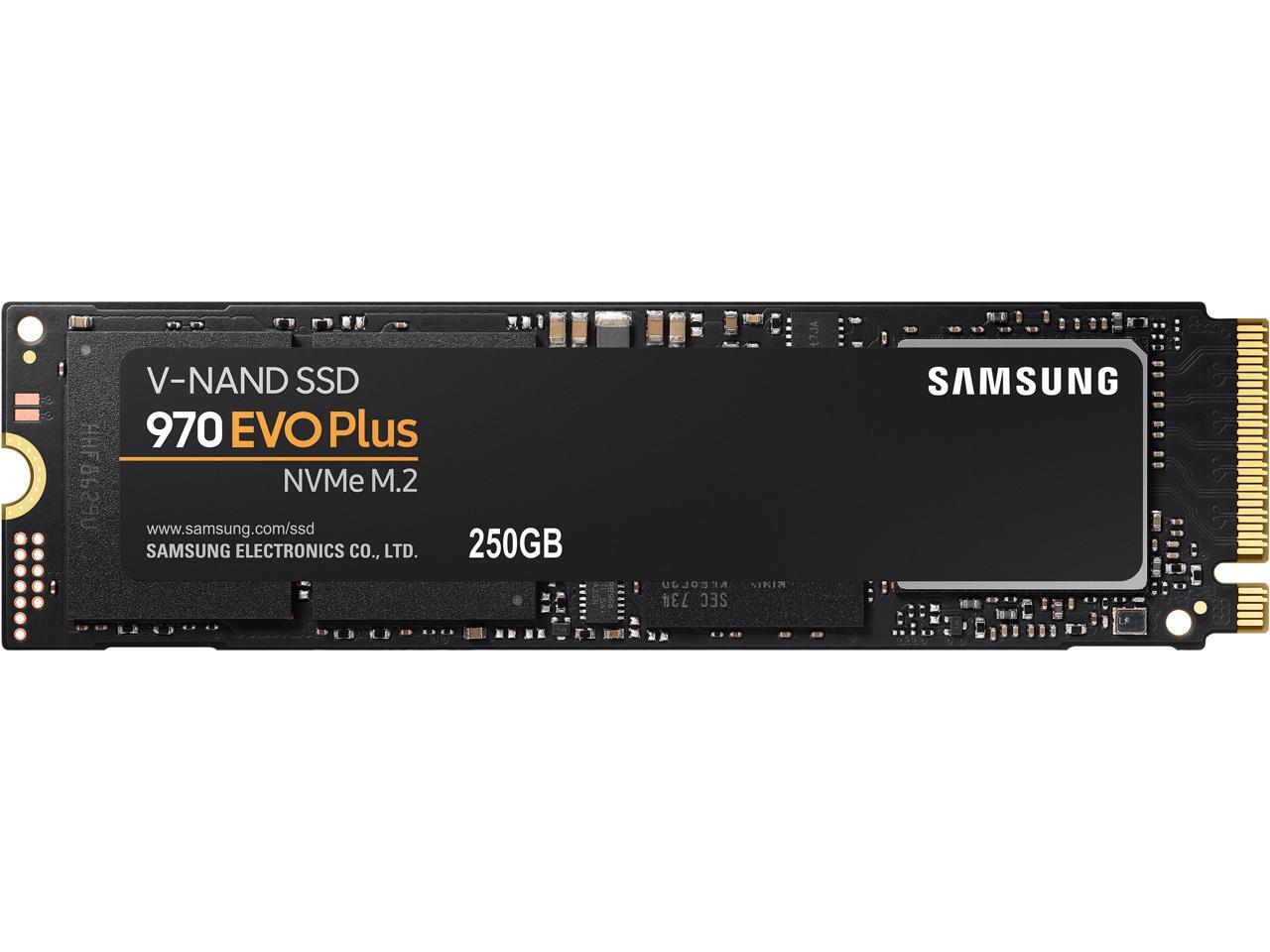
Get an NVMe version in any capacity you need/can afford. you don't have to get a Samsung, but they are a very good brand. Edited by Cretae - 18 Apr 2020 at 4:03am |
|
|
|
|
Kfroggydog
Newbie
Joined: 17 Apr 2020 Online Status: Offline Posts: 3 |
Quote Reply
Posted: 18 Apr 2020 at 8:12am |
|
Thank you Cretae but I'm new to this and don't quite understand. I looked and don't see where it would go.
|
|
|
|
|
Cretae
DS Veteran
Joined: 22 Mar 2010 Online Status: Offline Posts: 7331 |
Quote Reply
Posted: 19 Apr 2020 at 3:59am |
|
The right side in the pic is the side that plugs into the M.2 slot on your motherboard. It's about an inch wide is all, so it's going to be hard to see. If you got some kind of manual/spec sheet on the motherboard in your build from DS, it (or they, sometimes there's 2) should be labeled. If you don't have that, just get in touch with DS, and they will be happy to help you. It's possible you don't even have an M.2 slot. If not, you will need a SATA ssd, and I can help you with that.
I would like to do more, but I don't even know what motherboard you have. Have a look HERE, and maybe it'll help. It's about a bizillion pics of M.2 slots!: https://www.google.com/search?q=m+2+slot&tbm=isch&source=iu&ictx=1&tbs=simg:CAESxgIJa_1pKCuVi6y0augILELCMpwgaYgpgCAMSKP8X2gz7F_14X1QzUDKYSwwWXDMAM5CbjJp4zuDO1IeEmzCbIM7YhuTMaMDsdaeD2-47aof4dkeSSlKPj5GeIkmJrcUQ7d8DvladwhXB3B1IdbvjV93NCARuNfyAEDAsQjq7-CBoKCggIARIEBeBBAAwLEJ3twQkasgEKIwoRbWlsaXRhcnkgYWlyY3JhZnTapYj2AwoKCC9tLzBmNWx4CicKFGVsZWN0cm9uaWMgY29tcG9uZW502qWI9gMLCgkvbS8wNjNzeXQKIQoQYWlyY3JhZnQgY2FycmllctqliPYDCQoHL20vMHhzYwogCg5lc2NvcnQgY2FycmllctqliPYDCgoIL20vMDJweTEKHQoLbW90aGVyYm9hcmTapYj2AwoKCC9tLzA1MDhwDA&fir=eG6phVqHdOn-hM%253A%252CcfAPECIcUNkNJM%252C_&vet=1&usg=AI4_-kSoL8dIWc8G-5xwzH2atZorkd1V2Q&sa=X&ved=2ahUKEwjMkPfYp_ToAhWunOAKHReTCBcQ9QEwCXoECAMQEg#imgrc=pKWsDkWpnEnQSM Copy that, and "paste and go" in your browser. You can easily see how small and hard to identify they often are, but you should come away with a much better idea. I wish I could just hyperlink, but that doesn't seem to work for me here. Good luck. Edited by Cretae - 19 Apr 2020 at 4:06am |
|
|
|
|
Kfroggydog
Newbie
Joined: 17 Apr 2020 Online Status: Offline Posts: 3 |
Quote Reply
Posted: 20 Apr 2020 at 2:22pm |
|
Thank you I talked to someone. I appreciate your help.
|
|
|
|
|
Cretae
DS Veteran
Joined: 22 Mar 2010 Online Status: Offline Posts: 7331 |
Quote Reply
Posted: 21 Apr 2020 at 4:09am |

Well done! |
|
|
|
|
Post Reply
|
| Forum Jump | Forum Permissions You cannot post new topics in this forum You cannot reply to topics in this forum You cannot delete your posts in this forum You cannot edit your posts in this forum You cannot create polls in this forum You cannot vote in polls in this forum |

About Digital Storm
Contact Information
Facility Tour
Financing
Buy Now, Pay Later
Downloads
GSA Schedule
Terms & Conditions
Privacy Policy
Request Help
Call: 1-866-817-8676
(Hours 9AM-5PM PST)





 Topic Options