Vanquish II Case help? Fans!Post Date: 2020-02-08 |
Post Reply 
|
| Author | |
Raindyrps 
Newbie 
Joined: 08 Feb 2020 Online Status: Offline Posts: 2 |
 Quote Reply Quote Reply
 Topic: Vanquish II Case help? Fans! Topic: Vanquish II Case help? Fans!Posted: 08 Feb 2020 at 4:59pm |
|
Hi, First time poster on here. I've had a Digital Storm Vanquish II for the loooooooooongest time.
(I Believe i got this computer back in 2014 and been upgrading it ever since! Great buy!) I've loved the case and equipment it came with from day one. Over the last few years though some parts have been failing/getting out of date and ive been replacing here and there (Motherboard, GPU,RAM, Hard drives, CPU, PSU, and now fans! It's hardly a Vanquish anymore :D). I've replaced motherboards and switched from Intel to AMD as well! Exciting stuff. But it's that time again as one of the front case fans are starting to fail finally. My question is, How do i get the front case off to replace the fans? Is there a specific way to do it? I've never messed with that part of the case before and cant find any tutorials on it. Also what size fans are mounted on the front? 120mm? Thanks in advance if anybody knows off the top of their head! Maybe even go with water cooling? |
|
 |
|
|
Snaike
Moderator Group 
Just a dude trying to keep the spam away 
Joined: 23 Jan 2014 Online Status: Offline Posts: 9462 |
Quote Reply
Posted: 09 Feb 2020 at 12:47am |
|
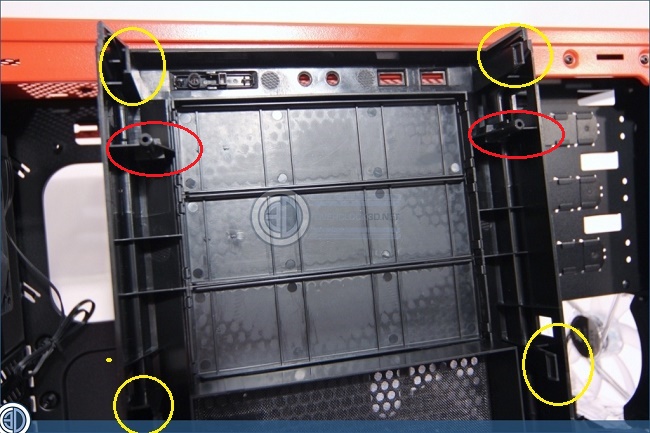
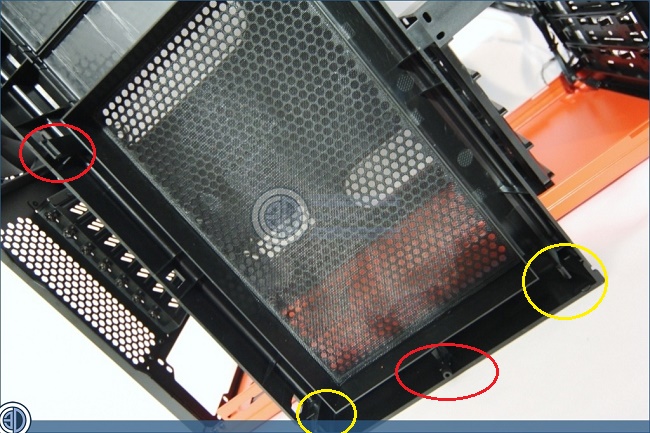
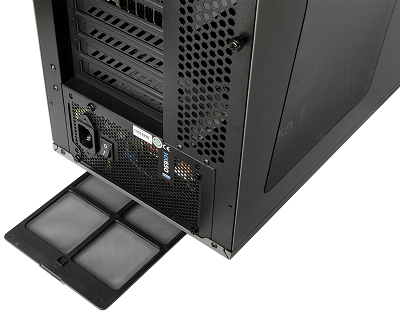
That is the Corsair 230T case. You have to get the front cover off to replace the fans. (And to clean the intake filter...)
I wrote something up about 5 years ago after I had an issue getting the front cover off, so I thought I would put it here. Once you get the cover off you have access to the 120mm fans. (And CLEAN your filter while you're there!!) I also recommend you go to the site linked below.. it gives a really good visual overview of the case. Here ya go...
Edited by Snaike - 09 Feb 2020 at 12:51am |
|
|
|
|
Raindyrps
Newbie
Joined: 08 Feb 2020 Online Status: Offline Posts: 2 |
Quote Reply
Posted: 09 Feb 2020 at 3:42am |
|
Thanks so much for the information!! it helped a ton!
|
|
|
|
|
Snaike
Moderator Group
Just a dude trying to keep the spam away
Joined: 23 Jan 2014 Online Status: Offline Posts: 9462 |
Quote Reply
Posted: 09 Feb 2020 at 4:01am |
|
Outstanding... happy to help.

|
|
|
|
|
Cretae
DS Veteran 
Joined: 22 Mar 2010 Online Status: Offline Posts: 7331 |
Quote Reply
Posted: 10 Feb 2020 at 3:47am |
 
|
|
|
|
|
Post Reply
|
| Forum Jump | Forum Permissions You cannot post new topics in this forum You cannot reply to topics in this forum You cannot delete your posts in this forum You cannot edit your posts in this forum You cannot create polls in this forum You cannot vote in polls in this forum |

About Digital Storm
Contact Information
Facility Tour
Financing
Buy Now, Pay Later
Downloads
GSA Schedule
Terms & Conditions
Privacy Policy
Request Help
Call: 1-866-817-8676
(Hours 9AM-5PM PST)





 Topic Options