Velox buildingPost Date: 2021-08-31 |
Post Reply 
|
| Author | ||
Misterclever0ne 
Newbie 
Joined: 31 Jul 2019 Online Status: Offline Posts: 57 |
 Quote Reply Quote Reply
 Topic: Velox building Topic: Velox buildingPosted: 31 Aug 2021 at 4:59pm |
|
|
Chassis Model: Digital Storm Velox
Exterior Finish: - Standard Factory Finish Trim Accents: - Standard Factory Finish Processor: AMD Ryzen 9 5900X (12-Core) 4.8 GHz Turbo Motherboard: ASUS ROG Strix X570-E Gaming (Wi-Fi) (AMD X570 Chipset) (Up to 3x PCI-E Devices) (No SLI) System Memory: 32GB DDR4 3600MHz HyperX Fury RGB Power Supply: 850W Digital Storm Performance Series (Modular) (80 Plus Gold) Expansion Bay: - No Thanks Optical Drive: - No Thanks Storage Set 1: 1x SSD M.2 (1TB Samsung 980 PRO) (NVM Express) Storage Set 2: 1x SSD (1TB Samsung 860 EVO) Storage Set 3: - No Thanks RAID Config: - No Thanks RAID Card: - No Thanks Internet Access: High Speed Network Port (Supports High-Speed Cable / DSL / Network Connections) Graphics Card(s): 1x GeForce RTX 3080 Ti 12GB (VR Ready) Sound Card: Integrated Motherboard Audio Add On Card: - No Thanks Extreme Cooling: H20: Stage 2: Digital Storm Vortex Liquid CPU Cooler (Dual Fan) (Fully Sealed + No Maintenance) HydroLux Tubing Style: - Not Applicable, I do not have a custom HydroLux liquid cooling system selected HydroLux Fluid Color: - Not Applicable, I do not have a custom HydroLux liquid cooling system selected Cable Management: Exotic Cable Management - Black - (Cable Combs with Custom Color Sleeved Extension Cables) Chassis Fans: Cooler Master MasterFan Halo (RGB Fans) (Remote Control Only) Internal Lighting: Digital Storm LED Lighting System Airflow Control: - No Thanks Chassis Mods: - No Thanks Noise Reduction: - No Thanks LaserMark: - No Thanks CPU Boost: Stock Factory Turbo Boost Advanced Automatic Overclocking Graphics: - No Thanks, Please do not overclock my video card(s) OS Boost: - No Thanks, Please do not tweak the services on the operating system Operating System: Microsoft Windows 10 Home (64-Bit) Recovery Tools: USB Drive - Windows 10 Installation (Format and Clean Install) Virus Protection: Windows Defender Antivirus (Built-in to Windows 10) Office: - No Thanks Mouse Pad: - No Thanks Display: - No Thanks Surge Shield: - No Thanks Speakers: - No Thanks Keyboard: - No Thanks Mouse: - No Thanks Branded Gear: - No Thanks Priority Build: - No Thanks, Ship Within 14-21 Business Days After Order Is Successfully Processed Warranty: Life-time Expert Care with 3 Year Limited Warranty (3 Year Labor & 1 Year Part Replacement) what do you guys think of this? |
||
 |
||
|
Cretae
DS Veteran 

Joined: 22 Mar 2010 Online Status: Offline Posts: 7331 |
Quote Reply
Posted: 01 Sep 2021 at 4:10am |
|
|
It's hard to comment when you don't tell us what you want to do, and what your monitor can do. If you will be gaming mostly, I think you have more CPU than you will ever use. The extra cores will do nothing. If you're still deciding, look into the release of the latest Gen 12 CPUs from Intel due soon. Strictly for gaming, the 11900K is the top CPU, but the 12000s will be better.
I'd suggest you read up a bit on the 3080 Ti. The reviews I've seen talk about wasting money for very little gain. If you are using a 1440p monitor, even a 3080 is a bit much. The card is designed for high performance at 4K. At these prices, this is not the time to seek overkill in a GPU. Nothing else seems out of place for a high budget system, IMHO. 
|
||
|
||
|
Misterclever0ne
Newbie
Joined: 31 Jul 2019 Online Status: Offline Posts: 57 |
Quote Reply
Posted: 01 Sep 2021 at 6:15am |
|
Oh ok I will go with rtx 3080 and i reached that amd is much better with gaming while intel i9 11000k isnt great. |
||
|
||
|
JamesAstro
Senior Member 
Joined: 28 Nov 2008 Online Status: Offline Posts: 624 |
Quote Reply
Posted: 01 Sep 2021 at 11:16am |
|
If you are just gaming, the i9 11900K is the best performing CPU (just barely.) However, if you do more than gaming, a Ryzen CPU is probably better, because it has more cores that non-gaming apps tend to use. But personally, I don't think the CPU choice makes a huge difference for gaming. It's the GPU this is the most important. 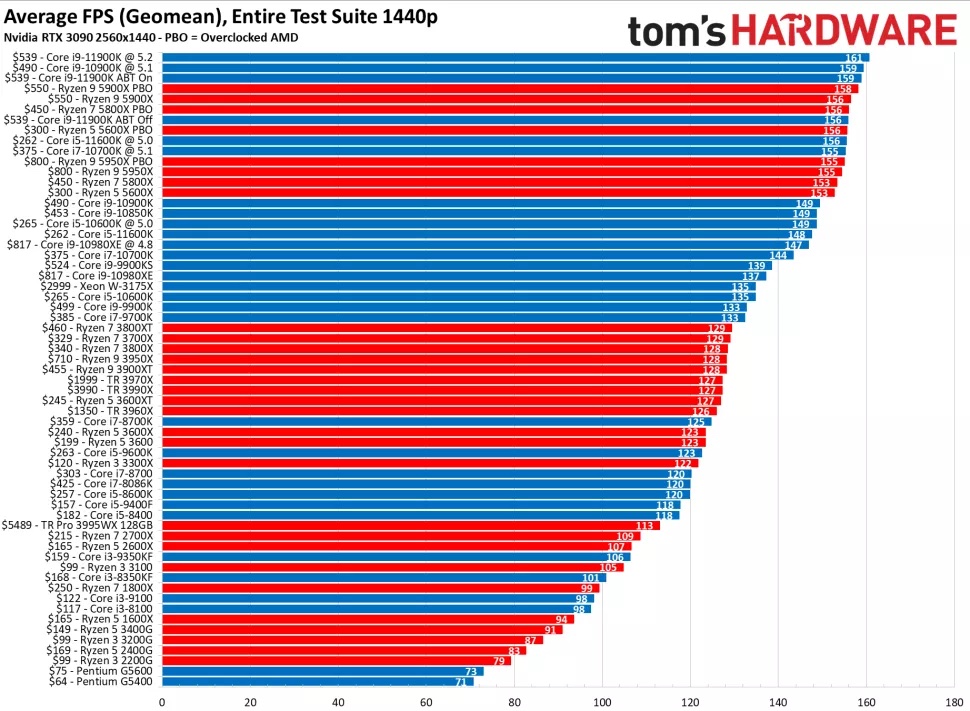 Edited by JamesAstro - 01 Sep 2021 at 11:17am |
||
|
Velox, Intel Core i9 11900K, ASUS ROG Maximus XIII Hero
32GB RAM, 1TB Samsung 980 Pro NVME RTX 4090, 38" Ultrawide LG-38GL950G Noctua NH-D15S cooler and NF-A14 fans, Corsair AX1600i PSU |
||
|
||
|
Misterclever0ne
Newbie
Joined: 31 Jul 2019 Online Status: Offline Posts: 57 |
Quote Reply
Posted: 01 Sep 2021 at 12:29pm |
|
I see that intel have better performance than ryzen cpu. But do u think i should go to intel i9 1100k instead? |
||
|
||
|
JamesAstro
Senior Member
Joined: 28 Nov 2008 Online Status: Offline Posts: 624 |
Quote Reply
Posted: 01 Sep 2021 at 3:09pm |
|
Do you mean the 11900K? |
||
|
Velox, Intel Core i9 11900K, ASUS ROG Maximus XIII Hero
32GB RAM, 1TB Samsung 980 Pro NVME RTX 4090, 38" Ultrawide LG-38GL950G Noctua NH-D15S cooler and NF-A14 fans, Corsair AX1600i PSU |
||
|
||
|
Misterclever0ne
Newbie
Joined: 31 Jul 2019 Online Status: Offline Posts: 57 |
Quote Reply
Posted: 01 Sep 2021 at 3:43pm |
|
Yeah my bad |
||
|
||
|
JamesAstro
Senior Member
Joined: 28 Nov 2008 Online Status: Offline Posts: 624 |
Quote Reply
Posted: 01 Sep 2021 at 3:47pm |
|
|
Based on the benchmark numbers, I would say get the i9 11900K if you are just using this machine for gaming.
However, if you plan on using other apps that require a strong CPU, then get the Ryzen. |
||
|
Velox, Intel Core i9 11900K, ASUS ROG Maximus XIII Hero
32GB RAM, 1TB Samsung 980 Pro NVME RTX 4090, 38" Ultrawide LG-38GL950G Noctua NH-D15S cooler and NF-A14 fans, Corsair AX1600i PSU |
||
|
||
|
Cretae
DS Veteran
Joined: 22 Mar 2010 Online Status: Offline Posts: 7331 |
Quote Reply
Posted: 02 Sep 2021 at 4:20am |
|
Agree. The 11900K "isn't great" because it's a bit of a disappointing step from the last gen from Intel. It's still the boss chip for gaming "(just barely)" as JamesAstro said. The Alder Lake 12th Generation from Intel is now rumored for late October, and promises to be much better than the 11900K. Strictly for gaming, it won't make a whole lot of difference that matters IMHO. |
||
|
||
|
Misterclever0ne
Newbie
Joined: 31 Jul 2019 Online Status: Offline Posts: 57 |
Quote Reply
Posted: 02 Sep 2021 at 6:22am |
|
|
Ok i guess i will wait for intel 12th gen to order with DS PC
|
||
|
||
|
Misterclever0ne
Newbie
Joined: 31 Jul 2019 Online Status: Offline Posts: 57 |
Quote Reply
Posted: 02 Sep 2021 at 6:54am |
|
Ok i will wait for 12th gen and change 3080 ti to 3080 and should i add overclocking stage 2? |
||
|
||
|
Cretae
DS Veteran
Joined: 22 Mar 2010 Online Status: Offline Posts: 7331 |
Quote Reply
Posted: 02 Sep 2021 at 3:08pm |
|
|
"...should I add overclocking stage 2?"
You already asked this in another thread, and the answer was a resounding "NO". You should not add overclocking because an Intel i9 CPU will turbo as high as 5.3 GHz all by itself. All overclocking will add is that the entire chip runs at an unnecessarily high speed and heat all day long adding nothing, and probably shortening life. IDK why you won't tell us if this a gaming rig, or multi-purpose. Just about every question has multiple answers depending on this one issue. 
|
||
|
||
|
Misterclever0ne
Newbie
Joined: 31 Jul 2019 Online Status: Offline Posts: 57 |
Quote Reply
Posted: 02 Sep 2021 at 3:30pm |
|
Yes you have told me that but i want to check double to make sure and i had overclocking my old lumo and give me my gaming little lag and freeze sometime even i have great internet |
||
|
||
|
JamesAstro
Senior Member
Joined: 28 Nov 2008 Online Status: Offline Posts: 624 |
Quote Reply
Posted: 02 Sep 2021 at 3:32pm |
|
I'd like to reinforce what Cretae said: Don't bother overclocking. Last night I was running some gaming benchmarks on my new Velox machine, and I kept my eye on CPU usage the whole time. I don't think it ever went above 30% usage while playing Shadow of the Tomb Raider, Anno 1800, and The Division 2. I was really surprised by how little the CPU was used. Since I don't have an overclocked CPU, that means it was able to throttle back as needed, didn't waste energy, didn't heat up the inside of my case, didn't contribute to warming up the graphics card, and didn't cause my case fans to speed up. If I had been using an overclocked CPU, then everything would have gotten much hotter, and there would have been no benefit. |
||
|
Velox, Intel Core i9 11900K, ASUS ROG Maximus XIII Hero
32GB RAM, 1TB Samsung 980 Pro NVME RTX 4090, 38" Ultrawide LG-38GL950G Noctua NH-D15S cooler and NF-A14 fans, Corsair AX1600i PSU |
||
|
||
|
Misterclever0ne
Newbie
Joined: 31 Jul 2019 Online Status: Offline Posts: 57 |
Quote Reply
Posted: 02 Sep 2021 at 3:47pm |
|
Yes im agreed with you. i had my lumo before with overclocking stage 1 and my pc was hot. but good thing i sold my pc on ebay and want to get new one without overclocking so my pc wont get hotter |
||
|
||
|
Post Reply
|
| Forum Jump | Forum Permissions You cannot post new topics in this forum You cannot reply to topics in this forum You cannot delete your posts in this forum You cannot edit your posts in this forum You cannot create polls in this forum You can vote in polls in this forum |

About Digital Storm
Contact Information
Facility Tour
Financing
Buy Now, Pay Later
Downloads
GSA Schedule
Terms & Conditions
Privacy Policy
Request Help
Call: 1-866-817-8676
(Hours 9AM-5PM PST)





 Topic Options