Video card running hotPost Date: 2010-08-10 |
Post Reply 
|
| Author | |
BruceLeroy 
Newbie 

Joined: 09 Jun 2010 Online Status: Offline Posts: 67 |
 Quote Reply Quote Reply
 Topic: Video card running hot Topic: Video card running hotPosted: 10 Aug 2010 at 3:33am |
|
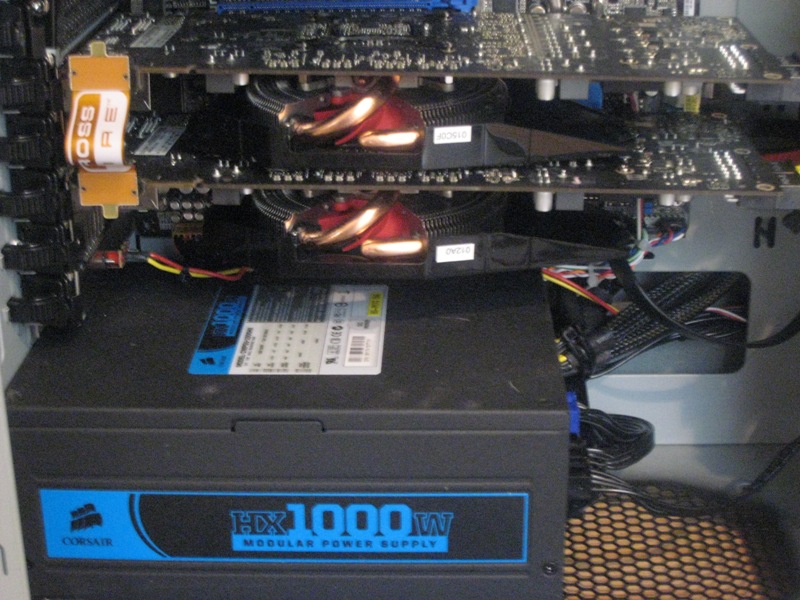
Not sure if this the right section, but I was hoping someone could help me out. I have 2 Xfx 5850 cards in crossfire. The cards are practically on top of each other. When playing Bad Company 2, the temps on the primary card will get up to 80c and this is with using MSI Afterburner. The only way to get the temps to hold at 80c is setting the fan to 90%.
Doesn't this seem a little too high for temps and fan speed? I would hate to wear out the card prematurely. |
|
 |
|
|
BruceLeroy
Newbie
Joined: 09 Jun 2010 Online Status: Offline Posts: 67 |
Quote Reply
Posted: 10 Aug 2010 at 2:25pm |
|
Bump???
|
|
|
|
|
Alex
Admin Group 
Digital Storm Supervisor 
Joined: 04 Jun 2012 Online Status: Offline Posts: 16314 |
Quote Reply
Posted: 10 Aug 2010 at 2:40pm |
|
Those are perfectly fine operating temperatures for the video cards. They can handle 100'C.
You could move the cards a slot away from each other, which will help with temps, but you won't be on a full 16x PCI-E slot. Your video cards however, most likely don't even use all of the 16X bandwidth so you should be in the clear. Nevertheless, you are still within time temperature ranges. Edited by Alex - 10 Aug 2010 at 2:41pm |
|

|
|
|
|
|
BruceLeroy
Newbie
Joined: 09 Jun 2010 Online Status: Offline Posts: 67 |
Quote Reply
Posted: 10 Aug 2010 at 2:56pm |
|
Thanks for the prompt response Alex. I'm not as concerned about the temps as I am about the fan speed. 90% fan speed seems kind of high. I'm worried that if it continually runs at that speed during long gaming sessions that I may wear them out prematurely. Unfortunately the way the mobo, power supply, and video cards are configured right now, I am unable to move it a slot away. There isn't even room for a sound card.
|
|
|
|
|
!ender_
DS Veteran 
Joined: 24 Oct 2007 Online Status: Offline Posts: 4219 |
Quote Reply
Posted: 10 Aug 2010 at 3:02pm |
|
geez
not sure how atis are but you should be able to change the fan speeds, which will help keep the temps down
you could also look into more cool air intake thru the case, what case are you using?
|
|
|
|
|
BruceLeroy
Newbie
Joined: 09 Jun 2010 Online Status: Offline Posts: 67 |
Quote Reply
Posted: 10 Aug 2010 at 3:13pm |
|
Hey !ender
I have the HAF 932. The side fan is set to pull air into the case directly at the video cards. I am using MSI Afterburner with the fan settings to gradually increase as the temps rise. I have to set the fan speed at 90% when temps get up to 80C and higher in order to keep it level at that temperature. The temps for the second card are fine and tops out at about 60-65C.
Current set up of the fans are: front and side fans pull air in. The rear and top fans push air out.
|
|
|
|
|
!ender_
DS Veteran
Joined: 24 Oct 2007 Online Status: Offline Posts: 4219 |
Quote Reply
Posted: 10 Aug 2010 at 3:45pm |
|
if your fans are already tuned up a bit then there is little more you can do, again, not versed with ati cards, but on my 470 10% of fan power made a big differece, maybe make your usage:power ratio push the fan a little higher faster
maybe a little noisier, but the lower the temps on that card the better
|
|
|
|
|
BruceLeroy
Newbie
Joined: 09 Jun 2010 Online Status: Offline Posts: 67 |
Quote Reply
Posted: 10 Aug 2010 at 4:20pm |
|
I'll play around with the fan controls on Afteburner some more and see if I can strike a nice balance.
|
|
|
|
|
Alex
Admin Group
Digital Storm Supervisor
Joined: 04 Jun 2012 Online Status: Offline Posts: 16314 |
Quote Reply
Posted: 10 Aug 2010 at 6:54pm |
|
@BruceLeroy,
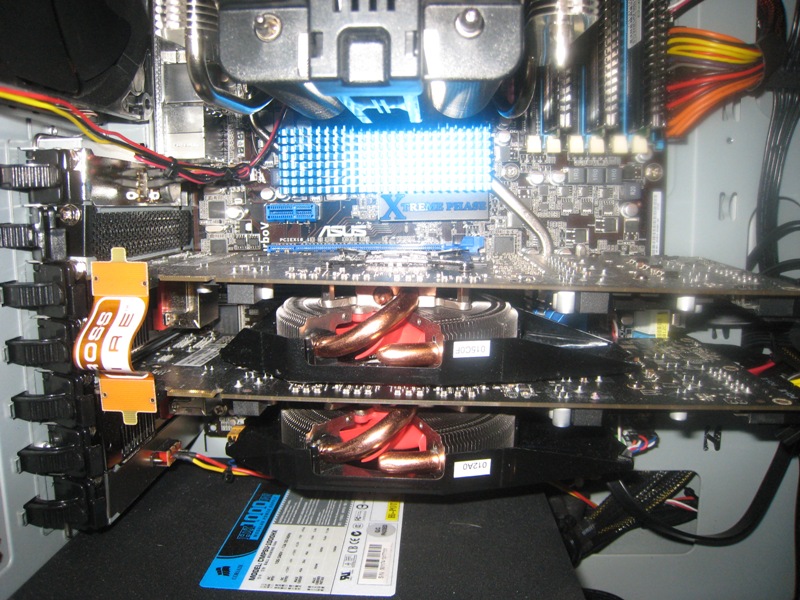
1. Why don't you just leave the fan speed at AUTO? 2. Can you send me a better image showing your PCI Slot configuration dead on? |
|
|
|
|
|
|
|
BruceLeroy
Newbie
Joined: 09 Jun 2010 Online Status: Offline Posts: 67 |
Quote Reply
Posted: 10 Aug 2010 at 7:08pm |
|
Alex,
It is currently set to auto in MSI Afterburner with a custom fan profile.
This is the closest pic I have right now showing the PCI slot config. I'll need to take a better pic when I get home tonight.
 |
|
|
|
|
ablahblah
DS Veteran
Joined: 12 Jun 2009 Online Status: Offline Posts: 2312 |
Quote Reply
Posted: 10 Aug 2010 at 7:33pm |
|
7 slot motherboard, but with those annoying triple slot ATI gpus. that's why he has no space for a sound card.
actually, you do have space. that PCI-Ex1 at the top is a popular format being adopted by sound card makers. |
|
|
R4D4RPR00F
Core i7 920 @ 3.9Ghz Asus Sabertooth X58 EVGA GTX 570 Mushkin 6GB 1414Mhz |
|
|
|
|
Dragoonseal
DS Veteran
Joined: 03 Apr 2009 Online Status: Offline Posts: 2247 |
Quote Reply
Posted: 10 Aug 2010 at 7:37pm |
|
Those are triple slot GPUs? Geeze.
And it doesn't even sound like they cool very well, some non-reference card designs are such junk I'll never understand it. |
|
|
Lilim
Intel Core i7 920 @4.2GHz HAF 932 - Dual SLI Nvidia GTX 480s 3x Intel X25-M G2 (80GB) SSD RAID0 |
|
|
|
|
BruceLeroy
Newbie
Joined: 09 Jun 2010 Online Status: Offline Posts: 67 |
Quote Reply
Posted: 10 Aug 2010 at 10:07pm |
|
They're double slot video cards.
|
|
|
|
|
!ender_
DS Veteran
Joined: 24 Oct 2007 Online Status: Offline Posts: 4219 |
Quote Reply
Posted: 10 Aug 2010 at 10:11pm |
|
lol triple that would be rediculous
i mean the problem is obvious, your intake is sandwitched to the top of the lower card, youll for sure have higher temps.. almost unavoidable from what i see here
|
|
|
|
|
BruceLeroy
Newbie
Joined: 09 Jun 2010 Online Status: Offline Posts: 67 |
Quote Reply
Posted: 10 Aug 2010 at 10:18pm |
|
Yea...kind of sucks. I know that 80C is withing operating range of these cards. I'm just worried about the fans wearing out by continuously running them over 70-80% speed.
Do you think it might make a difference if I set the side fan to pull air out instead? |
|
|
|
|
!ender_
DS Veteran
Joined: 24 Oct 2007 Online Status: Offline Posts: 4219 |
Quote Reply
Posted: 10 Aug 2010 at 10:23pm |
|
unlikely, but worth a try..
but you dont have to run the fan at 70% when youre idle..... right?
|
|
|
|
|
BruceLeroy
Newbie
Joined: 09 Jun 2010 Online Status: Offline Posts: 67 |
Quote Reply
Posted: 10 Aug 2010 at 10:30pm |
|
Not during idle. At idle, fan speed is set to 30%. The fan profile is set so that with every 10C increment in temps, fan speed is increased 10%. So at 80C, speed is 70%, 90C it is set to 95% fan speed.
|
|
|
|
|
!ender_
DS Veteran
Joined: 24 Oct 2007 Online Status: Offline Posts: 4219 |
Quote Reply
Posted: 10 Aug 2010 at 10:35pm |
|
and with that profile, youre still over what number when you game for a while? bc if its low 80s, youre really fine
|
|
|
|
|
BruceLeroy
Newbie
Joined: 09 Jun 2010 Online Status: Offline Posts: 67 |
Quote Reply
Posted: 10 Aug 2010 at 10:47pm |
|
it hovers around 79-80C when playing Bad Company 2 on max settings. So running the fans at 90% speed is fine during gaming sessions?
|
|
|
|
|
!ender_
DS Veteran
Joined: 24 Oct 2007 Online Status: Offline Posts: 4219 |
Quote Reply
Posted: 10 Aug 2010 at 10:50pm |
|
sure
plus its way better to work the crap out of the fan than overheat the gpu... the fan is cheap to replace if that ever needs to happen. though it likely wont
|
|
|
|
|
BruceLeroy
Newbie
Joined: 09 Jun 2010 Online Status: Offline Posts: 67 |
Quote Reply
Posted: 10 Aug 2010 at 10:55pm |
|
Thanks !ender.
|
|
|
|
|
!ender_
DS Veteran
Joined: 24 Oct 2007 Online Status: Offline Posts: 4219 |
Quote Reply
Posted: 10 Aug 2010 at 10:57pm |

|
|
|
|
|
justin.kerr
DS Veteran
Joined: 06 May 2008 Online Status: Offline Posts: 5084 |
Quote Reply
Posted: 10 Aug 2010 at 10:59pm |
|
non reference cards= higher temps. as long as there is no issues, like freezing, artifacting, run em |
|

|
|
|
|
|
BruceLeroy
Newbie
Joined: 09 Jun 2010 Online Status: Offline Posts: 67 |
Quote Reply
Posted: 10 Aug 2010 at 11:11pm |
|
Have not experienced any freezing or artifacts. Actually games have been silky smooth. Thanks Justin.
What is a non-reference card btw? |
|
|
|
|
justin.kerr
DS Veteran
Joined: 06 May 2008 Online Status: Offline Posts: 5084 |
Quote Reply
Posted: 11 Aug 2010 at 10:38am |
|
non reference means, it is non the PCB that ATI created.. it is designed by another company, usually to save costs. easy way to tell is if the fan is in the center of the card, instead of the rear. but some non refernce still have fans in the rear. lol
|
|
|
|
|
|
|
|
BruceLeroy
Newbie
Joined: 09 Jun 2010 Online Status: Offline Posts: 67 |
Quote Reply
Posted: 11 Aug 2010 at 5:27pm |
|
Got it.
One quick question, when using MSI Afterburner, should ATI CCC be running also? Meaning should Overdrive and Manual fan control be running in CCC? |
|
|
|
|
Alex
Admin Group
Digital Storm Supervisor
Joined: 04 Jun 2012 Online Status: Offline Posts: 16314 |
Quote Reply
Posted: 11 Aug 2010 at 5:40pm |
|
Sometimes some reference card revised cards are better than the original counter parts. Such as better cooling and higher end capacitors. EVGA is a great example of this.
|
|
|
|
|
|
|
|
justin.kerr
DS Veteran
Joined: 06 May 2008 Online Status: Offline Posts: 5084 |
Quote Reply
Posted: 11 Aug 2010 at 5:49pm |
|
those ATI Evga cards? just use MSI afterburners fan profile setup, leave CC alone.
 |
|
|
|
|
|
|
|
ablahblah
DS Veteran
Joined: 12 Jun 2009 Online Status: Offline Posts: 2312 |
Quote Reply
Posted: 11 Aug 2010 at 6:07pm |
 double slot, my bad. i wasn't directly looking at the slots, just the size and design of the cooler made it seriously look like one of those 3-slot coolers since I originally assumed it was a standard 7 slot board. looks like it's 5?. blegh. I have seriously gotta start double checking everything i say double slot, my bad. i wasn't directly looking at the slots, just the size and design of the cooler made it seriously look like one of those 3-slot coolers since I originally assumed it was a standard 7 slot board. looks like it's 5?. blegh. I have seriously gotta start double checking everything i say
Edited by ablahblah - 11 Aug 2010 at 6:09pm |
|
|
R4D4RPR00F
Core i7 920 @ 3.9Ghz Asus Sabertooth X58 EVGA GTX 570 Mushkin 6GB 1414Mhz |
|
|
|
|
Post Reply
|
| Forum Jump | Forum Permissions You cannot post new topics in this forum You cannot reply to topics in this forum You cannot delete your posts in this forum You cannot edit your posts in this forum You cannot create polls in this forum You cannot vote in polls in this forum |

About Digital Storm
Contact Information
Facility Tour
Financing
Buy Now, Pay Later
Downloads
GSA Schedule
Terms & Conditions
Privacy Policy
Request Help
Call: 1-866-817-8676
(Hours 9AM-5PM PST)





 Topic Options